
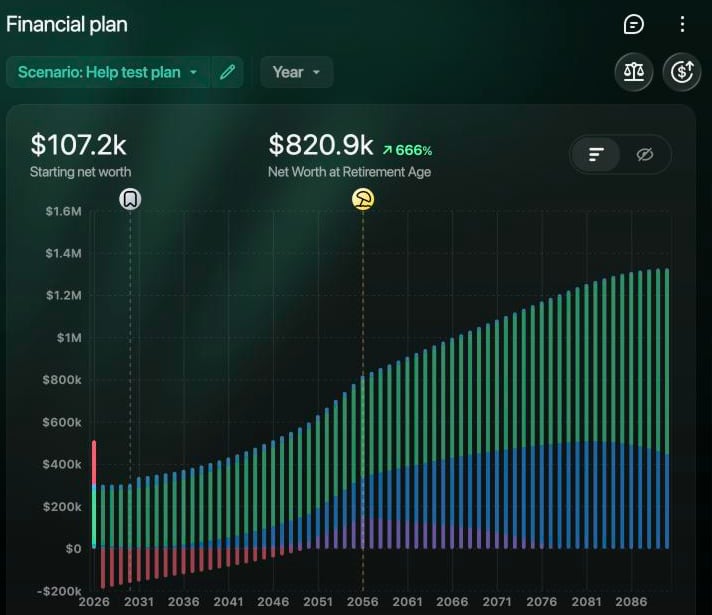
A Financial Plan scenario on the web: net worth today, at retirement and in every year up to the end of the plan.
How it works
You build the plan as a scenario. finerd copies your current account balances and your income and expenses by category into it; the scenario is a separate copy, so editing it doesn’t change your accounts. Then you set your age, how fast each asset grows, the interest on your loans, inflation and how much you invest. For each year ahead, finerd grows your assets at their rates, adds interest to your loans and takes off the payments you plan, and adds what’s left of your income after expenses. Asset values are shown in today’s money: with 3% inflation, an investment that earns 7% a year grows by about 3.9% a year in the plan. If spending outgrows income, for example after you retire, the plan pays the difference from your assets. The full explanation is in How a plan works. For the idea behind the growth, see What $1,000 can become.What a plan can answer
Words you’ll see
- Scenario: one version of your plan, with its own ages, rates, investments and events. You can keep several and compare them.
- Primary scenario: the scenario that the report, the dashboard widget and the warning about results that differ from the plan use. Your first scenario is the primary one.
- Future event: a change from a date you choose, such as a purchase, a new job, a loan or your pension.
- Today’s money: future asset values with inflation taken off, so you can compare them with prices now.
Start here
Read these in order to set up your plan:1. Build a financial plan
Create a scenario from your accounts, set your age, rates and investments, and read the projection.
2. Add future events
A home or car, a new job, a child, a loan or your pension.
3. Compare and update scenarios
Try another choice, find your independence age and keep the plan current.
Background reading
Why build a financial plan?
What a plan answers that a budget can’t, and why starting early matters.
What $1,000 can become
Compound growth and inflation in plain numbers, and how Financial Plan shows them.