Connect finerd to Claude, ChatGPT or Gemini through finerd MCP to ask about your money, build custom reports, update records and check the answers.
finerd MCP connects finerd to an AI assistant such as Claude, ChatGPT or Gemini. Once it’s connected, you can ask about your money in plain language, get a report for any dates you name, and, if you allow it, have the assistant update your records from the chat.AI access works on the Free plan: the assistant can do whatever is free in finerd for the space you ask about, and a Pro feature needs Pro in that space. You connect it in the AI assistant, not in finerd: the finerd web, Android and iOS apps only link to the setup page.On iPhone, you can also ask finerd about your money through Siri, without connecting an AI assistant: see Use finerd with Siri and Shortcuts on iPhone.
What finerd MCP is
MCP (Model Context Protocol) is an open standard that lets an AI assistant use outside tools and data. finerd runs an MCP server, so a compatible assistant can read your finerd records directly instead of relying on numbers you paste into the chat.When you connect an assistant, you sign in to finerd in your browser and choose its access:
Access
What the assistant can do
Read only (selected initially)
View transactions, accounts, balances, categories, receipts and reports, and build reports from them
Read & Write
Also change your records: transactions, transfers, tags and the rest listed in Update your records
With Read only, the assistant doesn’t even see the tools that change data. One connection covers every finerd space you belong to. If you have more than one, tell the assistant which space to use; to switch, name another space in the chat. You don’t need to reconnect.Each request is checked for the space it’s about, the same way the finerd app checks it. In a space without Pro, what’s free in the app works through the assistant too; a request that needs a Pro feature gets the answer that the feature needs a paid plan, with a link to upgrade.The assistant can’t move real money or connect a bank: finerd records your finances but doesn’t make payments. To connect a bank, use the finerd app; see Connect a bank.
Add the server URL https://api.finerd.ai/mcp and sign in to finerd when asked
finerd also links to its setup page, finerd.ai/mcp, from the apps:
Web
Android
iOS
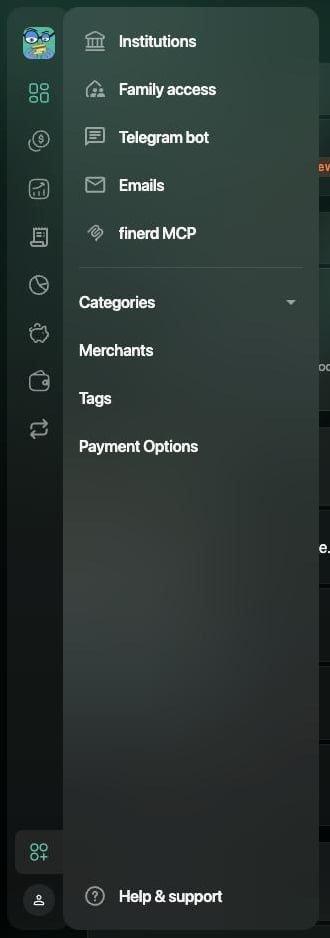
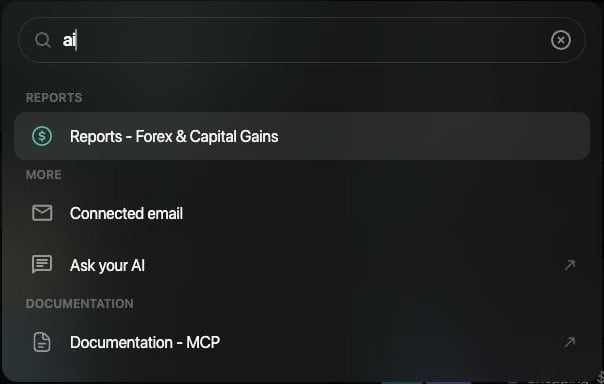
Select More (the icon above your profile at the bottom of the sidebar), then finerd MCP. You can also press ⌘K (Mac) or Ctrl+K (Windows), type AI and select Ask your AI. Both open the setup page in a new browser tab.
finerd MCP in the More menu.
Ask your AI in the command palette.
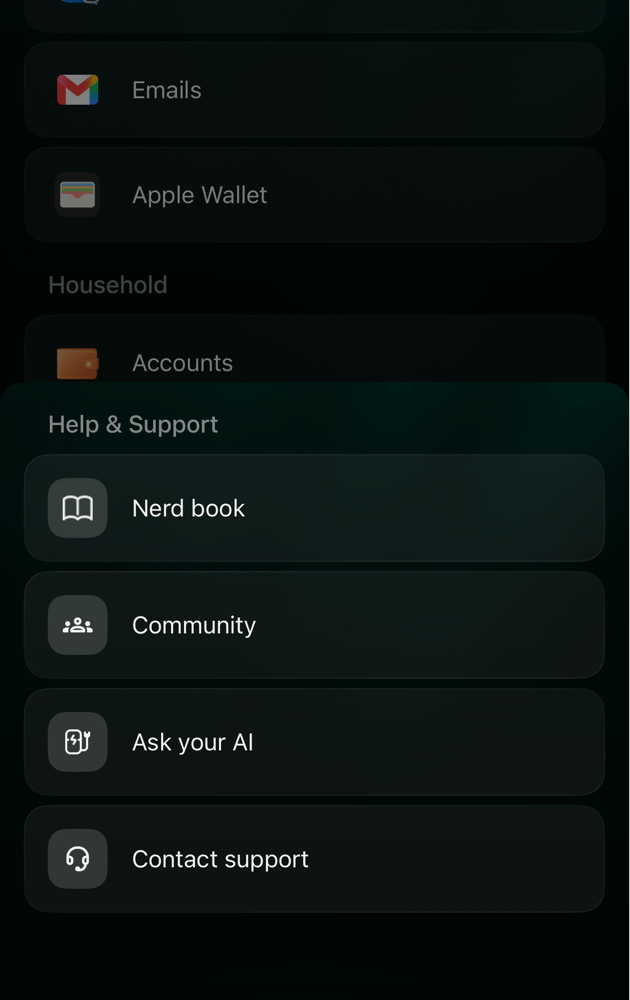
Tap More, then Help & Support, then Ask your AI. The setup page opens in your browser.
Tap More, then Help & Support, then Ask your AI. The setup page opens in your browser.
Ask your AI in Help & Support.
Ask about your money
Ask the way you would ask a person who has your records in front of them. The assistant looks up what it needs in finerd and answers from your data:
“What’s my current balance across all accounts?”
“Show me every Starbucks transaction in March.”
“How much did I spend on restaurants last weekend?”
“What were my top 5 food merchants last month? Break it down by week.”
“Which transactions still need review?”
Name the space, the period and the currency when they matter, for example “in my Business space, for July, in EUR”. The answer is then easier to check.
Analyze and plan
The assistant can combine finerd’s reports with your transactions to answer bigger questions:
“What was unusual about my spending last month compared with the previous three?”
“Compare dining out and groceries by week for the first quarter.”
“Show my net worth in EUR by quarter for the last two years.”
“Did my partner and I split household costs 50/50 last quarter? Who paid more?”
“Which subscriptions did I pay for in the last three months, and what do they cost in total?”
For questions about the future, such as “How long until I reach a $20,000 emergency fund at my current pace?”, the assistant works out the forecast itself from your figures. finerd provides the history; the forecast is the assistant’s estimate.
Update your records
With Read & Write access, the assistant can make changes for you:
Add expenses, income and transfers, edit transactions, and delete the ones you entered yourself.
Split a transaction between categories: “Split this $50 Whole Foods charge into $35 groceries and $15 household goods.”
Spread a payment across months: “Spread this $1,200 annual insurance payment evenly across 12 months.” The money leaves once; the expense counts in each month’s reports.
Move a transaction to another month in reports: “This January rent is really for February.”
Tag and review: “Tag all my transactions from April 1–10 as ‘NY trip’”, “Categorize what you can and mark it reviewed.”
Add a cash, debt or manual account; create categories, merchants, tags and budgets; rename categories, merchants and tags.
Track loyalty points: log earnings and redemptions, record a transfer between programs, and choose the valuation provider for your points.
The assistant can’t delete a transaction imported from a bank, connect a bank, or delete a category, tag or account. It also can’t take a receipt photo you paste into the chat; to add a receipt to finerd, see Add a receipt to your records.Changes made through the assistant are saved in finerd right away, like your own edits. Before you let it change many transactions, ask it to list what it’s going to change.
Build a custom report
finerd’s reports answer common questions with settings you choose. Through the assistant, you can describe a report finerd doesn’t have:
Any dates and steps: “How much did I spend from August 11 to today, by category?”, “Show my spending per day for August and compare with July.”
One card or account: “Spending on my Visa last week, by category.” The paying account is a filter here.
Categories with their subcategories, merchants and tags: “Total for the tag ‘renovation’ from June 1 to September 15.” You can ask for transactions that carry a tag, all of several tags, or not a tag.
Family spending: what you paid, what your partner paid, and personal spending, separately.
Summaries: “Income, expenses and the result for July”, “My average purchase and 10 largest purchases in August.”
Transfers: “How much left my checking account as transfers to my other accounts in August?” For transfers imported from a bank, finerd knows the money left but not always where it went, so the assistant reports the outflow only.
Totals come in the space’s primary currency. A few things to keep in mind:
If a transaction carries two tags, a per-tag breakdown shows it under both. Don’t add those lines together.
An account balance on a date, or your net worth, comes from a different report: ask “What was the balance on my card on August 31?” or ask for your net worth.
Check the answers
An AI assistant can misread a question, use the wrong space or period, or make a mistake in its own arithmetic. Treat its answer as a draft and check the figures that matter:
Ask how it got the number. Which space, dates, currency and date basis did it use? A good answer names them.
Know the two date bases. finerd’s Expenses and Income reports count each transaction in its Accrual month by default, so an annual payment spread over 12 months counts in each of those months. In a custom report, a period shorter than a month, such as a week or “the 11th to the 25th”, is counted by Transaction date. The two figures for the same month can differ, and both are correct. See Accrual month or transaction date.
Compare a whole month with finerd. Ask for a past month’s expenses by category on the accrual basis, then open Reports → Expenses for the same month in finerd. Both come from the same records, so the totals should match. See Analyze income, expenses and cash flow.
{"docsConfig":{"theme":"mint","$schema":"https://mintlify.com/docs.json","name":"finerd","description":"finerd helps financially savvy people manage complex personal, family, business, and international finances with accounting precision without accounting complexity.","colors":{"primary":"#38f7ff","light":"#38f7ff","dark":"#b98cff"},"logo":{"light":"https://finerd.ai/logo.svg","dark":"https://finerd.ai/logo.svg","href":"/"},"favicon":"https://finerd.ai/logo.svg","appearance":{"default":"dark","strict":true},"background":{"decoration":"grid","color":{"light":"#08090f","dark":"#08090f"}},"navbar":{"links":[{"href":"https://finerd.ai","label":"finerd.ai"}]},"seo":{"metatags":{"google-site-verification":"haq__cDMEelH2BlpExqZZ7DqIbXEtZMZDA_2Rn4amf8"}},"fonts":{"family":"Inter"},"styling":{"eyebrows":"breadcrumbs","latex":true},"contextual":{"options":["copy","view"],"display":"header"},"navigation":{"languages":[{"language":"en","footer":{"links":[{"items":[{"label":"YouTube","href":"https://www.youtube.com/@realFinerd"},{"label":"Reddit","href":"https://www.reddit.com/r/finerds"},{"label":"TikTok","href":"https://www.tiktok.com/@real.finerd"}]}]},"navbar":{"links":[{"href":"https://finerd.ai","label":"finerd.ai"}],"primary":{"type":"button","label":"Contact support","href":"/contact-us"}},"href":""},{"language":"uk","footer":{"links":[{"items":[{"label":"YouTube","href":"https://www.youtube.com/@finerd.ukraine"},{"label":"Telegram","href":"https://t.me/+TESz5VfXr50yNTRi"}]}]},"navbar":{"links":[{"href":"https://finerd.ai","label":"finerd.ai"}],"primary":{"type":"button","label":"Зв'язатися з підтримкою","href":"/uk/contact-us"}},"href":"uk"},{"language":"es","footer":{"links":[{"items":[{"label":"YouTube","href":"https://www.youtube.com/@realFinerd"},{"label":"Reddit","href":"https://www.reddit.com/r/finerds"},{"label":"TikTok","href":"https://www.tiktok.com/@real.finerd"}]}]},"navbar":{"links":[{"href":"https://finerd.ai","label":"finerd.ai"}],"primary":{"type":"button","label":"Contactar soporte","href":"/es/contact-us"}},"href":"es"},{"language":"ja","footer":{"links":[{"items":[{"label":"YouTube","href":"https://www.youtube.com/@realFinerd"},{"label":"Reddit","href":"https://www.reddit.com/r/finerds"},{"label":"TikTok","href":"https://www.tiktok.com/@real.finerd"}]}]},"navbar":{"links":[{"href":"https://finerd.ai","label":"finerd.ai"}],"primary":{"type":"button","label":"サポートに連絡","href":"/ja/contact-us"}},"href":"ja"},{"language":"pl","footer":{"links":[{"items":[{"label":"YouTube","href":"https://www.youtube.com/@realFinerd"},{"label":"Reddit","href":"https://www.reddit.com/r/finerds"},{"label":"TikTok","href":"https://www.tiktok.com/@real.finerd"}]}]},"navbar":{"links":[{"href":"https://finerd.ai","label":"finerd.ai"}],"primary":{"type":"button","label":"Kontakt z pomocą","href":"/pl/contact-us"}},"href":"pl"},{"language":"cs","footer":{"links":[{"items":[{"label":"YouTube","href":"https://www.youtube.com/@realFinerd"},{"label":"Reddit","href":"https://www.reddit.com/r/finerds"},{"label":"TikTok","href":"https://www.tiktok.com/@real.finerd"}]}]},"navbar":{"links":[{"href":"https://finerd.ai","label":"finerd.ai"}],"primary":{"type":"button","label":"Kontaktovat podporu","href":"/cs/contact-us"}},"href":"cs"},{"language":"it","footer":{"links":[{"items":[{"label":"YouTube","href":"https://www.youtube.com/@realFinerd"},{"label":"Reddit","href":"https://www.reddit.com/r/finerds"},{"label":"TikTok","href":"https://www.tiktok.com/@real.finerd"}]}]},"navbar":{"links":[{"href":"https://finerd.ai","label":"finerd.ai"}],"primary":{"type":"button","label":"Contatta assistenza","href":"/it/contact-us"}},"href":"it"},{"language":"fr","footer":{"links":[{"items":[{"label":"YouTube","href":"https://www.youtube.com/@realFinerd"},{"label":"Reddit","href":"https://www.reddit.com/r/finerds"},{"label":"TikTok","href":"https://www.tiktok.com/@real.finerd"}]}]},"navbar":{"links":[{"href":"https://finerd.ai","label":"finerd.ai"}],"primary":{"type":"button","label":"Contacter le support","href":"/fr/contact-us"}},"href":"fr"},{"language":"de","footer":{"links":[{"items":[{"label":"YouTube","href":"https://www.youtube.com/@realFinerd"},{"label":"Reddit","href":"https://www.reddit.com/r/finerds"},{"label":"TikTok","href":"https://www.tiktok.com/@real.finerd"}]}]},"navbar":{"links":[{"href":"https://finerd.ai","label":"finerd.ai"}],"primary":{"type":"button","label":"Support kontaktieren","href":"/de/contact-us"}},"href":"de"},{"language":"pt","footer":{"links":[{"items":[{"label":"YouTube","href":"https://www.youtube.com/@realFinerd"},{"label":"Reddit","href":"https://www.reddit.com/r/finerds"},{"label":"TikTok","href":"https://www.tiktok.com/@real.finerd"}]}]},"navbar":{"links":[{"href":"https://finerd.ai","label":"finerd.ai"}],"primary":{"type":"button","label":"Falar com suporte","href":"/pt/contact-us"}},"href":"pt"},{"language":"zh-Hant","footer":{"links":[{"items":[{"label":"YouTube","href":"https://www.youtube.com/@realFinerd"},{"label":"Reddit","href":"https://www.reddit.com/r/finerds"},{"label":"TikTok","href":"https://www.tiktok.com/@real.finerd"}]}]},"navbar":{"links":[{"href":"https://finerd.ai","label":"finerd.ai"}],"primary":{"type":"button","label":"聯絡客服","href":"/zh-Hant/contact-us"}},"href":"zh-Hant"},{"language":"ko","footer":{"links":[{"items":[{"label":"YouTube","href":"https://www.youtube.com/@realFinerd"},{"label":"Reddit","href":"https://www.reddit.com/r/finerds"},{"label":"TikTok","href":"https://www.tiktok.com/@real.finerd"}]}]},"navbar":{"links":[{"href":"https://finerd.ai","label":"finerd.ai"}],"primary":{"type":"button","label":"고객 지원 문의","href":"/ko/contact-us"}},"href":"ko"},{"language":"zh-Hans","footer":{"links":[{"items":[{"label":"YouTube","href":"https://www.youtube.com/@realFinerd"},{"label":"Reddit","href":"https://www.reddit.com/r/finerds"},{"label":"TikTok","href":"https://www.tiktok.com/@real.finerd"}]}]},"navbar":{"links":[{"href":"https://finerd.ai","label":"finerd.ai"}],"primary":{"type":"button","label":"联系支持","href":"/zh-Hans/contact-us"}},"href":"zh-Hans"},{"language":"nl","footer":{"links":[{"items":[{"label":"YouTube","href":"https://www.youtube.com/@realFinerd"},{"label":"Reddit","href":"https://www.reddit.com/r/finerds"},{"label":"TikTok","href":"https://www.tiktok.com/@real.finerd"}]}]},"navbar":{"links":[{"href":"https://finerd.ai","label":"finerd.ai"}],"primary":{"type":"button","label":"Neem contact op met support","href":"/nl/contact-us"}},"href":"nl"}]}},"deployment":{"deploymentMetadataValue":{"subdomain":"finerdai","hasAudioNarration":false,"actualSubdomain":"finerdai","customDomains":["help.finerd.ai"],"gitSource":{"type":"gitlab","owner":"finerd.ai/web","repo":"help","deployBranch":"main","contentDirectory":"","isPrivate":true,"projectId":85636094,"mountPath":"","label":""},"feedback":{"thumbs":true},"entitlements":{"AI_CHAT":{"status":"DISABLED"}},"buildId":"6b00a7593c4bb12541ace472","clientVersion":"0.0.4270","searchFilterCounts":[{"language":"en","tag":"Accounts \u0026 balances","count":8},{"language":"cs","tag":"Účty a zůstatky","count":8},{"language":"de","tag":"Konten und Salden","count":8},{"language":"es","tag":"Cuentas y saldos","count":8},{"language":"fr","tag":"Comptes et soldes","count":8},{"language":"it","tag":"Conti e saldi","count":8},{"language":"ja","tag":"口座と残高","count":8},{"language":"ko","tag":"계좌와 잔액","count":8},{"language":"nl","tag":"Rekeningen en saldi","count":8},{"language":"pl","tag":"Konta i salda","count":8},{"language":"pt","tag":"Contas e saldos","count":8},{"language":"uk","tag":"Рахунки та баланси","count":8},{"language":"zh-Hans","tag":"账户与余额","count":8},{"language":"zh-Hant","tag":"帳戶與餘額","count":8},{"language":"en","tag":"AI assistants","count":7},{"language":"en","tag":"Family \u0026 shared expenses","count":7},{"language":"en","tag":"Transactions","count":7},{"language":"cs","tag":"AI asistenti","count":7},{"language":"cs","tag":"Rodina a sdílené výdaje","count":7},{"language":"cs","tag":"Transakce","count":7},{"language":"de","tag":"AI-Assistenten","count":7},{"language":"de","tag":"Familie und geteilte Ausgaben","count":7},{"language":"de","tag":"Transaktionen","count":7},{"language":"es","tag":"Asistentes de AI","count":7},{"language":"es","tag":"Familia y gastos compartidos","count":7},{"language":"es","tag":"Transacciones","count":7},{"language":"fr","tag":"Assistants AI","count":7},{"language":"fr","tag":"Famille et dépenses partagées","count":7},{"language":"fr","tag":"Transactions","count":7},{"language":"it","tag":"Assistenti AI","count":7},{"language":"it","tag":"Famiglia e spese condivise","count":7},{"language":"it","tag":"Transazioni","count":7},{"language":"ja","tag":"AIアシスタント","count":7},{"language":"ja","tag":"ファミリーと共通の支出","count":7},{"language":"ja","tag":"取引","count":7},{"language":"ko","tag":"AI 어시스턴트","count":7},{"language":"ko","tag":"가족과 공유 지출","count":7},{"language":"ko","tag":"거래","count":7},{"language":"nl","tag":"AI-assistenten","count":7},{"language":"nl","tag":"Gezin en gedeelde uitgaven","count":7},{"language":"nl","tag":"Transacties","count":7},{"language":"pl","tag":"Asystenci AI","count":7},{"language":"pl","tag":"Rodzina i wspólne wydatki","count":7},{"language":"pl","tag":"Transakcje","count":7},{"language":"pt","tag":"Assistentes de AI","count":7},{"language":"pt","tag":"Família e despesas compartilhadas","count":7},{"language":"pt","tag":"Transações","count":7},{"language":"uk","tag":"ШІ-асистенти","count":7},{"language":"uk","tag":"Сім'я та спільні витрати","count":7},{"language":"uk","tag":"Транзакції","count":7},{"language":"zh-Hans","tag":"AI 助手","count":7},{"language":"zh-Hans","tag":"家庭与共同支出","count":7},{"language":"zh-Hans","tag":"交易","count":7},{"language":"zh-Hant","tag":"AI 助理","count":7},{"language":"zh-Hant","tag":"家庭與共享支出","count":7},{"language":"zh-Hant","tag":"交易","count":7},{"language":"en","tag":"Planning","count":6},{"language":"cs","tag":"Plánování","count":6},{"language":"de","tag":"Planung","count":6},{"language":"es","tag":"Planificación","count":6},{"language":"fr","tag":"Planification","count":6},{"language":"it","tag":"Pianificazione","count":6},{"language":"ja","tag":"プランニング","count":6},{"language":"ko","tag":"재무 설계","count":6},{"language":"nl","tag":"Financiële planning","count":6},{"language":"pl","tag":"Planowanie","count":6},{"language":"pt","tag":"Planejamento","count":6},{"language":"uk","tag":"Планування","count":6},{"language":"zh-Hans","tag":"财务规划","count":6},{"language":"zh-Hant","tag":"財務規劃","count":6},{"language":"en","tag":"Bills \u0026 receipts","count":5},{"language":"en","tag":"Get started","count":5},{"language":"cs","tag":"Účtenky","count":5},{"language":"cs","tag":"Začínáme","count":5},{"language":"de","tag":"Rechnungen und Kassenbons","count":5},{"language":"de","tag":"Erste Schritte","count":5},{"language":"es","tag":"Recibos","count":5},{"language":"es","tag":"Primeros pasos","count":5},{"language":"fr","tag":"Factures et tickets de caisse","count":5},{"language":"fr","tag":"Premiers pas","count":5},{"language":"it","tag":"Ricevute","count":5},{"language":"it","tag":"Primi passi","count":5},{"language":"ja","tag":"レシート","count":5},{"language":"ja","tag":"はじめに","count":5},{"language":"ko","tag":"영수증","count":5},{"language":"ko","tag":"시작하기","count":5},{"language":"nl","tag":"Bonnen","count":5},{"language":"nl","tag":"Aan de slag","count":5},{"language":"pl","tag":"Rachunki i paragony","count":5},{"language":"pl","tag":"Pierwsze kroki","count":5},{"language":"pt","tag":"Recibos de compra","count":5},{"language":"pt","tag":"Primeiros passos","count":5},{"language":"uk","tag":"Чеки","count":5},{"language":"uk","tag":"Початок роботи","count":5},{"language":"zh-Hans","tag":"小票","count":5},{"language":"zh-Hans","tag":"开始使用","count":5},{"language":"zh-Hant","tag":"收據","count":5},{"language":"zh-Hant","tag":"開始使用","count":5},{"language":"en","tag":"Account \u0026 subscription","count":4},{"language":"en","tag":"Business","count":4},{"language":"en","tag":"Investments \u0026 property","count":4},{"language":"cs","tag":"Účet a předplatné","count":4},{"language":"cs","tag":"Podnikání","count":4},{"language":"cs","tag":"Investice a majetek","count":4},{"language":"de","tag":"Konto und Abo","count":4},{"language":"de","tag":"Business","count":4},{"language":"de","tag":"Investments und Vermögenswerte","count":4},{"language":"es","tag":"Cuenta y suscripción","count":4},{"language":"es","tag":"Negocios","count":4},{"language":"es","tag":"Inversiones y patrimonio","count":4},{"language":"fr","tag":"Compte et abonnement","count":4},{"language":"fr","tag":"Entreprise","count":4},{"language":"fr","tag":"Investissements et patrimoine","count":4},{"language":"it","tag":"Account e abbonamento","count":4},{"language":"it","tag":"Business","count":4},{"language":"it","tag":"Investimenti e proprietà","count":4},{"language":"ja","tag":"アカウントとサブスクリプション","count":4},{"language":"ja","tag":"ビジネス","count":4},{"language":"ja","tag":"投資と資産","count":4},{"language":"ko","tag":"계정과 구독","count":4},{"language":"ko","tag":"비즈니스","count":4},{"language":"ko","tag":"투자와 재산","count":4},{"language":"nl","tag":"Account en abonnement","count":4},{"language":"nl","tag":"Zakelijk","count":4},{"language":"nl","tag":"Beleggingen en eigendommen","count":4},{"language":"pl","tag":"Konto i subskrypcja","count":4},{"language":"pl","tag":"Biznes","count":4},{"language":"pl","tag":"Inwestycje i majątek","count":4},{"language":"pt","tag":"Conta e assinatura","count":4},{"language":"pt","tag":"Negócios","count":4},{"language":"pt","tag":"Investimentos e patrimônio","count":4},{"language":"uk","tag":"Акаунт і підписка","count":4},{"language":"uk","tag":"Бізнес","count":4},{"language":"uk","tag":"Інвестиції й майно","count":4},{"language":"zh-Hans","tag":"账号与订阅","count":4},{"language":"zh-Hans","tag":"商业","count":4},{"language":"zh-Hans","tag":"投资与财产","count":4},{"language":"zh-Hant","tag":"會員帳號與訂閱","count":4},{"language":"zh-Hant","tag":"商務","count":4},{"language":"zh-Hant","tag":"投資與財產","count":4}]},"assistantConfig":{"enableAskAiButton":false,"enableStarterQuestions":false,"enableContextualStarterQuestions":false,"enableAskAiSearchBar":true},"basePath":"","hasChatPermissions":false,"hasWebMcpPermissions":false,"toggles":[{"name":"kill-isr","enabled":true,"variant":{"name":"disabled","enabled":false,"feature_enabled":true},"impressionData":false},{"name":"custom-rbac-roles","enabled":true,"variant":{"name":"disabled","enabled":false,"feature_enabled":true},"impressionData":false},{"name":"agent-mintlify-slack","enabled":true,"variant":{"name":"disabled","enabled":false,"feature_enabled":true},"impressionData":false},{"name":"agent-integrations-settings","enabled":true,"variant":{"name":"disabled","enabled":false,"feature_enabled":true},"impressionData":false},{"name":"rbac-expansion","enabled":true,"variant":{"name":"disabled","enabled":false,"feature_enabled":true},"impressionData":false},{"name":"automations-pr-grouping","enabled":true,"variant":{"name":"disabled","enabled":false,"feature_enabled":true},"impressionData":false},{"name":"custom-prefix","enabled":true,"variant":{"name":"disabled","enabled":false,"feature_enabled":true},"impressionData":false},{"name":"analytics-v7","enabled":true,"variant":{"name":"disabled","enabled":false,"feature_enabled":true},"impressionData":false},{"name":"user-flows-analytics","enabled":true,"variant":{"name":"disabled","enabled":false,"feature_enabled":true},"impressionData":false},{"name":"no-publish-flow","enabled":true,"variant":{"name":"disabled","enabled":false,"feature_enabled":true},"impressionData":false},{"name":"workos-onboarding","enabled":true,"variant":{"name":"disabled","enabled":false,"feature_enabled":true},"impressionData":false},{"name":"snapshot-serving-live","enabled":true,"variant":{"name":"disabled","enabled":false,"feature_enabled":true},"impressionData":false},{"name":"stripTemperatureMiddleware","enabled":true,"variant":{"name":"disabled","enabled":false,"feature_enabled":true},"impressionData":false},{"name":"support-platform-pylon-zendesk","enabled":true,"variant":{"name":"disabled","enabled":false,"feature_enabled":true},"impressionData":false},{"name":"snapshot-serving","enabled":true,"variant":{"name":"disabled","enabled":false,"feature_enabled":true},"impressionData":false},{"name":"instant-rollback","enabled":true,"variant":{"name":"disabled","enabled":false,"feature_enabled":true},"impressionData":false},{"name":"granular-notifications-server","enabled":true,"variant":{"name":"disabled","enabled":false,"feature_enabled":true},"impressionData":false},{"name":"granular-notifications","enabled":true,"variant":{"name":"disabled","enabled":false,"feature_enabled":true},"impressionData":false},{"name":"automations-fable","enabled":true,"variant":{"name":"disabled","enabled":false,"feature_enabled":true},"impressionData":false},{"name":"fixed-ai-action-pricing","enabled":true,"variant":{"name":"disabled","enabled":false,"feature_enabled":true},"impressionData":false},{"name":"site-roles","enabled":true,"variant":{"name":"disabled","enabled":false,"feature_enabled":true},"impressionData":false},{"name":"automation-resolve-merge-conflict","enabled":true,"variant":{"name":"disabled","enabled":false,"feature_enabled":true},"impressionData":false},{"name":"scoped-publishing","enabled":true,"variant":{"name":"disabled","enabled":false,"feature_enabled":true},"impressionData":false},{"name":"mintql","enabled":true,"variant":{"name":"disabled","enabled":false,"feature_enabled":true},"impressionData":false},{"name":"page-level-analytics","enabled":true,"variant":{"name":"disabled","enabled":false,"feature_enabled":true},"impressionData":false},{"name":"editor-version-history-v2","enabled":true,"variant":{"name":"disabled","enabled":false,"feature_enabled":true},"impressionData":false},{"name":"billing-page-v2","enabled":true,"variant":{"name":"disabled","enabled":false,"feature_enabled":true},"impressionData":false},{"name":"full-page-search","enabled":true,"variant":{"name":"disabled","enabled":false,"feature_enabled":true},"impressionData":false},{"name":"workspace-projects","enabled":true,"variant":{"name":"disabled","enabled":false,"feature_enabled":true},"impressionData":false},{"name":"assistant-v5","enabled":true,"variant":{"name":"disabled","enabled":false,"feature_enabled":true},"impressionData":false},{"name":"fork-pr-previews","enabled":true,"variant":{"name":"disabled","enabled":false,"feature_enabled":true},"impressionData":false},{"name":"revalidation-jwt","enabled":true,"variant":{"name":"disabled","enabled":false,"feature_enabled":true},"impressionData":false},{"name":"workos-sso-scim","enabled":true,"variant":{"name":"disabled","enabled":false,"feature_enabled":true},"impressionData":false},{"name":"hobby-abuse-scan","enabled":true,"variant":{"name":"disabled","enabled":false,"feature_enabled":true},"impressionData":false},{"name":"dashboard-inbox","enabled":true,"variant":{"name":"disabled","enabled":false,"feature_enabled":true},"impressionData":false},{"name":"workos-signup","enabled":true,"variant":{"name":"disabled","enabled":false,"feature_enabled":true},"impressionData":false},{"name":"turbopuffer-dual-write","enabled":true,"variant":{"name":"disabled","enabled":false,"feature_enabled":true},"impressionData":false},{"name":"workos-enabled","enabled":true,"variant":{"name":"disabled","enabled":false,"feature_enabled":true},"impressionData":false},{"name":"approve-review-flow","enabled":true,"variant":{"name":"disabled","enabled":false,"feature_enabled":true},"impressionData":false},{"name":"editor-metadata","enabled":true,"variant":{"name":"disabled","enabled":false,"feature_enabled":true},"impressionData":false},{"name":"sso-setup-deadline-banner","enabled":true,"variant":{"name":"disabled","enabled":false,"feature_enabled":true},"impressionData":false},{"name":"turbopuffer-serve","enabled":true,"variant":{"name":"disabled","enabled":false,"feature_enabled":true},"impressionData":false},{"name":"live-agents","enabled":true,"variant":{"name":"disabled","enabled":false,"feature_enabled":true},"impressionData":false},{"name":"starter-pricing","enabled":true,"variant":{"name":"treatment","enabled":true,"payload":{"type":"string","value":"treatment"},"feature_enabled":true},"impressionData":false},{"name":"llms-txt-v2","enabled":true,"variant":{"name":"disabled","enabled":false,"feature_enabled":true},"impressionData":false},{"name":"wildcard-email-auth","enabled":true,"variant":{"name":"disabled","enabled":false,"feature_enabled":true},"impressionData":false}],"googleFontsInlined":false},"customCss":[{"filePath":"style.css","content":".tab-container>ul[role=\"tablist\"]>li[role=\"tab\"]>div{font-size:1rem;line-height:1.75rem}.tab-container>ul[role=\"tablist\"]>li[role=\"tab\"]{padding-bottom:0.25rem}.tab-container .tab-container>ul[role=\"tablist\"]>li[role=\"tab\"]>div{font-size:0.875rem;line-height:1.5rem}#topbar-cta-button a>span:first-child{background:transparent;box-shadow:inset 0 0 0 1px rgb(0 0 0 / 0.15)}#topbar-cta-button a .text-white{color:rgb(17 24 39)}#topbar-cta-button a:hover>span:first-child{background:rgb(0 0 0 / 0.04)}.dark #topbar-cta-button a>span:first-child{box-shadow:inset 0 0 0 1px rgb(255 255 255 / 0.2)}.dark #topbar-cta-button a .text-white{color:rgb(243 244 246)}.dark #topbar-cta-button a:hover>span:first-child{background:rgb(255 255 255 / 0.06)}#header nav[aria-label=\"Breadcrumb\"]:not(.fh-crumbs){display:none}.fh-crumbs{display:flex;flex-wrap:wrap;align-items:center;gap:0.375rem;font-size:0.875rem;line-height:1.25rem;color:rgb(107 114 128)}.dark .fh-crumbs{color:rgb(156 163 175)}.fh-crumbs a{color:inherit;text-decoration:none;border:none}.fh-crumbs a:hover{color:rgb(8 145 178)}.dark .fh-crumbs a:hover{color:#38f7ff}.fh-video{width:100%;aspect-ratio:1804 / 1080;overflow:hidden;border-radius:12px;background:#000}.fh-video iframe{display:block;width:100%;height:100%;border:0}.fh-video-intro{display:grid;gap:1.5rem;align-items:center;margin:1.5rem 0 2rem;padding:1.25rem;border-radius:16px;box-shadow:inset 0 0 0 1px rgb(0 0 0 / 0.08)}.dark .fh-video-intro{background:#ffffff08;box-shadow:inset 0 0 0 1px rgb(255 255 255 / 0.08)}@media (min-width: 640px){.fh-video-intro{grid-template-columns:12rem minmax(0, 1fr);gap:2rem}}.fh-video-frame{width:100%;max-width:12rem;margin:0 auto;aspect-ratio:9 / 16;overflow:hidden;border-radius:12px;background:#000}.fh-video-frame iframe{display:block;width:100%;height:100%;border:0}.fh-video-text>:first-child{margin-top:0}.fh-video-text>:last-child{margin-bottom:0}.card{border:none!important;background:url(\"/images/home/card-gradient.png\") 0 0 / 100% 100% no-repeat,\n rgb(0 0 0 / 0.03)!important}.dark .card{background-color:#ffffff0d!important}.card:hover{background-color:rgb(0 0 0 / 0.05)!important}.dark .card:hover{background-color:#ffffff14!important}.card::before{content:\"\";position:absolute;inset:0;padding:1px;border-radius:inherit;background:linear-gradient(\n 147.14deg,\n rgb(0 0 0 / 0.12) 0%,\n rgb(0 0 0 / 0.04) 31.25%,\n rgb(0 0 0 / 0.04) 69.23%,\n rgb(0 0 0 / 0.12) 100%\n );-webkit-mask:linear-gradient(#fff 0 0) content-box,\n linear-gradient(#fff 0 0);-webkit-mask-composite:xor;mask-composite:exclude;pointer-events:none;z-index:1}.dark .card::before{background:linear-gradient(\n 147.14deg,\n rgb(255 255 255 / 0.05) 0%,\n rgb(255 255 255 / 0.015) 31.25%,\n rgb(255 255 255 / 0.015) 69.23%,\n rgb(255 255 255 / 0.05) 100%\n )}.dark .card [data-component-part=\"card-title\"]{color:#fffffff2}.dark .card [data-component-part=\"card-content\"]{color:#ffffff80}#navbar div:has(>#localization-select-trigger){display:flex!important}html:has(.fh-home) #search-bar-entry{visibility:hidden}html:has(.fh-home) #navbar button.h-14{display:none}@media (min-width: 768px){html:has(.fh-home) .fixed:has(>[role=\"dialog\"] [data-component-part=\"search-header\"]){padding-top:var(--fh-search-top, 3rem)!important}html:has(.fh-home) [role=\"dialog\"]:has([data-component-part=\"search-header\"]){margin-top:0!important;max-width:40rem!important;border-radius:1.5rem!important;transition:none!important;transform:none!important;scale:none!important;opacity:1!important}html:has(.fh-home) [data-component-part=\"search-header\"]{height:3.5rem!important;padding:0!important}html:has(.fh-home) [data-component-part=\"search-input-container\"]{padding:0 1rem 0 1.25rem!important;border:none!important;border-radius:9999px!important;background:rgb(0 0 0 / 0.04)!important;box-shadow:inset 0 0 0 1px rgb(56 247 255 / 0.5)!important}html.dark:has(.fh-home) [data-component-part=\"search-input-container\"]{background:rgb(255 255 255 / 0.05)!important}html:has(.fh-home) [data-component-part=\"search-input-container\"]>svg{left:1.25rem!important;width:1.125rem!important;height:1.125rem!important}html:has(.fh-home) [data-component-part=\"search-input\"]{padding-left:2.125rem!important;font-size:1.0625rem!important;font-weight:400!important}html:has(.fh-home) .fixed.inset-0[class*=\"bg-black/40\"]{opacity:0!important}html:has(.fh-home):has([data-component-part=\"search-input\"]) .fh-search{visibility:hidden}}.fh-home{--fh-text: rgb(17 24 39);--fh-muted: rgb(75 85 99);--fh-line: rgb(0 0 0 / 0.1);--fh-hover: rgb(0 0 0 / 0.04);display:flex;flex-direction:column;align-items:center;gap:4rem;max-width:64rem;margin:0 auto;padding:4rem 1rem 5rem;color:var(--fh-text)}.dark .fh-home{--fh-text: rgb(243 244 246);--fh-muted: rgb(156 163 175);--fh-line: rgb(255 255 255 / 0.1);--fh-hover: rgb(255 255 255 / 0.05)}.fh-home h1,.fh-home h2,.fh-home p,.fh-home ul{margin:0}.fh-home ul{padding:0;list-style:none}.fh-home li{margin:0;padding:0}.fh-home a{color:inherit;text-decoration:none;border:none}.fh-hero{position:relative;display:flex;flex-direction:column;align-items:center;gap:0.75rem;width:100%;text-align:center}.fh-hero::before{content:\"\";position:absolute;inset:-4rem 0 auto;height:22rem;background:radial-gradient(40% 60% at 30% 30%, rgb(56 247 255 / 0.14), transparent 70%),\n radial-gradient(40% 60% at 70% 30%, rgb(185 140 255 / 0.16), transparent 70%);pointer-events:none;z-index:-1}.fh-hero h1{font-size:clamp(2.25rem, 5vw, 3.5rem);line-height:1.1;font-weight:600;letter-spacing:-0.03em}.fh-accent{background:linear-gradient(90deg, #38f7ff, #b98cff);-webkit-background-clip:text;background-clip:text;color:transparent}.fh-hero p{font-size:1.125rem;color:var(--fh-muted)}.fh-search{display:flex;align-items:center;gap:0.75rem;width:100%;max-width:40rem;height:3.5rem;margin-top:2rem;padding:0 1.25rem;border-radius:9999px;background:var(--fh-hover);box-shadow:inset 0 0 0 1px var(--fh-line);color:var(--fh-muted);font-size:1.0625rem;cursor:pointer;text-align:left}.fh-search:hover{box-shadow:inset 0 0 0 1px rgb(56 247 255 / 0.5)}.fh-search span{flex:1;min-width:0;overflow:hidden;text-overflow:ellipsis;white-space:nowrap}.fh-search kbd{font-size:0.75rem;font-weight:600;font-family:inherit}.fh-label{margin-bottom:1rem!important;font-size:1rem;font-weight:600;text-align:center}.fh-chips{display:flex;flex-wrap:wrap;justify-content:center;gap:0.75rem;max-width:56rem}.fh-chips a{display:inline-flex;align-items:center;gap:0.625rem;padding:0.625rem 1.125rem;border-radius:9999px;box-shadow:inset 0 0 0 1px var(--fh-line);font-size:1rem;line-height:1.5rem}.fh-chips a:hover{background:var(--fh-hover);box-shadow:inset 0 0 0 1px rgb(56 247 255 / 0.4)}.fh-chips svg{flex:none}.fh-topics{display:grid;grid-template-columns:repeat(2, minmax(0, 1fr));gap:0.75rem;width:100%;max-width:56rem;margin:0 auto!important}.fh-topics li:last-child:nth-child(odd){grid-column:1 / -1}@media (max-width: 767px){.fh-home .fh-topics a{padding:1rem 1.125rem}}@media (min-width: 768px){.fh-topics{grid-template-columns:repeat(3, minmax(0, 1fr))}.fh-topics li:last-child:nth-child(odd){grid-column:auto}}.fh-topics a{position:relative;z-index:0;display:flex;flex-direction:column;gap:0.25rem;height:100%;padding:1.25rem 1.5rem;overflow:hidden;border-radius:16px;background:url(\"/images/home/card-gradient.png\") 0 0 / 100% 100% no-repeat,\n rgb(0 0 0 / 0.03);color:var(--fh-text)}.dark .fh-topics a{background-color:#ffffff0d}.fh-topics a:hover{background-color:rgb(0 0 0 / 0.05)}.dark .fh-topics a:hover{background-color:#ffffff14}.fh-topics a::before{content:\"\";position:absolute;inset:0;padding:1px;border-radius:inherit;background:linear-gradient(\n 147.14deg,\n rgb(0 0 0 / 0.12) 0%,\n rgb(0 0 0 / 0.04) 31.25%,\n rgb(0 0 0 / 0.04) 69.23%,\n rgb(0 0 0 / 0.12) 100%\n );-webkit-mask:linear-gradient(#fff 0 0) content-box,\n linear-gradient(#fff 0 0);-webkit-mask-composite:xor;mask-composite:exclude;pointer-events:none;z-index:1}.dark .fh-topics a::before{background:linear-gradient(\n 147.14deg,\n rgb(255 255 255 / 0.05) 0%,\n rgb(255 255 255 / 0.015) 31.25%,\n rgb(255 255 255 / 0.015) 69.23%,\n rgb(255 255 255 / 0.05) 100%\n )}.fh-topics strong{font-size:1rem;font-weight:600;line-height:1.5rem}.dark .fh-topics strong{color:#fffffff2}.fh-topics span{font-size:0.9375rem;line-height:1.375rem;color:var(--fh-muted)}.dark .fh-topics span{color:#ffffff80}.fh-lang{margin:0!important;font-size:0.9375rem;text-align:center}.fh-lang a{color:var(--fh-muted);text-decoration:underline;text-underline-offset:0.2em}.fh-lang a:hover{color:var(--fh-text)}"}]}
{"page":{"pagePath":"ai","slug":"/ai","pageMetadata":{"title":"Work with your finances through AI","sidebarTitle":"Work with AI","description":"Connect finerd to Claude, ChatGPT or Gemini through finerd MCP to ask about your money, build custom reports, update records and check the answers.","icon":"robot","keywords":["ai","ai assistant","mcp","finerd mcp","model context protocol","chatgpt","claude","gemini","antigravity","llm","ask your ai","ai prompts","example questions","what can ai do","custom report","ai reports","spending by card","spending by day","spending by week","accrual basis","check ai answers"],"href":"/ai"},"description":{"compiledSource":"\"use strict\";\nconst {jsx: _jsx} = arguments[0];\nconst {useMDXComponents: _provideComponents} = arguments[0];\nfunction _createMdxContent(props) {\n const _components = {\n p: \"p\",\n ..._provideComponents(),\n ...props.components\n };\n return _jsx(_components.p, {\n children: \"Connect finerd to Claude, ChatGPT or Gemini through finerd MCP to ask about your money, build custom reports, update records and check the answers.\"\n });\n}\nfunction MDXContent(props = {}) {\n const {wrapper: MDXLayout} = {\n ..._provideComponents(),\n ...props.components\n };\n return MDXLayout ? _jsx(MDXLayout, {\n ...props,\n children: _jsx(_createMdxContent, {\n ...props\n })\n }) : _createMdxContent(props);\n}\nreturn {\n default: MDXContent\n};\n","frontmatter":{},"scope":{}},"pageType":"default","mdx":{"mdxSource":{"compiledSource":"\"use strict\";const{Fragment:_Fragment,jsx:_jsx,jsxs:_jsxs}=arguments[0];const{useMDXComponents:_provideComponents}=arguments[0];function _createMdxContent(props){const _components={a:`a`,code:`code`,li:`li`,ol:`ol`,p:`p`,strong:`strong`,tbody:`tbody`,td:`td`,th:`th`,thead:`thead`,tr:`tr`,ul:`ul`,..._provideComponents(),...props.components},{Frame,Heading,OptimizedImage,Tab,Table,Tabs}=_components;if(!Frame)_missingMdxReference(`Frame`,true);if(!Heading)_missingMdxReference(`Heading`,true);if(!OptimizedImage)_missingMdxReference(`OptimizedImage`,true);if(!Tab)_missingMdxReference(`Tab`,true);if(!Table)_missingMdxReference(`Table`,true);if(!Tabs)_missingMdxReference(`Tabs`,true);return _jsxs(_Fragment,{children:[_jsx(_components.p,{children:`finerd MCP connects finerd to an AI assistant such as Claude, ChatGPT or Gemini. Once it’s connected, you can ask about your money in plain language, get a report for any dates you name, and, if you allow it, have the assistant update your records from the chat.`}),`\n`,_jsxs(_components.p,{children:[`AI access works on the Free plan: the assistant can do whatever is free in finerd for the space you ask about, and a Pro feature needs `,_jsx(_components.strong,{children:`Pro`}),` in that space. You connect it in the AI assistant, not in finerd: the finerd web, Android and iOS apps only link to the setup page.`]}),`\n`,_jsxs(_components.p,{children:[`On iPhone, you can also ask finerd about your money through Siri, without connecting an AI assistant: see `,_jsx(_components.a,{href:`/ai/siri`,children:`Use finerd with Siri and Shortcuts on iPhone`}),`.`]}),`\n`,_jsx(Heading,{level:`2`,id:`mcp`,children:`What finerd MCP is`}),`\n`,_jsx(_components.p,{children:`MCP (Model Context Protocol) is an open standard that lets an AI assistant use outside tools and data. finerd runs an MCP server, so a compatible assistant can read your finerd records directly instead of relying on numbers you paste into the chat.`}),`\n`,_jsx(_components.p,{children:`When you connect an assistant, you sign in to finerd in your browser and choose its access:`}),`\n`,_jsxs(Table,{children:[_jsx(_components.thead,{children:_jsxs(_components.tr,{children:[_jsx(_components.th,{children:`Access`}),_jsx(_components.th,{children:`What the assistant can do`})]})}),_jsxs(_components.tbody,{children:[_jsxs(_components.tr,{children:[_jsxs(_components.td,{children:[_jsx(_components.strong,{children:`Read only`}),` (selected initially)`]}),_jsx(_components.td,{children:`View transactions, accounts, balances, categories, receipts and reports, and build reports from them`})]}),_jsxs(_components.tr,{children:[_jsx(_components.td,{children:_jsx(_components.strong,{children:`Read \u0026 Write`})}),_jsxs(_components.td,{children:[`Also change your records: transactions, transfers, tags and the rest listed in `,_jsx(_components.a,{href:`#changes`,children:`Update your records`})]})]})]})]}),`\n`,_jsxs(_components.p,{children:[`With `,_jsx(_components.strong,{children:`Read only`}),`, the assistant doesn’t even see the tools that change data. One connection covers every finerd space you belong to. If you have more than one, tell the assistant which space to use; to switch, name another space in the chat. You don’t need to reconnect.`]}),`\n`,_jsx(_components.p,{children:`Each request is checked for the space it’s about, the same way the finerd app checks it. In a space without Pro, what’s free in the app works through the assistant too; a request that needs a Pro feature gets the answer that the feature needs a paid plan, with a link to upgrade.`}),`\n`,_jsxs(_components.p,{children:[`The assistant can’t move real money or connect a bank: finerd records your finances but doesn’t make payments. To connect a bank, use the finerd app; see `,_jsx(_components.a,{href:`/institutions/connect-institution`,children:`Connect a bank`}),`.`]}),`\n`,_jsx(`span`,{id:`connect-your-ai`}),`\n`,_jsx(Heading,{level:`2`,id:`connect`,children:`Connect an AI assistant`}),`\n`,_jsx(_components.p,{children:`Choose the article for your assistant:`}),`\n`,_jsxs(Table,{children:[_jsx(_components.thead,{children:_jsxs(_components.tr,{children:[_jsx(_components.th,{children:`Assistant`}),_jsx(_components.th,{children:`Where it works`}),_jsx(_components.th,{children:`How to connect`})]})}),_jsxs(_components.tbody,{children:[_jsxs(_components.tr,{children:[_jsx(_components.td,{children:`Claude`}),_jsx(_components.td,{children:`Claude.ai, Claude Desktop, Claude Code`}),_jsx(_components.td,{children:_jsx(_components.a,{href:`/ai/connect-claude`,children:`Connect finerd to Claude`})})]}),_jsxs(_components.tr,{children:[_jsx(_components.td,{children:`ChatGPT`}),_jsx(_components.td,{children:`ChatGPT in a web browser, through the published finerd plugin`}),_jsx(_components.td,{children:_jsx(_components.a,{href:`/ai/connect-chatgpt`,children:`Connect finerd to ChatGPT`})})]}),_jsxs(_components.tr,{children:[_jsx(_components.td,{children:`Gemini`}),_jsx(_components.td,{children:`Gemini CLI`}),_jsx(_components.td,{children:_jsx(_components.a,{href:`/ai/connect-gemini`,children:`Connect finerd to Gemini`})})]}),_jsxs(_components.tr,{children:[_jsx(_components.td,{children:`Another MCP client`}),_jsx(_components.td,{children:`Any assistant that can add a remote MCP server`}),_jsxs(_components.td,{children:[`Add the server URL `,_jsx(_components.code,{children:`https://api.finerd.ai/mcp`}),` and sign in to finerd when asked`]})]})]})]}),`\n`,_jsxs(_components.p,{children:[`finerd also links to its setup page, `,_jsx(_components.a,{href:`https://finerd.ai/mcp`,children:`finerd.ai/mcp`}),`, from the apps:`]}),`\n`,_jsxs(Tabs,{children:[_jsxs(Tab,{title:`Web`,id:`web`,children:[_jsxs(_components.p,{children:[`Select `,_jsx(_components.strong,{children:`More`}),` (the icon above your profile at the bottom of the sidebar), then `,_jsx(_components.strong,{children:`finerd MCP`}),`. You can also press `,_jsx(_components.strong,{children:`⌘K`}),` (Mac) or `,_jsx(_components.strong,{children:`Ctrl+K`}),` (Windows), type `,_jsx(_components.strong,{children:`AI`}),` and select `,_jsx(_components.strong,{children:`Ask your AI`}),`. Both open the setup page in a new browser tab.`]}),_jsxs(`div`,{style:{display:`flex`,gap:`16px`,flexWrap:`wrap`,alignItems:`flex-start`},children:[_jsx(Frame,{caption:`finerd MCP in the More menu.`,children:_jsx(OptimizedImage,{src:`https://mintcdn.com/finerdai/RLiCh6iJvujMbRE2/images/ai/work-with-ai/web-more-menu.png?fit=max\u0026auto=format\u0026n=RLiCh6iJvujMbRE2\u0026q=85\u0026s=2bad96da165ee8ea357caf118ae7f30f`,width:`220`,alt:`finerd web More menu: Institutions, Family access, Telegram bot, Emails and finerd MCP, then Categories, Merchants, Tags, Payment Options and Help \u0026 support.`,\"data-og-width\":`330`,\"data-og-height\":`938`,\"data-path\":`images/ai/work-with-ai/web-more-menu.png`,\"data-optimize\":`true`,\"data-opv\":`3`,srcset:`https://mintcdn.com/finerdai/RLiCh6iJvujMbRE2/images/ai/work-with-ai/web-more-menu.png?w=280\u0026fit=max\u0026auto=format\u0026n=RLiCh6iJvujMbRE2\u0026q=85\u0026s=a4cbd64fe84e0655f2b5e35e9808fef8 280w, https://mintcdn.com/finerdai/RLiCh6iJvujMbRE2/images/ai/work-with-ai/web-more-menu.png?w=560\u0026fit=max\u0026auto=format\u0026n=RLiCh6iJvujMbRE2\u0026q=85\u0026s=a2e0d769b7a8d0d2227086b77fdfe6fa 560w, https://mintcdn.com/finerdai/RLiCh6iJvujMbRE2/images/ai/work-with-ai/web-more-menu.png?w=840\u0026fit=max\u0026auto=format\u0026n=RLiCh6iJvujMbRE2\u0026q=85\u0026s=8ec05fb2ea261148f37715c752ed6ba3 840w, https://mintcdn.com/finerdai/RLiCh6iJvujMbRE2/images/ai/work-with-ai/web-more-menu.png?w=1100\u0026fit=max\u0026auto=format\u0026n=RLiCh6iJvujMbRE2\u0026q=85\u0026s=7383a750c80b020fe2e2a53c25dfe6c3 1100w, https://mintcdn.com/finerdai/RLiCh6iJvujMbRE2/images/ai/work-with-ai/web-more-menu.png?w=1650\u0026fit=max\u0026auto=format\u0026n=RLiCh6iJvujMbRE2\u0026q=85\u0026s=3af4d419ba8d100262ef37e75571bf85 1650w, https://mintcdn.com/finerdai/RLiCh6iJvujMbRE2/images/ai/work-with-ai/web-more-menu.png?w=2500\u0026fit=max\u0026auto=format\u0026n=RLiCh6iJvujMbRE2\u0026q=85\u0026s=b8c7dcb092c2840adbb11eafc80e84db 2500w`})}),_jsx(Frame,{caption:`Ask your AI in the command palette.`,children:_jsx(OptimizedImage,{src:`https://mintcdn.com/finerdai/RLiCh6iJvujMbRE2/images/ai/work-with-ai/web-ask-your-ai.png?fit=max\u0026auto=format\u0026n=RLiCh6iJvujMbRE2\u0026q=85\u0026s=5b1e6f200d1406be4560a9f5a48fae10`,width:`420`,alt:`finerd command palette searched for ai: Reports - Forex \u0026 Capital Gains, Connected email, Ask your AI and Documentation - MCP.`,\"data-og-width\":`604`,\"data-og-height\":`384`,\"data-path\":`images/ai/work-with-ai/web-ask-your-ai.png`,\"data-optimize\":`true`,\"data-opv\":`3`,srcset:`https://mintcdn.com/finerdai/RLiCh6iJvujMbRE2/images/ai/work-with-ai/web-ask-your-ai.png?w=280\u0026fit=max\u0026auto=format\u0026n=RLiCh6iJvujMbRE2\u0026q=85\u0026s=5e386bdef522654649dc5d038194feaa 280w, https://mintcdn.com/finerdai/RLiCh6iJvujMbRE2/images/ai/work-with-ai/web-ask-your-ai.png?w=560\u0026fit=max\u0026auto=format\u0026n=RLiCh6iJvujMbRE2\u0026q=85\u0026s=8e497dc4322f08f68ee7dcaf0525c7b1 560w, https://mintcdn.com/finerdai/RLiCh6iJvujMbRE2/images/ai/work-with-ai/web-ask-your-ai.png?w=840\u0026fit=max\u0026auto=format\u0026n=RLiCh6iJvujMbRE2\u0026q=85\u0026s=af0206c5fe395f5fa16e2cc7ee03d237 840w, https://mintcdn.com/finerdai/RLiCh6iJvujMbRE2/images/ai/work-with-ai/web-ask-your-ai.png?w=1100\u0026fit=max\u0026auto=format\u0026n=RLiCh6iJvujMbRE2\u0026q=85\u0026s=2ee542202d6074346fa7482720194a24 1100w, https://mintcdn.com/finerdai/RLiCh6iJvujMbRE2/images/ai/work-with-ai/web-ask-your-ai.png?w=1650\u0026fit=max\u0026auto=format\u0026n=RLiCh6iJvujMbRE2\u0026q=85\u0026s=2deb50b071f277c321d2481de0aeeee0 1650w, https://mintcdn.com/finerdai/RLiCh6iJvujMbRE2/images/ai/work-with-ai/web-ask-your-ai.png?w=2500\u0026fit=max\u0026auto=format\u0026n=RLiCh6iJvujMbRE2\u0026q=85\u0026s=b990c73463b47e594816542d1ec60336 2500w`})})]})]}),_jsx(Tab,{title:`Android`,id:`android`,children:_jsxs(_components.p,{children:[`Tap `,_jsx(_components.strong,{children:`More`}),`, then `,_jsx(_components.strong,{children:`Help \u0026 Support`}),`, then `,_jsx(_components.strong,{children:`Ask your AI`}),`. The setup page opens in your browser.`]})}),_jsxs(Tab,{title:`iOS`,id:`ios`,children:[_jsxs(_components.p,{children:[`Tap `,_jsx(_components.strong,{children:`More`}),`, then `,_jsx(_components.strong,{children:`Help \u0026 Support`}),`, then `,_jsx(_components.strong,{children:`Ask your AI`}),`. The setup page opens in your browser.`]}),_jsx(Frame,{caption:`Ask your AI in Help \u0026 Support.`,children:_jsx(OptimizedImage,{src:`https://mintcdn.com/finerdai/RLiCh6iJvujMbRE2/images/ai/work-with-ai/ios-ask-your-ai.png?fit=max\u0026auto=format\u0026n=RLiCh6iJvujMbRE2\u0026q=85\u0026s=1e9b743c823bdc6709c12fe4e8ae8a78`,width:`315`,alt:`finerd iOS Help \u0026 Support sheet: Nerd book, Community, Ask your AI and Contact support.`,\"data-og-width\":`630`,\"data-og-height\":`1000`,\"data-path\":`images/ai/work-with-ai/ios-ask-your-ai.png`,\"data-optimize\":`true`,\"data-opv\":`3`,srcset:`https://mintcdn.com/finerdai/RLiCh6iJvujMbRE2/images/ai/work-with-ai/ios-ask-your-ai.png?w=280\u0026fit=max\u0026auto=format\u0026n=RLiCh6iJvujMbRE2\u0026q=85\u0026s=473be2e1f579ae79fbfad90fca9235b2 280w, https://mintcdn.com/finerdai/RLiCh6iJvujMbRE2/images/ai/work-with-ai/ios-ask-your-ai.png?w=560\u0026fit=max\u0026auto=format\u0026n=RLiCh6iJvujMbRE2\u0026q=85\u0026s=05c384f2e6281c5991b7175d8b1546f9 560w, https://mintcdn.com/finerdai/RLiCh6iJvujMbRE2/images/ai/work-with-ai/ios-ask-your-ai.png?w=840\u0026fit=max\u0026auto=format\u0026n=RLiCh6iJvujMbRE2\u0026q=85\u0026s=a1a1eeeff8679c78a2f7d2b6d682b580 840w, https://mintcdn.com/finerdai/RLiCh6iJvujMbRE2/images/ai/work-with-ai/ios-ask-your-ai.png?w=1100\u0026fit=max\u0026auto=format\u0026n=RLiCh6iJvujMbRE2\u0026q=85\u0026s=f27df491015b2e0269ab85ccc4b6c64e 1100w, https://mintcdn.com/finerdai/RLiCh6iJvujMbRE2/images/ai/work-with-ai/ios-ask-your-ai.png?w=1650\u0026fit=max\u0026auto=format\u0026n=RLiCh6iJvujMbRE2\u0026q=85\u0026s=26fdf99eb6da1b24f2e67e4f538b769a 1650w, https://mintcdn.com/finerdai/RLiCh6iJvujMbRE2/images/ai/work-with-ai/ios-ask-your-ai.png?w=2500\u0026fit=max\u0026auto=format\u0026n=RLiCh6iJvujMbRE2\u0026q=85\u0026s=bd99986b0991d3d9dc0ebbcd7dcf751c 2500w`})})]})]}),`\n`,_jsx(`span`,{id:`start-here`}),`\n`,_jsx(Heading,{level:`2`,id:`examples`,children:`Ask about your money`}),`\n`,_jsx(_components.p,{children:`Ask the way you would ask a person who has your records in front of them. The assistant looks up what it needs in finerd and answers from your data:`}),`\n`,_jsxs(_components.ul,{children:[`\n`,_jsx(_components.li,{children:`“What’s my current balance across all accounts?”`}),`\n`,_jsx(_components.li,{children:`“Show me every Starbucks transaction in March.”`}),`\n`,_jsx(_components.li,{children:`“How much did I spend on restaurants last weekend?”`}),`\n`,_jsx(_components.li,{children:`“What were my top 5 food merchants last month? Break it down by week.”`}),`\n`,_jsx(_components.li,{children:`“Which transactions still need review?”`}),`\n`]}),`\n`,_jsx(_components.p,{children:`Name the space, the period and the currency when they matter, for example “in my Business space, for July, in EUR”. The answer is then easier to check.`}),`\n`,_jsx(Heading,{level:`2`,id:`analyze`,children:`Analyze and plan`}),`\n`,_jsx(_components.p,{children:`The assistant can combine finerd’s reports with your transactions to answer bigger questions:`}),`\n`,_jsxs(_components.ul,{children:[`\n`,_jsx(_components.li,{children:`“What was unusual about my spending last month compared with the previous three?”`}),`\n`,_jsx(_components.li,{children:`“Compare dining out and groceries by week for the first quarter.”`}),`\n`,_jsx(_components.li,{children:`“Show my net worth in EUR by quarter for the last two years.”`}),`\n`,_jsx(_components.li,{children:`“Did my partner and I split household costs 50/50 last quarter? Who paid more?”`}),`\n`,_jsx(_components.li,{children:`“Which subscriptions did I pay for in the last three months, and what do they cost in total?”`}),`\n`]}),`\n`,_jsx(_components.p,{children:`For questions about the future, such as “How long until I reach a $20,000 emergency fund at my current pace?”, the assistant works out the forecast itself from your figures. finerd provides the history; the forecast is the assistant’s estimate.`}),`\n`,_jsx(Heading,{level:`2`,id:`changes`,children:`Update your records`}),`\n`,_jsxs(_components.p,{children:[`With `,_jsx(_components.strong,{children:`Read \u0026 Write`}),` access, the assistant can make changes for you:`]}),`\n`,_jsxs(_components.ul,{children:[`\n`,_jsx(_components.li,{children:`Add expenses, income and transfers, edit transactions, and delete the ones you entered yourself.`}),`\n`,_jsxs(_components.li,{children:[`Split a transaction between categories: “Split this `,`$50 Whole Foods charge into $`,`35 groceries and $15 household goods.”`]}),`\n`,_jsx(_components.li,{children:`Spread a payment across months: “Spread this $1,200 annual insurance payment evenly across 12 months.” The money leaves once; the expense counts in each month’s reports.`}),`\n`,_jsx(_components.li,{children:`Move a transaction to another month in reports: “This January rent is really for February.”`}),`\n`,_jsx(_components.li,{children:`Tag and review: “Tag all my transactions from April 1–10 as ‘NY trip’”, “Categorize what you can and mark it reviewed.”`}),`\n`,_jsx(_components.li,{children:`Add a cash, debt or manual account; create categories, merchants, tags and budgets; rename categories, merchants and tags.`}),`\n`,_jsx(_components.li,{children:`Track loyalty points: log earnings and redemptions, record a transfer between programs, and choose the valuation provider for your points.`}),`\n`]}),`\n`,_jsxs(_components.p,{children:[`The assistant can’t delete a transaction imported from a bank, connect a bank, or delete a category, tag or account. It also can’t take a receipt photo you paste into the chat; to add a receipt to finerd, see `,_jsx(_components.a,{href:`/bills`,children:`Add a receipt to your records`}),`.`]}),`\n`,_jsx(_components.p,{children:`Changes made through the assistant are saved in finerd right away, like your own edits. Before you let it change many transactions, ask it to list what it’s going to change.`}),`\n`,_jsx(Heading,{level:`2`,id:`custom-reports`,children:`Build a custom report`}),`\n`,_jsxs(_components.p,{children:[`finerd’s `,_jsx(_components.a,{href:`/reports/income-expenses-cash-flow`,children:`reports`}),` answer common questions with settings you choose. Through the assistant, you can describe a report finerd doesn’t have:`]}),`\n`,_jsxs(_components.ul,{children:[`\n`,_jsxs(_components.li,{children:[_jsx(_components.strong,{children:`Any dates and steps:`}),` “How much did I spend from August 11 to today, by category?”, “Show my spending per day for August and compare with July.”`]}),`\n`,_jsxs(_components.li,{children:[_jsx(_components.strong,{children:`One card or account:`}),` “Spending on my Visa last week, by category.” The paying account is a filter here.`]}),`\n`,_jsxs(_components.li,{children:[_jsx(_components.strong,{children:`Categories with their subcategories, merchants and tags:`}),` “Total for the tag ‘renovation’ from June 1 to September 15.” You can ask for transactions that carry a tag, all of several tags, or not a tag.`]}),`\n`,_jsxs(_components.li,{children:[_jsx(_components.strong,{children:`Family spending:`}),` what you paid, what your partner paid, and personal spending, separately.`]}),`\n`,_jsxs(_components.li,{children:[_jsx(_components.strong,{children:`Summaries:`}),` “Income, expenses and the result for July”, “My average purchase and 10 largest purchases in August.”`]}),`\n`,_jsxs(_components.li,{children:[_jsx(_components.strong,{children:`Transfers:`}),` “How much left my checking account as transfers to my other accounts in August?” For transfers imported from a bank, finerd knows the money left but not always where it went, so the assistant reports the outflow only.`]}),`\n`]}),`\n`,_jsx(_components.p,{children:`Totals come in the space’s primary currency. A few things to keep in mind:`}),`\n`,_jsxs(_components.ul,{children:[`\n`,_jsx(_components.li,{children:`If a transaction carries two tags, a per-tag breakdown shows it under both. Don’t add those lines together.`}),`\n`,_jsx(_components.li,{children:`An account balance on a date, or your net worth, comes from a different report: ask “What was the balance on my card on August 31?” or ask for your net worth.`}),`\n`]}),`\n`,_jsx(Heading,{level:`2`,id:`check`,children:`Check the answers`}),`\n`,_jsx(_components.p,{children:`An AI assistant can misread a question, use the wrong space or period, or make a mistake in its own arithmetic. Treat its answer as a draft and check the figures that matter:`}),`\n`,_jsxs(_components.ol,{children:[`\n`,_jsxs(_components.li,{children:[_jsx(_components.strong,{children:`Ask how it got the number.`}),` Which space, dates, currency and date basis did it use? A good answer names them.`]}),`\n`,_jsxs(_components.li,{children:[_jsx(_components.strong,{children:`Know the two date bases.`}),` finerd’s Expenses and Income reports count each transaction in its `,_jsx(_components.strong,{children:`Accrual month`}),` by default, so an annual payment spread over 12 months counts in each of those months. In a custom report, a period shorter than a month, such as a week or “the 11th to the 25th”, is counted by `,_jsx(_components.strong,{children:`Transaction date`}),`. The two figures for the same month can differ, and both are correct. See `,_jsx(_components.a,{href:`/reports/customize-report#date-basis`,children:`Accrual month or transaction date`}),`.`]}),`\n`,_jsxs(_components.li,{children:[_jsx(_components.strong,{children:`Compare a whole month with finerd.`}),` Ask for a past month’s expenses by category on the accrual basis, then open `,_jsx(_components.strong,{children:`Reports`}),` → `,_jsx(_components.strong,{children:`Expenses`}),` for the same month in finerd. Both come from the same records, so the totals should match. See `,_jsx(_components.a,{href:`/reports/income-expenses-cash-flow`,children:`Analyze income, expenses and cash flow`}),`.`]}),`\n`,_jsxs(_components.li,{children:[_jsx(_components.strong,{children:`Open the transactions.`}),` To see what’s behind a figure, find the transactions in finerd; see `,_jsx(_components.a,{href:`/reports/income-expenses-cash-flow#details`,children:`See the transactions behind a number`}),`.`]}),`\n`,_jsxs(_components.li,{children:[_jsx(_components.strong,{children:`Start with Read only.`}),` Grant `,_jsx(_components.strong,{children:`Read \u0026 Write`}),` when you want the assistant to change records, and check the changes in finerd afterwards.`]}),`\n`]}),`\n`,_jsxs(_components.p,{children:[`If a whole-month figure doesn’t match finerd’s report, `,_jsx(_components.a,{href:`/contact-us`,children:`contact support`}),` with the question you asked, the answer and the month.`]}),`\n`,_jsx(Heading,{level:`2`,id:`related`,children:`Related articles`}),`\n`,_jsxs(_components.ul,{children:[`\n`,_jsx(_components.li,{children:_jsx(_components.a,{href:`/ai/manage-access`,children:`Manage AI access`})}),`\n`,_jsx(_components.li,{children:_jsx(_components.a,{href:`/reports/customize-report`,children:`Customize a report`})}),`\n`,_jsx(_components.li,{children:_jsx(_components.a,{href:`/reports/net-worth`,children:`Understand your net worth`})}),`\n`]})]})}function MDXContent(props={}){const{wrapper:MDXLayout}={..._provideComponents(),...props.components};return MDXLayout?_jsx(MDXLayout,{...props,children:_jsx(_createMdxContent,{...props})}):_createMdxContent(props)}return{default:MDXContent};function _missingMdxReference(id,component){throw new Error(`Expected `+(component?`component`:`object`)+\" `\"+id+\"` to be defined: you likely forgot to import, pass, or provide it.\")}","frontmatter":{},"scope":{"config":{},"pageMetadata":{"title":"Work with your finances through AI","sidebarTitle":"Work with AI","description":"Connect finerd to Claude, ChatGPT or Gemini through finerd MCP to ask about your money, build custom reports, update records and check the answers.","icon":"robot","keywords":["ai","ai assistant","mcp","finerd mcp","model context protocol","chatgpt","claude","gemini","antigravity","llm","ask your ai","ai prompts","example questions","what can ai do","custom report","ai reports","spending by card","spending by day","spending by week","accrual basis","check ai answers"],"href":"/ai"}}},"mdxSourceWithNoJs":null},"mdxExtracts":{"tableOfContents":[{"title":"What finerd MCP is","slug":"mcp","depth":2,"children":[]},{"title":"Connect an AI assistant","slug":"connect","depth":2,"children":[]},{"title":"Ask about your money","slug":"examples","depth":2,"children":[]},{"title":"Analyze and plan","slug":"analyze","depth":2,"children":[]},{"title":"Update your records","slug":"changes","depth":2,"children":[]},{"title":"Build a custom report","slug":"custom-reports","depth":2,"children":[]},{"title":"Check the answers","slug":"check","depth":2,"children":[]},{"title":"Related articles","slug":"related","depth":2,"children":[]}],"codeExamples":{}},"jsLinks":["/_mintlify/custom/finerdai/2881c869d4bf7355/navigation.js","/_mintlify/custom/finerdai/478ffae39ccf7bd6/search.js"],"subdomain":"finerdai","siteName":"finerd","title":"Work with your finances through AI - finerd","navMaps":{"firstHrefInVersion":{},"firstHrefInLanguage":{"en":{"href":"/ai","matchLevel":0},"uk":{"href":"/uk/ai","matchLevel":1},"es":{"href":"/es/ai","matchLevel":1},"ja":{"href":"/ja/ai","matchLevel":1},"pl":{"href":"/pl/ai","matchLevel":1},"cs":{"href":"/cs/ai","matchLevel":1},"it":{"href":"/it/ai","matchLevel":1},"fr":{"href":"/fr/ai","matchLevel":1},"de":{"href":"/de/ai","matchLevel":1},"pt":{"href":"/pt/ai","matchLevel":1},"zh-Hant":{"href":"/zh-Hant/ai","matchLevel":1},"ko":{"href":"/ko/ai","matchLevel":1},"zh-Hans":{"href":"/zh-Hans/ai","matchLevel":1},"nl":{"href":"/nl/ai","matchLevel":1}}},"lastModified":"2026-11-17T17:10:26.135Z","originalFileLocation":"ai.mdx","locale":"en"},"headHtml":"\u003cscript data-mint-head>(function(){var d=document.documentElement,p=\"dark\";if(!p){try{p=localStorage.getItem(\"isDarkMode\")}catch(e){}if(p==='true')p='dark';else if(p==='false')p='light';if(p!=='light'\u0026\u0026p!=='dark'\u0026\u0026p!=='system')p=\"dark\"}var r=p==='system'?(matchMedia(\"(prefers-color-scheme: dark)\").matches?'dark':'light'):p;d.classList.remove(r==='dark'?'light':'dark');d.classList.add(r);d.setAttribute(\"data-theme-preference\",p)})();\u003c/script>\u003cmeta data-mint-head name=\"description\" content=\"Connect finerd to Claude, ChatGPT or Gemini through finerd MCP to ask about your money, build custom reports, update records and check the answers.\">\u003cmeta data-mint-head name=\"application-name\" content=\"finerd\">\u003cmeta data-mint-head name=\"generator\" content=\"Mintlify\">\u003clink data-mint-head rel=\"apple-touch-icon\" type=\"image/svg+xml\" sizes=\"180x180\" href=\"https://finerd.ai/logo.svg\">\u003clink data-mint-head rel=\"icon\" type=\"image/svg+xml\" sizes=\"32x32\" href=\"https://finerd.ai/logo.svg\">\u003clink data-mint-head rel=\"icon\" type=\"image/svg+xml\" sizes=\"16x16\" href=\"https://finerd.ai/logo.svg\">\u003clink data-mint-head rel=\"shortcut icon\" type=\"image/svg+xml\" href=\"https://finerd.ai/logo.svg\">\u003cmeta data-mint-head property=\"og:title\" content=\"Work with your finances through AI - finerd\">\u003cmeta data-mint-head property=\"og:description\" content=\"Connect finerd to Claude, ChatGPT or Gemini through finerd MCP to ask about your money, build custom reports, update records and check the answers.\">\u003cmeta data-mint-head property=\"og:site_name\" content=\"finerd\">\u003cmeta data-mint-head property=\"og:url\" content=\"https://help.finerd.ai/ai\">\u003cmeta data-mint-head property=\"og:type\" content=\"website\">\u003cmeta data-mint-head property=\"og:image\" content=\"https://finerdai.mintlify.site/_mintlify/api/og/v2?division=AI+assistants\u0026amp;title=Work+with+your+finances+through+AI\u0026amp;description=Connect+finerd+to+Claude%2C+ChatGPT+or+Gemini+through+finerd+MCP+to+ask+about+your+money%2C+build+custom+reports%2C+update+records+and+check+the+answers.\u0026amp;theme=ab72892c1009f3eed2e27227\u0026amp;signature=acbce6fec8f2ac9ce26b98b2af71bbf350fd4cc8d4dc3f5077dda384cfa02458\">\u003cmeta data-mint-head property=\"og:image:width\" content=\"1200\">\u003cmeta data-mint-head property=\"og:image:height\" content=\"630\">\u003cmeta data-mint-head name=\"twitter:card\" content=\"summary_large_image\">\u003cmeta data-mint-head name=\"twitter:title\" content=\"Work with your finances through AI - finerd\">\u003cmeta data-mint-head name=\"twitter:description\" content=\"Connect finerd to Claude, ChatGPT or Gemini through finerd MCP to ask about your money, build custom reports, update records and check the answers.\">\u003cmeta data-mint-head name=\"twitter:image\" content=\"https://finerdai.mintlify.site/_mintlify/api/og/v2?division=AI+assistants\u0026amp;title=Work+with+your+finances+through+AI\u0026amp;description=Connect+finerd+to+Claude%2C+ChatGPT+or+Gemini+through+finerd+MCP+to+ask+about+your+money%2C+build+custom+reports%2C+update+records+and+check+the+answers.\u0026amp;theme=ab72892c1009f3eed2e27227\u0026amp;signature=acbce6fec8f2ac9ce26b98b2af71bbf350fd4cc8d4dc3f5077dda384cfa02458\">\u003cmeta data-mint-head name=\"twitter:image:width\" content=\"1200\">\u003cmeta data-mint-head name=\"twitter:image:height\" content=\"630\">\u003cmeta data-mint-head name=\"msapplication-config\" content=\"https://mintlify.s3.us-west-1.amazonaws.com/finerdai/_generated/favicon/browserconfig.xml?v=3\">\u003cmeta data-mint-head name=\"apple-mobile-web-app-title\" content=\"finerd\">\u003cmeta data-mint-head name=\"msapplication-TileColor\" content=\"#38f7ff\">\u003cmeta data-mint-head name=\"google-site-verification\" content=\"haq__cDMEelH2BlpExqZZ7DqIbXEtZMZDA_2Rn4amf8\">\u003clink data-mint-head rel=\"canonical\" href=\"https://help.finerd.ai/ai\">\u003clink data-mint-head rel=\"alternate\" type=\"application/xml\" href=\"/sitemap.xml\">\u003clink data-mint-head rel=\"alternate\" type=\"text/markdown\" href=\"/ai.md\">\u003clink data-mint-head rel=\"alternate\" hreflang=\"en\" href=\"https://help.finerd.ai/ai\">\u003clink data-mint-head rel=\"alternate\" hreflang=\"uk\" href=\"https://help.finerd.ai/uk/ai\">\u003clink data-mint-head rel=\"alternate\" hreflang=\"es\" href=\"https://help.finerd.ai/es/ai\">\u003clink data-mint-head rel=\"alternate\" hreflang=\"ja\" href=\"https://help.finerd.ai/ja/ai\">\u003clink data-mint-head rel=\"alternate\" hreflang=\"pl\" href=\"https://help.finerd.ai/pl/ai\">\u003clink data-mint-head rel=\"alternate\" hreflang=\"cs\" href=\"https://help.finerd.ai/cs/ai\">\u003clink data-mint-head rel=\"alternate\" hreflang=\"it\" href=\"https://help.finerd.ai/it/ai\">\u003clink data-mint-head rel=\"alternate\" hreflang=\"fr\" href=\"https://help.finerd.ai/fr/ai\">\u003clink data-mint-head rel=\"alternate\" hreflang=\"de\" href=\"https://help.finerd.ai/de/ai\">\u003clink data-mint-head rel=\"alternate\" hreflang=\"pt\" href=\"https://help.finerd.ai/pt/ai\">\u003clink data-mint-head rel=\"alternate\" hreflang=\"zh-Hant\" href=\"https://help.finerd.ai/zh-Hant/ai\">\u003clink data-mint-head rel=\"alternate\" hreflang=\"ko\" href=\"https://help.finerd.ai/ko/ai\">\u003clink data-mint-head rel=\"alternate\" hreflang=\"zh-Hans\" href=\"https://help.finerd.ai/zh-Hans/ai\">\u003clink data-mint-head rel=\"alternate\" hreflang=\"nl\" href=\"https://help.finerd.ai/nl/ai\">\u003clink data-mint-head rel=\"alternate\" hreflang=\"x-default\" href=\"https://help.finerd.ai/ai\">\u003cscript data-mint-head type=\"application/ld+json\">{\"@context\":\"https://schema.org\",\"@graph\":[{\"@type\":\"Organization\",\"@id\":\"https://help.finerd.ai/#organization\",\"name\":\"finerd\",\"url\":\"https://help.finerd.ai\",\"logo\":{\"@type\":\"ImageObject\",\"url\":\"https://finerd.ai/logo.svg\"}},{\"@type\":\"WebSite\",\"@id\":\"https://help.finerd.ai#website\",\"name\":\"finerd\",\"url\":\"https://help.finerd.ai\",\"publisher\":{\"@id\":\"https://help.finerd.ai/#organization\"}},{\"@type\":\"WebPage\",\"@id\":\"https://help.finerd.ai/ai#webpage\",\"url\":\"https://help.finerd.ai/ai\",\"name\":\"Work with your finances through AI\",\"description\":\"Connect finerd to Claude, ChatGPT or Gemini through finerd MCP to ask about your money, build custom reports, update records and check the answers.\",\"dateModified\":\"2026-11-17T17:10:26.135Z\",\"isPartOf\":{\"@id\":\"https://help.finerd.ai#website\"},\"breadcrumb\":{\"@id\":\"https://help.finerd.ai/ai#breadcrumb\"}},{\"@type\":\"BreadcrumbList\",\"@id\":\"https://help.finerd.ai/ai#breadcrumb\",\"itemListElement\":[{\"@type\":\"ListItem\",\"position\":1,\"name\":\"finerd\",\"item\":\"https://help.finerd.ai\"},{\"@type\":\"ListItem\",\"position\":2,\"name\":\"Work with your finances through AI\",\"item\":\"https://help.finerd.ai/ai\"}]},{\"@type\":[\"Article\",\"TechArticle\"],\"@id\":\"https://help.finerd.ai/ai#article\",\"headline\":\"Work with your finances through AI\",\"name\":\"Work with your finances through AI\",\"description\":\"Connect finerd to Claude, ChatGPT or Gemini through finerd MCP to ask about your money, build custom reports, update records and check the answers.\",\"url\":\"https://help.finerd.ai/ai\",\"mainEntityOfPage\":{\"@id\":\"https://help.finerd.ai/ai#webpage\"},\"dateModified\":\"2026-11-17T17:10:26.135Z\",\"keywords\":\"ai, ai assistant, mcp, finerd mcp, model context protocol, chatgpt, claude, gemini, antigravity, llm, ask your ai, ai prompts, example questions, what can ai do, custom report, ai reports, spending by card, spending by day, spending by week, accrual basis, check ai answers\",\"publisher\":{\"@id\":\"https://help.finerd.ai/#organization\"},\"isPartOf\":{\"@id\":\"https://help.finerd.ai#website\"}}]}\u003c/script>\u003cscript data-mint-head type=\"application/ld+json\">{\"@context\":\"https://schema.org\",\"@type\":\"WebSite\",\"name\":\"finerd\",\"publisher\":{\"@type\":\"Organization\",\"name\":\"finerd\"},\"provider\":{\"@type\":\"Organization\",\"name\":\"Mintlify\",\"url\":\"https://mintlify.com\"}}\u003c/script>","agentPointerHref":"/ai.md","siteName":"finerd","nav":{"global":null,"languages":[{"language":"en","footer":{"links":[{"items":[{"label":"YouTube","href":"https://www.youtube.com/@realFinerd"},{"label":"Reddit","href":"https://www.reddit.com/r/finerds"},{"label":"TikTok","href":"https://www.tiktok.com/@real.finerd"}]}]},"navbar":{"links":[{"href":"https://finerd.ai","label":"finerd.ai"}],"primary":{"type":"button","label":"Contact support","href":"/contact-us"}},"groups":[{"group":"Overview","pages":[{"title":"finerd Help Center","sidebarTitle":"Home","icon":"house","mode":"custom","href":""},{"title":"What is finerd?","icon":"sparkles","href":"/what-is-finerd"}]},{"group":"Get started","icon":"rocket","pages":[{"title":"Sign up and sign in to finerd","sidebarTitle":"Sign up and sign in","icon":"right-to-bracket","href":"/getting-started/sign-up-and-sign-in"},{"title":"Currency and time zone","icon":"globe","href":"/getting-started/initial-setup"},{"title":"Start fresh or import history","icon":"file-import","href":"/getting-started/choose-how-to-start"},{"title":"Connect a bank, pick goals and check your first accounts","sidebarTitle":"Banks, goals and first accounts","icon":"wallet","href":"/getting-started/first-account"},{"title":"Customize your dashboard","sidebarTitle":"Dashboard","icon":"table-cells-large","href":"/getting-started/customize-dashboard"}]},{"group":"Automatic import","icon":"arrows-rotate","pages":[{"title":"Track Apple Pay payments","href":"/apple-pay"},{"title":"Track Google Wallet payments","href":"/google-wallet"}]},{"group":"Accounts \u0026 balances","icon":"wallet","pages":[{"title":"Create and set up an account","href":"/accounts/create-account"},{"title":"Track cash in finerd","href":"/accounts/track-cash"},{"title":"Connect a bank","href":"/institutions/connect-institution"},{"title":"Bank connections by country","sidebarTitle":"Supported countries","href":"/institutions/supported-countries"},{"title":"Connect PrivatBank through email","href":"/institutions/connect-privatbank"},{"title":"Fix or reconnect a bank connection","href":"/institutions/reconnect-institution"},{"title":"Disconnect a bank","href":"/institutions/disconnect-institution"},{"title":"Verified balance","href":"/verified-balance"}]},{"group":"Transactions","icon":"arrow-right-arrow-left","pages":[{"title":"Add or edit a transaction","href":"/transactions/add-transaction"},{"title":"Record a transfer or currency exchange","href":"/transactions/transfer-or-exchange"},{"title":"Record a refund","href":"/transactions/record-refund"},{"title":"Split a transaction","href":"/transactions/split-transaction"},{"title":"Review imported transactions","href":"/transactions/review-imported-transactions"},{"title":"Set up categories, merchants and tags","sidebarTitle":"Categories, merchants and tags","href":"/transactions/categories-merchants-tags"},{"title":"How finerd processes transactions automatically","sidebarTitle":"Automatic processing","href":"/transactions/auto-processing"}]},{"group":"Bills \u0026 receipts","icon":"file-invoice","pages":[{"title":"Add a receipt to your records","sidebarTitle":"Add a receipt","href":"/bills"},{"title":"Connect Gmail to import receipts","sidebarTitle":"Connect your email","href":"/bills/connect-email"},{"title":"Forward email receipts to finerd","sidebarTitle":"Forward receipts","href":"/bills/forward-email"},{"title":"Import a bank statement","sidebarTitle":"Import a statement","href":"/bills/import-statement"},{"title":"Move your data from another app or spreadsheet","sidebarTitle":"Move from another app","href":"/bills/move-your-data"}]},{"group":"Family \u0026 shared expenses","icon":"users","pages":[{"title":"Set up family accounting","sidebarTitle":"Set up family accounting","href":"/family-accounting"},{"title":"Manage personal and family transactions","sidebarTitle":"Personal and family transactions","href":"/family-accounting/family-transactions"},{"title":"Track debts","href":"/debts/track-debts"},{"title":"Settle up with people","href":"/debts/settle-up-with-people"},{"title":"Split expenses in an iMessage group chat","sidebarTitle":"Split in iMessage","icon":"message","href":"/debts/split-expenses-in-imessage"},{"group":"Split a bill: CheckPie","icon":"receipt","root":{"title":"Split a bill with CheckPie","sidebarTitle":"Split a bill with CheckPie","href":"/checkpie"},"pages":[{"title":"Join a CheckPie and select your items","sidebarTitle":"Join and select items","href":"/checkpie/select-your-items"},{"title":"Settle up after a CheckPie","sidebarTitle":"Settle up","href":"/checkpie/settle-up"}]}]},{"group":"Recurring \u0026 budget","icon":"calendar-days","pages":[{"title":"Track recurring payments","sidebarTitle":"Recurring payments","href":"/recurring/track-recurring-payments"},{"title":"Create and track a budget","href":"/budget/create-budget"},{"title":"Adjust your budget when plans change","href":"/budget/adjust-budget"}]},{"group":"Reports","icon":"chart-pie","pages":[{"title":"Analyze income, expenses and cash flow","sidebarTitle":"Income, expenses and cash flow","href":"/reports/income-expenses-cash-flow"},{"title":"Understand your net worth","sidebarTitle":"Net worth","href":"/reports/net-worth"},{"title":"Customize a report","sidebarTitle":"Customize a report","href":"/reports/customize-report"}]},{"group":"Investments \u0026 property","icon":"arrow-trend-up","pages":[{"title":"Track your investments","sidebarTitle":"Track investments","href":"/investments/track-investments"},{"title":"Track your property","sidebarTitle":"Track property","href":"/investments/track-property"},{"title":"Track a loan or mortgage","sidebarTitle":"Track a loan","href":"/investments/track-loan"},{"title":"Track rewards and loyalty points","sidebarTitle":"Rewards and points","href":"/investments/track-rewards"}]},{"group":"Planning","icon":"chart-line","pages":[{"title":"Financial Plan","sidebarTitle":"Overview","href":"/financial-plan"},{"title":"Build a financial plan","sidebarTitle":"Build a plan","href":"/financial-plan/build-financial-plan"},{"title":"Add future events to your plan","sidebarTitle":"Add future events","href":"/financial-plan/add-future-events"},{"title":"Compare and update scenarios","sidebarTitle":"Compare scenarios","href":"/financial-plan/compare-scenarios"},{"title":"Why build a financial plan?","href":"/financial-plan/why-build-a-financial-plan"},{"title":"What $1,000 can become","description":"How $1,000 grows at 7% a year over 10 to 30 years, what 3% inflation does to cash, and how finerd's Financial Plan shows the same growth.","href":"/financial-plan/what-1000-can-become"}]},{"group":"AI assistants","icon":"robot","pages":[{"title":"Work with your finances through AI","sidebarTitle":"Work with AI","icon":"robot","href":"/ai"},{"title":"Connect Finerd to Claude","description":"Use Finerd in Claude.ai, Claude Desktop, or Claude Code.","icon":"comment","href":"/ai/connect-claude"},{"title":"Connect finerd to ChatGPT","icon":"comment-dots","href":"/ai/connect-chatgpt"},{"title":"Connect Finerd to Gemini","icon":"gem","href":"/ai/connect-gemini"},{"title":"Manage AI access","sidebarTitle":"Manage AI access","icon":"shield-halved","href":"/ai/manage-access"},{"title":"Connect the Telegram bot","sidebarTitle":"Connect Telegram","icon":"telegram","href":"/ai/connect-telegram"},{"title":"Use finerd with Siri and Shortcuts on iPhone","sidebarTitle":"Siri and Shortcuts","href":"/ai/siri"}]},{"group":"Business","icon":"briefcase","pages":[{"title":"Create a business space in finerd","sidebarTitle":"Create a business space","href":"/business/create-business-space"},{"title":"Invite and manage business-space members","sidebarTitle":"Members and roles","href":"/business/manage-members"},{"title":"Track business equity in finerd","sidebarTitle":"Track business equity","href":"/business/track-equity"},{"title":"View business reports in finerd","sidebarTitle":"Business reports","href":"/business/business-reports"}]},{"group":"Account \u0026 subscription","icon":"credit-card","pages":[{"title":"Manage your profile and sign-in methods","sidebarTitle":"Profile and sign-in methods","icon":"id-card","href":"/account/profile-and-sign-in-methods"},{"title":"Manage your finerd subscription","sidebarTitle":"Manage your subscription","href":"/account/manage-subscription"},{"title":"Export your data from finerd","sidebarTitle":"Export your data","href":"/account/export-data"},{"title":"Delete a space or your finerd account","sidebarTitle":"Delete a space or account","href":"/account/delete-space-or-account"}]},{"group":"Support","icon":"headset","pages":[{"title":"Notifications and support","icon":"headset","href":"/contact-us"},{"title":"Give finerd support access to your data","sidebarTitle":"finerd support access","href":"/support/support-access"}]}]},{"language":"uk","footer":{"links":[{"items":[{"label":"YouTube","href":"https://www.youtube.com/@finerd.ukraine"},{"label":"Telegram","href":"https://t.me/+TESz5VfXr50yNTRi"}]}]},"navbar":{"links":[{"href":"https://finerd.ai","label":"finerd.ai"}],"primary":{"type":"button","label":"Зв'язатися з підтримкою","href":"/uk/contact-us"}},"pages":[{"title":"uk","href":"/uk/ai"}]},{"language":"es","footer":{"links":[{"items":[{"label":"YouTube","href":"https://www.youtube.com/@realFinerd"},{"label":"Reddit","href":"https://www.reddit.com/r/finerds"},{"label":"TikTok","href":"https://www.tiktok.com/@real.finerd"}]}]},"navbar":{"links":[{"href":"https://finerd.ai","label":"finerd.ai"}],"primary":{"type":"button","label":"Contactar soporte","href":"/es/contact-us"}},"pages":[{"title":"es","href":"/es/ai"}]},{"language":"ja","footer":{"links":[{"items":[{"label":"YouTube","href":"https://www.youtube.com/@realFinerd"},{"label":"Reddit","href":"https://www.reddit.com/r/finerds"},{"label":"TikTok","href":"https://www.tiktok.com/@real.finerd"}]}]},"navbar":{"links":[{"href":"https://finerd.ai","label":"finerd.ai"}],"primary":{"type":"button","label":"サポートに連絡","href":"/ja/contact-us"}},"pages":[{"title":"ja","href":"/ja/ai"}]},{"language":"pl","footer":{"links":[{"items":[{"label":"YouTube","href":"https://www.youtube.com/@realFinerd"},{"label":"Reddit","href":"https://www.reddit.com/r/finerds"},{"label":"TikTok","href":"https://www.tiktok.com/@real.finerd"}]}]},"navbar":{"links":[{"href":"https://finerd.ai","label":"finerd.ai"}],"primary":{"type":"button","label":"Kontakt z pomocą","href":"/pl/contact-us"}},"pages":[{"title":"pl","href":"/pl/ai"}]},{"language":"cs","footer":{"links":[{"items":[{"label":"YouTube","href":"https://www.youtube.com/@realFinerd"},{"label":"Reddit","href":"https://www.reddit.com/r/finerds"},{"label":"TikTok","href":"https://www.tiktok.com/@real.finerd"}]}]},"navbar":{"links":[{"href":"https://finerd.ai","label":"finerd.ai"}],"primary":{"type":"button","label":"Kontaktovat podporu","href":"/cs/contact-us"}},"pages":[{"title":"cs","href":"/cs/ai"}]},{"language":"it","footer":{"links":[{"items":[{"label":"YouTube","href":"https://www.youtube.com/@realFinerd"},{"label":"Reddit","href":"https://www.reddit.com/r/finerds"},{"label":"TikTok","href":"https://www.tiktok.com/@real.finerd"}]}]},"navbar":{"links":[{"href":"https://finerd.ai","label":"finerd.ai"}],"primary":{"type":"button","label":"Contatta assistenza","href":"/it/contact-us"}},"pages":[{"title":"it","href":"/it/ai"}]},{"language":"fr","footer":{"links":[{"items":[{"label":"YouTube","href":"https://www.youtube.com/@realFinerd"},{"label":"Reddit","href":"https://www.reddit.com/r/finerds"},{"label":"TikTok","href":"https://www.tiktok.com/@real.finerd"}]}]},"navbar":{"links":[{"href":"https://finerd.ai","label":"finerd.ai"}],"primary":{"type":"button","label":"Contacter le support","href":"/fr/contact-us"}},"pages":[{"title":"fr","href":"/fr/ai"}]},{"language":"de","footer":{"links":[{"items":[{"label":"YouTube","href":"https://www.youtube.com/@realFinerd"},{"label":"Reddit","href":"https://www.reddit.com/r/finerds"},{"label":"TikTok","href":"https://www.tiktok.com/@real.finerd"}]}]},"navbar":{"links":[{"href":"https://finerd.ai","label":"finerd.ai"}],"primary":{"type":"button","label":"Support kontaktieren","href":"/de/contact-us"}},"pages":[{"title":"de","href":"/de/ai"}]},{"language":"pt","footer":{"links":[{"items":[{"label":"YouTube","href":"https://www.youtube.com/@realFinerd"},{"label":"Reddit","href":"https://www.reddit.com/r/finerds"},{"label":"TikTok","href":"https://www.tiktok.com/@real.finerd"}]}]},"navbar":{"links":[{"href":"https://finerd.ai","label":"finerd.ai"}],"primary":{"type":"button","label":"Falar com suporte","href":"/pt/contact-us"}},"pages":[{"title":"pt","href":"/pt/ai"}]},{"language":"zh-Hant","footer":{"links":[{"items":[{"label":"YouTube","href":"https://www.youtube.com/@realFinerd"},{"label":"Reddit","href":"https://www.reddit.com/r/finerds"},{"label":"TikTok","href":"https://www.tiktok.com/@real.finerd"}]}]},"navbar":{"links":[{"href":"https://finerd.ai","label":"finerd.ai"}],"primary":{"type":"button","label":"聯絡客服","href":"/zh-Hant/contact-us"}},"pages":[{"title":"zh-Hant","href":"/zh-Hant/ai"}]},{"language":"ko","footer":{"links":[{"items":[{"label":"YouTube","href":"https://www.youtube.com/@realFinerd"},{"label":"Reddit","href":"https://www.reddit.com/r/finerds"},{"label":"TikTok","href":"https://www.tiktok.com/@real.finerd"}]}]},"navbar":{"links":[{"href":"https://finerd.ai","label":"finerd.ai"}],"primary":{"type":"button","label":"고객 지원 문의","href":"/ko/contact-us"}},"pages":[{"title":"ko","href":"/ko/ai"}]},{"language":"zh-Hans","footer":{"links":[{"items":[{"label":"YouTube","href":"https://www.youtube.com/@realFinerd"},{"label":"Reddit","href":"https://www.reddit.com/r/finerds"},{"label":"TikTok","href":"https://www.tiktok.com/@real.finerd"}]}]},"navbar":{"links":[{"href":"https://finerd.ai","label":"finerd.ai"}],"primary":{"type":"button","label":"联系支持","href":"/zh-Hans/contact-us"}},"pages":[{"title":"zh-Hans","href":"/zh-Hans/ai"}]},{"language":"nl","footer":{"links":[{"items":[{"label":"YouTube","href":"https://www.youtube.com/@realFinerd"},{"label":"Reddit","href":"https://www.reddit.com/r/finerds"},{"label":"TikTok","href":"https://www.tiktok.com/@real.finerd"}]}]},"navbar":{"links":[{"href":"https://finerd.ai","label":"finerd.ai"}],"primary":{"type":"button","label":"Neem contact op met support","href":"/nl/contact-us"}},"pages":[{"title":"nl","href":"/nl/ai"}]}]},"basePath":"","title":"Work with your finances through AI - finerd","deploymentId":"dpl_DyXGnKeCjZyA3sUdfMJ7FjkdBefg","buildId":"dpl_DyXGnKeCjZyA3sUdfMJ7FjkdBefg","dynamics":["07c022d89b","a74be98ba7","a9bb46feb3"],"chunks":["Frame-D0FT0qQs.js","DynamicMarkdown-CQM9Bhbv.js","zoom-image-lightbox-BQ4tbj_9.js","lightbox-handle-r17bVUz3.js","Markdown-CX2QY19L.js","AssistantPageLink-CY3bFglh.js","dist-Dl6_zDnT.js","lib-DMeTj1gb.js","lib-B8HbPgcC.js","katex-Dbtb6Wk7.js","html-void-elements-mCSPHezU.js","marked.esm-CZWythHk.js"]}