Choisis les widgets de l’écran Accueil de finerd, comprends leurs totaux et tendances, filtre leurs données et change leur ordre sur le web, Android et iOS.
Accueil est le premier écran que tu vois dans finerd. Il se compose de widgets : soldes, dépenses du mois, transactions récentes, budget et bien d’autres. Tu choisis les widgets affichés, les données que chacun inclut et leur ordre.La personnalisation de l’écran Accueil est gratuite sur le web, Android et iOS. Les widgets Récurrent et Plan financier nécessitent Pro. Chaque app garde sa propre disposition pour chaque espace, et cette disposition n’appartient qu’à toi : une modification sur le web ne change ni ton téléphone, ni l’écran Accueil des autres membres de l’espace.Cet article porte sur les widgets à l’intérieur de finerd. Pour les widgets finerd sur l’écran d’accueil et l’écran verrouillé de ton iPhone, voir Utiliser finerd avec Siri et Raccourcis sur iPhone.
Widgets disponibles
Widget
Ce qu’il affiche
Où
Dépenses
Les dépenses du mois en cours, au total et par catégorie ou par commerçant.
Web, Android, iOS
Revenu
Les revenus du mois en cours, au total et par catégorie ou par commerçant.
Web, Android, iOS
Soldes
Le solde total de tes comptes et les trois plus importants d’entre eux.
Web, Android, iOS
Transactions (5 dernières transactions)
Les cinq dernières transactions qui correspondent aux filtres du widget.
La progression vers le scénario de ton plan financier. Espaces personnels, nécessite Pro.
Web, iOS
Sur Android, la liste des widgets affiche Dépenses du mois et Revenus du mois ; sur iOS, Récurrent s’appelle Calendrier récurrent.Un nouvel espace commence avec Soldes, 5 dernières transactions, Dépenses du mois et, dans un espace personnel, Patrimoine net. iOS ajoute aussi Budget.Certaines cartes apparaissent d’elles-mêmes au-dessus de tes widgets. Tu ne peux ni les ajouter, ni les déplacer, ni les supprimer, et elles disparaissent quand il n’y a rien à afficher :
Transactions à réviser indique combien de transactions sont marquées À réviser et affiche la première. Sélectionne-la pour commencer la révision ; voir Trouver les transactions à réviser.
Demandes de dette en attente (web et iOS) affiche une dette partagée qu’une autre personne t’a envoyée et que tu dois accepter.
Boîte de réception (iOS) affiche tes messages non lus de la Boîte de réception, et Processus actifs (iOS) affiche un import en cours.
Sur Android, ces cartes s’affichent à tour de rôle au même endroit : un message de la Boîte de réception, une mise à jour de l’app, des paiements Google Wallet ou Transactions à réviser.
Ajouter un widget
Choisis un type de widget, configure ses données et enregistre-le. Les réglages disponibles dépendent du type de widget.
Web
Android
iOS
Ajouter un widget sur le web.
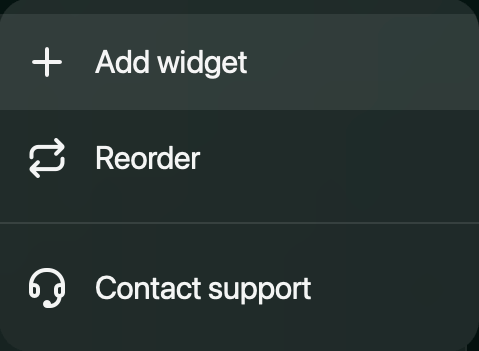
Sélectionne Ajouter un widget en bas de l’écran Accueil, ou ouvre le menu ⋮ en haut à droite et sélectionne Ajouter un widget.
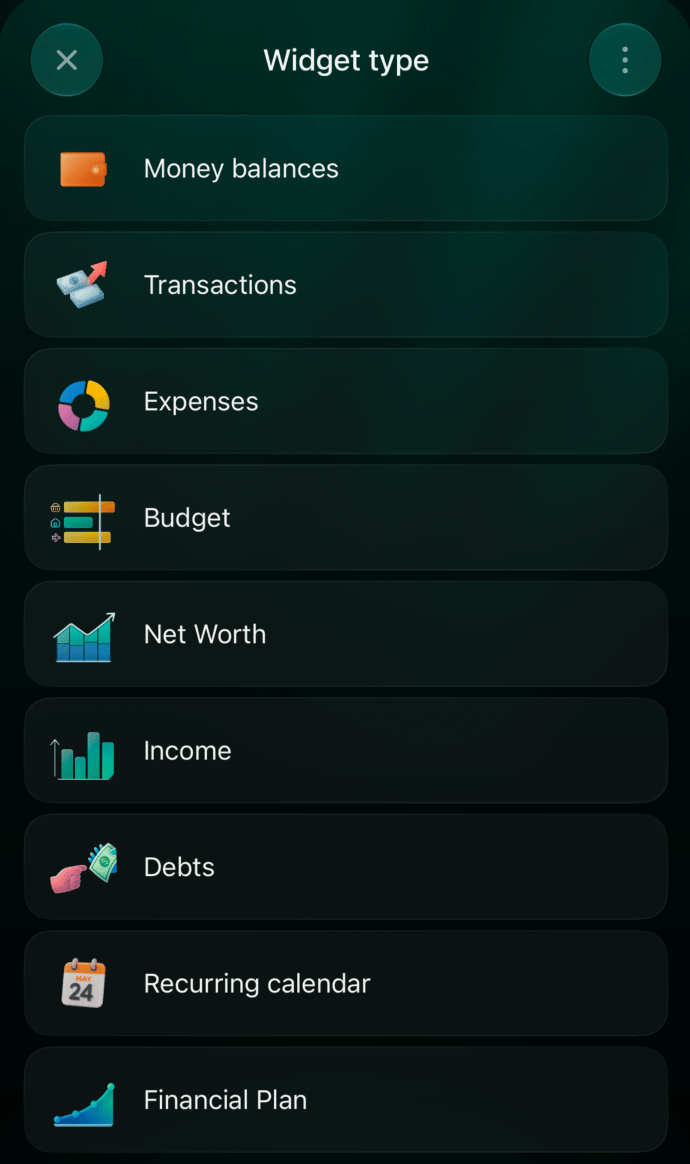
Choisis un type de widget, par exemple Dépenses, Revenu, Soldes ou Transactions.
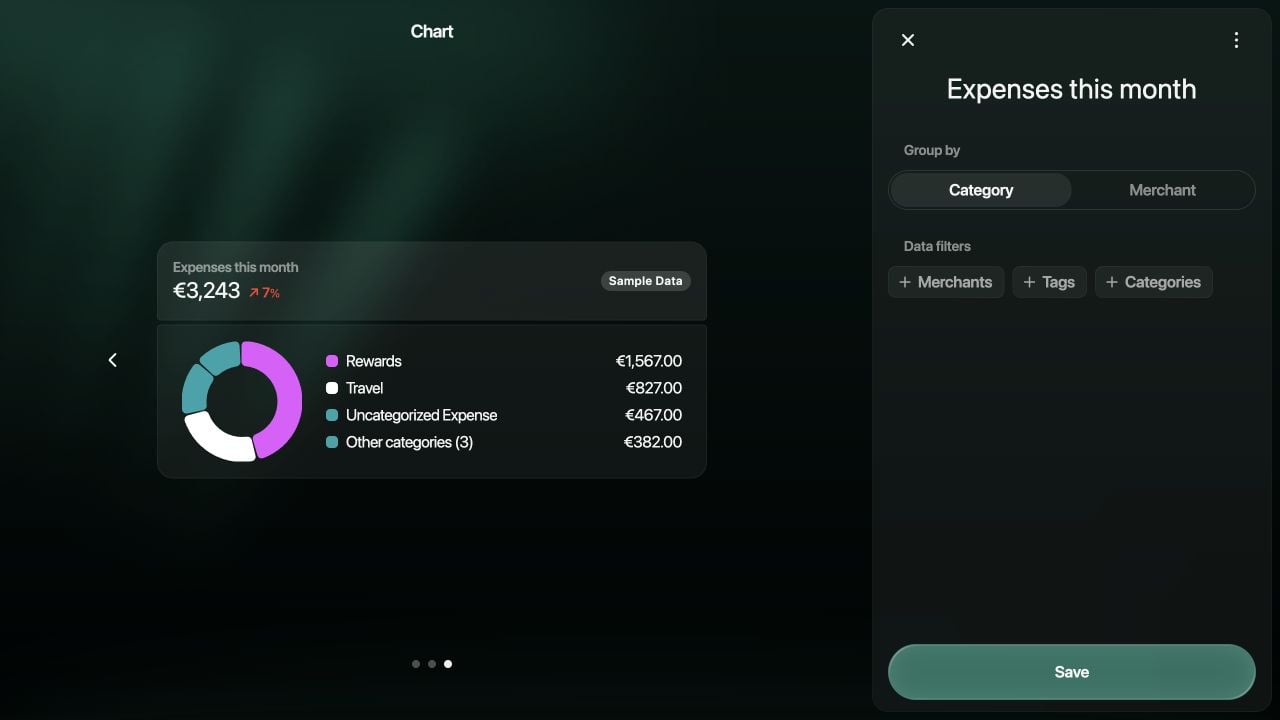
Configure les données à afficher. Par exemple, Dépenses propose Catégorie ou Commerçant sous Grouper par, et des Filtres de données pour les commerçants, les tags ou les catégories.
Sélectionne Enregistrer pour ajouter le widget.
Le menu de l'écran Accueil : ajouter des widgets ou changer leur ordre.
Exemple de réglages du widget Dépenses. L'aperçu marqué Données exemple utilise des données de démonstration.
Fais défiler l’écran Accueil jusqu’en bas et appuie sur Ajouter un widget.
Choisis un type de widget. Budget et Récurrent sont ajoutés aussitôt.
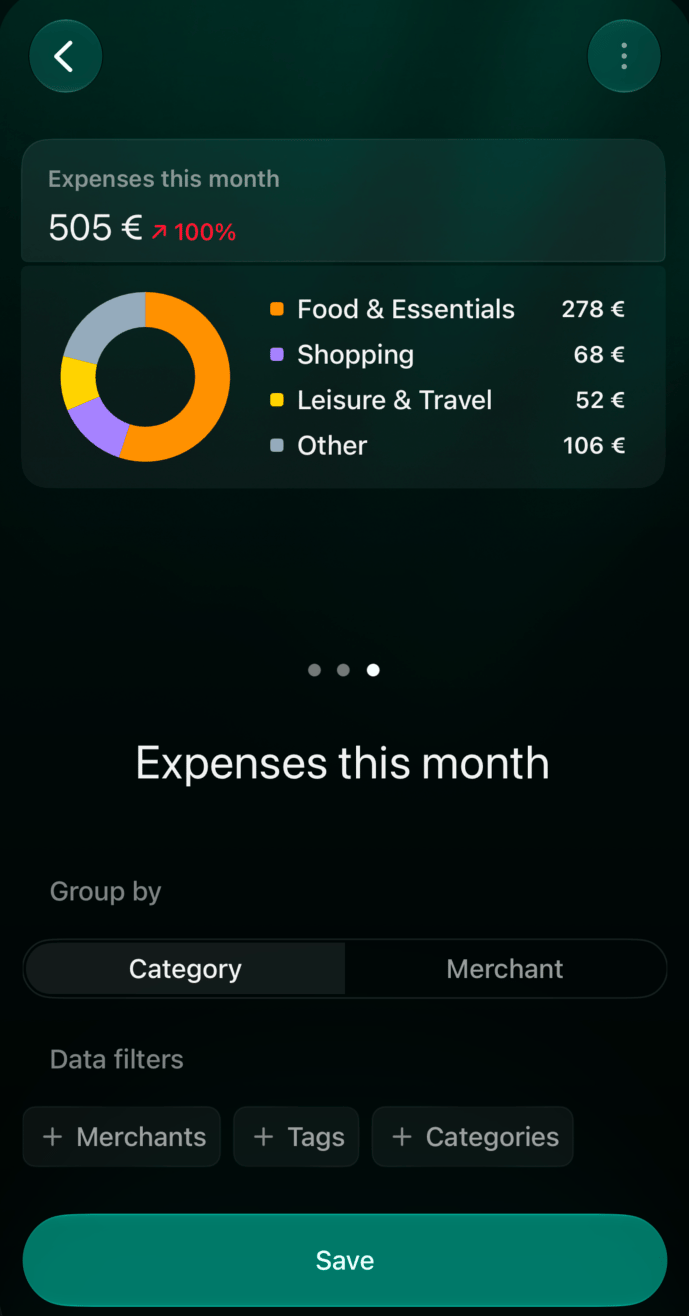
Pour les autres types, saisis un nom si tu le souhaites et ajoute des Filtres de données.
Appuie sur Enregistrer.
Choisis un type de widget.
Configure le regroupement et les filtres.
Ajouter un widget apparaît dès que l’espace contient des transactions.
Tu peux renommer un widget dans ses réglages. Un widget avec un badge Pro ouvre à la place l’offre d’abonnement.
Ce que montrent les chiffres
Dépenses et Revenu comptent le mois civil en cours. La flèche et le pourcentage à côté du total le comparent à la période précédente. Le détail liste les trois catégories ou commerçants les plus importants et regroupe le reste, par exemple Autres catégories (5).
Soldes, sur le web et sur iOS, additionne les soldes actuels de tes comptes bancaires et de tes comptes en espèces. S’ils sont tous dans la même devise, le total est dans cette devise ; sinon, il est converti dans la devise principale de l’espace. Sur Android, le widget compte aussi les comptes d’investissement, de récompenses, de prêt et de biens, dans la devise principale. Il n’affiche pas de tendance.
Patrimoine net affiche ton patrimoine net du dernier mois, avec son évolution, et un graphique mensuel sur la période que tu choisis.
Budget indique combien tu as dépensé sur le budget prévu ce mois-ci.
Dettes affiche le total que tu dois, ou le total qu’on te doit, et les dettes les plus importantes.
Récurrent affiche les paiements à venir. Sur le web, le calendrier totalise aussi ce qui est payé, ce qui reste à payer et ce qui est en retard.
Sur le web et sur iOS, certains widgets existent en plusieurs tailles : un résumé avec le total seul, une liste ou un graphique. Pendant la modification d’un widget, change d’aperçu avec les flèches sur le web ou en le faisant glisser sur iOS. Un aperçu marqué Données exemple utilise des données d’exemple tant que ton espace n’a pas les siennes.
Filtrer les données d’un widget
Utilise Filtres de données dans les réglages d’un widget pour choisir ce qu’il compte. Chaque filtre peut inclure ou exclure les éléments que tu choisis : par exemple, Catégories exclues avec la catégorie Loyer laisse le loyer en dehors de Dépenses.
Widget
Filtres de données
Autres réglages
Dépenses, Revenu
Commerçants, Tags, Catégories
Grouper par : Catégorie ou Commerçant (web, iOS)
Transactions
Commerçants, Comptes, Tags, Catégories, Statut
Virements internes : Afficher ou Masquer (web, iOS)
Soldes
Comptes
Grouper par : Compte ou Type (web, iOS)
Patrimoine net
Comptes
Période : la période du graphique
Dettes
Comptes (web, iOS)
Type : Je dois ou On me doit
Récurrent
Commerçants (web, iOS)
Période du calendrier (web)
Plan financier
—
Scénario (web, iOS)
Par exemple, un widget Transactions avec Statut réglé sur À réviser liste les dernières transactions que tu dois encore vérifier. Quand tu ouvres le rapport ou la liste complète d’un widget, les mêmes filtres s’appliquent.Sur Android, Budget et Récurrent n’ont pas de réglages : Modifier ouvre le budget ou le calendrier des paiements récurrents.
Modifier, réorganiser ou supprimer des widgets
Web
Android
iOS
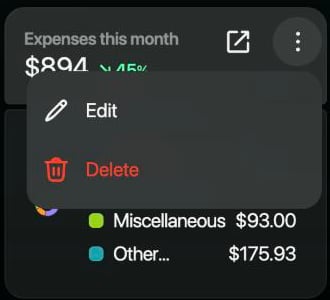
Modifier ou supprimer un widget. Survole un widget avec la souris : une icône d’ouverture et un bouton ⋮ apparaissent dans son en-tête. Sélectionne ⋮, puis Modifier ou Supprimer. La suppression demande une confirmation. L’icône d’ouverture t’amène au rapport ou à la liste complète.
Survole un widget pour afficher son menu ⋮.
Changer l’ordre.
Ouvre le menu ⋮ en haut à droite de l’écran Accueil et sélectionne Réorganiser.
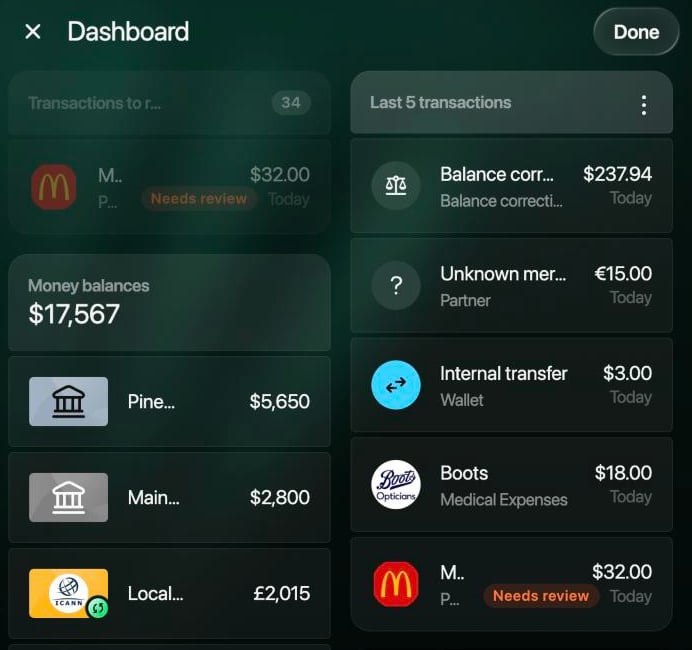
Fais glisser les widgets dans une colonne ou vers l’autre colonne. Un widget en taille résumé a aussi une poignée sur son bord droit : fais-la glisser pour lui donner une demi-largeur ou toute la largeur.
Sélectionne Terminé pour enregistrer. Pour quitter sans enregistrer, sélectionne ✕, puis Annuler.
Le mode de réorganisation. Les cartes intégrées restent en haut.
Appuie longuement sur le titre d’un widget. Le menu propose Modifier, Réorganiser et Supprimer.
Modifier ouvre les réglages du widget.
Supprimer retire le widget immédiatement, sans demander de confirmation.
Réorganiser ouvre la liste de tes widgets. Fais-les glisser par leurs poignées et appuie sur Enregistrer. Pour quitter sans enregistrer, reviens en arrière.
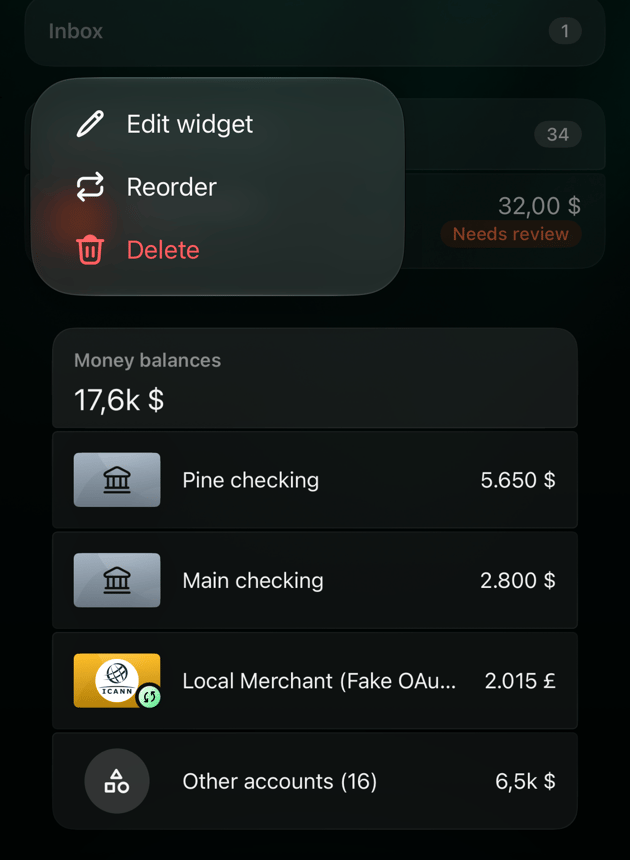
Appuie longuement sur un widget. Le menu propose Modifier le widget, Réorganiser et Supprimer.
Modifier le widget ouvre les réglages du widget.
Supprimer retire le widget immédiatement, sans demander de confirmation.
Réorganiser fait trembler les widgets. Fais-les glisser à leur place, ou retires-en un avec son icône de corbeille, puis appuie sur Terminé en bas à droite.
Appuie longuement sur un widget pour le modifier, le réorganiser ou le supprimer.
Tu peux aussi supprimer un widget depuis ses réglages : ouvre ⋮ et sélectionne Supprimer. Un widget supprimé peut être ajouté de nouveau depuis Ajouter un widget, mais ses réglages sont à refaire.
Articles connexes
Les widgets affichent des données venant d’autres parties de finerd. Pour en savoir plus :
{"docsConfig":{"theme":"mint","$schema":"https://mintlify.com/docs.json","name":"finerd","description":"finerd helps financially savvy people manage complex personal, family, business, and international finances with accounting precision without accounting complexity.","colors":{"primary":"#38f7ff","light":"#38f7ff","dark":"#b98cff"},"logo":{"light":"https://finerd.ai/logo.svg","dark":"https://finerd.ai/logo.svg","href":"/"},"favicon":"https://finerd.ai/logo.svg","appearance":{"default":"dark","strict":true},"background":{"decoration":"grid","color":{"light":"#08090f","dark":"#08090f"}},"navbar":{"links":[{"href":"https://finerd.ai","label":"finerd.ai"}]},"seo":{"metatags":{"google-site-verification":"haq__cDMEelH2BlpExqZZ7DqIbXEtZMZDA_2Rn4amf8"}},"fonts":{"family":"Inter"},"styling":{"eyebrows":"breadcrumbs","latex":true},"contextual":{"options":["copy","view"],"display":"header"},"navigation":{"languages":[{"language":"en","footer":{"links":[{"items":[{"label":"YouTube","href":"https://www.youtube.com/@realFinerd"},{"label":"Reddit","href":"https://www.reddit.com/r/finerds"},{"label":"TikTok","href":"https://www.tiktok.com/@real.finerd"}]}]},"navbar":{"links":[{"href":"https://finerd.ai","label":"finerd.ai"}],"primary":{"type":"button","label":"Contact support","href":"/contact-us"}},"href":""},{"language":"uk","footer":{"links":[{"items":[{"label":"YouTube","href":"https://www.youtube.com/@finerd.ukraine"},{"label":"Telegram","href":"https://t.me/+TESz5VfXr50yNTRi"}]}]},"navbar":{"links":[{"href":"https://finerd.ai","label":"finerd.ai"}],"primary":{"type":"button","label":"Зв'язатися з підтримкою","href":"/uk/contact-us"}},"href":"uk"},{"language":"es","footer":{"links":[{"items":[{"label":"YouTube","href":"https://www.youtube.com/@realFinerd"},{"label":"Reddit","href":"https://www.reddit.com/r/finerds"},{"label":"TikTok","href":"https://www.tiktok.com/@real.finerd"}]}]},"navbar":{"links":[{"href":"https://finerd.ai","label":"finerd.ai"}],"primary":{"type":"button","label":"Contactar soporte","href":"/es/contact-us"}},"href":"es"},{"language":"ja","footer":{"links":[{"items":[{"label":"YouTube","href":"https://www.youtube.com/@realFinerd"},{"label":"Reddit","href":"https://www.reddit.com/r/finerds"},{"label":"TikTok","href":"https://www.tiktok.com/@real.finerd"}]}]},"navbar":{"links":[{"href":"https://finerd.ai","label":"finerd.ai"}],"primary":{"type":"button","label":"サポートに連絡","href":"/ja/contact-us"}},"href":"ja"},{"language":"pl","footer":{"links":[{"items":[{"label":"YouTube","href":"https://www.youtube.com/@realFinerd"},{"label":"Reddit","href":"https://www.reddit.com/r/finerds"},{"label":"TikTok","href":"https://www.tiktok.com/@real.finerd"}]}]},"navbar":{"links":[{"href":"https://finerd.ai","label":"finerd.ai"}],"primary":{"type":"button","label":"Kontakt z pomocą","href":"/pl/contact-us"}},"href":"pl"},{"language":"cs","footer":{"links":[{"items":[{"label":"YouTube","href":"https://www.youtube.com/@realFinerd"},{"label":"Reddit","href":"https://www.reddit.com/r/finerds"},{"label":"TikTok","href":"https://www.tiktok.com/@real.finerd"}]}]},"navbar":{"links":[{"href":"https://finerd.ai","label":"finerd.ai"}],"primary":{"type":"button","label":"Kontaktovat podporu","href":"/cs/contact-us"}},"href":"cs"},{"language":"it","footer":{"links":[{"items":[{"label":"YouTube","href":"https://www.youtube.com/@realFinerd"},{"label":"Reddit","href":"https://www.reddit.com/r/finerds"},{"label":"TikTok","href":"https://www.tiktok.com/@real.finerd"}]}]},"navbar":{"links":[{"href":"https://finerd.ai","label":"finerd.ai"}],"primary":{"type":"button","label":"Contatta assistenza","href":"/it/contact-us"}},"href":"it"},{"language":"fr","footer":{"links":[{"items":[{"label":"YouTube","href":"https://www.youtube.com/@realFinerd"},{"label":"Reddit","href":"https://www.reddit.com/r/finerds"},{"label":"TikTok","href":"https://www.tiktok.com/@real.finerd"}]}]},"navbar":{"links":[{"href":"https://finerd.ai","label":"finerd.ai"}],"primary":{"type":"button","label":"Contacter le support","href":"/fr/contact-us"}},"href":"fr"},{"language":"de","footer":{"links":[{"items":[{"label":"YouTube","href":"https://www.youtube.com/@realFinerd"},{"label":"Reddit","href":"https://www.reddit.com/r/finerds"},{"label":"TikTok","href":"https://www.tiktok.com/@real.finerd"}]}]},"navbar":{"links":[{"href":"https://finerd.ai","label":"finerd.ai"}],"primary":{"type":"button","label":"Support kontaktieren","href":"/de/contact-us"}},"href":"de"},{"language":"pt","footer":{"links":[{"items":[{"label":"YouTube","href":"https://www.youtube.com/@realFinerd"},{"label":"Reddit","href":"https://www.reddit.com/r/finerds"},{"label":"TikTok","href":"https://www.tiktok.com/@real.finerd"}]}]},"navbar":{"links":[{"href":"https://finerd.ai","label":"finerd.ai"}],"primary":{"type":"button","label":"Falar com suporte","href":"/pt/contact-us"}},"href":"pt"},{"language":"zh-Hant","footer":{"links":[{"items":[{"label":"YouTube","href":"https://www.youtube.com/@realFinerd"},{"label":"Reddit","href":"https://www.reddit.com/r/finerds"},{"label":"TikTok","href":"https://www.tiktok.com/@real.finerd"}]}]},"navbar":{"links":[{"href":"https://finerd.ai","label":"finerd.ai"}],"primary":{"type":"button","label":"聯絡客服","href":"/zh-Hant/contact-us"}},"href":"zh-Hant"},{"language":"ko","footer":{"links":[{"items":[{"label":"YouTube","href":"https://www.youtube.com/@realFinerd"},{"label":"Reddit","href":"https://www.reddit.com/r/finerds"},{"label":"TikTok","href":"https://www.tiktok.com/@real.finerd"}]}]},"navbar":{"links":[{"href":"https://finerd.ai","label":"finerd.ai"}],"primary":{"type":"button","label":"고객 지원 문의","href":"/ko/contact-us"}},"href":"ko"},{"language":"zh-Hans","footer":{"links":[{"items":[{"label":"YouTube","href":"https://www.youtube.com/@realFinerd"},{"label":"Reddit","href":"https://www.reddit.com/r/finerds"},{"label":"TikTok","href":"https://www.tiktok.com/@real.finerd"}]}]},"navbar":{"links":[{"href":"https://finerd.ai","label":"finerd.ai"}],"primary":{"type":"button","label":"联系支持","href":"/zh-Hans/contact-us"}},"href":"zh-Hans"},{"language":"nl","footer":{"links":[{"items":[{"label":"YouTube","href":"https://www.youtube.com/@realFinerd"},{"label":"Reddit","href":"https://www.reddit.com/r/finerds"},{"label":"TikTok","href":"https://www.tiktok.com/@real.finerd"}]}]},"navbar":{"links":[{"href":"https://finerd.ai","label":"finerd.ai"}],"primary":{"type":"button","label":"Neem contact op met support","href":"/nl/contact-us"}},"href":"nl"}]}},"deployment":{"deploymentMetadataValue":{"subdomain":"finerdai","hasAudioNarration":false,"actualSubdomain":"finerdai","customDomains":["help.finerd.ai"],"gitSource":{"type":"gitlab","owner":"finerd.ai/web","repo":"help","deployBranch":"main","contentDirectory":"","isPrivate":true,"projectId":85636094,"mountPath":"","label":""},"feedback":{"thumbs":true},"entitlements":{"AI_CHAT":{"status":"DISABLED"}},"buildId":"6b00a7593c4bb12541ace472","clientVersion":"0.0.4263","searchFilterCounts":[{"language":"en","tag":"Accounts \u0026 balances","count":8},{"language":"cs","tag":"Účty a zůstatky","count":8},{"language":"de","tag":"Konten und Salden","count":8},{"language":"es","tag":"Cuentas y saldos","count":8},{"language":"fr","tag":"Comptes et soldes","count":8},{"language":"it","tag":"Conti e saldi","count":8},{"language":"ja","tag":"口座と残高","count":8},{"language":"ko","tag":"계좌와 잔액","count":8},{"language":"nl","tag":"Rekeningen en saldi","count":8},{"language":"pl","tag":"Konta i salda","count":8},{"language":"pt","tag":"Contas e saldos","count":8},{"language":"uk","tag":"Рахунки та баланси","count":8},{"language":"zh-Hans","tag":"账户与余额","count":8},{"language":"zh-Hant","tag":"帳戶與餘額","count":8},{"language":"en","tag":"AI assistants","count":7},{"language":"en","tag":"Family \u0026 shared expenses","count":7},{"language":"en","tag":"Transactions","count":7},{"language":"cs","tag":"AI asistenti","count":7},{"language":"cs","tag":"Rodina a sdílené výdaje","count":7},{"language":"cs","tag":"Transakce","count":7},{"language":"de","tag":"AI-Assistenten","count":7},{"language":"de","tag":"Familie und geteilte Ausgaben","count":7},{"language":"de","tag":"Transaktionen","count":7},{"language":"es","tag":"Asistentes de AI","count":7},{"language":"es","tag":"Familia y gastos compartidos","count":7},{"language":"es","tag":"Transacciones","count":7},{"language":"fr","tag":"Assistants AI","count":7},{"language":"fr","tag":"Famille et dépenses partagées","count":7},{"language":"fr","tag":"Transactions","count":7},{"language":"it","tag":"Assistenti AI","count":7},{"language":"it","tag":"Famiglia e spese condivise","count":7},{"language":"it","tag":"Transazioni","count":7},{"language":"ja","tag":"AIアシスタント","count":7},{"language":"ja","tag":"ファミリーと共通の支出","count":7},{"language":"ja","tag":"取引","count":7},{"language":"ko","tag":"AI 어시스턴트","count":7},{"language":"ko","tag":"가족과 공유 지출","count":7},{"language":"ko","tag":"거래","count":7},{"language":"nl","tag":"AI-assistenten","count":7},{"language":"nl","tag":"Gezin en gedeelde uitgaven","count":7},{"language":"nl","tag":"Transacties","count":7},{"language":"pl","tag":"Asystenci AI","count":7},{"language":"pl","tag":"Rodzina i wspólne wydatki","count":7},{"language":"pl","tag":"Transakcje","count":7},{"language":"pt","tag":"Assistentes de AI","count":7},{"language":"pt","tag":"Família e despesas compartilhadas","count":7},{"language":"pt","tag":"Transações","count":7},{"language":"uk","tag":"ШІ-асистенти","count":7},{"language":"uk","tag":"Сім'я та спільні витрати","count":7},{"language":"uk","tag":"Транзакції","count":7},{"language":"zh-Hans","tag":"AI 助手","count":7},{"language":"zh-Hans","tag":"家庭与共同支出","count":7},{"language":"zh-Hans","tag":"交易","count":7},{"language":"zh-Hant","tag":"AI 助理","count":7},{"language":"zh-Hant","tag":"家庭與共享支出","count":7},{"language":"zh-Hant","tag":"交易","count":7},{"language":"en","tag":"Planning","count":6},{"language":"cs","tag":"Plánování","count":6},{"language":"de","tag":"Planung","count":6},{"language":"es","tag":"Planificación","count":6},{"language":"fr","tag":"Planification","count":6},{"language":"it","tag":"Pianificazione","count":6},{"language":"ja","tag":"プランニング","count":6},{"language":"ko","tag":"재무 설계","count":6},{"language":"nl","tag":"Financiële planning","count":6},{"language":"pl","tag":"Planowanie","count":6},{"language":"pt","tag":"Planejamento","count":6},{"language":"uk","tag":"Планування","count":6},{"language":"zh-Hans","tag":"财务规划","count":6},{"language":"zh-Hant","tag":"財務規劃","count":6},{"language":"en","tag":"Bills \u0026 receipts","count":5},{"language":"en","tag":"Get started","count":5},{"language":"cs","tag":"Účtenky","count":5},{"language":"cs","tag":"Začínáme","count":5},{"language":"de","tag":"Rechnungen und Kassenbons","count":5},{"language":"de","tag":"Erste Schritte","count":5},{"language":"es","tag":"Recibos","count":5},{"language":"es","tag":"Primeros pasos","count":5},{"language":"fr","tag":"Factures et tickets de caisse","count":5},{"language":"fr","tag":"Premiers pas","count":5},{"language":"it","tag":"Ricevute","count":5},{"language":"it","tag":"Primi passi","count":5},{"language":"ja","tag":"レシート","count":5},{"language":"ja","tag":"はじめに","count":5},{"language":"ko","tag":"영수증","count":5},{"language":"ko","tag":"시작하기","count":5},{"language":"nl","tag":"Bonnen","count":5},{"language":"nl","tag":"Aan de slag","count":5},{"language":"pl","tag":"Rachunki i paragony","count":5},{"language":"pl","tag":"Pierwsze kroki","count":5},{"language":"pt","tag":"Recibos de compra","count":5},{"language":"pt","tag":"Primeiros passos","count":5},{"language":"uk","tag":"Чеки","count":5},{"language":"uk","tag":"Початок роботи","count":5},{"language":"zh-Hans","tag":"小票","count":5},{"language":"zh-Hans","tag":"开始使用","count":5},{"language":"zh-Hant","tag":"收據","count":5},{"language":"zh-Hant","tag":"開始使用","count":5},{"language":"en","tag":"Account \u0026 subscription","count":4},{"language":"en","tag":"Business","count":4},{"language":"en","tag":"Investments \u0026 property","count":4},{"language":"cs","tag":"Účet a předplatné","count":4},{"language":"cs","tag":"Podnikání","count":4},{"language":"cs","tag":"Investice a majetek","count":4},{"language":"de","tag":"Konto und Abo","count":4},{"language":"de","tag":"Business","count":4},{"language":"de","tag":"Investments und Vermögenswerte","count":4},{"language":"es","tag":"Cuenta y suscripción","count":4},{"language":"es","tag":"Negocios","count":4},{"language":"es","tag":"Inversiones y patrimonio","count":4},{"language":"fr","tag":"Compte et abonnement","count":4},{"language":"fr","tag":"Entreprise","count":4},{"language":"fr","tag":"Investissements et patrimoine","count":4},{"language":"it","tag":"Account e abbonamento","count":4},{"language":"it","tag":"Business","count":4},{"language":"it","tag":"Investimenti e proprietà","count":4},{"language":"ja","tag":"アカウントとサブスクリプション","count":4},{"language":"ja","tag":"ビジネス","count":4},{"language":"ja","tag":"投資と資産","count":4},{"language":"ko","tag":"계정과 구독","count":4},{"language":"ko","tag":"비즈니스","count":4},{"language":"ko","tag":"투자와 재산","count":4},{"language":"nl","tag":"Account en abonnement","count":4},{"language":"nl","tag":"Zakelijk","count":4},{"language":"nl","tag":"Beleggingen en eigendommen","count":4},{"language":"pl","tag":"Konto i subskrypcja","count":4},{"language":"pl","tag":"Biznes","count":4},{"language":"pl","tag":"Inwestycje i majątek","count":4},{"language":"pt","tag":"Conta e assinatura","count":4},{"language":"pt","tag":"Negócios","count":4},{"language":"pt","tag":"Investimentos e patrimônio","count":4},{"language":"uk","tag":"Акаунт і підписка","count":4},{"language":"uk","tag":"Бізнес","count":4},{"language":"uk","tag":"Інвестиції й майно","count":4},{"language":"zh-Hans","tag":"账号与订阅","count":4},{"language":"zh-Hans","tag":"商业","count":4},{"language":"zh-Hans","tag":"投资与财产","count":4},{"language":"zh-Hant","tag":"會員帳號與訂閱","count":4},{"language":"zh-Hant","tag":"商務","count":4},{"language":"zh-Hant","tag":"投資與財產","count":4}]},"assistantConfig":{"enableAskAiButton":false,"enableStarterQuestions":false,"enableContextualStarterQuestions":false,"enableAskAiSearchBar":true},"basePath":"","hasChatPermissions":false,"hasWebMcpPermissions":false,"toggles":[{"name":"kill-isr","enabled":true,"variant":{"name":"disabled","enabled":false,"feature_enabled":true},"impressionData":false},{"name":"custom-rbac-roles","enabled":true,"variant":{"name":"disabled","enabled":false,"feature_enabled":true},"impressionData":false},{"name":"agent-mintlify-slack","enabled":true,"variant":{"name":"disabled","enabled":false,"feature_enabled":true},"impressionData":false},{"name":"agent-integrations-settings","enabled":true,"variant":{"name":"disabled","enabled":false,"feature_enabled":true},"impressionData":false},{"name":"rbac-expansion","enabled":true,"variant":{"name":"disabled","enabled":false,"feature_enabled":true},"impressionData":false},{"name":"automations-pr-grouping","enabled":true,"variant":{"name":"disabled","enabled":false,"feature_enabled":true},"impressionData":false},{"name":"custom-prefix","enabled":true,"variant":{"name":"disabled","enabled":false,"feature_enabled":true},"impressionData":false},{"name":"analytics-v7","enabled":true,"variant":{"name":"disabled","enabled":false,"feature_enabled":true},"impressionData":false},{"name":"user-flows-analytics","enabled":true,"variant":{"name":"disabled","enabled":false,"feature_enabled":true},"impressionData":false},{"name":"no-publish-flow","enabled":true,"variant":{"name":"disabled","enabled":false,"feature_enabled":true},"impressionData":false},{"name":"workos-onboarding","enabled":true,"variant":{"name":"disabled","enabled":false,"feature_enabled":true},"impressionData":false},{"name":"snapshot-serving-live","enabled":true,"variant":{"name":"disabled","enabled":false,"feature_enabled":true},"impressionData":false},{"name":"stripTemperatureMiddleware","enabled":true,"variant":{"name":"disabled","enabled":false,"feature_enabled":true},"impressionData":false},{"name":"support-platform-pylon-zendesk","enabled":true,"variant":{"name":"disabled","enabled":false,"feature_enabled":true},"impressionData":false},{"name":"snapshot-serving","enabled":true,"variant":{"name":"disabled","enabled":false,"feature_enabled":true},"impressionData":false},{"name":"instant-rollback","enabled":true,"variant":{"name":"disabled","enabled":false,"feature_enabled":true},"impressionData":false},{"name":"granular-notifications-server","enabled":true,"variant":{"name":"disabled","enabled":false,"feature_enabled":true},"impressionData":false},{"name":"granular-notifications","enabled":true,"variant":{"name":"disabled","enabled":false,"feature_enabled":true},"impressionData":false},{"name":"automations-fable","enabled":true,"variant":{"name":"disabled","enabled":false,"feature_enabled":true},"impressionData":false},{"name":"fixed-ai-action-pricing","enabled":true,"variant":{"name":"disabled","enabled":false,"feature_enabled":true},"impressionData":false},{"name":"site-roles","enabled":true,"variant":{"name":"disabled","enabled":false,"feature_enabled":true},"impressionData":false},{"name":"automation-resolve-merge-conflict","enabled":true,"variant":{"name":"disabled","enabled":false,"feature_enabled":true},"impressionData":false},{"name":"scoped-publishing","enabled":true,"variant":{"name":"disabled","enabled":false,"feature_enabled":true},"impressionData":false},{"name":"mintql","enabled":true,"variant":{"name":"disabled","enabled":false,"feature_enabled":true},"impressionData":false},{"name":"page-level-analytics","enabled":true,"variant":{"name":"disabled","enabled":false,"feature_enabled":true},"impressionData":false},{"name":"editor-version-history-v2","enabled":true,"variant":{"name":"disabled","enabled":false,"feature_enabled":true},"impressionData":false},{"name":"billing-page-v2","enabled":true,"variant":{"name":"disabled","enabled":false,"feature_enabled":true},"impressionData":false},{"name":"full-page-search","enabled":true,"variant":{"name":"disabled","enabled":false,"feature_enabled":true},"impressionData":false},{"name":"workspace-projects","enabled":true,"variant":{"name":"disabled","enabled":false,"feature_enabled":true},"impressionData":false},{"name":"assistant-v5","enabled":true,"variant":{"name":"disabled","enabled":false,"feature_enabled":true},"impressionData":false},{"name":"fork-pr-previews","enabled":true,"variant":{"name":"disabled","enabled":false,"feature_enabled":true},"impressionData":false},{"name":"revalidation-jwt","enabled":true,"variant":{"name":"disabled","enabled":false,"feature_enabled":true},"impressionData":false},{"name":"workos-sso-scim","enabled":true,"variant":{"name":"disabled","enabled":false,"feature_enabled":true},"impressionData":false},{"name":"hobby-abuse-scan","enabled":true,"variant":{"name":"disabled","enabled":false,"feature_enabled":true},"impressionData":false},{"name":"dashboard-inbox","enabled":true,"variant":{"name":"disabled","enabled":false,"feature_enabled":true},"impressionData":false},{"name":"workos-signup","enabled":true,"variant":{"name":"disabled","enabled":false,"feature_enabled":true},"impressionData":false},{"name":"turbopuffer-dual-write","enabled":true,"variant":{"name":"disabled","enabled":false,"feature_enabled":true},"impressionData":false},{"name":"workos-enabled","enabled":true,"variant":{"name":"disabled","enabled":false,"feature_enabled":true},"impressionData":false},{"name":"approve-review-flow","enabled":true,"variant":{"name":"disabled","enabled":false,"feature_enabled":true},"impressionData":false},{"name":"editor-metadata","enabled":true,"variant":{"name":"disabled","enabled":false,"feature_enabled":true},"impressionData":false},{"name":"sso-setup-deadline-banner","enabled":true,"variant":{"name":"disabled","enabled":false,"feature_enabled":true},"impressionData":false},{"name":"turbopuffer-serve","enabled":true,"variant":{"name":"disabled","enabled":false,"feature_enabled":true},"impressionData":false},{"name":"live-agents","enabled":true,"variant":{"name":"disabled","enabled":false,"feature_enabled":true},"impressionData":false},{"name":"starter-pricing","enabled":true,"variant":{"name":"control","enabled":true,"payload":{"type":"string","value":"control"},"feature_enabled":true},"impressionData":false},{"name":"llms-txt-v2","enabled":true,"variant":{"name":"disabled","enabled":false,"feature_enabled":true},"impressionData":false},{"name":"wildcard-email-auth","enabled":true,"variant":{"name":"disabled","enabled":false,"feature_enabled":true},"impressionData":false}],"googleFontsInlined":false},"customCss":[{"filePath":"style.css","content":".tab-container>ul[role=\"tablist\"]>li[role=\"tab\"]>div{font-size:1rem;line-height:1.75rem}.tab-container>ul[role=\"tablist\"]>li[role=\"tab\"]{padding-bottom:0.25rem}.tab-container .tab-container>ul[role=\"tablist\"]>li[role=\"tab\"]>div{font-size:0.875rem;line-height:1.5rem}#topbar-cta-button a>span:first-child{background:transparent;box-shadow:inset 0 0 0 1px rgb(0 0 0 / 0.15)}#topbar-cta-button a .text-white{color:rgb(17 24 39)}#topbar-cta-button a:hover>span:first-child{background:rgb(0 0 0 / 0.04)}.dark #topbar-cta-button a>span:first-child{box-shadow:inset 0 0 0 1px rgb(255 255 255 / 0.2)}.dark #topbar-cta-button a .text-white{color:rgb(243 244 246)}.dark #topbar-cta-button a:hover>span:first-child{background:rgb(255 255 255 / 0.06)}#header nav[aria-label=\"Breadcrumb\"]:not(.fh-crumbs){display:none}.fh-crumbs{display:flex;flex-wrap:wrap;align-items:center;gap:0.375rem;font-size:0.875rem;line-height:1.25rem;color:rgb(107 114 128)}.dark .fh-crumbs{color:rgb(156 163 175)}.fh-crumbs a{color:inherit;text-decoration:none;border:none}.fh-crumbs a:hover{color:rgb(8 145 178)}.dark .fh-crumbs a:hover{color:#38f7ff}.fh-video{width:100%;aspect-ratio:1804 / 1080;overflow:hidden;border-radius:12px;background:#000}.fh-video iframe{display:block;width:100%;height:100%;border:0}.fh-video-intro{display:grid;gap:1.5rem;align-items:center;margin:1.5rem 0 2rem;padding:1.25rem;border-radius:16px;box-shadow:inset 0 0 0 1px rgb(0 0 0 / 0.08)}.dark .fh-video-intro{background:#ffffff08;box-shadow:inset 0 0 0 1px rgb(255 255 255 / 0.08)}@media (min-width: 640px){.fh-video-intro{grid-template-columns:12rem minmax(0, 1fr);gap:2rem}}.fh-video-frame{width:100%;max-width:12rem;margin:0 auto;aspect-ratio:9 / 16;overflow:hidden;border-radius:12px;background:#000}.fh-video-frame iframe{display:block;width:100%;height:100%;border:0}.fh-video-text>:first-child{margin-top:0}.fh-video-text>:last-child{margin-bottom:0}.card{border:none!important;background:url(\"/images/home/card-gradient.png\") 0 0 / 100% 100% no-repeat,\n rgb(0 0 0 / 0.03)!important}.dark .card{background-color:#ffffff0d!important}.card:hover{background-color:rgb(0 0 0 / 0.05)!important}.dark .card:hover{background-color:#ffffff14!important}.card::before{content:\"\";position:absolute;inset:0;padding:1px;border-radius:inherit;background:linear-gradient(\n 147.14deg,\n rgb(0 0 0 / 0.12) 0%,\n rgb(0 0 0 / 0.04) 31.25%,\n rgb(0 0 0 / 0.04) 69.23%,\n rgb(0 0 0 / 0.12) 100%\n );-webkit-mask:linear-gradient(#fff 0 0) content-box,\n linear-gradient(#fff 0 0);-webkit-mask-composite:xor;mask-composite:exclude;pointer-events:none;z-index:1}.dark .card::before{background:linear-gradient(\n 147.14deg,\n rgb(255 255 255 / 0.05) 0%,\n rgb(255 255 255 / 0.015) 31.25%,\n rgb(255 255 255 / 0.015) 69.23%,\n rgb(255 255 255 / 0.05) 100%\n )}.dark .card [data-component-part=\"card-title\"]{color:#fffffff2}.dark .card [data-component-part=\"card-content\"]{color:#ffffff80}#navbar div:has(>#localization-select-trigger){display:flex!important}html:has(.fh-home) #search-bar-entry{visibility:hidden}html:has(.fh-home) #navbar button.h-14{display:none}@media (min-width: 768px){html:has(.fh-home) .fixed:has(>[role=\"dialog\"] [data-component-part=\"search-header\"]){padding-top:var(--fh-search-top, 3rem)!important}html:has(.fh-home) [role=\"dialog\"]:has([data-component-part=\"search-header\"]){margin-top:0!important;max-width:40rem!important;border-radius:1.5rem!important;transition:none!important;transform:none!important;scale:none!important;opacity:1!important}html:has(.fh-home) [data-component-part=\"search-header\"]{height:3.5rem!important;padding:0!important}html:has(.fh-home) [data-component-part=\"search-input-container\"]{padding:0 1rem 0 1.25rem!important;border:none!important;border-radius:9999px!important;background:rgb(0 0 0 / 0.04)!important;box-shadow:inset 0 0 0 1px rgb(56 247 255 / 0.5)!important}html.dark:has(.fh-home) [data-component-part=\"search-input-container\"]{background:rgb(255 255 255 / 0.05)!important}html:has(.fh-home) [data-component-part=\"search-input-container\"]>svg{left:1.25rem!important;width:1.125rem!important;height:1.125rem!important}html:has(.fh-home) [data-component-part=\"search-input\"]{padding-left:2.125rem!important;font-size:1.0625rem!important;font-weight:400!important}html:has(.fh-home) .fixed.inset-0[class*=\"bg-black/40\"]{opacity:0!important}html:has(.fh-home):has([data-component-part=\"search-input\"]) .fh-search{visibility:hidden}}.fh-home{--fh-text: rgb(17 24 39);--fh-muted: rgb(75 85 99);--fh-line: rgb(0 0 0 / 0.1);--fh-hover: rgb(0 0 0 / 0.04);display:flex;flex-direction:column;align-items:center;gap:4rem;max-width:64rem;margin:0 auto;padding:4rem 1rem 5rem;color:var(--fh-text)}.dark .fh-home{--fh-text: rgb(243 244 246);--fh-muted: rgb(156 163 175);--fh-line: rgb(255 255 255 / 0.1);--fh-hover: rgb(255 255 255 / 0.05)}.fh-home h1,.fh-home h2,.fh-home p,.fh-home ul{margin:0}.fh-home ul{padding:0;list-style:none}.fh-home li{margin:0;padding:0}.fh-home a{color:inherit;text-decoration:none;border:none}.fh-hero{position:relative;display:flex;flex-direction:column;align-items:center;gap:0.75rem;width:100%;text-align:center}.fh-hero::before{content:\"\";position:absolute;inset:-4rem 0 auto;height:22rem;background:radial-gradient(40% 60% at 30% 30%, rgb(56 247 255 / 0.14), transparent 70%),\n radial-gradient(40% 60% at 70% 30%, rgb(185 140 255 / 0.16), transparent 70%);pointer-events:none;z-index:-1}.fh-hero h1{font-size:clamp(2.25rem, 5vw, 3.5rem);line-height:1.1;font-weight:600;letter-spacing:-0.03em}.fh-accent{background:linear-gradient(90deg, #38f7ff, #b98cff);-webkit-background-clip:text;background-clip:text;color:transparent}.fh-hero p{font-size:1.125rem;color:var(--fh-muted)}.fh-search{display:flex;align-items:center;gap:0.75rem;width:100%;max-width:40rem;height:3.5rem;margin-top:2rem;padding:0 1.25rem;border-radius:9999px;background:var(--fh-hover);box-shadow:inset 0 0 0 1px var(--fh-line);color:var(--fh-muted);font-size:1.0625rem;cursor:pointer;text-align:left}.fh-search:hover{box-shadow:inset 0 0 0 1px rgb(56 247 255 / 0.5)}.fh-search span{flex:1;min-width:0;overflow:hidden;text-overflow:ellipsis;white-space:nowrap}.fh-search kbd{font-size:0.75rem;font-weight:600;font-family:inherit}.fh-label{margin-bottom:1rem!important;font-size:1rem;font-weight:600;text-align:center}.fh-chips{display:flex;flex-wrap:wrap;justify-content:center;gap:0.75rem;max-width:56rem}.fh-chips a{display:inline-flex;align-items:center;gap:0.625rem;padding:0.625rem 1.125rem;border-radius:9999px;box-shadow:inset 0 0 0 1px var(--fh-line);font-size:1rem;line-height:1.5rem}.fh-chips a:hover{background:var(--fh-hover);box-shadow:inset 0 0 0 1px rgb(56 247 255 / 0.4)}.fh-chips svg{flex:none}.fh-topics{display:grid;grid-template-columns:repeat(2, minmax(0, 1fr));gap:0.75rem;width:100%;max-width:56rem;margin:0 auto!important}.fh-topics li:last-child:nth-child(odd){grid-column:1 / -1}@media (max-width: 767px){.fh-home .fh-topics a{padding:1rem 1.125rem}}@media (min-width: 768px){.fh-topics{grid-template-columns:repeat(3, minmax(0, 1fr))}.fh-topics li:last-child:nth-child(odd){grid-column:auto}}.fh-topics a{position:relative;z-index:0;display:flex;flex-direction:column;gap:0.25rem;height:100%;padding:1.25rem 1.5rem;overflow:hidden;border-radius:16px;background:url(\"/images/home/card-gradient.png\") 0 0 / 100% 100% no-repeat,\n rgb(0 0 0 / 0.03);color:var(--fh-text)}.dark .fh-topics a{background-color:#ffffff0d}.fh-topics a:hover{background-color:rgb(0 0 0 / 0.05)}.dark .fh-topics a:hover{background-color:#ffffff14}.fh-topics a::before{content:\"\";position:absolute;inset:0;padding:1px;border-radius:inherit;background:linear-gradient(\n 147.14deg,\n rgb(0 0 0 / 0.12) 0%,\n rgb(0 0 0 / 0.04) 31.25%,\n rgb(0 0 0 / 0.04) 69.23%,\n rgb(0 0 0 / 0.12) 100%\n );-webkit-mask:linear-gradient(#fff 0 0) content-box,\n linear-gradient(#fff 0 0);-webkit-mask-composite:xor;mask-composite:exclude;pointer-events:none;z-index:1}.dark .fh-topics a::before{background:linear-gradient(\n 147.14deg,\n rgb(255 255 255 / 0.05) 0%,\n rgb(255 255 255 / 0.015) 31.25%,\n rgb(255 255 255 / 0.015) 69.23%,\n rgb(255 255 255 / 0.05) 100%\n )}.fh-topics strong{font-size:1rem;font-weight:600;line-height:1.5rem}.dark .fh-topics strong{color:#fffffff2}.fh-topics span{font-size:0.9375rem;line-height:1.375rem;color:var(--fh-muted)}.dark .fh-topics span{color:#ffffff80}.fh-lang{margin:0!important;font-size:0.9375rem;text-align:center}.fh-lang a{color:var(--fh-muted);text-decoration:underline;text-underline-offset:0.2em}.fh-lang a:hover{color:var(--fh-text)}"}]}
{"page":{"pagePath":"fr/getting-started/customize-dashboard","slug":"/fr/getting-started/customize-dashboard","pageMetadata":{"title":"Personnaliser l'écran Accueil","sidebarTitle":"Écran Accueil","icon":"table-cells-large","description":"Choisis les widgets de l'écran Accueil de finerd, comprends leurs totaux et tendances, filtre leurs données et change leur ordre sur le web, Android et iOS.","keywords":["écran d'accueil","accueil","tableau de bord","dashboard","page d'accueil","widgets","ajouter un widget","supprimer un widget","réorganiser les widgets","déplacer un widget","personnaliser l'accueil","transactions à réviser","soldes","dépenses du mois","revenus du mois","widget patrimoine net","widget budget","paiements récurrents","widget dettes"],"href":"/fr/getting-started/customize-dashboard"},"description":{"compiledSource":"\"use strict\";\nconst {jsx: _jsx} = arguments[0];\nconst {useMDXComponents: _provideComponents} = arguments[0];\nfunction _createMdxContent(props) {\n const _components = {\n p: \"p\",\n ..._provideComponents(),\n ...props.components\n };\n return _jsx(_components.p, {\n children: \"Choisis les widgets de l’écran Accueil de finerd, comprends leurs totaux et tendances, filtre leurs données et change leur ordre sur le web, Android et iOS.\"\n });\n}\nfunction MDXContent(props = {}) {\n const {wrapper: MDXLayout} = {\n ..._provideComponents(),\n ...props.components\n };\n return MDXLayout ? _jsx(MDXLayout, {\n ...props,\n children: _jsx(_createMdxContent, {\n ...props\n })\n }) : _createMdxContent(props);\n}\nreturn {\n default: MDXContent\n};\n","frontmatter":{},"scope":{}},"pageType":"default","mdx":{"mdxSource":{"compiledSource":"\"use strict\";const{Fragment:_Fragment,jsx:_jsx,jsxs:_jsxs}=arguments[0];const{useMDXComponents:_provideComponents}=arguments[0];const Video=({id,title,aspect})=>_jsx(`div`,{className:`fh-video not-prose`,style:aspect?{aspectRatio:aspect}:undefined,children:_jsx(`iframe`,{src:`https://www.youtube-nocookie.com/embed/${id}?rel=0`,title,loading:`lazy`,referrerPolicy:`strict-origin-when-cross-origin`,allow:`accelerometer; autoplay; clipboard-write; encrypted-media; gyroscope; picture-in-picture; web-share`,allowFullScreen:true})});const VideoIntro=({id,title,aspect,children})=>_jsxs(`div`,{className:`fh-video-intro not-prose`,children:[_jsx(`div`,{className:`fh-video-frame`,style:aspect?{aspectRatio:aspect}:undefined,children:_jsx(`iframe`,{src:`https://www.youtube.com/embed/${id}`,title,loading:`lazy`,allow:`accelerometer; autoplay; clipboard-write; encrypted-media; gyroscope; picture-in-picture; web-share`,allowFullScreen:true})}),_jsx(`div`,{className:`fh-video-text prose dark:prose-invert`,children})]});function _createMdxContent(props){const _components={a:`a`,li:`li`,ol:`ol`,p:`p`,strong:`strong`,tbody:`tbody`,td:`td`,th:`th`,thead:`thead`,tr:`tr`,ul:`ul`,..._provideComponents(),...props.components},{Frame,Heading,OptimizedImage,Tab,Table,Tabs,_MdxComponentBoundary}=_components;if(!Frame)_missingMdxReference(`Frame`,true);if(!Heading)_missingMdxReference(`Heading`,true);if(!OptimizedImage)_missingMdxReference(`OptimizedImage`,true);if(!Tab)_missingMdxReference(`Tab`,true);if(!Table)_missingMdxReference(`Table`,true);if(!Tabs)_missingMdxReference(`Tabs`,true);if(!_MdxComponentBoundary)_missingMdxReference(`_MdxComponentBoundary`,true);return _jsxs(_Fragment,{children:[_jsxs(_components.p,{children:[_jsx(_components.strong,{children:`Accueil`}),` est le premier écran que tu vois dans finerd. Il se compose de widgets\\xA0: soldes, dépenses du mois, transactions récentes, budget et bien d’autres. Tu choisis les widgets affichés, les données que chacun inclut et leur ordre.`]}),`\n`,_jsxs(_components.p,{children:[`La personnalisation de l’écran Accueil est gratuite sur le web, Android et iOS. Les widgets `,_jsx(_components.strong,{children:`Récurrent`}),` et `,_jsx(_components.strong,{children:`Plan financier`}),` nécessitent Pro. Chaque app garde sa propre disposition pour chaque espace, et cette disposition n’appartient qu’à toi\\xA0: une modification sur le web ne change ni ton téléphone, ni l’écran Accueil des autres membres de l’espace.`]}),`\n`,_jsxs(_components.p,{children:[`Cet article porte sur les widgets à l’intérieur de finerd. Pour les widgets finerd sur l’écran d’accueil et l’écran verrouillé de ton iPhone, voir `,_jsx(_components.a,{href:`/fr/ai/siri#controls-widgets`,children:`Utiliser finerd avec Siri et Raccourcis sur iPhone`}),`.`]}),`\n`,_jsx(Heading,{level:`2`,id:`widgets`,children:`Widgets disponibles`}),`\n`,_jsxs(Table,{children:[_jsx(_components.thead,{children:_jsxs(_components.tr,{children:[_jsx(_components.th,{children:`Widget`}),_jsx(_components.th,{children:`Ce qu’il affiche`}),_jsx(_components.th,{children:`Où`})]})}),_jsxs(_components.tbody,{children:[_jsxs(_components.tr,{children:[_jsx(_components.td,{children:_jsx(_components.strong,{children:`Dépenses`})}),_jsx(_components.td,{children:`Les dépenses du mois en cours, au total et par catégorie ou par commerçant.`}),_jsx(_components.td,{children:`Web, Android, iOS`})]}),_jsxs(_components.tr,{children:[_jsx(_components.td,{children:_jsx(_components.strong,{children:`Revenu`})}),_jsx(_components.td,{children:`Les revenus du mois en cours, au total et par catégorie ou par commerçant.`}),_jsx(_components.td,{children:`Web, Android, iOS`})]}),_jsxs(_components.tr,{children:[_jsx(_components.td,{children:_jsx(_components.strong,{children:`Soldes`})}),_jsx(_components.td,{children:`Le solde total de tes comptes et les trois plus importants d’entre eux.`}),_jsx(_components.td,{children:`Web, Android, iOS`})]}),_jsxs(_components.tr,{children:[_jsxs(_components.td,{children:[_jsx(_components.strong,{children:`Transactions`}),` (`,_jsx(_components.strong,{children:`5 dernières transactions`}),`)`]}),_jsx(_components.td,{children:`Les cinq dernières transactions qui correspondent aux filtres du widget.`}),_jsx(_components.td,{children:`Web, Android, iOS`})]}),_jsxs(_components.tr,{children:[_jsx(_components.td,{children:_jsx(_components.strong,{children:`Récurrent`})}),_jsxs(_components.td,{children:[`Les `,_jsx(_components.a,{href:`/fr/recurring/track-recurring-payments`,children:`paiements récurrents`}),` à venir. Nécessite Pro.`]}),_jsx(_components.td,{children:`Web, Android, iOS`})]}),_jsxs(_components.tr,{children:[_jsx(_components.td,{children:_jsx(_components.strong,{children:`Budget`})}),_jsxs(_components.td,{children:[`Le `,_jsx(_components.a,{href:`/fr/budget/create-budget`,children:`budget`}),` du mois\\xA0: le montant dépensé par rapport au montant prévu. Espaces personnels.`]}),_jsx(_components.td,{children:`Web, Android, iOS`})]}),_jsxs(_components.tr,{children:[_jsx(_components.td,{children:_jsx(_components.strong,{children:`Patrimoine net`})}),_jsxs(_components.td,{children:[`Ton `,_jsx(_components.a,{href:`/fr/reports/net-worth`,children:`patrimoine net`}),` et son graphique mensuel. Espaces personnels.`]}),_jsx(_components.td,{children:`Web, Android, iOS`})]}),_jsxs(_components.tr,{children:[_jsx(_components.td,{children:_jsx(_components.strong,{children:`Dettes`})}),_jsxs(_components.td,{children:[`Ce que tu `,_jsx(_components.a,{href:`/fr/debts/track-debts`,children:`dois ou ce qu’on te doit`}),`.`]}),_jsx(_components.td,{children:`Web, iOS`})]}),_jsxs(_components.tr,{children:[_jsx(_components.td,{children:_jsx(_components.strong,{children:`Plan financier`})}),_jsxs(_components.td,{children:[`La progression vers le scénario de ton `,_jsx(_components.a,{href:`/fr/financial-plan`,children:`plan financier`}),`. Espaces personnels, nécessite Pro.`]}),_jsx(_components.td,{children:`Web, iOS`})]})]})]}),`\n`,_jsxs(_components.p,{children:[`Sur Android, la liste des widgets affiche `,_jsx(_components.strong,{children:`Dépenses du mois`}),` et `,_jsx(_components.strong,{children:`Revenus du mois`}),`\\xA0; sur iOS, `,_jsx(_components.strong,{children:`Récurrent`}),` s’appelle `,_jsx(_components.strong,{children:`Calendrier récurrent`}),`.`]}),`\n`,_jsxs(_components.p,{children:[`Un nouvel espace commence avec `,_jsx(_components.strong,{children:`Soldes`}),`, `,_jsx(_components.strong,{children:`5 dernières transactions`}),`, `,_jsx(_components.strong,{children:`Dépenses du mois`}),` et, dans un espace personnel, `,_jsx(_components.strong,{children:`Patrimoine net`}),`. iOS ajoute aussi `,_jsx(_components.strong,{children:`Budget`}),`.`]}),`\n`,_jsx(_components.p,{children:`Certaines cartes apparaissent d’elles-mêmes au-dessus de tes widgets. Tu ne peux ni les ajouter, ni les déplacer, ni les supprimer, et elles disparaissent quand il n’y a rien à afficher\\xA0:`}),`\n`,_jsxs(_components.ul,{children:[`\n`,_jsxs(_components.li,{children:[_jsx(_components.strong,{children:`Transactions à réviser`}),` indique combien de transactions sont marquées `,_jsx(_components.strong,{children:`À réviser`}),` et affiche la première. Sélectionne-la pour commencer la révision\\xA0; voir `,_jsx(_components.a,{href:`/fr/transactions/review-imported-transactions#needs-review`,children:`Trouver les transactions à réviser`}),`.`]}),`\n`,_jsxs(_components.li,{children:[_jsx(_components.strong,{children:`Demandes de dette en attente`}),` (web et iOS) affiche une `,_jsx(_components.a,{href:`/fr/debts/settle-up-with-people`,children:`dette partagée`}),` qu’une autre personne t’a envoyée et que tu dois accepter.`]}),`\n`,_jsxs(_components.li,{children:[_jsx(_components.strong,{children:`Boîte de réception`}),` (iOS) affiche tes messages non lus de la `,_jsx(_components.a,{href:`/fr/contact-us#inbox`,children:`Boîte de réception`}),`, et `,_jsx(_components.strong,{children:`Processus actifs`}),` (iOS) affiche un import en cours.`]}),`\n`]}),`\n`,_jsxs(_components.p,{children:[`Sur Android, ces cartes s’affichent à tour de rôle au même endroit\\xA0: un message de la Boîte de réception, une mise à jour de l’app, des paiements Google Wallet ou `,_jsx(_components.strong,{children:`Transactions à réviser`}),`.`]}),`\n`,_jsx(Heading,{level:`2`,id:`configure-widgets`,children:`Ajouter un widget`}),`\n`,_jsx(_components.p,{children:`Choisis un type de widget, configure ses données et enregistre-le. Les réglages disponibles dépendent du type de widget.`}),`\n`,_jsxs(Tabs,{children:[_jsxs(Tab,{title:`Web`,id:`web`,children:[_jsx(Frame,{caption:`Ajouter un widget sur le web.`,children:_jsx(_MdxComponentBoundary,{name:`Video`,children:_jsx(Video,{id:`coGhAh11mSY`,title:`Ajouter un widget sur le web`})})}),_jsxs(_components.ol,{children:[`\n`,_jsxs(_components.li,{children:[`Sélectionne `,_jsx(_components.strong,{children:`Ajouter un widget`}),` en bas de l’écran `,_jsx(_components.strong,{children:`Accueil`}),`, ou ouvre le menu `,_jsx(_components.strong,{children:`⋮`}),` en haut à droite et sélectionne `,_jsx(_components.strong,{children:`Ajouter un widget`}),`.`]}),`\n`,_jsxs(_components.li,{children:[`Choisis un type de widget, par exemple `,_jsx(_components.strong,{children:`Dépenses`}),`, `,_jsx(_components.strong,{children:`Revenu`}),`, `,_jsx(_components.strong,{children:`Soldes`}),` ou `,_jsx(_components.strong,{children:`Transactions`}),`.`]}),`\n`,_jsxs(_components.li,{children:[`Configure les données à afficher. Par exemple, `,_jsx(_components.strong,{children:`Dépenses`}),` propose `,_jsx(_components.strong,{children:`Catégorie`}),` ou `,_jsx(_components.strong,{children:`Commerçant`}),` sous `,_jsx(_components.strong,{children:`Grouper par`}),`, et des `,_jsx(_components.strong,{children:`Filtres de données`}),` pour les commerçants, les tags ou les catégories.`]}),`\n`,_jsxs(_components.li,{children:[`Sélectionne `,_jsx(_components.strong,{children:`Enregistrer`}),` pour ajouter le widget.`]}),`\n`]}),_jsx(Frame,{caption:`Le menu de l'écran Accueil\\xA0: ajouter des widgets ou changer leur ordre.`,children:_jsx(OptimizedImage,{src:`https://mintcdn.com/finerdai/OIprfxtJ6cc-sLYD/images/getting-started/dashboard/web-dashboard-menu.png?fit=max\u0026auto=format\u0026n=OIprfxtJ6cc-sLYD\u0026q=85\u0026s=d516a70b7ab02523187daf1722b1f307`,alt:`Add widget, Reorder.`,width:`320`,\"data-og-width\":`479`,\"data-og-height\":`351`,\"data-path\":`images/getting-started/dashboard/web-dashboard-menu.png`,\"data-optimize\":`true`,\"data-opv\":`3`,srcset:`https://mintcdn.com/finerdai/OIprfxtJ6cc-sLYD/images/getting-started/dashboard/web-dashboard-menu.png?w=280\u0026fit=max\u0026auto=format\u0026n=OIprfxtJ6cc-sLYD\u0026q=85\u0026s=740e3801b6eec61dc3ff51f07cc6f30f 280w, https://mintcdn.com/finerdai/OIprfxtJ6cc-sLYD/images/getting-started/dashboard/web-dashboard-menu.png?w=560\u0026fit=max\u0026auto=format\u0026n=OIprfxtJ6cc-sLYD\u0026q=85\u0026s=c851b575148bf3822a3498d07a206bd7 560w, https://mintcdn.com/finerdai/OIprfxtJ6cc-sLYD/images/getting-started/dashboard/web-dashboard-menu.png?w=840\u0026fit=max\u0026auto=format\u0026n=OIprfxtJ6cc-sLYD\u0026q=85\u0026s=0b0adb8beecfe121e5d45f5811197908 840w, https://mintcdn.com/finerdai/OIprfxtJ6cc-sLYD/images/getting-started/dashboard/web-dashboard-menu.png?w=1100\u0026fit=max\u0026auto=format\u0026n=OIprfxtJ6cc-sLYD\u0026q=85\u0026s=ccec7afeaf9ca4e503a0ef880c82c1a7 1100w, https://mintcdn.com/finerdai/OIprfxtJ6cc-sLYD/images/getting-started/dashboard/web-dashboard-menu.png?w=1650\u0026fit=max\u0026auto=format\u0026n=OIprfxtJ6cc-sLYD\u0026q=85\u0026s=9194f18bfda151a36416d4595a4d5bfe 1650w, https://mintcdn.com/finerdai/OIprfxtJ6cc-sLYD/images/getting-started/dashboard/web-dashboard-menu.png?w=2500\u0026fit=max\u0026auto=format\u0026n=OIprfxtJ6cc-sLYD\u0026q=85\u0026s=07bfa0885d264857cd11eb03b31a9443 2500w`})}),_jsx(Frame,{caption:`Exemple de réglages du widget Dépenses. L'aperçu marqué Données exemple utilise des données de démonstration.`,children:_jsx(OptimizedImage,{src:`https://mintcdn.com/finerdai/OIprfxtJ6cc-sLYD/images/getting-started/dashboard/web-widget-settings.png?fit=max\u0026auto=format\u0026n=OIprfxtJ6cc-sLYD\u0026q=85\u0026s=0e6435dbd9509062b7da89a9d38f8f0b`,alt:`Les réglages du widget Expenses avec Group by, Data filters et Save.`,\"data-og-width\":`1280`,width:`1280`,\"data-og-height\":`720`,height:`720`,\"data-path\":`images/getting-started/dashboard/web-widget-settings.png`,\"data-optimize\":`true`,\"data-opv\":`3`,srcset:`https://mintcdn.com/finerdai/OIprfxtJ6cc-sLYD/images/getting-started/dashboard/web-widget-settings.png?w=280\u0026fit=max\u0026auto=format\u0026n=OIprfxtJ6cc-sLYD\u0026q=85\u0026s=7fa7e1358ec71495b9cc519224113160 280w, https://mintcdn.com/finerdai/OIprfxtJ6cc-sLYD/images/getting-started/dashboard/web-widget-settings.png?w=560\u0026fit=max\u0026auto=format\u0026n=OIprfxtJ6cc-sLYD\u0026q=85\u0026s=4f08e2617d73a0e9f96120835f082b44 560w, https://mintcdn.com/finerdai/OIprfxtJ6cc-sLYD/images/getting-started/dashboard/web-widget-settings.png?w=840\u0026fit=max\u0026auto=format\u0026n=OIprfxtJ6cc-sLYD\u0026q=85\u0026s=f0623c87f9dc4b5c866eb9c4c95a9371 840w, https://mintcdn.com/finerdai/OIprfxtJ6cc-sLYD/images/getting-started/dashboard/web-widget-settings.png?w=1100\u0026fit=max\u0026auto=format\u0026n=OIprfxtJ6cc-sLYD\u0026q=85\u0026s=660894ed510e6ab60fdf9dbe2c37375f 1100w, https://mintcdn.com/finerdai/OIprfxtJ6cc-sLYD/images/getting-started/dashboard/web-widget-settings.png?w=1650\u0026fit=max\u0026auto=format\u0026n=OIprfxtJ6cc-sLYD\u0026q=85\u0026s=52d11694c5c8bcfaea0f5b40424475b4 1650w, https://mintcdn.com/finerdai/OIprfxtJ6cc-sLYD/images/getting-started/dashboard/web-widget-settings.png?w=2500\u0026fit=max\u0026auto=format\u0026n=OIprfxtJ6cc-sLYD\u0026q=85\u0026s=03f2371020edd66788e7df01cdfaa4ce 2500w`})})]}),_jsx(Tab,{title:`Android`,id:`android`,children:_jsxs(_components.ol,{children:[`\n`,_jsxs(_components.li,{children:[`Fais défiler l’écran `,_jsx(_components.strong,{children:`Accueil`}),` jusqu’en bas et appuie sur `,_jsx(_components.strong,{children:`Ajouter un widget`}),`.`]}),`\n`,_jsxs(_components.li,{children:[`Choisis un type de widget. `,_jsx(_components.strong,{children:`Budget`}),` et `,_jsx(_components.strong,{children:`Récurrent`}),` sont ajoutés aussitôt.`]}),`\n`,_jsxs(_components.li,{children:[`Pour les autres types, saisis un nom si tu le souhaites et ajoute des `,_jsx(_components.strong,{children:`Filtres de données`}),`.`]}),`\n`,_jsxs(_components.li,{children:[`Appuie sur `,_jsx(_components.strong,{children:`Enregistrer`}),`.`]}),`\n`]})}),_jsxs(Tab,{title:`iOS`,id:`ios`,children:[_jsx(_MdxComponentBoundary,{name:`VideoIntro`,children:_jsx(VideoIntro,{id:`1uBGFthJ3_Y`,title:`Ajouter un widget sur iOS`,children:_jsxs(_components.ol,{children:[`\n`,_jsxs(_components.li,{children:[`Fais défiler l’écran `,_jsx(_components.strong,{children:`Accueil`}),` jusqu’en bas et appuie sur `,_jsx(_components.strong,{children:`Ajouter un widget`}),`.`]}),`\n`,_jsxs(_components.li,{children:[`Sur l’écran `,_jsx(_components.strong,{children:`Type de widget`}),`, choisis les informations à afficher, par exemple `,_jsx(_components.strong,{children:`Dépenses`}),`.`]}),`\n`,_jsxs(_components.li,{children:[`Pour `,_jsx(_components.strong,{children:`Dépenses`}),`, choisis `,_jsx(_components.strong,{children:`Catégorie`}),` ou `,_jsx(_components.strong,{children:`Commerçant`}),` sous `,_jsx(_components.strong,{children:`Grouper par`}),`. Ajoute si besoin des `,_jsx(_components.strong,{children:`Commerçants`}),`, des `,_jsx(_components.strong,{children:`Tags`}),` ou des `,_jsx(_components.strong,{children:`Catégories`}),` sous `,_jsx(_components.strong,{children:`Filtres de données`}),`.`]}),`\n`,_jsxs(_components.li,{children:[`Appuie sur `,_jsx(_components.strong,{children:`Enregistrer`}),`.`]}),`\n`]})})}),_jsxs(`div`,{style:{display:`grid`,gridTemplateColumns:`repeat(auto-fit, minmax(min(100%, 240px), 1fr))`,gap:`20px`,alignItems:`start`},children:[_jsx(Frame,{caption:`Choisis un type de widget.`,children:_jsx(OptimizedImage,{src:`https://mintcdn.com/finerdai/OIprfxtJ6cc-sLYD/images/getting-started/dashboard/ios-widget-types.png?fit=max\u0026auto=format\u0026n=OIprfxtJ6cc-sLYD\u0026q=85\u0026s=a4508d8abb515bf541ac9c734496efb1`,alt:`Choisis un type de widget.`,width:`400`,\"data-og-width\":`690`,\"data-og-height\":`1164`,\"data-path\":`images/getting-started/dashboard/ios-widget-types.png`,\"data-optimize\":`true`,\"data-opv\":`3`,srcset:`https://mintcdn.com/finerdai/OIprfxtJ6cc-sLYD/images/getting-started/dashboard/ios-widget-types.png?w=280\u0026fit=max\u0026auto=format\u0026n=OIprfxtJ6cc-sLYD\u0026q=85\u0026s=72f82b1ba97cb50b44d8f1d725180a77 280w, https://mintcdn.com/finerdai/OIprfxtJ6cc-sLYD/images/getting-started/dashboard/ios-widget-types.png?w=560\u0026fit=max\u0026auto=format\u0026n=OIprfxtJ6cc-sLYD\u0026q=85\u0026s=40ce2650e6dd3eafe1a56fe17eb21334 560w, https://mintcdn.com/finerdai/OIprfxtJ6cc-sLYD/images/getting-started/dashboard/ios-widget-types.png?w=840\u0026fit=max\u0026auto=format\u0026n=OIprfxtJ6cc-sLYD\u0026q=85\u0026s=e17fbab33a724a8c79c1203b14a72cd2 840w, https://mintcdn.com/finerdai/OIprfxtJ6cc-sLYD/images/getting-started/dashboard/ios-widget-types.png?w=1100\u0026fit=max\u0026auto=format\u0026n=OIprfxtJ6cc-sLYD\u0026q=85\u0026s=796f553cfc1c1c2ac9db1f40daddcfc7 1100w, https://mintcdn.com/finerdai/OIprfxtJ6cc-sLYD/images/getting-started/dashboard/ios-widget-types.png?w=1650\u0026fit=max\u0026auto=format\u0026n=OIprfxtJ6cc-sLYD\u0026q=85\u0026s=acea434826ece3740718249cb954fb4f 1650w, https://mintcdn.com/finerdai/OIprfxtJ6cc-sLYD/images/getting-started/dashboard/ios-widget-types.png?w=2500\u0026fit=max\u0026auto=format\u0026n=OIprfxtJ6cc-sLYD\u0026q=85\u0026s=fe3477f567863a9bfb6945a0f989a8b6 2500w`})}),_jsx(Frame,{caption:`Configure le regroupement et les filtres.`,children:_jsx(OptimizedImage,{src:`https://mintcdn.com/finerdai/OIprfxtJ6cc-sLYD/images/getting-started/dashboard/ios-widget-settings.png?fit=max\u0026auto=format\u0026n=OIprfxtJ6cc-sLYD\u0026q=85\u0026s=273926b7cc8cc4d3e231463d9a46ca63`,alt:`Configure le regroupement et les filtres.`,width:`400`,\"data-og-width\":`689`,\"data-og-height\":`1316`,\"data-path\":`images/getting-started/dashboard/ios-widget-settings.png`,\"data-optimize\":`true`,\"data-opv\":`3`,srcset:`https://mintcdn.com/finerdai/OIprfxtJ6cc-sLYD/images/getting-started/dashboard/ios-widget-settings.png?w=280\u0026fit=max\u0026auto=format\u0026n=OIprfxtJ6cc-sLYD\u0026q=85\u0026s=6f334b4b969f6d3fda26cd77cd1ae3ec 280w, https://mintcdn.com/finerdai/OIprfxtJ6cc-sLYD/images/getting-started/dashboard/ios-widget-settings.png?w=560\u0026fit=max\u0026auto=format\u0026n=OIprfxtJ6cc-sLYD\u0026q=85\u0026s=4099ddf6d37b4b2164242c2709e8db60 560w, https://mintcdn.com/finerdai/OIprfxtJ6cc-sLYD/images/getting-started/dashboard/ios-widget-settings.png?w=840\u0026fit=max\u0026auto=format\u0026n=OIprfxtJ6cc-sLYD\u0026q=85\u0026s=4d22a152384efc82233b91aacec50c5b 840w, https://mintcdn.com/finerdai/OIprfxtJ6cc-sLYD/images/getting-started/dashboard/ios-widget-settings.png?w=1100\u0026fit=max\u0026auto=format\u0026n=OIprfxtJ6cc-sLYD\u0026q=85\u0026s=93f19737e56d7cce51c38deec966ed1d 1100w, https://mintcdn.com/finerdai/OIprfxtJ6cc-sLYD/images/getting-started/dashboard/ios-widget-settings.png?w=1650\u0026fit=max\u0026auto=format\u0026n=OIprfxtJ6cc-sLYD\u0026q=85\u0026s=fe36eb191f344423fafc9167188f037d 1650w, https://mintcdn.com/finerdai/OIprfxtJ6cc-sLYD/images/getting-started/dashboard/ios-widget-settings.png?w=2500\u0026fit=max\u0026auto=format\u0026n=OIprfxtJ6cc-sLYD\u0026q=85\u0026s=78534027121fd0e69cd3bd192ba330de 2500w`})})]}),_jsxs(_components.p,{children:[_jsx(_components.strong,{children:`Ajouter un widget`}),` apparaît dès que l’espace contient des transactions.`]})]})]}),`\n`,_jsxs(_components.p,{children:[`Tu peux renommer un widget dans ses réglages. Un widget avec un badge `,_jsx(_components.strong,{children:`Pro`}),` ouvre à la place l’offre d’abonnement.`]}),`\n`,_jsx(Heading,{level:`2`,id:`metrics`,children:`Ce que montrent les chiffres`}),`\n`,_jsxs(_components.ul,{children:[`\n`,_jsxs(_components.li,{children:[_jsx(_components.strong,{children:`Dépenses`}),` et `,_jsx(_components.strong,{children:`Revenu`}),` comptent le mois civil en cours. La flèche et le pourcentage à côté du total le comparent à la période précédente. Le détail liste les trois catégories ou commerçants les plus importants et regroupe le reste, par exemple `,_jsx(_components.strong,{children:`Autres catégories (5)`}),`.`]}),`\n`,_jsxs(_components.li,{children:[_jsx(_components.strong,{children:`Soldes`}),`, sur le web et sur iOS, additionne les soldes actuels de tes comptes bancaires et de tes comptes en espèces. S’ils sont tous dans la même devise, le total est dans cette devise\\xA0; sinon, il est converti dans la devise principale de l’espace. Sur Android, le widget compte aussi les comptes d’investissement, de récompenses, de prêt et de biens, dans la devise principale. Il n’affiche pas de tendance.`]}),`\n`,_jsxs(_components.li,{children:[_jsx(_components.strong,{children:`Patrimoine net`}),` affiche ton patrimoine net du dernier mois, avec son évolution, et un graphique mensuel sur la période que tu choisis.`]}),`\n`,_jsxs(_components.li,{children:[_jsx(_components.strong,{children:`Budget`}),` indique combien tu as dépensé sur le budget prévu ce mois-ci.`]}),`\n`,_jsxs(_components.li,{children:[_jsx(_components.strong,{children:`Dettes`}),` affiche le total que tu dois, ou le total qu’on te doit, et les dettes les plus importantes.`]}),`\n`,_jsxs(_components.li,{children:[_jsx(_components.strong,{children:`Récurrent`}),` affiche les paiements à venir. Sur le web, le calendrier totalise aussi ce qui est payé, ce qui reste à payer et ce qui est en retard.`]}),`\n`]}),`\n`,_jsxs(_components.p,{children:[`Sur le web et sur iOS, certains widgets existent en plusieurs tailles\\xA0: un résumé avec le total seul, une liste ou un graphique. Pendant la modification d’un widget, change d’aperçu avec les flèches sur le web ou en le faisant glisser sur iOS. Un aperçu marqué `,_jsx(_components.strong,{children:`Données exemple`}),` utilise des données d’exemple tant que ton espace n’a pas les siennes.`]}),`\n`,_jsx(Heading,{level:`2`,id:`filters`,children:`Filtrer les données d’un widget`}),`\n`,_jsxs(_components.p,{children:[`Utilise `,_jsx(_components.strong,{children:`Filtres de données`}),` dans les réglages d’un widget pour choisir ce qu’il compte. Chaque filtre peut inclure ou exclure les éléments que tu choisis\\xA0: par exemple, `,_jsx(_components.strong,{children:`Catégories exclues`}),` avec la catégorie Loyer laisse le loyer en dehors de `,_jsx(_components.strong,{children:`Dépenses`}),`.`]}),`\n`,_jsxs(Table,{children:[_jsx(_components.thead,{children:_jsxs(_components.tr,{children:[_jsx(_components.th,{children:`Widget`}),_jsx(_components.th,{children:`Filtres de données`}),_jsx(_components.th,{children:`Autres réglages`})]})}),_jsxs(_components.tbody,{children:[_jsxs(_components.tr,{children:[_jsx(_components.td,{children:`Dépenses, Revenu`}),_jsx(_components.td,{children:`Commerçants, Tags, Catégories`}),_jsxs(_components.td,{children:[_jsx(_components.strong,{children:`Grouper par`}),`\\xA0: `,_jsx(_components.strong,{children:`Catégorie`}),` ou `,_jsx(_components.strong,{children:`Commerçant`}),` (web, iOS)`]})]}),_jsxs(_components.tr,{children:[_jsx(_components.td,{children:`Transactions`}),_jsx(_components.td,{children:`Commerçants, Comptes, Tags, Catégories, Statut`}),_jsxs(_components.td,{children:[_jsx(_components.strong,{children:`Virements internes`}),`\\xA0: `,_jsx(_components.strong,{children:`Afficher`}),` ou `,_jsx(_components.strong,{children:`Masquer`}),` (web, iOS)`]})]}),_jsxs(_components.tr,{children:[_jsx(_components.td,{children:`Soldes`}),_jsx(_components.td,{children:`Comptes`}),_jsxs(_components.td,{children:[_jsx(_components.strong,{children:`Grouper par`}),`\\xA0: `,_jsx(_components.strong,{children:`Compte`}),` ou `,_jsx(_components.strong,{children:`Type`}),` (web, iOS)`]})]}),_jsxs(_components.tr,{children:[_jsx(_components.td,{children:`Patrimoine net`}),_jsx(_components.td,{children:`Comptes`}),_jsxs(_components.td,{children:[_jsx(_components.strong,{children:`Période`}),`\\xA0: la période du graphique`]})]}),_jsxs(_components.tr,{children:[_jsx(_components.td,{children:`Dettes`}),_jsx(_components.td,{children:`Comptes (web, iOS)`}),_jsxs(_components.td,{children:[_jsx(_components.strong,{children:`Type`}),`\\xA0: `,_jsx(_components.strong,{children:`Je dois`}),` ou `,_jsx(_components.strong,{children:`On me doit`})]})]}),_jsxs(_components.tr,{children:[_jsx(_components.td,{children:`Récurrent`}),_jsx(_components.td,{children:`Commerçants (web, iOS)`}),_jsxs(_components.td,{children:[_jsx(_components.strong,{children:`Période du calendrier`}),` (web)`]})]}),_jsxs(_components.tr,{children:[_jsx(_components.td,{children:`Plan financier`}),_jsx(_components.td,{children:`—`}),_jsxs(_components.td,{children:[_jsx(_components.strong,{children:`Scénario`}),` (web, iOS)`]})]})]})]}),`\n`,_jsxs(_components.p,{children:[`Par exemple, un widget `,_jsx(_components.strong,{children:`Transactions`}),` avec `,_jsx(_components.strong,{children:`Statut`}),` réglé sur `,_jsx(_components.strong,{children:`À réviser`}),` liste les dernières transactions que tu dois encore vérifier. Quand tu ouvres le rapport ou la liste complète d’un widget, les mêmes filtres s’appliquent.`]}),`\n`,_jsxs(_components.p,{children:[`Sur Android, `,_jsx(_components.strong,{children:`Budget`}),` et `,_jsx(_components.strong,{children:`Récurrent`}),` n’ont pas de réglages\\xA0: `,_jsx(_components.strong,{children:`Modifier`}),` ouvre le budget ou le calendrier des paiements récurrents.`]}),`\n`,_jsx(Heading,{level:`2`,id:`order`,children:`Modifier, réorganiser ou supprimer des widgets`}),`\n`,_jsxs(Tabs,{children:[_jsxs(Tab,{title:`Web`,id:`web-2`,children:[_jsxs(_components.p,{children:[_jsx(_components.strong,{children:`Modifier ou supprimer un widget.`}),` Survole un widget avec la souris\\xA0: une icône d’ouverture et un bouton `,_jsx(_components.strong,{children:`⋮`}),` apparaissent dans son en-tête. Sélectionne `,_jsx(_components.strong,{children:`⋮`}),`, puis `,_jsx(_components.strong,{children:`Modifier`}),` ou `,_jsx(_components.strong,{children:`Supprimer`}),`. La suppression demande une confirmation. L’icône d’ouverture t’amène au rapport ou à la liste complète.`]}),_jsx(Frame,{caption:`Survole un widget pour afficher son menu ⋮.`,children:_jsx(OptimizedImage,{src:`https://mintcdn.com/finerdai/VKs44KzasmsahKpA/images/getting-started/dashboard/web-widget-menu.png?fit=max\u0026auto=format\u0026n=VKs44KzasmsahKpA\u0026q=85\u0026s=1ea81274ce6f772974cf8ceab6e75ecd`,alt:`Le widget Expenses this month avec son icône d'ouverture et le menu ⋮ qui affiche Edit et Delete`,width:`330`,\"data-og-width\":`330`,\"data-og-height\":`300`,\"data-path\":`images/getting-started/dashboard/web-widget-menu.png`,\"data-optimize\":`true`,\"data-opv\":`3`,srcset:`https://mintcdn.com/finerdai/VKs44KzasmsahKpA/images/getting-started/dashboard/web-widget-menu.png?w=280\u0026fit=max\u0026auto=format\u0026n=VKs44KzasmsahKpA\u0026q=85\u0026s=717b15d42c87da34612bdee56cb2ae1c 280w, https://mintcdn.com/finerdai/VKs44KzasmsahKpA/images/getting-started/dashboard/web-widget-menu.png?w=560\u0026fit=max\u0026auto=format\u0026n=VKs44KzasmsahKpA\u0026q=85\u0026s=e2a84b67870e8979ba09fd3d6e5fe04d 560w, https://mintcdn.com/finerdai/VKs44KzasmsahKpA/images/getting-started/dashboard/web-widget-menu.png?w=840\u0026fit=max\u0026auto=format\u0026n=VKs44KzasmsahKpA\u0026q=85\u0026s=32fee402662963a632be2450275187fd 840w, https://mintcdn.com/finerdai/VKs44KzasmsahKpA/images/getting-started/dashboard/web-widget-menu.png?w=1100\u0026fit=max\u0026auto=format\u0026n=VKs44KzasmsahKpA\u0026q=85\u0026s=eff6cbdf1e8c5f76a06726e3ae33d410 1100w, https://mintcdn.com/finerdai/VKs44KzasmsahKpA/images/getting-started/dashboard/web-widget-menu.png?w=1650\u0026fit=max\u0026auto=format\u0026n=VKs44KzasmsahKpA\u0026q=85\u0026s=17ba2fa876738c4cdc1958756e76ec26 1650w, https://mintcdn.com/finerdai/VKs44KzasmsahKpA/images/getting-started/dashboard/web-widget-menu.png?w=2500\u0026fit=max\u0026auto=format\u0026n=VKs44KzasmsahKpA\u0026q=85\u0026s=ec652a701bd5f80dceb21dfd3328bdca 2500w`})}),_jsx(_components.p,{children:_jsx(_components.strong,{children:`Changer l’ordre.`})}),_jsxs(_components.ol,{children:[`\n`,_jsxs(_components.li,{children:[`Ouvre le menu `,_jsx(_components.strong,{children:`⋮`}),` en haut à droite de l’écran `,_jsx(_components.strong,{children:`Accueil`}),` et sélectionne `,_jsx(_components.strong,{children:`Réorganiser`}),`.`]}),`\n`,_jsx(_components.li,{children:`Fais glisser les widgets dans une colonne ou vers l’autre colonne. Un widget en taille résumé a aussi une poignée sur son bord droit\\xA0: fais-la glisser pour lui donner une demi-largeur ou toute la largeur.`}),`\n`,_jsxs(_components.li,{children:[`Sélectionne `,_jsx(_components.strong,{children:`Terminé`}),` pour enregistrer. Pour quitter sans enregistrer, sélectionne `,_jsx(_components.strong,{children:`✕`}),`, puis `,_jsx(_components.strong,{children:`Annuler`}),`.`]}),`\n`]}),_jsx(Frame,{caption:`Le mode de réorganisation. Les cartes intégrées restent en haut.`,children:_jsx(OptimizedImage,{src:`https://mintcdn.com/finerdai/VKs44KzasmsahKpA/images/getting-started/dashboard/web-reorder.png?fit=max\u0026auto=format\u0026n=VKs44KzasmsahKpA\u0026q=85\u0026s=e7ebe0cc8db6fbde2ea2333e84252621`,alt:`L'écran Dashboard en mode réorganisation avec un bouton de fermeture, Done et la carte Transactions to review grisée`,width:`400`,\"data-og-width\":`692`,\"data-og-height\":`650`,\"data-path\":`images/getting-started/dashboard/web-reorder.png`,\"data-optimize\":`true`,\"data-opv\":`3`,srcset:`https://mintcdn.com/finerdai/VKs44KzasmsahKpA/images/getting-started/dashboard/web-reorder.png?w=280\u0026fit=max\u0026auto=format\u0026n=VKs44KzasmsahKpA\u0026q=85\u0026s=d566f503ea33b128ab7b69545dbc9203 280w, https://mintcdn.com/finerdai/VKs44KzasmsahKpA/images/getting-started/dashboard/web-reorder.png?w=560\u0026fit=max\u0026auto=format\u0026n=VKs44KzasmsahKpA\u0026q=85\u0026s=564374e7e4ae784ffef367b6aa58d0e4 560w, https://mintcdn.com/finerdai/VKs44KzasmsahKpA/images/getting-started/dashboard/web-reorder.png?w=840\u0026fit=max\u0026auto=format\u0026n=VKs44KzasmsahKpA\u0026q=85\u0026s=9a9459722c4d6ab3df490baa4655e0e1 840w, https://mintcdn.com/finerdai/VKs44KzasmsahKpA/images/getting-started/dashboard/web-reorder.png?w=1100\u0026fit=max\u0026auto=format\u0026n=VKs44KzasmsahKpA\u0026q=85\u0026s=3440e44310244c778837b2f7b5cc20ce 1100w, https://mintcdn.com/finerdai/VKs44KzasmsahKpA/images/getting-started/dashboard/web-reorder.png?w=1650\u0026fit=max\u0026auto=format\u0026n=VKs44KzasmsahKpA\u0026q=85\u0026s=9ede6b46304d921b70501382e71ac4c4 1650w, https://mintcdn.com/finerdai/VKs44KzasmsahKpA/images/getting-started/dashboard/web-reorder.png?w=2500\u0026fit=max\u0026auto=format\u0026n=VKs44KzasmsahKpA\u0026q=85\u0026s=0c42f175af0e52c1a1e70d4e225480fe 2500w`})})]}),_jsxs(Tab,{title:`Android`,id:`android-2`,children:[_jsxs(_components.p,{children:[`Appuie longuement sur le titre d’un widget. Le menu propose `,_jsx(_components.strong,{children:`Modifier`}),`, `,_jsx(_components.strong,{children:`Réorganiser`}),` et `,_jsx(_components.strong,{children:`Supprimer`}),`.`]}),_jsxs(_components.ul,{children:[`\n`,_jsxs(_components.li,{children:[_jsx(_components.strong,{children:`Modifier`}),` ouvre les réglages du widget.`]}),`\n`,_jsxs(_components.li,{children:[_jsx(_components.strong,{children:`Supprimer`}),` retire le widget immédiatement, sans demander de confirmation.`]}),`\n`,_jsxs(_components.li,{children:[_jsx(_components.strong,{children:`Réorganiser`}),` ouvre la liste de tes widgets. Fais-les glisser par leurs poignées et appuie sur `,_jsx(_components.strong,{children:`Enregistrer`}),`. Pour quitter sans enregistrer, reviens en arrière.`]}),`\n`]})]}),_jsxs(Tab,{title:`iOS`,id:`ios-2`,children:[_jsxs(_components.p,{children:[`Appuie longuement sur un widget. Le menu propose `,_jsx(_components.strong,{children:`Modifier le widget`}),`, `,_jsx(_components.strong,{children:`Réorganiser`}),` et `,_jsx(_components.strong,{children:`Supprimer`}),`.`]}),_jsxs(_components.ul,{children:[`\n`,_jsxs(_components.li,{children:[_jsx(_components.strong,{children:`Modifier le widget`}),` ouvre les réglages du widget.`]}),`\n`,_jsxs(_components.li,{children:[_jsx(_components.strong,{children:`Supprimer`}),` retire le widget immédiatement, sans demander de confirmation.`]}),`\n`,_jsxs(_components.li,{children:[_jsx(_components.strong,{children:`Réorganiser`}),` fait trembler les widgets. Fais-les glisser à leur place, ou retires-en un avec son icône de corbeille, puis appuie sur `,_jsx(_components.strong,{children:`Terminé`}),` en bas à droite.`]}),`\n`]}),_jsx(Frame,{caption:`Appuie longuement sur un widget pour le modifier, le réorganiser ou le supprimer.`,children:_jsx(OptimizedImage,{src:`https://mintcdn.com/finerdai/VKs44KzasmsahKpA/images/getting-started/dashboard/ios-widget-menu.png?fit=max\u0026auto=format\u0026n=VKs44KzasmsahKpA\u0026q=85\u0026s=459aed763008c38fc49c93d74cdf04d3`,alt:`Le menu contextuel d'iOS au-dessus d'un widget de l'écran Dashboard avec Edit widget, Reorder et Delete`,width:`360`,\"data-og-width\":`630`,\"data-og-height\":`860`,\"data-path\":`images/getting-started/dashboard/ios-widget-menu.png`,\"data-optimize\":`true`,\"data-opv\":`3`,srcset:`https://mintcdn.com/finerdai/VKs44KzasmsahKpA/images/getting-started/dashboard/ios-widget-menu.png?w=280\u0026fit=max\u0026auto=format\u0026n=VKs44KzasmsahKpA\u0026q=85\u0026s=84f1edec8141a07638fa397bdff065b4 280w, https://mintcdn.com/finerdai/VKs44KzasmsahKpA/images/getting-started/dashboard/ios-widget-menu.png?w=560\u0026fit=max\u0026auto=format\u0026n=VKs44KzasmsahKpA\u0026q=85\u0026s=a800a150b88c01577b2d537c2a7e5bfb 560w, https://mintcdn.com/finerdai/VKs44KzasmsahKpA/images/getting-started/dashboard/ios-widget-menu.png?w=840\u0026fit=max\u0026auto=format\u0026n=VKs44KzasmsahKpA\u0026q=85\u0026s=cc7900edc63882f54b6f9aaa48e7647b 840w, https://mintcdn.com/finerdai/VKs44KzasmsahKpA/images/getting-started/dashboard/ios-widget-menu.png?w=1100\u0026fit=max\u0026auto=format\u0026n=VKs44KzasmsahKpA\u0026q=85\u0026s=c64849aaee2c46cde0982753e76723a1 1100w, https://mintcdn.com/finerdai/VKs44KzasmsahKpA/images/getting-started/dashboard/ios-widget-menu.png?w=1650\u0026fit=max\u0026auto=format\u0026n=VKs44KzasmsahKpA\u0026q=85\u0026s=f2fd5f0bb8041fffa9f9413bff6bd40d 1650w, https://mintcdn.com/finerdai/VKs44KzasmsahKpA/images/getting-started/dashboard/ios-widget-menu.png?w=2500\u0026fit=max\u0026auto=format\u0026n=VKs44KzasmsahKpA\u0026q=85\u0026s=7168ae6354ca3fd0644977ef70ac4ad2 2500w`})})]})]}),`\n`,_jsxs(_components.p,{children:[`Tu peux aussi supprimer un widget depuis ses réglages\\xA0: ouvre `,_jsx(_components.strong,{children:`⋮`}),` et sélectionne `,_jsx(_components.strong,{children:`Supprimer`}),`. Un widget supprimé peut être ajouté de nouveau depuis `,_jsx(_components.strong,{children:`Ajouter un widget`}),`, mais ses réglages sont à refaire.`]}),`\n`,_jsx(Heading,{level:`2`,id:`related-articles`,children:`Articles connexes`}),`\n`,_jsx(_components.p,{children:`Les widgets affichent des données venant d’autres parties de finerd. Pour en savoir plus\\xA0:`}),`\n`,_jsxs(_components.ul,{children:[`\n`,_jsx(_components.li,{children:_jsx(_components.a,{href:`/fr/reports/net-worth`,children:`Comprendre son patrimoine net`})}),`\n`,_jsx(_components.li,{children:_jsx(_components.a,{href:`/fr/reports/income-expenses-cash-flow`,children:`Analyser les revenus, les dépenses et le flux de trésorerie`})}),`\n`,_jsx(_components.li,{children:_jsx(_components.a,{href:`/fr/budget/create-budget`,children:`Créer et suivre un budget`})}),`\n`,_jsx(_components.li,{children:_jsx(_components.a,{href:`/fr/recurring/track-recurring-payments`,children:`Suivre les paiements récurrents`})}),`\n`,_jsx(_components.li,{children:_jsx(_components.a,{href:`/fr/transactions/review-imported-transactions#needs-review`,children:`Trouver les transactions à réviser`})}),`\n`,_jsx(_components.li,{children:_jsx(_components.a,{href:`/fr/financial-plan`,children:`Plan financier`})}),`\n`]})]})}function MDXContent(props={}){const{wrapper:MDXLayout}={..._provideComponents(),...props.components};return MDXLayout?_jsx(MDXLayout,{...props,children:_jsx(_createMdxContent,{...props})}):_createMdxContent(props)}return{Video,VideoIntro,default:MDXContent};function _missingMdxReference(id,component){throw new Error(`Expected `+(component?`component`:`object`)+\" `\"+id+\"` to be defined: you likely forgot to import, pass, or provide it.\")}","frontmatter":{},"scope":{"config":{},"pageMetadata":{"title":"Personnaliser l'écran Accueil","sidebarTitle":"Écran Accueil","icon":"table-cells-large","description":"Choisis les widgets de l'écran Accueil de finerd, comprends leurs totaux et tendances, filtre leurs données et change leur ordre sur le web, Android et iOS.","keywords":["écran d'accueil","accueil","tableau de bord","dashboard","page d'accueil","widgets","ajouter un widget","supprimer un widget","réorganiser les widgets","déplacer un widget","personnaliser l'accueil","transactions à réviser","soldes","dépenses du mois","revenus du mois","widget patrimoine net","widget budget","paiements récurrents","widget dettes"],"href":"/fr/getting-started/customize-dashboard"}}},"mdxSourceWithNoJs":null,"noJsSplices":[[141,1024,")=>null;const VideoIntro=()=>null;functi"]]},"mdxExtracts":{"tableOfContents":[{"title":"Widgets disponibles","slug":"widgets","depth":2,"children":[]},{"title":"Ajouter un widget","slug":"configure-widgets","depth":2,"children":[]},{"title":"Ce que montrent les chiffres","slug":"metrics","depth":2,"children":[]},{"title":"Filtrer les données d’un widget","slug":"filters","depth":2,"children":[]},{"title":"Modifier, réorganiser ou supprimer des widgets","slug":"order","depth":2,"children":[]},{"title":"Articles connexes","slug":"related-articles","depth":2,"children":[]}],"codeExamples":{}},"jsLinks":["/_mintlify/custom/finerdai/2881c869d4bf7355/navigation.js","/_mintlify/custom/finerdai/478ffae39ccf7bd6/search.js"],"subdomain":"finerdai","siteName":"finerd","title":"Personnaliser l'écran Accueil - finerd","navMaps":{"firstHrefInVersion":{},"firstHrefInLanguage":{"en":{"href":"/getting-started/customize-dashboard","matchLevel":1},"uk":{"href":"/uk/getting-started/customize-dashboard","matchLevel":1},"es":{"href":"/es/getting-started/customize-dashboard","matchLevel":1},"ja":{"href":"/ja/getting-started/customize-dashboard","matchLevel":1},"pl":{"href":"/pl/getting-started/customize-dashboard","matchLevel":1},"cs":{"href":"/cs/getting-started/customize-dashboard","matchLevel":1},"it":{"href":"/it/getting-started/customize-dashboard","matchLevel":1},"fr":{"href":"/fr/getting-started/customize-dashboard","matchLevel":0},"de":{"href":"/de/getting-started/customize-dashboard","matchLevel":1},"pt":{"href":"/pt/getting-started/customize-dashboard","matchLevel":1},"zh-Hant":{"href":"/zh-Hant/getting-started/customize-dashboard","matchLevel":1},"ko":{"href":"/ko/getting-started/customize-dashboard","matchLevel":1},"zh-Hans":{"href":"/zh-Hans/getting-started/customize-dashboard","matchLevel":1},"nl":{"href":"/nl/getting-started/customize-dashboard","matchLevel":1}}},"lastModified":"2026-11-11T08:36:19.306Z","originalFileLocation":"fr/getting-started/customize-dashboard.mdx","locale":"fr"},"headHtml":"\u003cscript data-mint-head>(function(){var d=document.documentElement,p=\"dark\";if(!p){try{p=localStorage.getItem(\"isDarkMode\")}catch(e){}if(p==='true')p='dark';else if(p==='false')p='light';if(p!=='light'\u0026\u0026p!=='dark'\u0026\u0026p!=='system')p=\"dark\"}var r=p==='system'?(matchMedia(\"(prefers-color-scheme: dark)\").matches?'dark':'light'):p;d.classList.remove(r==='dark'?'light':'dark');d.classList.add(r);d.setAttribute(\"data-theme-preference\",p)})();\u003c/script>\u003cmeta data-mint-head name=\"description\" content=\"Choisis les widgets de l\u0026#x27;écran Accueil de finerd, comprends leurs totaux et tendances, filtre leurs données et change leur ordre sur le web, Android et iOS.\">\u003cmeta data-mint-head name=\"application-name\" content=\"finerd\">\u003cmeta data-mint-head name=\"generator\" content=\"Mintlify\">\u003clink data-mint-head rel=\"apple-touch-icon\" type=\"image/svg+xml\" sizes=\"180x180\" href=\"https://finerd.ai/logo.svg\">\u003clink data-mint-head rel=\"icon\" type=\"image/svg+xml\" sizes=\"32x32\" href=\"https://finerd.ai/logo.svg\">\u003clink data-mint-head rel=\"icon\" type=\"image/svg+xml\" sizes=\"16x16\" href=\"https://finerd.ai/logo.svg\">\u003clink data-mint-head rel=\"shortcut icon\" type=\"image/svg+xml\" href=\"https://finerd.ai/logo.svg\">\u003cmeta data-mint-head property=\"og:title\" content=\"Personnaliser l\u0026#x27;écran Accueil - finerd\">\u003cmeta data-mint-head property=\"og:description\" content=\"Choisis les widgets de l\u0026#x27;écran Accueil de finerd, comprends leurs totaux et tendances, filtre leurs données et change leur ordre sur le web, Android et iOS.\">\u003cmeta data-mint-head property=\"og:site_name\" content=\"finerd\">\u003cmeta data-mint-head property=\"og:url\" content=\"https://help.finerd.ai/fr/getting-started/customize-dashboard\">\u003cmeta data-mint-head property=\"og:type\" content=\"website\">\u003cmeta data-mint-head property=\"og:image\" content=\"https://finerdai.mintlify.site/_mintlify/api/og/v2?division=Premiers+pas\u0026amp;title=Personnaliser+l%27%C3%A9cran+Accueil\u0026amp;description=Choisis+les+widgets+de+l%27%C3%A9cran+Accueil+de+finerd%2C+comprends+leurs+totaux+et+tendances%2C+filtre+leurs+donn%C3%A9es+et+change+leur+ordre+sur+le+web%2C+Android+et+iOS.\u0026amp;theme=ab72892c1009f3eed2e27227\u0026amp;signature=946fdc04b5cfc434b8fd0f033e1f52834deb26d7d3924778e05d8f249f7002c7\">\u003cmeta data-mint-head property=\"og:image:width\" content=\"1200\">\u003cmeta data-mint-head property=\"og:image:height\" content=\"630\">\u003cmeta data-mint-head name=\"twitter:card\" content=\"summary_large_image\">\u003cmeta data-mint-head name=\"twitter:title\" content=\"Personnaliser l\u0026#x27;écran Accueil - finerd\">\u003cmeta data-mint-head name=\"twitter:description\" content=\"Choisis les widgets de l\u0026#x27;écran Accueil de finerd, comprends leurs totaux et tendances, filtre leurs données et change leur ordre sur le web, Android et iOS.\">\u003cmeta data-mint-head name=\"twitter:image\" content=\"https://finerdai.mintlify.site/_mintlify/api/og/v2?division=Premiers+pas\u0026amp;title=Personnaliser+l%27%C3%A9cran+Accueil\u0026amp;description=Choisis+les+widgets+de+l%27%C3%A9cran+Accueil+de+finerd%2C+comprends+leurs+totaux+et+tendances%2C+filtre+leurs+donn%C3%A9es+et+change+leur+ordre+sur+le+web%2C+Android+et+iOS.\u0026amp;theme=ab72892c1009f3eed2e27227\u0026amp;signature=946fdc04b5cfc434b8fd0f033e1f52834deb26d7d3924778e05d8f249f7002c7\">\u003cmeta data-mint-head name=\"twitter:image:width\" content=\"1200\">\u003cmeta data-mint-head name=\"twitter:image:height\" content=\"630\">\u003cmeta data-mint-head name=\"msapplication-config\" content=\"https://mintlify.s3.us-west-1.amazonaws.com/finerdai/_generated/favicon/browserconfig.xml?v=3\">\u003cmeta data-mint-head name=\"apple-mobile-web-app-title\" content=\"finerd\">\u003cmeta data-mint-head name=\"msapplication-TileColor\" content=\"#38f7ff\">\u003cmeta data-mint-head name=\"google-site-verification\" content=\"haq__cDMEelH2BlpExqZZ7DqIbXEtZMZDA_2Rn4amf8\">\u003clink data-mint-head rel=\"canonical\" href=\"https://help.finerd.ai/fr/getting-started/customize-dashboard\">\u003clink data-mint-head rel=\"alternate\" type=\"application/xml\" href=\"/sitemap.xml\">\u003clink data-mint-head rel=\"alternate\" type=\"text/markdown\" href=\"/fr/getting-started/customize-dashboard.md\">\u003clink data-mint-head rel=\"alternate\" hreflang=\"fr\" href=\"https://help.finerd.ai/fr/getting-started/customize-dashboard\">\u003clink data-mint-head rel=\"alternate\" hreflang=\"en\" href=\"https://help.finerd.ai/getting-started/customize-dashboard\">\u003clink data-mint-head rel=\"alternate\" hreflang=\"uk\" href=\"https://help.finerd.ai/uk/getting-started/customize-dashboard\">\u003clink data-mint-head rel=\"alternate\" hreflang=\"es\" href=\"https://help.finerd.ai/es/getting-started/customize-dashboard\">\u003clink data-mint-head rel=\"alternate\" hreflang=\"ja\" href=\"https://help.finerd.ai/ja/getting-started/customize-dashboard\">\u003clink data-mint-head rel=\"alternate\" hreflang=\"pl\" href=\"https://help.finerd.ai/pl/getting-started/customize-dashboard\">\u003clink data-mint-head rel=\"alternate\" hreflang=\"cs\" href=\"https://help.finerd.ai/cs/getting-started/customize-dashboard\">\u003clink data-mint-head rel=\"alternate\" hreflang=\"it\" href=\"https://help.finerd.ai/it/getting-started/customize-dashboard\">\u003clink data-mint-head rel=\"alternate\" hreflang=\"de\" href=\"https://help.finerd.ai/de/getting-started/customize-dashboard\">\u003clink data-mint-head rel=\"alternate\" hreflang=\"pt\" href=\"https://help.finerd.ai/pt/getting-started/customize-dashboard\">\u003clink data-mint-head rel=\"alternate\" hreflang=\"zh-Hant\" href=\"https://help.finerd.ai/zh-Hant/getting-started/customize-dashboard\">\u003clink data-mint-head rel=\"alternate\" hreflang=\"ko\" href=\"https://help.finerd.ai/ko/getting-started/customize-dashboard\">\u003clink data-mint-head rel=\"alternate\" hreflang=\"zh-Hans\" href=\"https://help.finerd.ai/zh-Hans/getting-started/customize-dashboard\">\u003clink data-mint-head rel=\"alternate\" hreflang=\"nl\" href=\"https://help.finerd.ai/nl/getting-started/customize-dashboard\">\u003clink data-mint-head rel=\"alternate\" hreflang=\"x-default\" href=\"https://help.finerd.ai/getting-started/customize-dashboard\">\u003cscript data-mint-head type=\"application/ld+json\">{\"@context\":\"https://schema.org\",\"@graph\":[{\"@type\":\"Organization\",\"@id\":\"https://help.finerd.ai/#organization\",\"name\":\"finerd\",\"url\":\"https://help.finerd.ai\",\"logo\":{\"@type\":\"ImageObject\",\"url\":\"https://finerd.ai/logo.svg\"}},{\"@type\":\"WebSite\",\"@id\":\"https://help.finerd.ai#website\",\"name\":\"finerd\",\"url\":\"https://help.finerd.ai\",\"publisher\":{\"@id\":\"https://help.finerd.ai/#organization\"}},{\"@type\":\"WebPage\",\"@id\":\"https://help.finerd.ai/fr/getting-started/customize-dashboard#webpage\",\"url\":\"https://help.finerd.ai/fr/getting-started/customize-dashboard\",\"name\":\"Personnaliser l'écran Accueil\",\"description\":\"Choisis les widgets de l'écran Accueil de finerd, comprends leurs totaux et tendances, filtre leurs données et change leur ordre sur le web, Android et iOS.\",\"dateModified\":\"2026-11-11T08:36:19.306Z\",\"isPartOf\":{\"@id\":\"https://help.finerd.ai#website\"},\"breadcrumb\":{\"@id\":\"https://help.finerd.ai/fr/getting-started/customize-dashboard#breadcrumb\"}},{\"@type\":\"BreadcrumbList\",\"@id\":\"https://help.finerd.ai/fr/getting-started/customize-dashboard#breadcrumb\",\"itemListElement\":[{\"@type\":\"ListItem\",\"position\":1,\"name\":\"Premiers pas\",\"item\":\"https://help.finerd.ai/fr/getting-started/sign-up-and-sign-in\"},{\"@type\":\"ListItem\",\"position\":2,\"name\":\"Personnaliser l'écran Accueil\",\"item\":\"https://help.finerd.ai/fr/getting-started/customize-dashboard\"}]},{\"@type\":[\"Article\",\"TechArticle\"],\"@id\":\"https://help.finerd.ai/fr/getting-started/customize-dashboard#article\",\"headline\":\"Personnaliser l'écran Accueil\",\"name\":\"Personnaliser l'écran Accueil\",\"description\":\"Choisis les widgets de l'écran Accueil de finerd, comprends leurs totaux et tendances, filtre leurs données et change leur ordre sur le web, Android et iOS.\",\"url\":\"https://help.finerd.ai/fr/getting-started/customize-dashboard\",\"mainEntityOfPage\":{\"@id\":\"https://help.finerd.ai/fr/getting-started/customize-dashboard#webpage\"},\"dateModified\":\"2026-11-11T08:36:19.306Z\",\"keywords\":\"écran d'accueil, accueil, tableau de bord, dashboard, page d'accueil, widgets, ajouter un widget, supprimer un widget, réorganiser les widgets, déplacer un widget, personnaliser l'accueil, transactions à réviser, soldes, dépenses du mois, revenus du mois, widget patrimoine net, widget budget, paiements récurrents, widget dettes\",\"publisher\":{\"@id\":\"https://help.finerd.ai/#organization\"},\"isPartOf\":{\"@id\":\"https://help.finerd.ai#website\"}}]}\u003c/script>\u003cscript data-mint-head type=\"application/ld+json\">{\"@context\":\"https://schema.org\",\"@type\":\"WebSite\",\"name\":\"finerd\",\"publisher\":{\"@type\":\"Organization\",\"name\":\"finerd\"},\"provider\":{\"@type\":\"Organization\",\"name\":\"Mintlify\",\"url\":\"https://mintlify.com\"}}\u003c/script>","agentPointerHref":"/fr/getting-started/customize-dashboard.md","siteName":"finerd","nav":{"global":null,"languages":[{"language":"en","footer":{"links":[{"items":[{"label":"YouTube","href":"https://www.youtube.com/@realFinerd"},{"label":"Reddit","href":"https://www.reddit.com/r/finerds"},{"label":"TikTok","href":"https://www.tiktok.com/@real.finerd"}]}]},"navbar":{"links":[{"href":"https://finerd.ai","label":"finerd.ai"}],"primary":{"type":"button","label":"Contact support","href":"/contact-us"}},"pages":[{"title":"en","href":"/getting-started/customize-dashboard"}]},{"language":"uk","footer":{"links":[{"items":[{"label":"YouTube","href":"https://www.youtube.com/@finerd.ukraine"},{"label":"Telegram","href":"https://t.me/+TESz5VfXr50yNTRi"}]}]},"navbar":{"links":[{"href":"https://finerd.ai","label":"finerd.ai"}],"primary":{"type":"button","label":"Зв'язатися з підтримкою","href":"/uk/contact-us"}},"pages":[{"title":"uk","href":"/uk/getting-started/customize-dashboard"}]},{"language":"es","footer":{"links":[{"items":[{"label":"YouTube","href":"https://www.youtube.com/@realFinerd"},{"label":"Reddit","href":"https://www.reddit.com/r/finerds"},{"label":"TikTok","href":"https://www.tiktok.com/@real.finerd"}]}]},"navbar":{"links":[{"href":"https://finerd.ai","label":"finerd.ai"}],"primary":{"type":"button","label":"Contactar soporte","href":"/es/contact-us"}},"pages":[{"title":"es","href":"/es/getting-started/customize-dashboard"}]},{"language":"ja","footer":{"links":[{"items":[{"label":"YouTube","href":"https://www.youtube.com/@realFinerd"},{"label":"Reddit","href":"https://www.reddit.com/r/finerds"},{"label":"TikTok","href":"https://www.tiktok.com/@real.finerd"}]}]},"navbar":{"links":[{"href":"https://finerd.ai","label":"finerd.ai"}],"primary":{"type":"button","label":"サポートに連絡","href":"/ja/contact-us"}},"pages":[{"title":"ja","href":"/ja/getting-started/customize-dashboard"}]},{"language":"pl","footer":{"links":[{"items":[{"label":"YouTube","href":"https://www.youtube.com/@realFinerd"},{"label":"Reddit","href":"https://www.reddit.com/r/finerds"},{"label":"TikTok","href":"https://www.tiktok.com/@real.finerd"}]}]},"navbar":{"links":[{"href":"https://finerd.ai","label":"finerd.ai"}],"primary":{"type":"button","label":"Kontakt z pomocą","href":"/pl/contact-us"}},"pages":[{"title":"pl","href":"/pl/getting-started/customize-dashboard"}]},{"language":"cs","footer":{"links":[{"items":[{"label":"YouTube","href":"https://www.youtube.com/@realFinerd"},{"label":"Reddit","href":"https://www.reddit.com/r/finerds"},{"label":"TikTok","href":"https://www.tiktok.com/@real.finerd"}]}]},"navbar":{"links":[{"href":"https://finerd.ai","label":"finerd.ai"}],"primary":{"type":"button","label":"Kontaktovat podporu","href":"/cs/contact-us"}},"pages":[{"title":"cs","href":"/cs/getting-started/customize-dashboard"}]},{"language":"it","footer":{"links":[{"items":[{"label":"YouTube","href":"https://www.youtube.com/@realFinerd"},{"label":"Reddit","href":"https://www.reddit.com/r/finerds"},{"label":"TikTok","href":"https://www.tiktok.com/@real.finerd"}]}]},"navbar":{"links":[{"href":"https://finerd.ai","label":"finerd.ai"}],"primary":{"type":"button","label":"Contatta assistenza","href":"/it/contact-us"}},"pages":[{"title":"it","href":"/it/getting-started/customize-dashboard"}]},{"language":"fr","footer":{"links":[{"items":[{"label":"YouTube","href":"https://www.youtube.com/@realFinerd"},{"label":"Reddit","href":"https://www.reddit.com/r/finerds"},{"label":"TikTok","href":"https://www.tiktok.com/@real.finerd"}]}]},"navbar":{"links":[{"href":"https://finerd.ai","label":"finerd.ai"}],"primary":{"type":"button","label":"Contacter le support","href":"/fr/contact-us"}},"groups":[{"group":"Vue d'ensemble","pages":[{"title":"Centre d'aide finerd","sidebarTitle":"Accueil","icon":"house","mode":"custom","href":"/fr"},{"title":"Qu'est-ce que finerd ?","icon":"sparkles","href":"/fr/what-is-finerd"}]},{"group":"Premiers pas","icon":"rocket","pages":[{"title":"S'inscrire et se connecter à finerd","sidebarTitle":"S'inscrire et se connecter","icon":"right-to-bracket","href":"/fr/getting-started/sign-up-and-sign-in"},{"title":"Devise et fuseau horaire","icon":"globe","href":"/fr/getting-started/initial-setup"},{"title":"Partir de zéro ou importer son historique","icon":"file-import","href":"/fr/getting-started/choose-how-to-start"},{"title":"Connecter une banque, choisir ses objectifs et vérifier ses premiers comptes","sidebarTitle":"Banques, objectifs et premiers comptes","icon":"wallet","description":"Termine la configuration de finerd : connecte une banque ou passe l'étape, choisis tes objectifs, ajoute des comptes et vérifie tes premières transactions.","href":"/fr/getting-started/first-account"},{"title":"Personnaliser l'écran Accueil","sidebarTitle":"Écran Accueil","icon":"table-cells-large","href":"/fr/getting-started/customize-dashboard"}]},{"group":"Import automatique","icon":"arrows-rotate","pages":[{"title":"Enregistrer les paiements Apple Pay","description":"Crée une automatisation Raccourcis sur iPhone : chaque paiement Apple Pay ou notification bancaire devient une transaction finerd, sans connecter ta banque.","href":"/fr/apple-pay"},{"title":"Enregistrer les paiements Google Wallet","href":"/fr/google-wallet"}]},{"group":"Comptes et soldes","icon":"wallet","pages":[{"title":"Créer et configurer un compte","href":"/fr/accounts/create-account"},{"title":"Suivre ses espèces dans finerd","href":"/fr/accounts/track-cash"},{"title":"Connecter une banque","href":"/fr/institutions/connect-institution"},{"title":"Connexions bancaires par pays","sidebarTitle":"Pays pris en charge","href":"/fr/institutions/supported-countries"},{"title":"Connecter PrivatBank par e-mail","href":"/fr/institutions/connect-privatbank"},{"title":"Réparer ou reconnecter une connexion bancaire","href":"/fr/institutions/reconnect-institution"},{"title":"Déconnecter une banque","href":"/fr/institutions/disconnect-institution"},{"title":"Solde vérifié","href":"/fr/verified-balance"}]},{"group":"Transactions","icon":"arrow-right-arrow-left","pages":[{"title":"Ajouter ou modifier une transaction","href":"/fr/transactions/add-transaction"},{"title":"Enregistrer un virement ou un change de devises","href":"/fr/transactions/transfer-or-exchange"},{"title":"Enregistrer un remboursement","href":"/fr/transactions/record-refund"},{"title":"Fractionner une transaction","href":"/fr/transactions/split-transaction"},{"title":"Réviser les transactions importées","href":"/fr/transactions/review-imported-transactions"},{"title":"Configurer les catégories, les commerçants et les tags","sidebarTitle":"Catégories, commerçants et tags","href":"/fr/transactions/categories-merchants-tags"},{"title":"Comment finerd traite automatiquement les transactions","sidebarTitle":"Traitement automatique","href":"/fr/transactions/auto-processing"}]},{"group":"Factures et tickets de caisse","icon":"file-invoice","pages":[{"title":"Ajouter une facture ou un ticket de caisse","sidebarTitle":"Ajouter une facture","href":"/fr/bills"},{"title":"Connecter Gmail pour importer les factures","sidebarTitle":"Connecter sa boîte mail","href":"/fr/bills/connect-email"},{"title":"Transférer à finerd les factures reçues par e-mail","sidebarTitle":"Transférer les factures","href":"/fr/bills/forward-email"},{"title":"Importer un relevé bancaire","sidebarTitle":"Importer un relevé","href":"/fr/bills/import-statement"},{"title":"Migrer ses données depuis une autre app ou un tableur","sidebarTitle":"Migrer depuis une autre app","href":"/fr/bills/move-your-data"}]},{"group":"Famille et dépenses partagées","icon":"users","pages":[{"title":"Configurer la comptabilité familiale","sidebarTitle":"Configurer la comptabilité familiale","href":"/fr/family-accounting"},{"title":"Gérer les transactions personnelles et familiales","sidebarTitle":"Transactions personnelles et familiales","href":"/fr/family-accounting/family-transactions"},{"title":"Suivre les dettes","href":"/fr/debts/track-debts"},{"title":"Régler les comptes avec d'autres personnes","href":"/fr/debts/settle-up-with-people"},{"title":"Partager des dépenses dans une discussion de groupe iMessage","sidebarTitle":"Partager dans iMessage","icon":"message","href":"/fr/debts/split-expenses-in-imessage"},{"group":"Partager l'addition avec CheckPie","icon":"receipt","root":{"title":"Partager l'addition avec CheckPie","sidebarTitle":"Partager l'addition avec CheckPie","href":"/fr/checkpie"},"pages":[{"title":"Rejoindre un CheckPie et choisir ses articles","sidebarTitle":"Rejoindre et choisir ses articles","href":"/fr/checkpie/select-your-items"},{"title":"Régler les comptes après un CheckPie","sidebarTitle":"Régler les comptes","href":"/fr/checkpie/settle-up"}]}]},{"group":"Paiements récurrents et budget","icon":"calendar-days","pages":[{"title":"Suivre les paiements récurrents","sidebarTitle":"Paiements récurrents","href":"/fr/recurring/track-recurring-payments"},{"title":"Créer et suivre un budget","href":"/fr/budget/create-budget"},{"title":"Ajuster son budget quand les plans changent","href":"/fr/budget/adjust-budget"}]},{"group":"Rapports","icon":"chart-pie","pages":[{"title":"Analyser les revenus, les dépenses et le flux de trésorerie","sidebarTitle":"Revenus, dépenses et flux de trésorerie","href":"/fr/reports/income-expenses-cash-flow"},{"title":"Comprendre son patrimoine net","sidebarTitle":"Patrimoine net","href":"/fr/reports/net-worth"},{"title":"Personnaliser un rapport","sidebarTitle":"Personnaliser un rapport","href":"/fr/reports/customize-report"}]},{"group":"Investissements et patrimoine","icon":"arrow-trend-up","pages":[{"title":"Suivre ses investissements","sidebarTitle":"Suivre ses investissements","href":"/fr/investments/track-investments"},{"title":"Suivre ses biens","sidebarTitle":"Suivre ses biens","href":"/fr/investments/track-property"},{"title":"Suivre un prêt ou un crédit immobilier","sidebarTitle":"Suivre un prêt","href":"/fr/investments/track-loan"},{"title":"Suivre les récompenses et les points de fidélité","sidebarTitle":"Récompenses et points","href":"/fr/investments/track-rewards"}]},{"group":"Planification","icon":"chart-line","pages":[{"title":"Plan financier","sidebarTitle":"Vue d'ensemble","href":"/fr/financial-plan"},{"title":"Créer un plan financier","sidebarTitle":"Créer un plan","href":"/fr/financial-plan/build-financial-plan"},{"title":"Ajouter des événements futurs à son plan","sidebarTitle":"Ajouter des événements futurs","href":"/fr/financial-plan/add-future-events"},{"title":"Comparer et mettre à jour les scénarios","sidebarTitle":"Comparer les scénarios","href":"/fr/financial-plan/compare-scenarios"},{"title":"Pourquoi créer un plan financier ?","href":"/fr/financial-plan/why-build-a-financial-plan"},{"title":"Ce que peuvent devenir $1,000","href":"/fr/financial-plan/what-1000-can-become"}]},{"group":"Assistants AI","icon":"robot","pages":[{"title":"Gérer ses finances avec l'AI","sidebarTitle":"Utiliser l'AI","icon":"robot","href":"/fr/ai"},{"title":"Connecter finerd à Claude","icon":"comment","href":"/fr/ai/connect-claude"},{"title":"Connecter finerd à ChatGPT","icon":"comment-dots","href":"/fr/ai/connect-chatgpt"},{"title":"Connecter finerd à Gemini","icon":"gem","href":"/fr/ai/connect-gemini"},{"title":"Gérer l'accès de l'AI","sidebarTitle":"Gérer l'accès de l'AI","icon":"shield-halved","href":"/fr/ai/manage-access"},{"title":"Connecter le bot Telegram","sidebarTitle":"Connecter Telegram","icon":"telegram","href":"/fr/ai/connect-telegram"},{"title":"Utiliser finerd avec Siri et Raccourcis sur iPhone","sidebarTitle":"Siri et Raccourcis","href":"/fr/ai/siri"}]},{"group":"Entreprise","icon":"briefcase","pages":[{"title":"Créer un espace professionnel dans finerd","sidebarTitle":"Créer un espace professionnel","href":"/fr/business/create-business-space"},{"title":"Inviter et gérer les membres d'un espace professionnel","sidebarTitle":"Membres et rôles","href":"/fr/business/manage-members"},{"title":"Suivre les capitaux propres de l'entreprise dans finerd","sidebarTitle":"Capitaux propres","href":"/fr/business/track-equity"},{"title":"Consulter les rapports d'entreprise dans finerd","sidebarTitle":"Rapports d'entreprise","href":"/fr/business/business-reports"}]},{"group":"Compte et abonnement","icon":"credit-card","pages":[{"title":"Gérer son profil et ses méthodes de connexion","sidebarTitle":"Profil et méthodes de connexion","icon":"id-card","href":"/fr/account/profile-and-sign-in-methods"},{"title":"Gérer son abonnement finerd","sidebarTitle":"Gérer son abonnement","href":"/fr/account/manage-subscription"},{"title":"Exporter ses données depuis finerd","sidebarTitle":"Exporter ses données","href":"/fr/account/export-data"},{"title":"Supprimer un espace ou son compte finerd","sidebarTitle":"Supprimer un espace ou son compte","href":"/fr/account/delete-space-or-account"}]},{"group":"Aide et support","icon":"headset","pages":[{"title":"Notifications et support","icon":"headset","href":"/fr/contact-us"},{"title":"Donner au support finerd l'accès à tes données","sidebarTitle":"Accès pour l’assistance finerd","href":"/fr/support/support-access"}]}]},{"language":"de","footer":{"links":[{"items":[{"label":"YouTube","href":"https://www.youtube.com/@realFinerd"},{"label":"Reddit","href":"https://www.reddit.com/r/finerds"},{"label":"TikTok","href":"https://www.tiktok.com/@real.finerd"}]}]},"navbar":{"links":[{"href":"https://finerd.ai","label":"finerd.ai"}],"primary":{"type":"button","label":"Support kontaktieren","href":"/de/contact-us"}},"pages":[{"title":"de","href":"/de/getting-started/customize-dashboard"}]},{"language":"pt","footer":{"links":[{"items":[{"label":"YouTube","href":"https://www.youtube.com/@realFinerd"},{"label":"Reddit","href":"https://www.reddit.com/r/finerds"},{"label":"TikTok","href":"https://www.tiktok.com/@real.finerd"}]}]},"navbar":{"links":[{"href":"https://finerd.ai","label":"finerd.ai"}],"primary":{"type":"button","label":"Falar com suporte","href":"/pt/contact-us"}},"pages":[{"title":"pt","href":"/pt/getting-started/customize-dashboard"}]},{"language":"zh-Hant","footer":{"links":[{"items":[{"label":"YouTube","href":"https://www.youtube.com/@realFinerd"},{"label":"Reddit","href":"https://www.reddit.com/r/finerds"},{"label":"TikTok","href":"https://www.tiktok.com/@real.finerd"}]}]},"navbar":{"links":[{"href":"https://finerd.ai","label":"finerd.ai"}],"primary":{"type":"button","label":"聯絡客服","href":"/zh-Hant/contact-us"}},"pages":[{"title":"zh-Hant","href":"/zh-Hant/getting-started/customize-dashboard"}]},{"language":"ko","footer":{"links":[{"items":[{"label":"YouTube","href":"https://www.youtube.com/@realFinerd"},{"label":"Reddit","href":"https://www.reddit.com/r/finerds"},{"label":"TikTok","href":"https://www.tiktok.com/@real.finerd"}]}]},"navbar":{"links":[{"href":"https://finerd.ai","label":"finerd.ai"}],"primary":{"type":"button","label":"고객 지원 문의","href":"/ko/contact-us"}},"pages":[{"title":"ko","href":"/ko/getting-started/customize-dashboard"}]},{"language":"zh-Hans","footer":{"links":[{"items":[{"label":"YouTube","href":"https://www.youtube.com/@realFinerd"},{"label":"Reddit","href":"https://www.reddit.com/r/finerds"},{"label":"TikTok","href":"https://www.tiktok.com/@real.finerd"}]}]},"navbar":{"links":[{"href":"https://finerd.ai","label":"finerd.ai"}],"primary":{"type":"button","label":"联系支持","href":"/zh-Hans/contact-us"}},"pages":[{"title":"zh-Hans","href":"/zh-Hans/getting-started/customize-dashboard"}]},{"language":"nl","footer":{"links":[{"items":[{"label":"YouTube","href":"https://www.youtube.com/@realFinerd"},{"label":"Reddit","href":"https://www.reddit.com/r/finerds"},{"label":"TikTok","href":"https://www.tiktok.com/@real.finerd"}]}]},"navbar":{"links":[{"href":"https://finerd.ai","label":"finerd.ai"}],"primary":{"type":"button","label":"Neem contact op met support","href":"/nl/contact-us"}},"pages":[{"title":"nl","href":"/nl/getting-started/customize-dashboard"}]}]},"basePath":"","title":"Personnaliser l'écran Accueil - finerd","deploymentId":"dpl_7AgmPo2RyRWZ68ZGceW618SWGEAz","buildId":"dpl_7AgmPo2RyRWZ68ZGceW618SWGEAz","dynamics":["07c022d89b","a74be98ba7"],"chunks":["Frame-CvAlztAG.js","DynamicMarkdown-T8UDalrO.js","zoom-image-lightbox-HqsaJYmF.js","lightbox-handle-r17bVUz3.js"]}