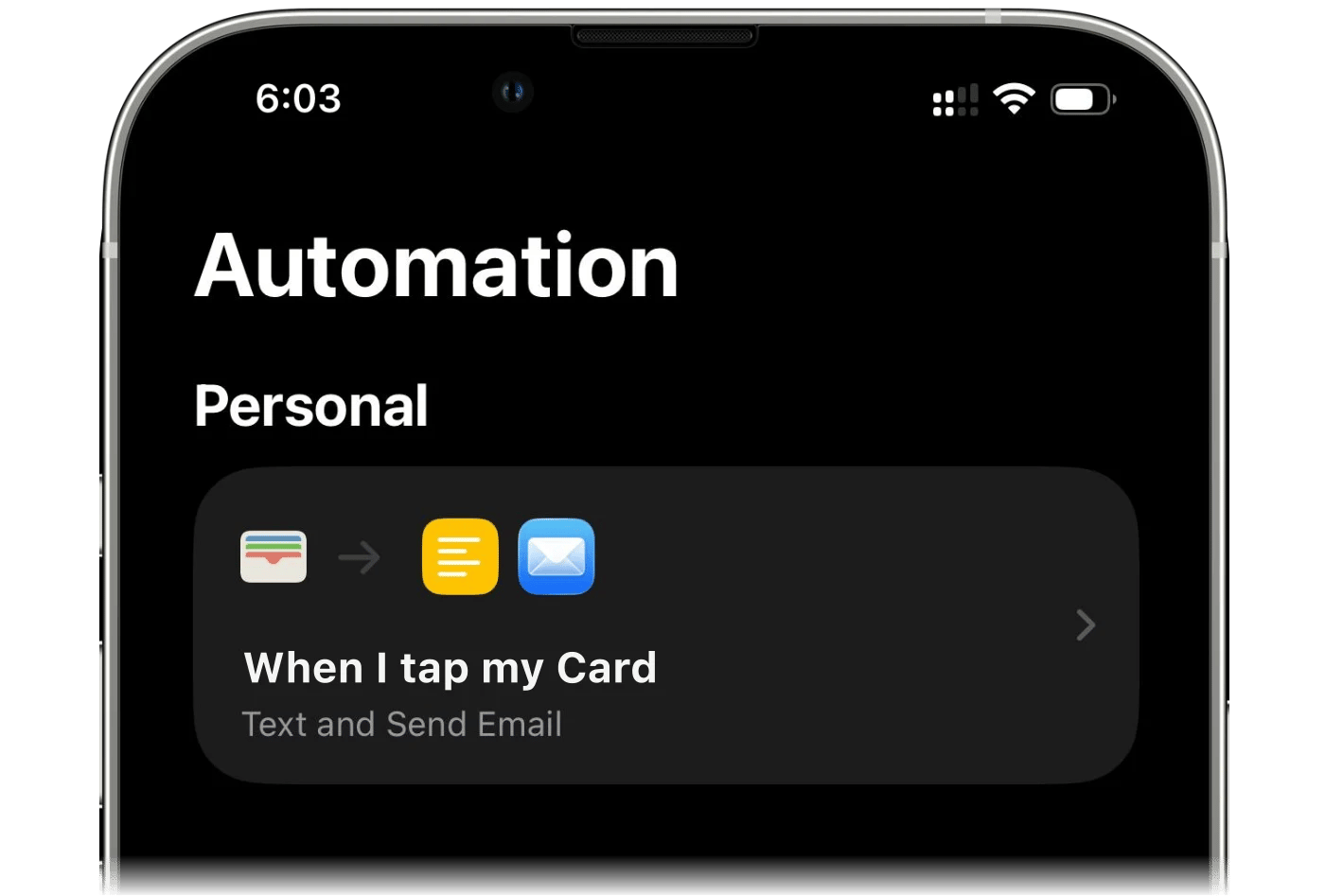
Crée une automatisation Raccourcis sur iPhone : chaque paiement Apple Pay ou notification bancaire devient une transaction finerd, sans connecter ta banque.
finerd peut enregistrer tes paiements Apple Pay à ta place. Une automatisation de l’app Raccourcis d’Apple envoie à finerd chaque paiement, ou chaque notification de paiement de l’app de ta banque, et finerd l’enregistre comme transaction sur le compte que tu as choisi. Ça fonctionne pour les cartes que ta connexion bancaire ne couvre pas, et ça se configure une seule fois par carte.L’enregistrement des paiements Apple Pay nécessite finerd Pro et se configure dans l’app finerd sur iPhone. Sur Android, tu peux plutôt enregistrer les paiements Google Wallet ; l’app web n’a pas d’équivalent.
Avant de commencer
finerd Pro. Sans Pro, Apple Wallet dans Plus affiche un badge Pro et ouvre l’offre d’abonnement.
Ta version d’iOS. Sur iOS 27 ou version ultérieure, finerd te fournit un raccourci tout prêt qui envoie les paiements directement à finerd. Sur les versions antérieures, tu crées l’automatisation toi-même, et elle envoie chaque paiement par e-mail : l’app Mail doit donc avoir un compte de messagerie qui fonctionne. Vérifie la version dans Réglages → Général → Informations → Version d’iOS.
Un compte pour chaque carte. Les paiements sont enregistrés sur un compte bancaire finerd. Si ton espace n’a pas encore de compte bancaire, la configuration propose d’en créer un nommé Carte Apple Pay ; tu pourras le renommer plus tard. Avec un compte par carte, chaque carte garde son propre solde et ses propres dépenses.
Configurer l’automatisation
Ouvre Plus → Apple Wallet, appuie sur Suivant, puis sur Configurer l’automatisation. Tu peux aussi partir de la recherche de banque : quand finerd ne prend pas en charge ta banque, choisis Suivre via Apple Wallet, et le nom que tu as cherché devient le nom de compte proposé.
iOS 27 ou version ultérieure
iOS 26
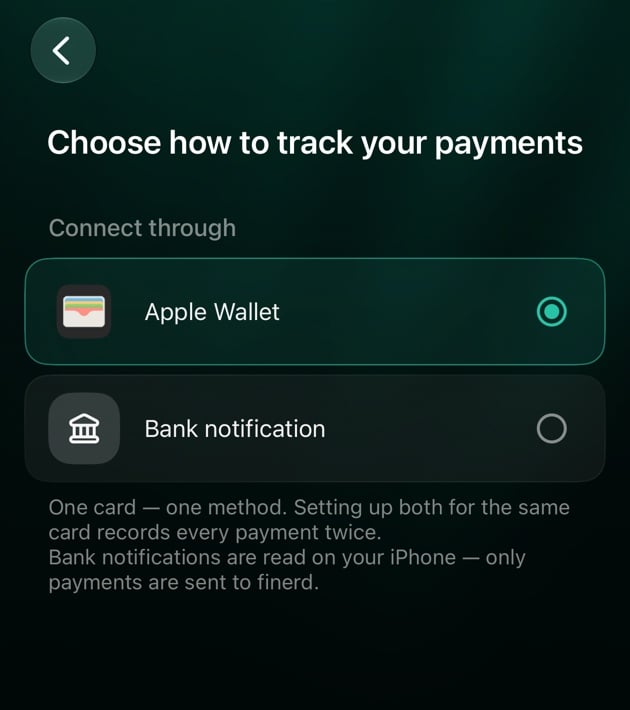
finerd te fournit un raccourci tout prêt. Tu l’installes, puis tu lui indiques ce qu’il doit écouter et sur quel compte finerd doit enregistrer les paiements. Il n’y a rien à copier ni à coller.Deux méthodes de connexion sont possibles :
Apple Wallet : chaque paiement effectué avec une carte choisie dans l’app Cartes (Apple Wallet), depuis cet iPhone ou ton Apple Watch. finerd reçoit le commerçant et le montant tels que l’app Cartes les a enregistrés. Les paiements effectués sur un Mac ou un iPad ne déclenchent pas l’automatisation.
Notification bancaire : chaque notification de paiement d’une app bancaire choisie. Utilise cette méthode pour les cartes qui ne sont pas dans Apple Wallet. Ton iPhone lit le montant dans la notification : ce que finerd enregistre dépend donc de la façon dont ta banque la formule.
Utilise une seule méthode par carte. Si tu configures les deux pour la même carte, chaque paiement est enregistré deux fois.
Choisir la méthode
Sur l’écran Choisis comment suivre tes paiements, sous Connecter via, appuie sur Apple Wallet ou sur Notification bancaire.
Appuie sur Continuer. finerd ouvre Comment configurer avec les étapes ci-dessous.
Choisis ce qui déclenche le raccourci.
Tu choisis le compte dans le raccourci, quelques étapes plus loin. Si finerd a proposé Carte Apple Pay, il crée ce compte quand tu appuies sur Installer le raccourci. Pour lui donner toi-même un nom, appuie sur la ligne avant de continuer.
Installer le raccourci
Tu avais déjà fait cette configuration ? Si ton ancien raccourci finerd · Apple Pay ou finerd · Bank Notification affiche Cette action est obsolète, supprime-le d’abord. Si un ancien et un nouveau raccourci restent tous les deux actifs, chaque paiement est enregistré deux fois.
Apple Wallet
Notification bancaire
1
Ajoute le raccourci
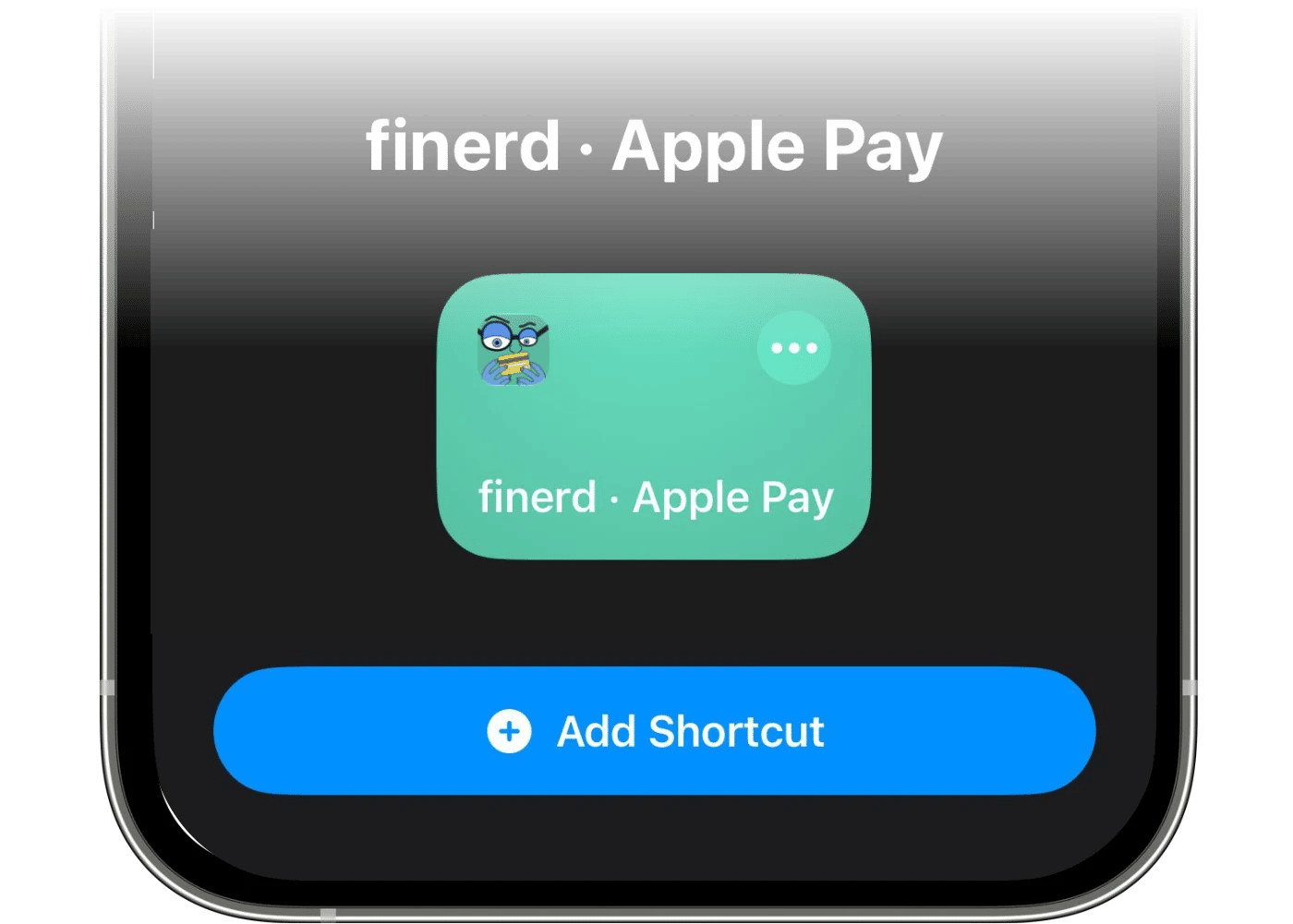
Appuie sur Installer le raccourci en bas du guide. Raccourcis s’ouvre sur finerd · Apple Pay. Appuie sur Ajouter ce raccourci.
2
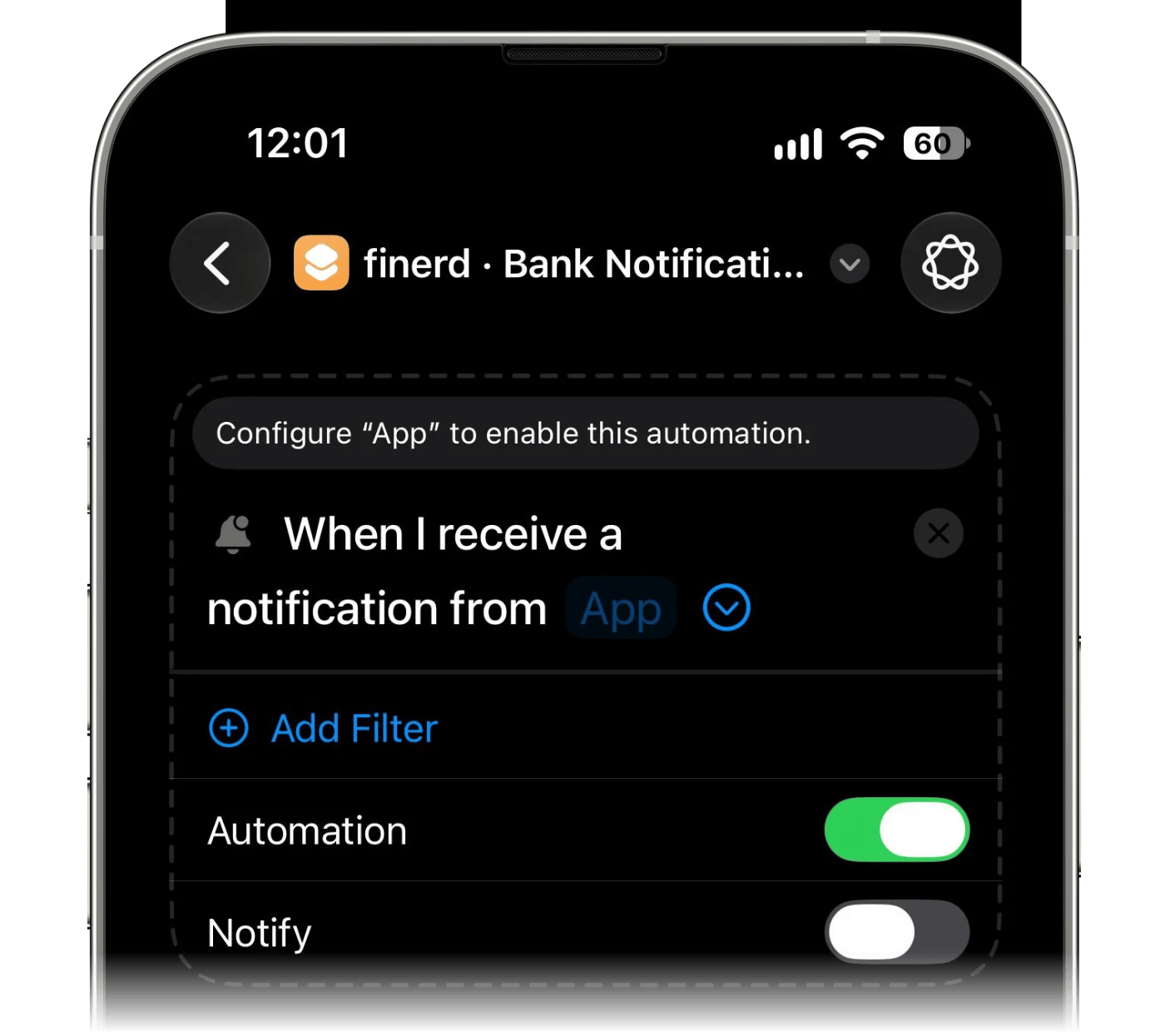
Active l'option Automatisation
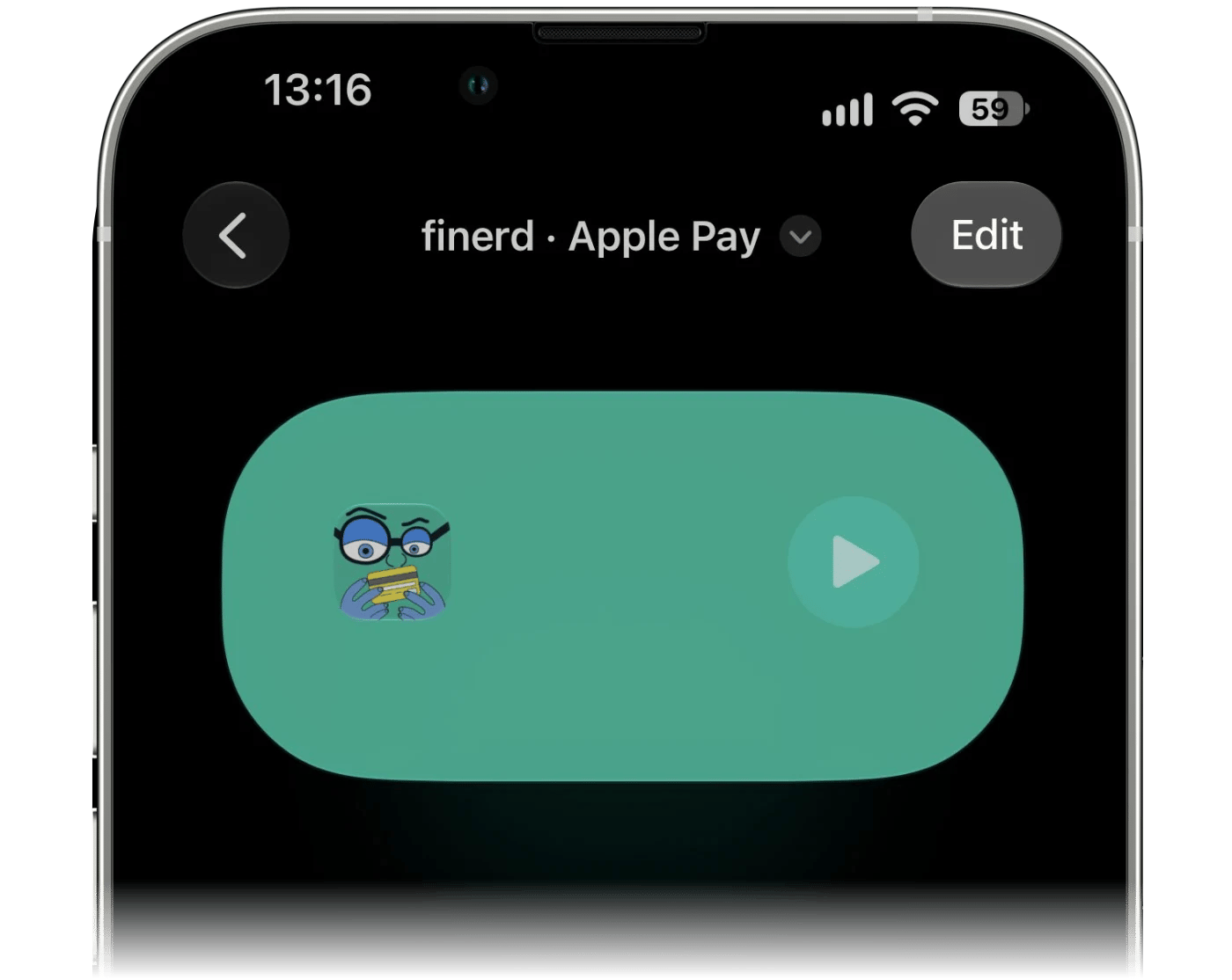
Ouvre le raccourci que tu viens d’ajouter. S’il s’ouvre sous forme de fiche de résumé, appuie d’abord sur Modifier.
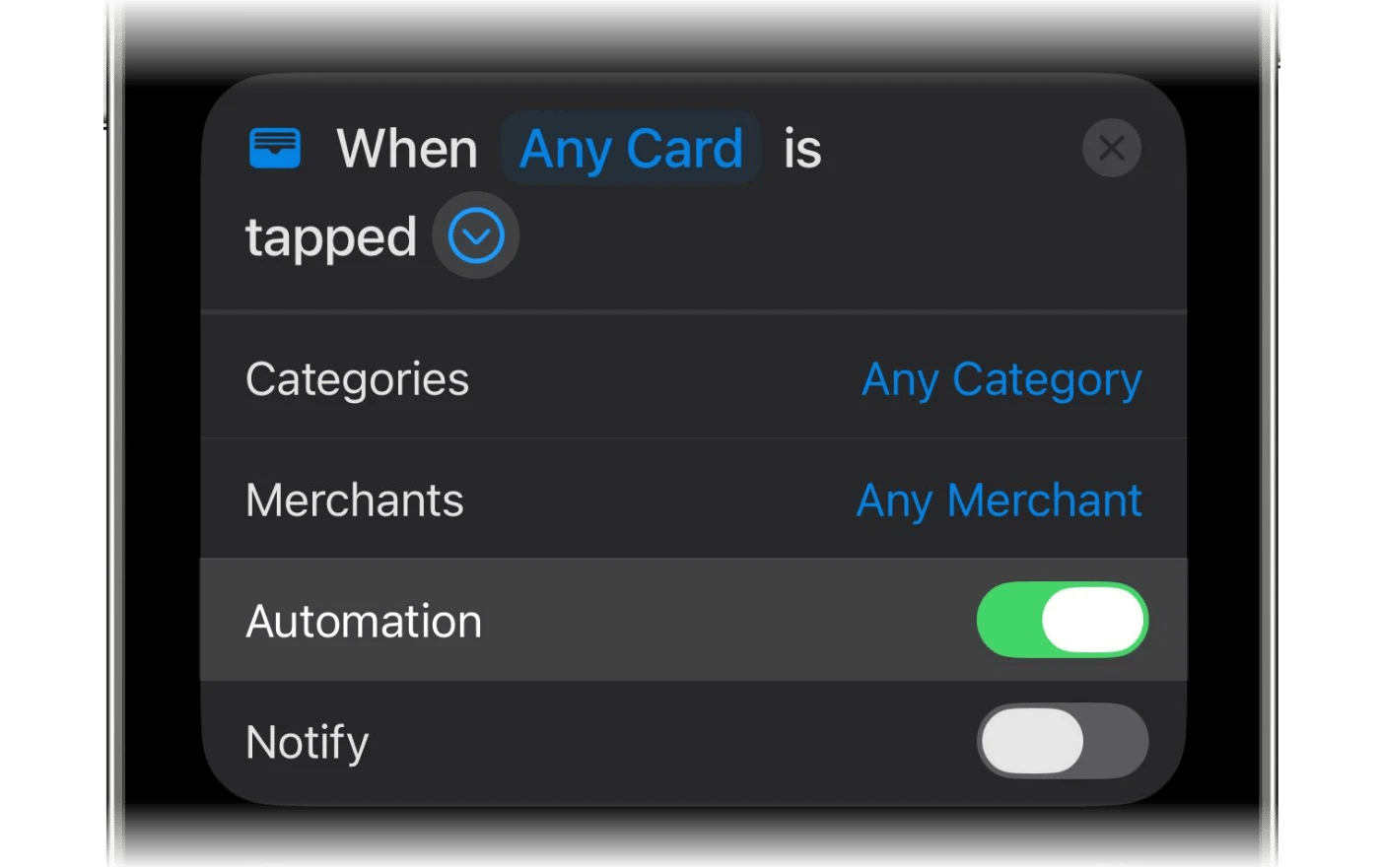
Déplie la fiche du déclencheur avec › et active Automatisation. Laisse l’option de notification (Notify) désactivée, pour ne pas recevoir de bannière à chaque paiement.
3
Choisis la carte
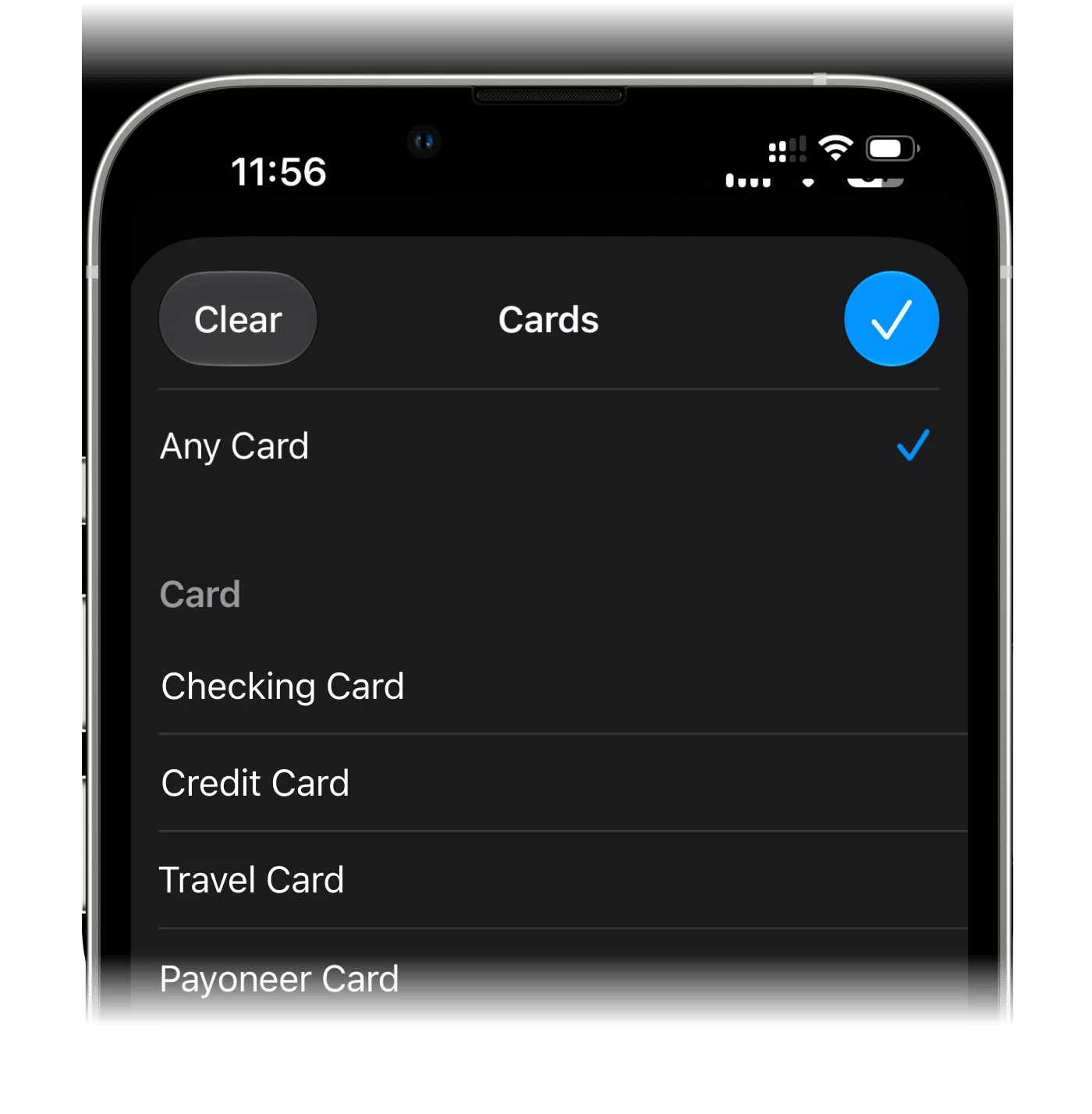
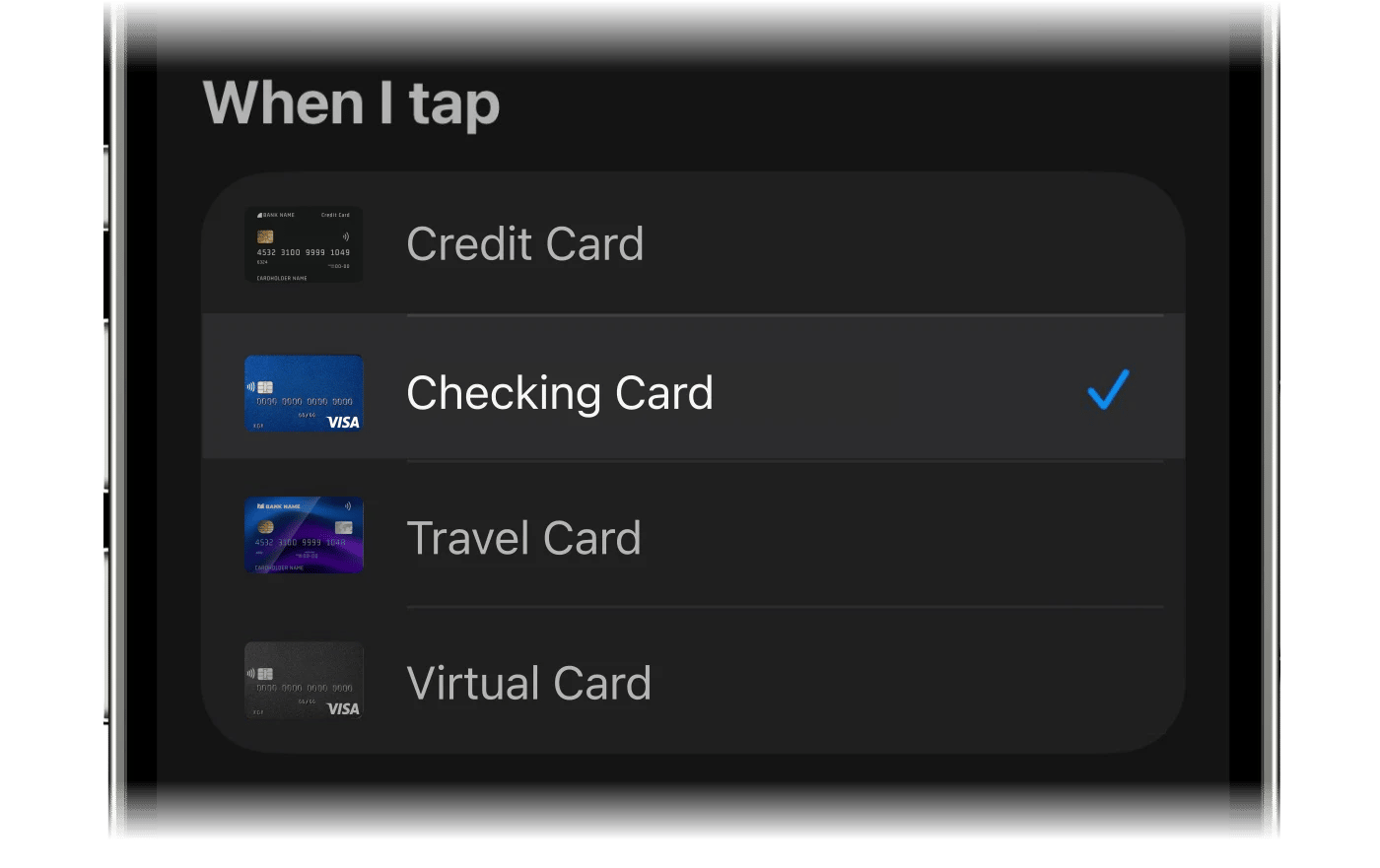
Appuie sur N’importe quelle carte et choisis la carte avec laquelle tu paies.
4
Choisis le compte où enregistrer les paiements
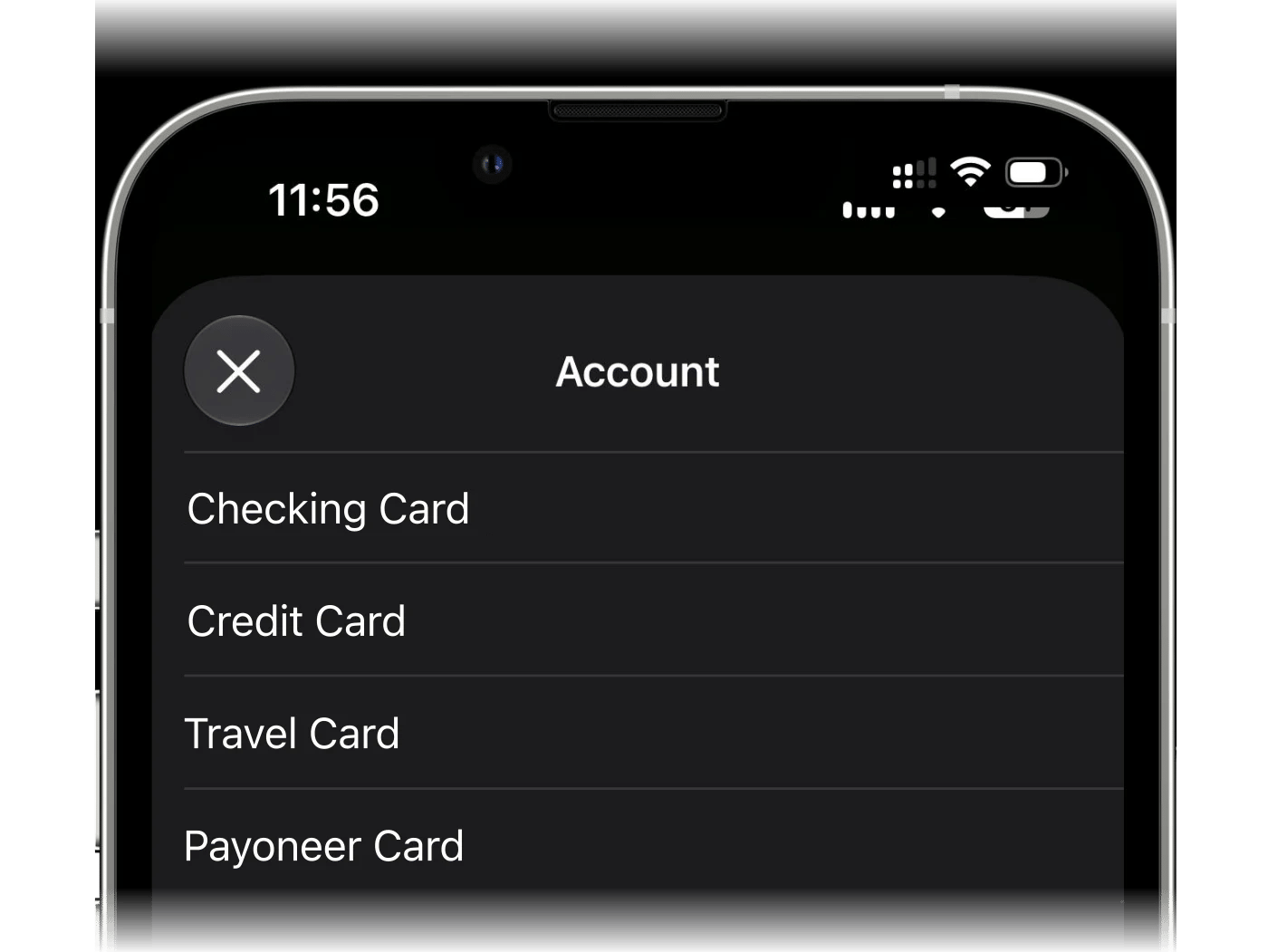
Dans l’action finerd, ouvre Compte et choisis le compte pour ces paiements. La liste affiche les comptes bancaires de l’espace ouvert dans finerd. Si le compte voulu n’y figure pas, crée-le dans finerd, puis reviens le choisir.
5
Recommence pour les autres cartes
L’automatisation est prête. Pour suivre une autre carte, relance la configuration : chaque carte a ainsi son propre raccourci et son propre compte.
1
Ajoute le raccourci
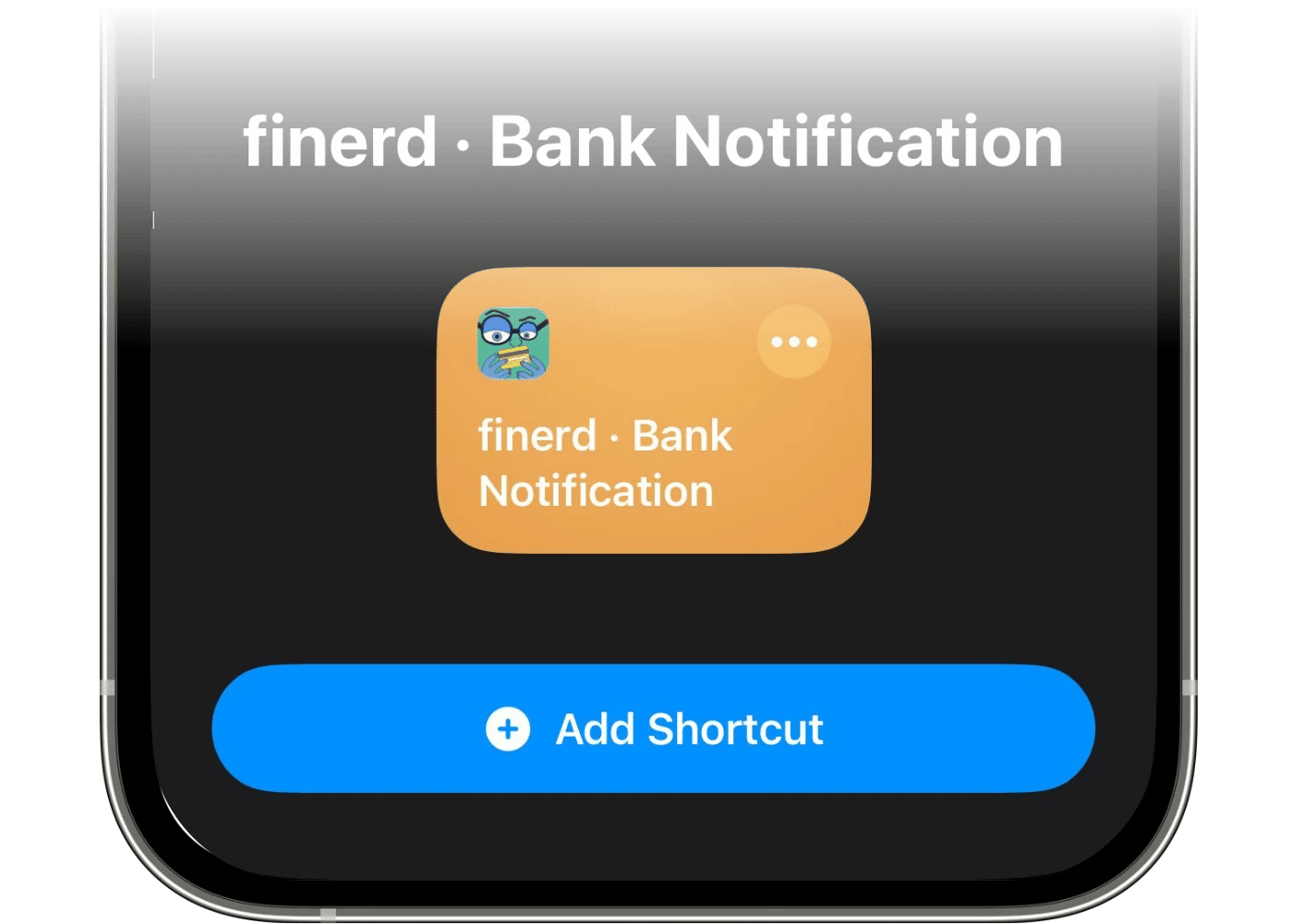
Appuie sur Installer le raccourci en bas du guide. Raccourcis s’ouvre sur finerd · Bank Notification. Appuie sur Ajouter ce raccourci.
2
Active l'option Automatisation
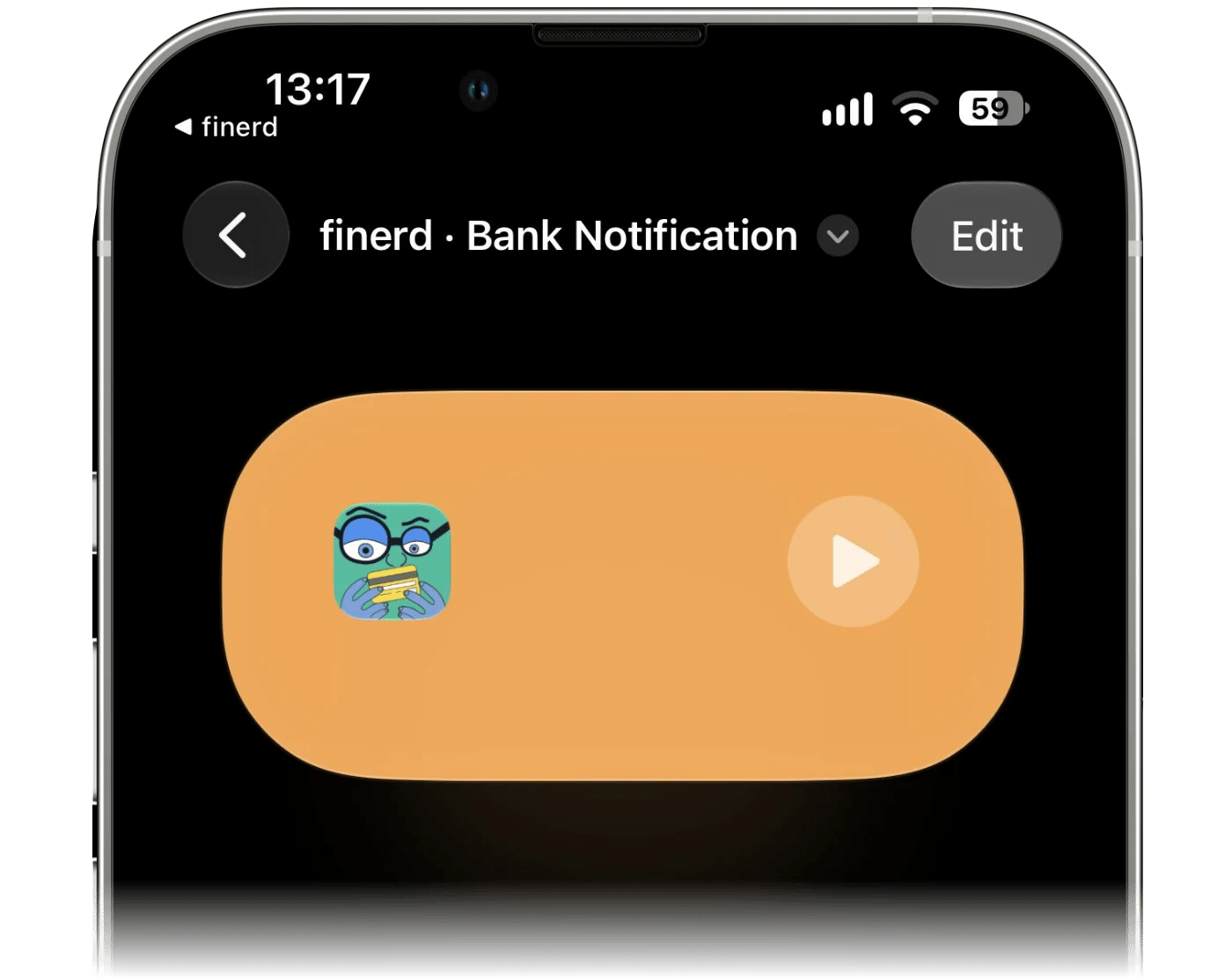
Ouvre le raccourci que tu viens d’ajouter. S’il s’ouvre sous forme de fiche de résumé, appuie d’abord sur Modifier.
Déplie la fiche du déclencheur avec › et active Automatisation. Laisse l’option de notification (Notify) désactivée, pour ne pas recevoir de bannière à chaque paiement.
3
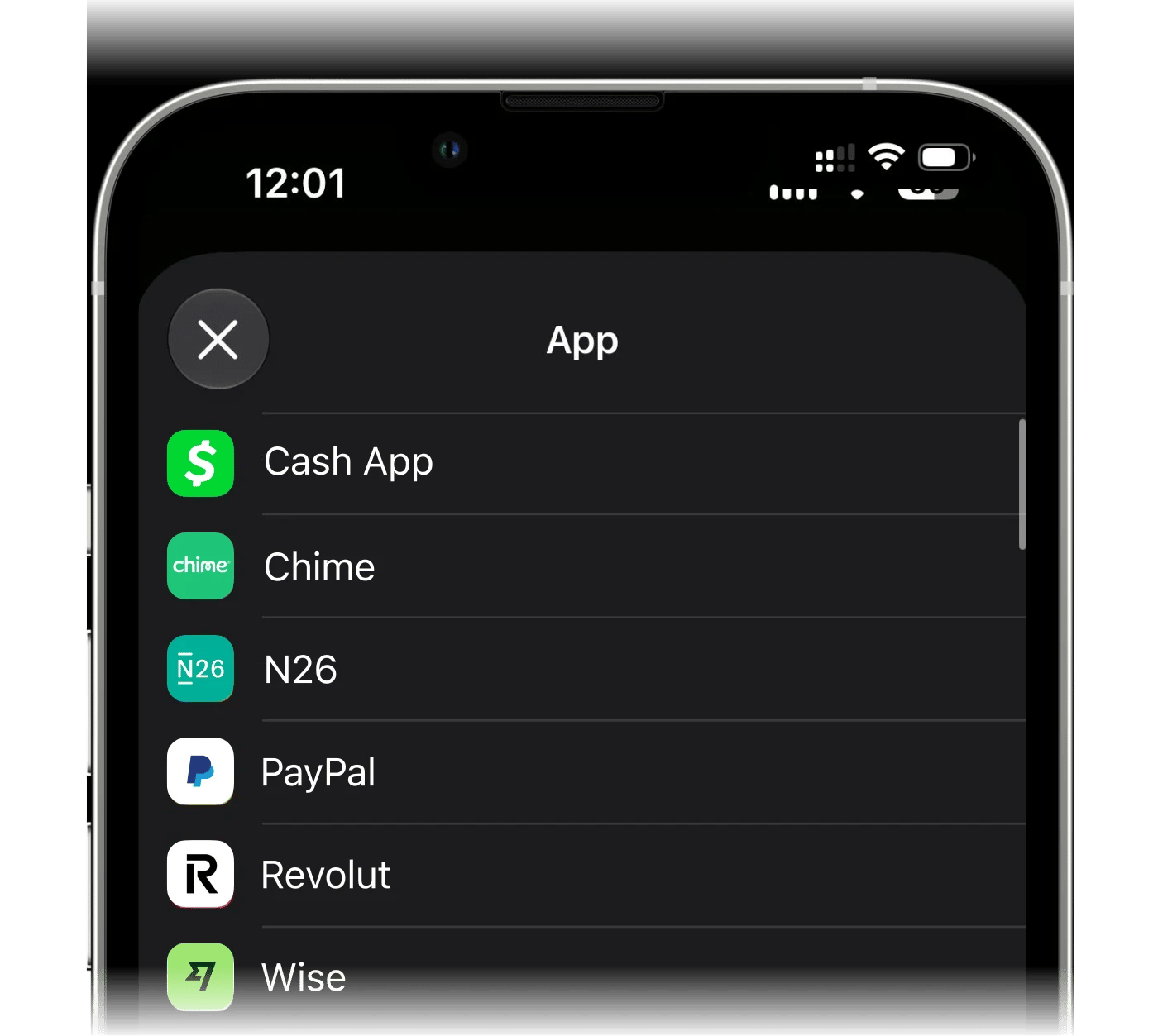
Choisis l'app bancaire
Appuie sur App et choisis l’app bancaire dont tu veux enregistrer les notifications de paiement.
4
Choisis le compte où enregistrer les paiements
Dans l’action finerd, ouvre Compte et choisis le compte pour ces paiements. La liste affiche les comptes bancaires de l’espace ouvert dans finerd. Si le compte voulu n’y figure pas, crée-le dans finerd, puis reviens le choisir.
5
Recommence pour les autres apps bancaires
L’automatisation est prête : la prochaine notification de paiement de cette app devient une transaction. Pour suivre une autre app bancaire, relance la configuration.
Les notifications sont d’abord vérifiées sur ton iPhone. Le raccourci cherche un montant avec sa devise dans chaque notification de l’app choisie. Les notifications qui n’en contiennent pas, comme les codes à usage unique, restent sur ton téléphone. Quand Apple Intelligence est activé et prend en charge la langue de la notification, ton iPhone écarte aussi les notifications qui ne sont pas des paiements, comme les mises à jour de solde et les offres, et distingue l’argent qui entre de l’argent qui sort. Sinon, la notification est envoyée à finerd, où l’AI de finerd fait de même : elle écarte les mises à jour de solde, les offres et les paiements refusés, repère le montant du paiement et distingue l’argent qui entre de l’argent qui sort. L’AI peut mal interpréter une notification : vérifie donc tes transactions de temps en temps. Dans tous les cas, finerd reçoit le texte de la notification, qui lui sert à trouver le commerçant.
Tu crées toi-même l’automatisation dans Raccourcis et tu y colles trois éléments fournis par finerd : un modèle, un objet et ton adresse de transfert. Chaque paiement est ensuite envoyé à finerd par e-mail.
Choisir le compte dans finerd
Sur l’écran Choisis le compte sur lequel tes paiements seront enregistrés, appuie sur Choisir ou créer un compte et choisis le compte, ou crée un nouveau compte bancaire dans la liste. Si ton espace n’a aucun compte bancaire, finerd propose Carte Apple Pay et le crée quand tu appuies sur Continuer.
En dessous, sous Envoie les paiements à cette adresse, finerd affiche l’adresse de transfert de ton espace. finerd la crée si ton espace n’en a pas encore.
Appuie sur Continuer. finerd ouvre Comment configurer, avec Copier le modèle, Copier l’objet et Copier l’e-mail à côté des étapes qui en ont besoin. Ouvrir Raccourcis, tout en bas, copie l’adresse et ouvre Raccourcis.
Garde le guide de finerd ouvert pendant que tu travailles dans Raccourcis. Le modèle contient l’identifiant du compte choisi et l’adresse appartient à ton espace : copie donc les deux depuis l’app.
Créer l’automatisation dans Raccourcis
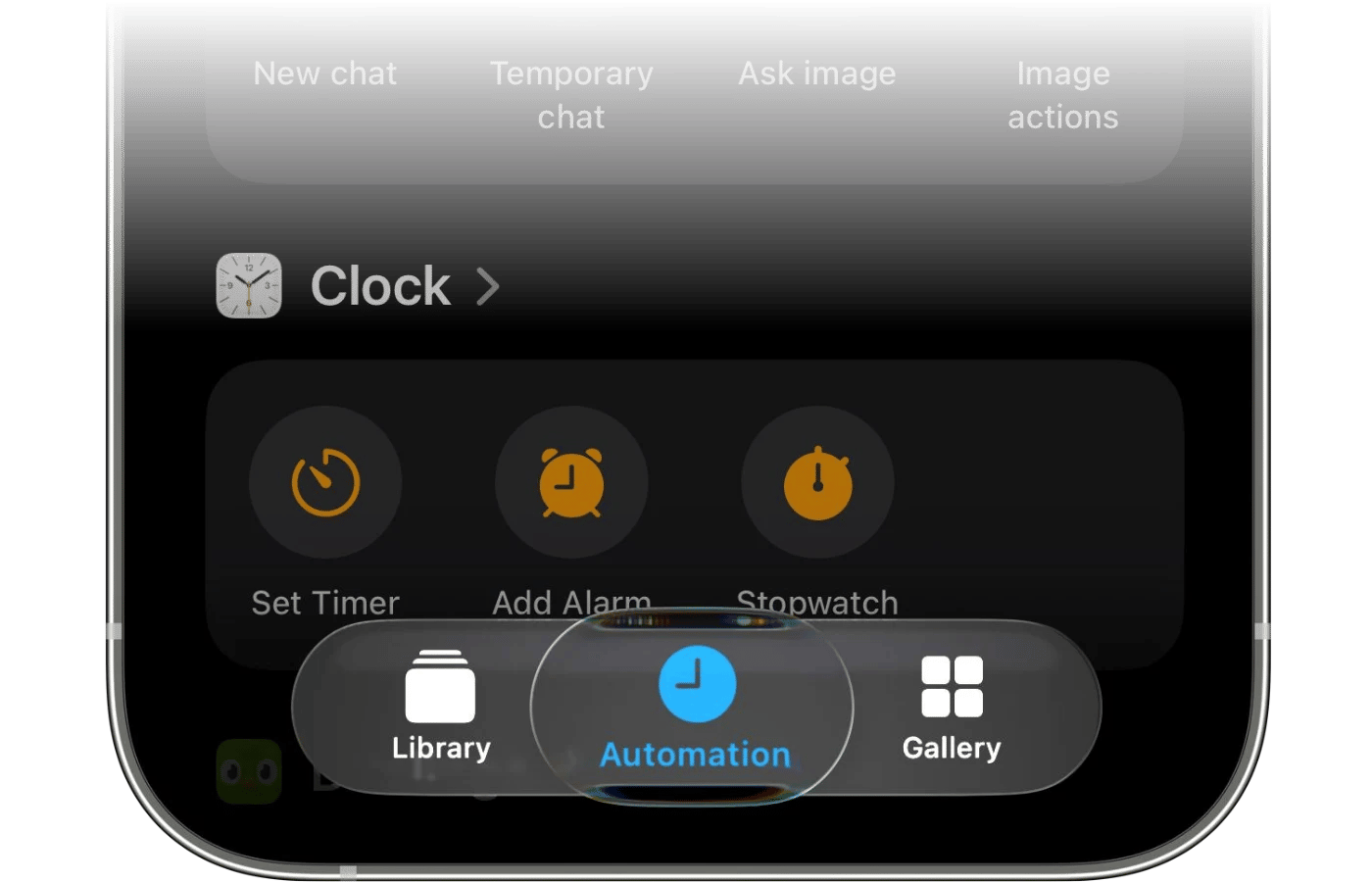
1
Ouvre l'onglet Automatisation
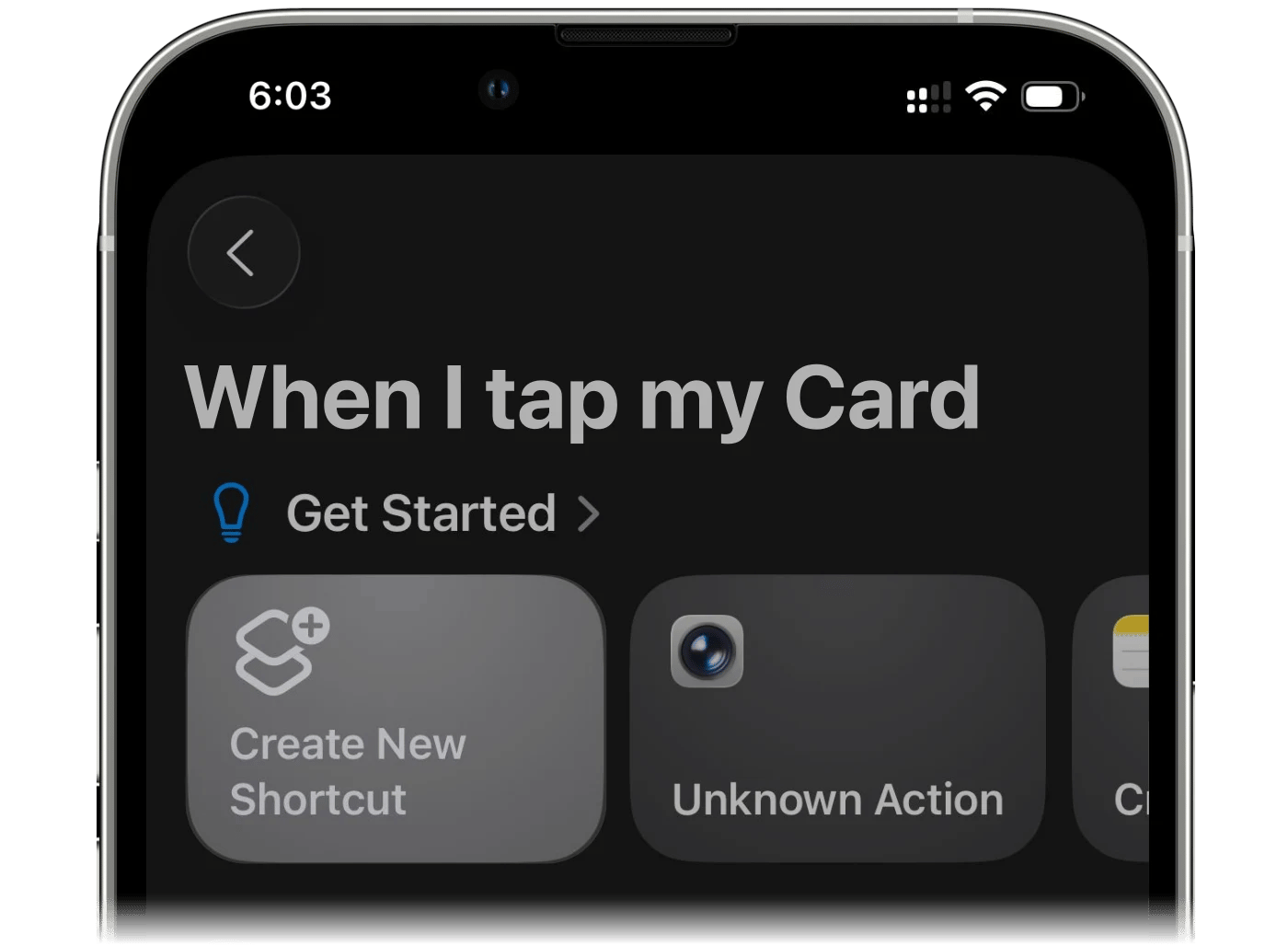
Ouvre l’app Raccourcis, va dans l’onglet Automatisation et appuie sur Nouvelle automatisation.
2
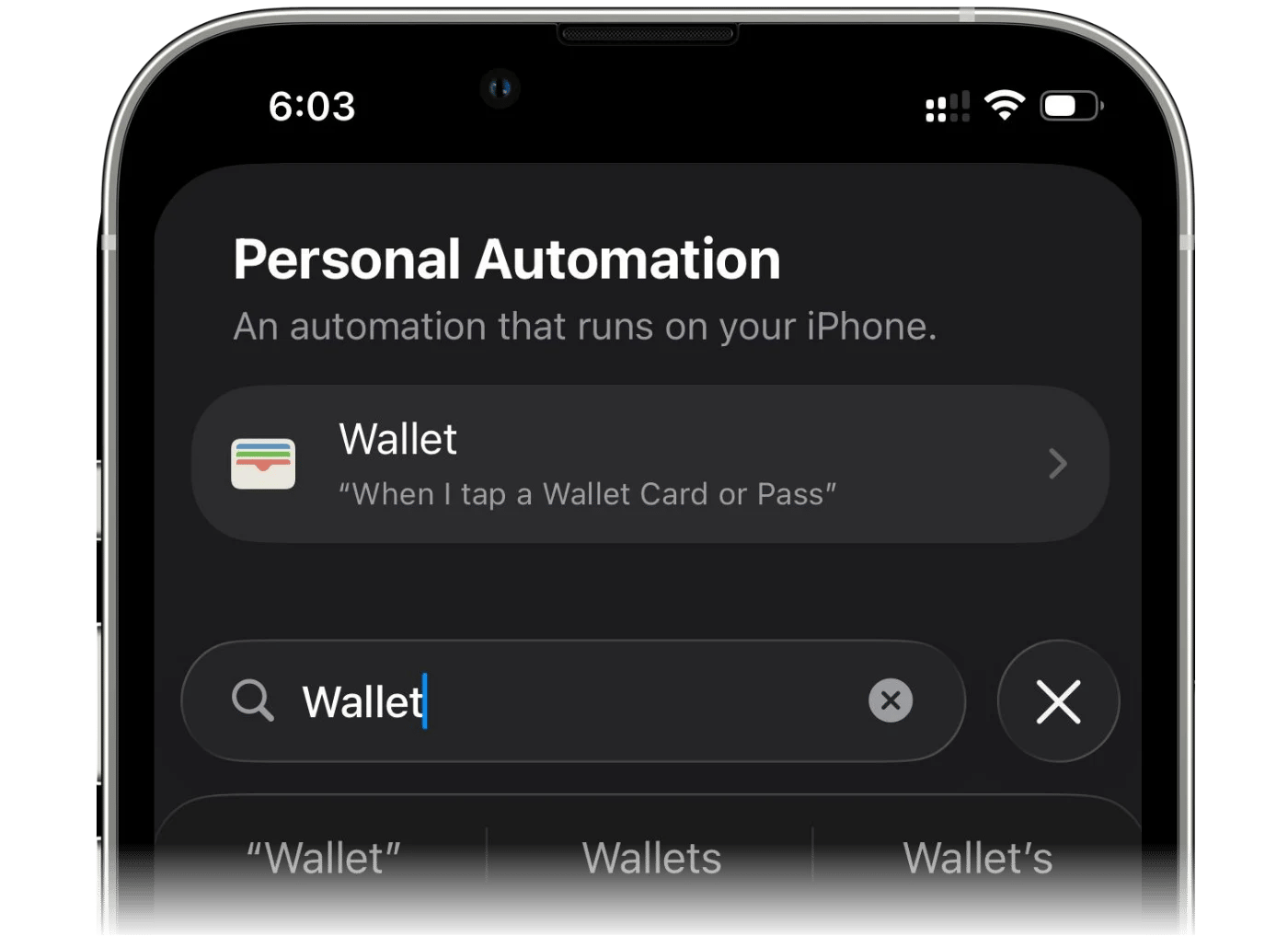
Recherche l'app Cartes
Recherche l’app Cartes (Apple Wallet) et choisis-la comme déclencheur.
3
Choisis ta carte
Choisis la carte qui correspond au compte choisi dans finerd. Pour d’autres cartes, refais toute la configuration pour chacune.
4
Exécuter immédiatement
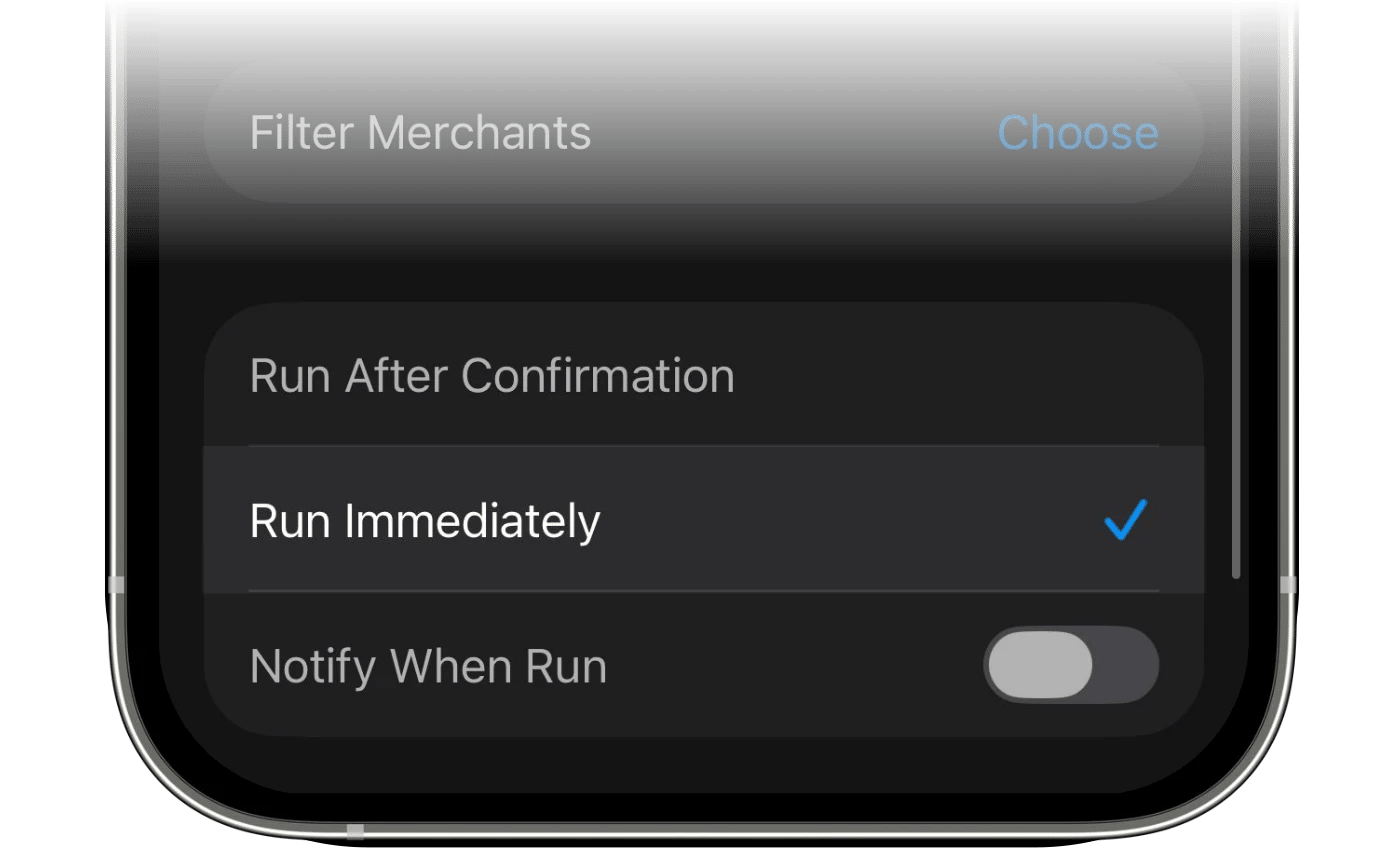
Fais défiler vers le bas et sélectionne Exécuter immédiatement, pour que l’automatisation s’exécute sans te demander de confirmation.
5
Crée un raccourci
Appuie sur Créer un raccourci.
6
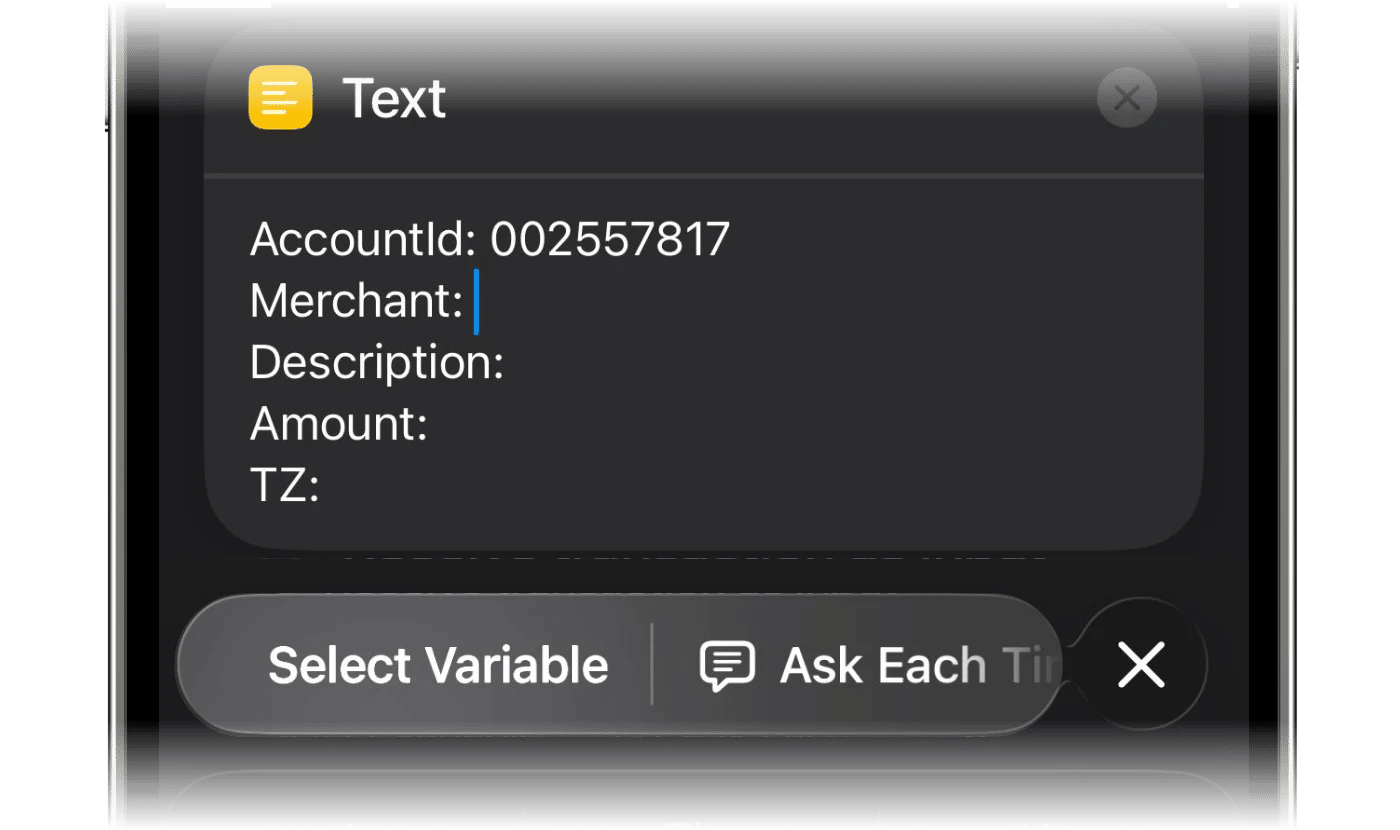
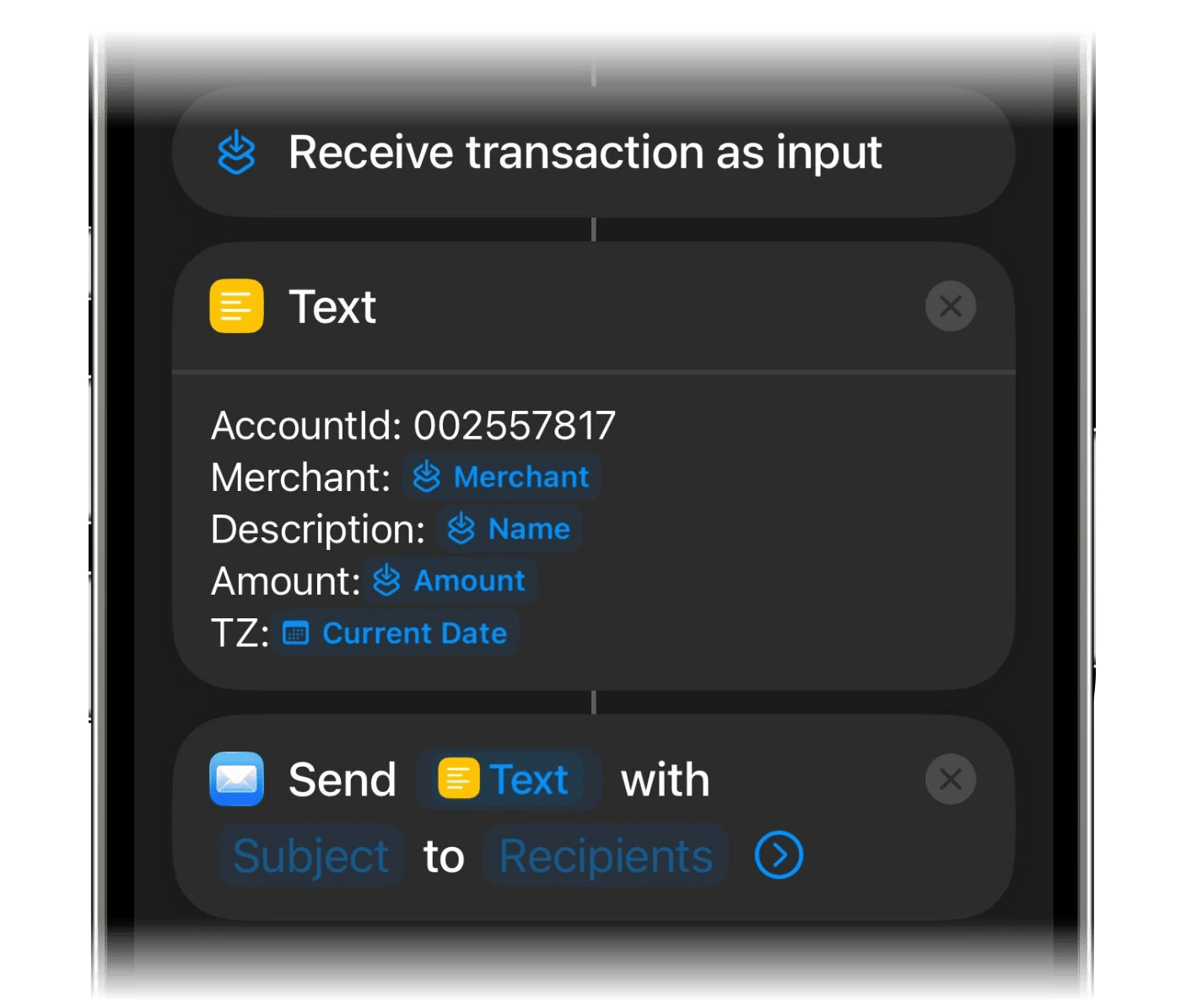
Ajoute l'action Texte et colle le modèle
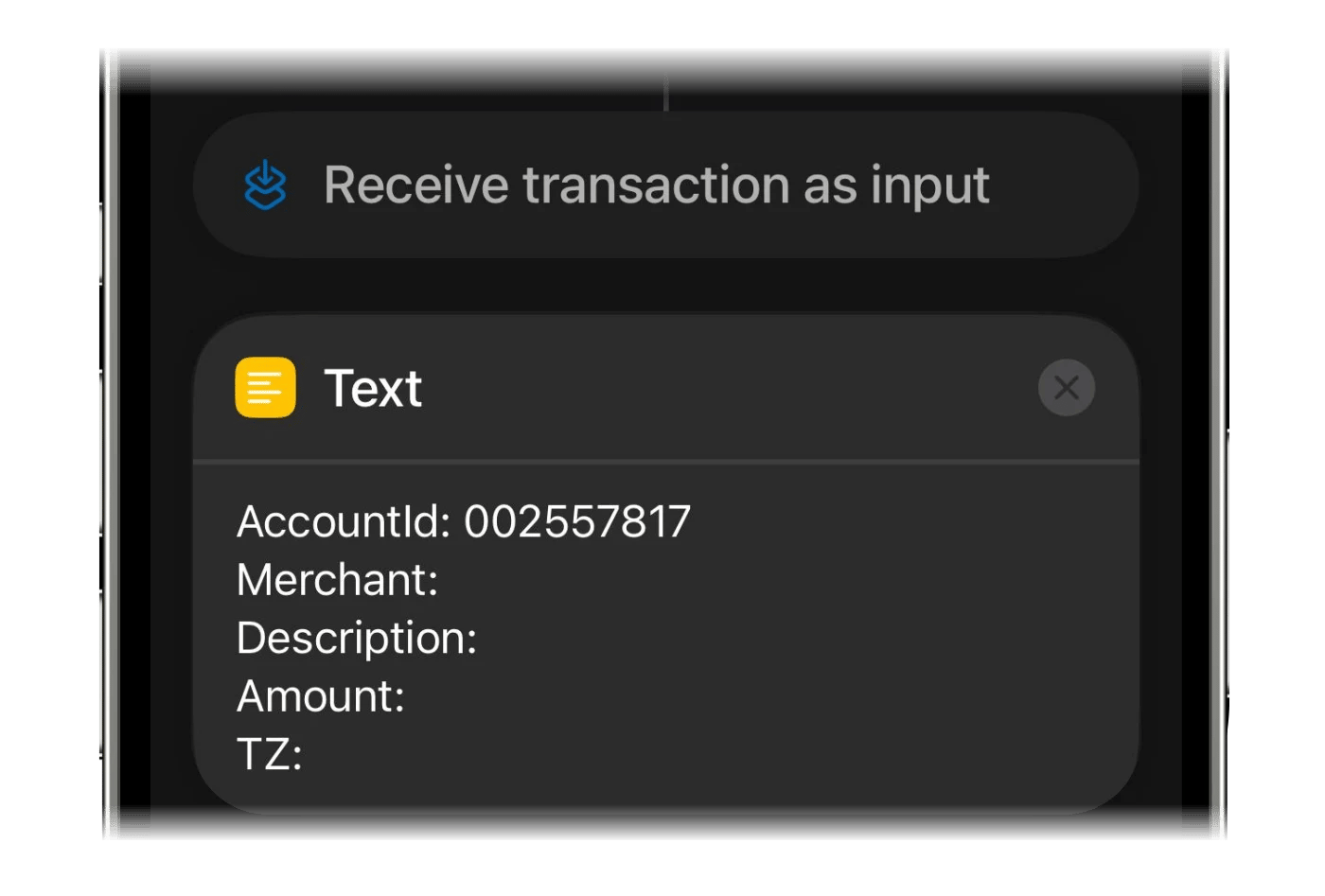
Ajoute l’action Texte. Appuie sur Copier le modèle dans finerd, puis colle-le dans le champ de texte.
7
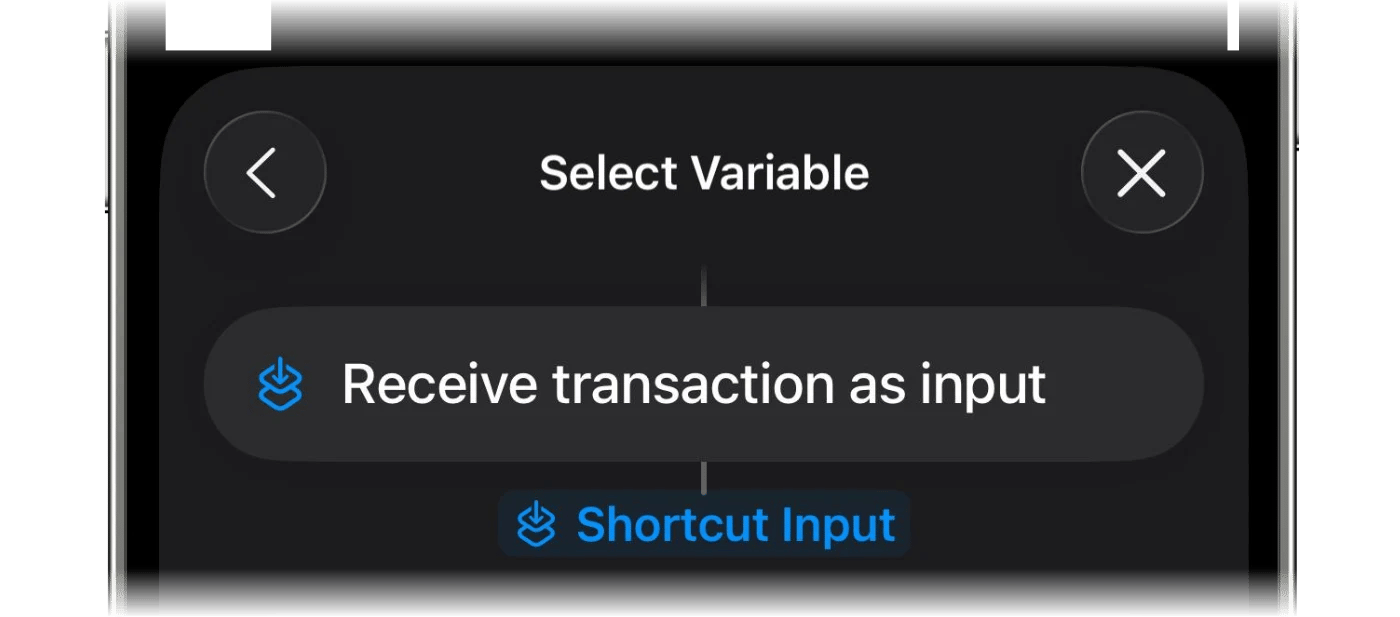
Insère les variables du paiement
Place le curseur après Merchant: et appuie sur Sélectionner la variable, puis choisis Entrée du raccourci. Recommence pour Description: et Amount:.
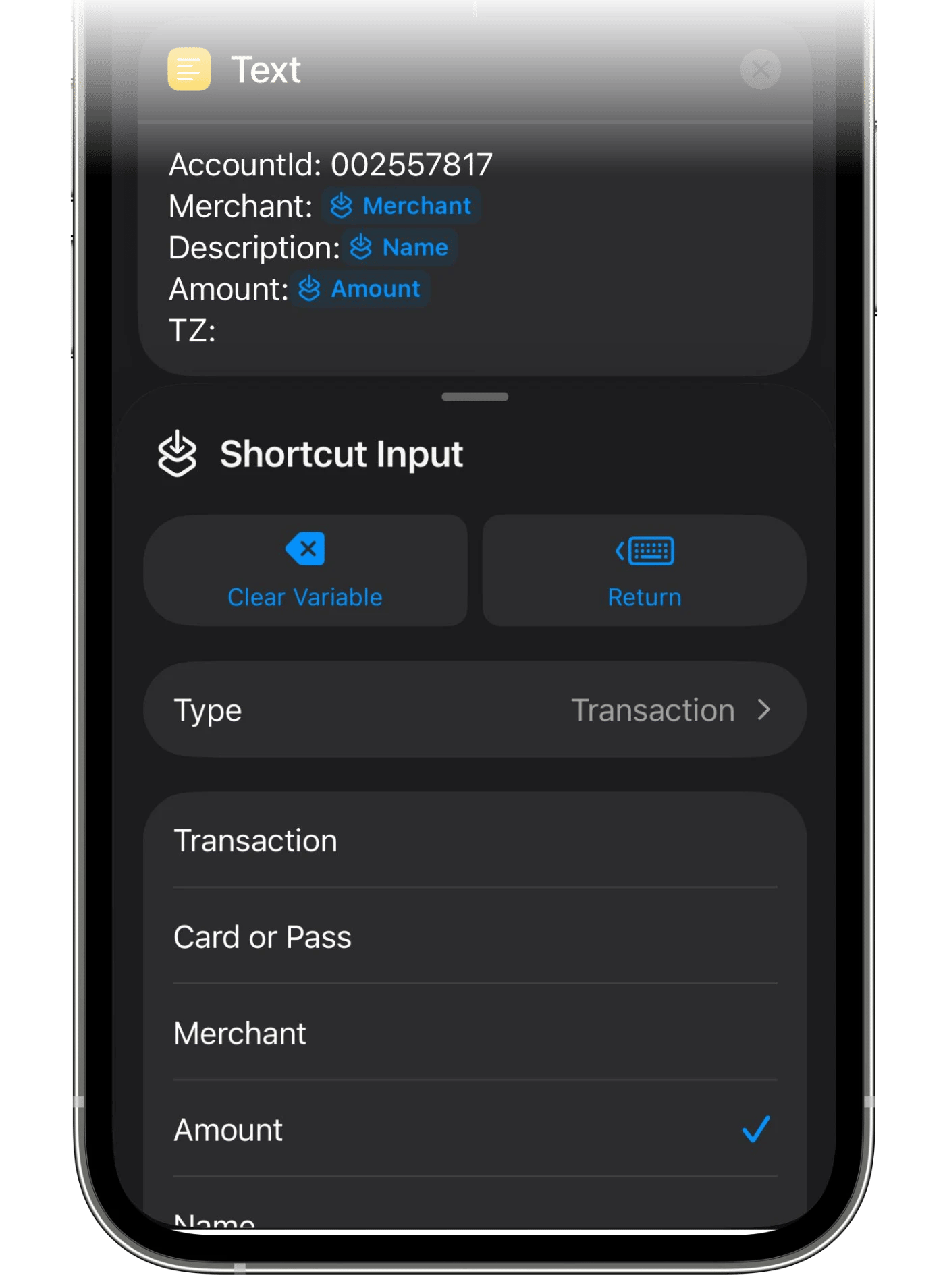
8
Donne à chaque variable le bon type
Appuie sur chaque variable insérée et choisis la propriété qu’elle doit transmettre : Commerçant pour Merchant, Nom pour Description et Montant pour Amount.
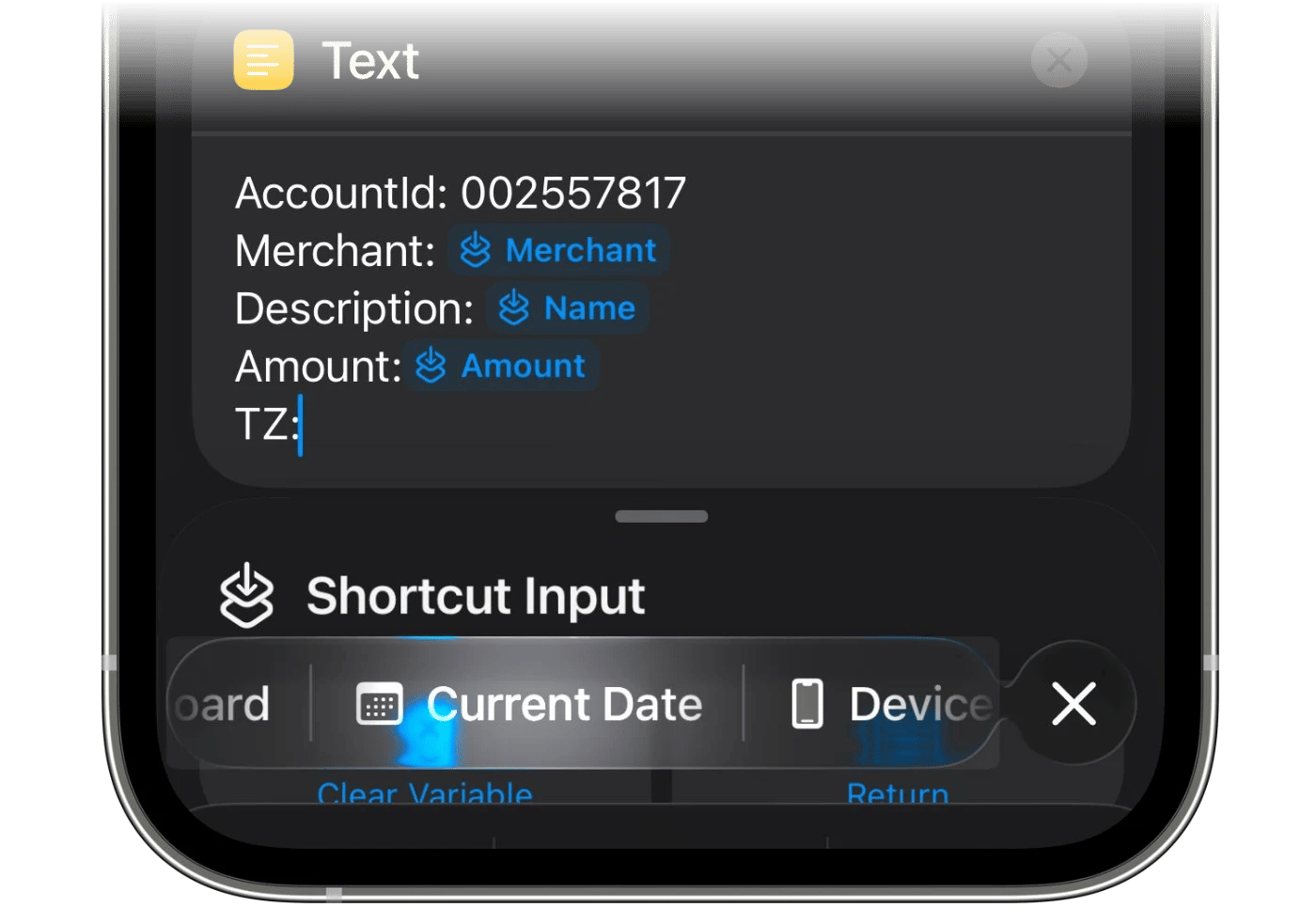
9
Ajoute la date pour TZ
Pour le paramètre TZ, choisis Date actuelle.
10
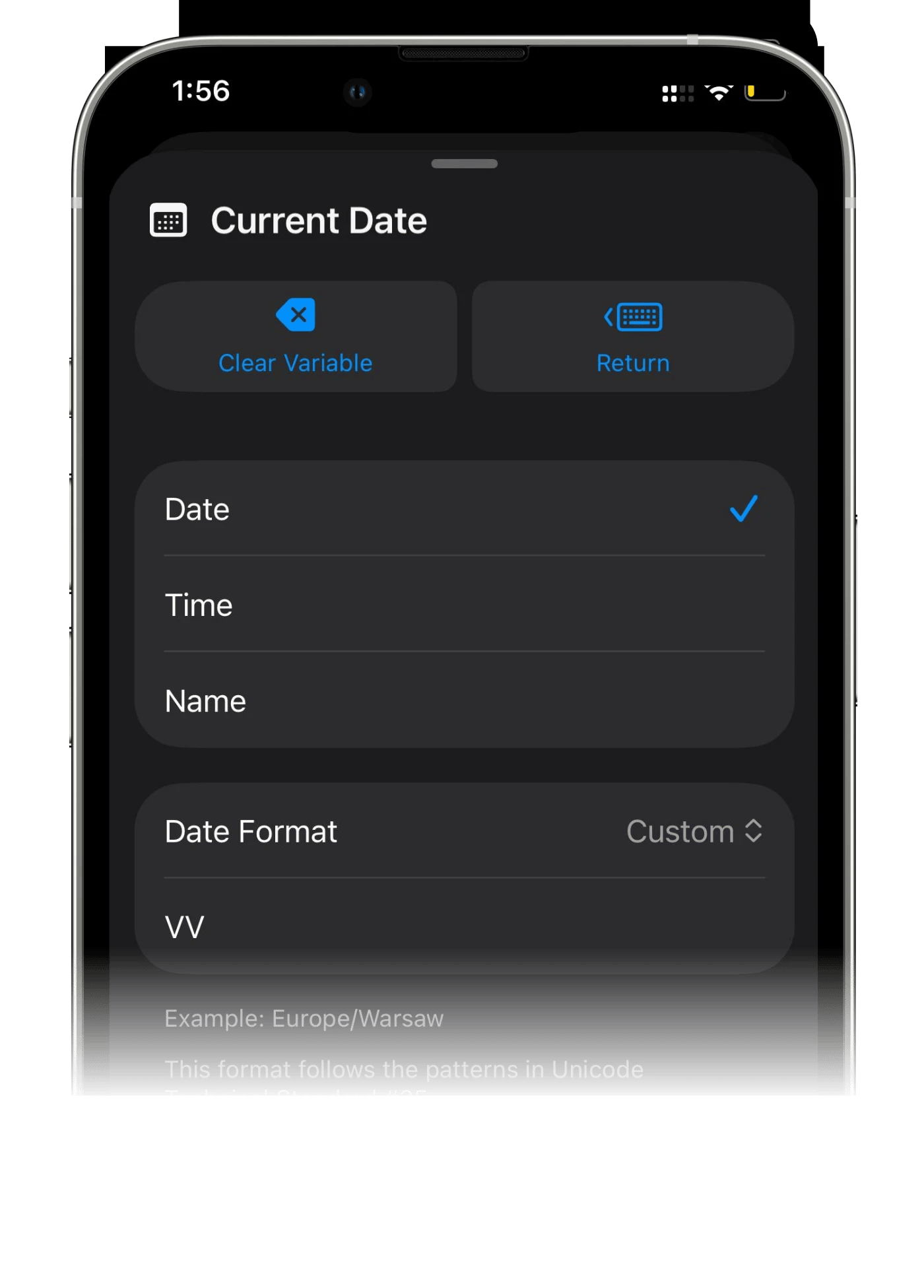
Règle le format de date sur VV
Appuie sur la date que tu viens d’ajouter, règle Format de date sur Personnalisé et remplace le format proposé par VV : deux V majuscules, rien d’autre. L’exemple sous le champ devient un fuseau horaire, comme Europe/Warsaw.
11
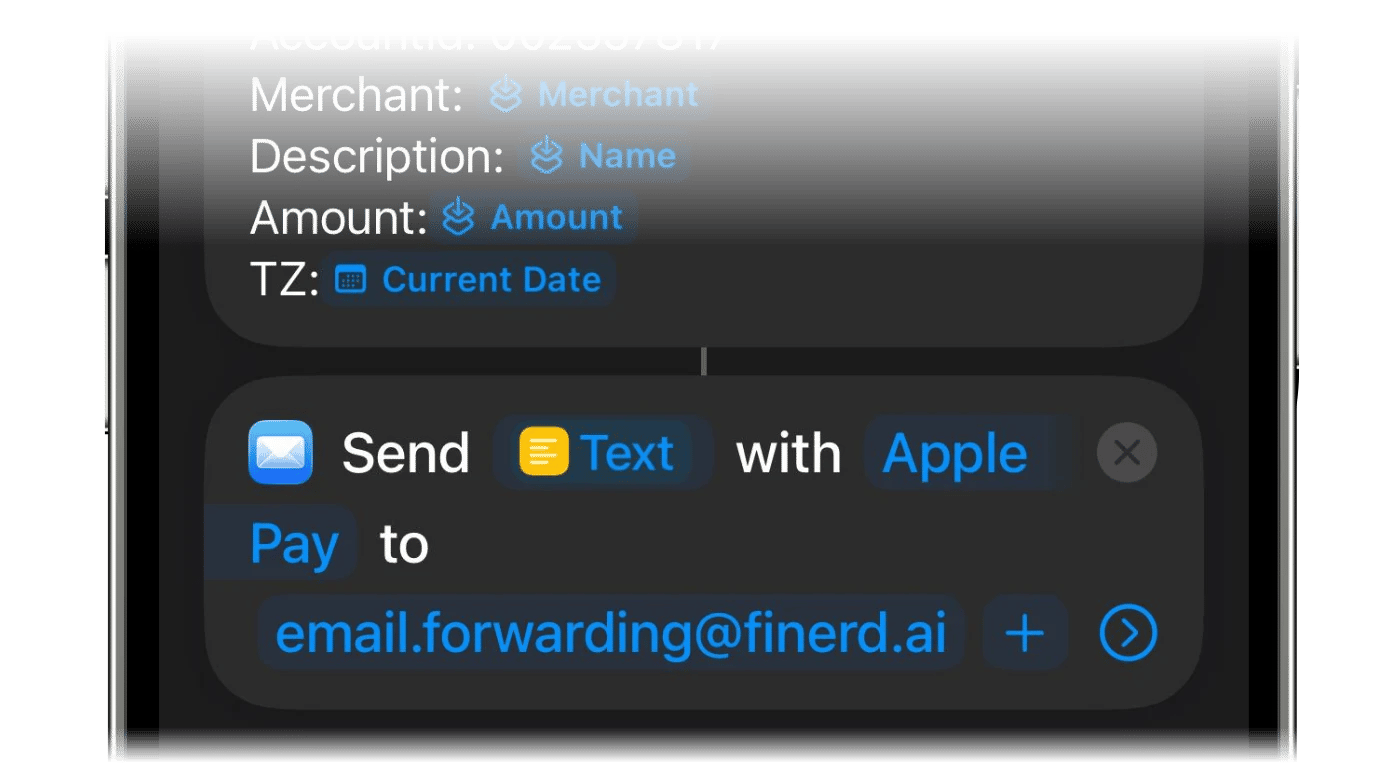
Ajoute l'action Envoyer un e-mail
Utilise Rechercher des actions pour trouver et ajouter l’action Envoyer un e-mail.
12
Indique l'objet
Colle l’objet dans le champ Objet. Il est le même pour tout le monde, et finerd s’en sert pour reconnaître l’e-mail :
finerd-automation / add-transaction
Copier l’objet dans finerd le copie pour toi.
13
Indique le destinataire
Appuie sur Copier l’e-mail dans finerd et colle ton adresse de transfert dans le champ Destinataires.
14
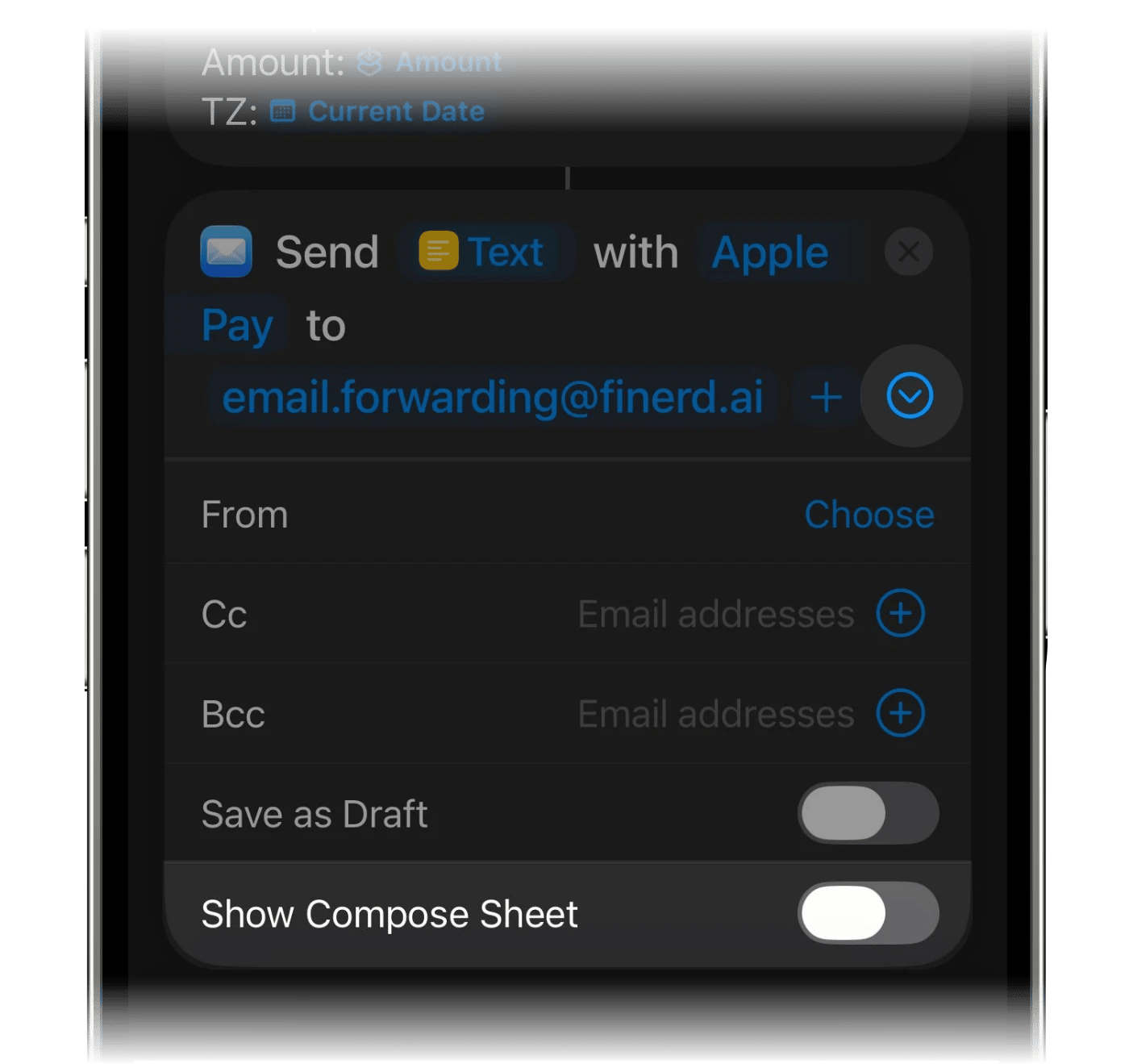
Désactive Afficher la feuille de composition
Fais défiler l’action Envoyer un e-mail vers le bas et désactive Afficher la feuille de composition. Si cette option est activée, Mail ouvre un brouillon et attend que tu appuies sur Envoyer : le paiement n’arrive alors jamais à finerd.
15
Enregistre l'automatisation
Enregistre l’automatisation. Ton prochain paiement Apple Pay avec cette carte sera envoyé à finerd.
Vérifier que tout fonctionne
Effectue un vrai paiement avec la carte choisie. Appuyer sur le bouton de lecture du raccourci ne permet pas de le tester : il n’y a aucun paiement à envoyer, donc sur iOS 27, Raccourcis répond Aucune donnée de paiement n’est arrivée. C’est normal quand tu lances le raccourci à la main.Après le paiement, la transaction apparaît dans Transactions, sur le compte choisi. finerd remplit le commerçant et la catégorie comme pour les transactions de ta banque : vérifie-les les premières fois et corrige-les si besoin (voir Réviser les transactions importées).
Dates. Sur iOS 27, la transaction est datée du moment où finerd reçoit le paiement ; sur iOS 26, de la date de l’e-mail.
Autres devises. Un paiement dans une autre devise est enregistré dans cette devise, et le compte reçoit un solde séparé dans celle-ci.
Cartes que ta banque synchronise déjà. Pour ces cartes, l’automatisation n’est pas nécessaire, sauf si tu veux voir les paiements plus tôt. Sur un compte connecté, la transaction Apple Pay reste En attente jusqu’à ce que la transaction de la banque arrive et que finerd associe les deux.
Si les paiements n’apparaissent pas
Sur iOS 27, quand le raccourci ne peut pas envoyer un paiement, Raccourcis en indique la raison. Le paiement n’est pas gardé pour un nouvel essai : ajoute-le donc à la main dans finerd.
Ce que tu vois
Ce que ça signifie et que faire
Ni transaction ni message
L’automatisation ne s’est pas exécutée. Dans Raccourcis, vérifie que l’option Automatisation est activée et que tu as payé avec la carte choisie ou reçu une notification de l’app choisie. Sur iOS 26, vérifie aussi que l’option Afficher la feuille de composition est désactivée et que l’e-mail se trouve dans le dossier Envoyés de Mail.
Impossible d’ajouter ce paiement à finerd. Vérifie ta connexion ou ajoute-le dans l’app.
Ton iPhone n’avait pas de connexion, ou finerd n’a pas répondu à temps. Ajoute ce paiement à la main ; les suivants passeront normalement.
finerd n’a pas pu accepter ce paiement. Ajoute-le plutôt dans l’app.
finerd a refusé ce paiement : par exemple, le compte a été archivé ou supprimé, ou tu ne peux plus modifier cet espace. Choisis un autre compte dans le raccourci si besoin, et préviens-nous si le problème se répète.
Ouvre d’abord finerd et termine la configuration.
Aucune session finerd n’est ouverte sur cet iPhone. Ouvre l’app et connecte-toi.
Impossible de trouver le montant et la devise du paiement dans cette notification.
Uniquement avec Notification bancaire. finerd reconnaît un montant accompagné d’un code de devise de trois lettres en majuscules, comme 120.50 UAH, ou de l’un de ces symboles : $ € £ ₴ ₽ ¥ zł. Les montants écrits avec грн ou avec un code en minuscules ne sont pas reconnus ; dis-nous quelle banque les envoie.
Impossible de déterminer quel montant de cette notification correspond au paiement.
Uniquement avec Notification bancaire. La notification contient plusieurs montants. Ajoute ce paiement à la main.
Chaque paiement est enregistré deux fois
La même carte est configurée à la fois via Apple Wallet et via Notification bancaire, ou un ancien raccourci est encore actif. Supprime le raccourci en trop.
Sur iOS 26, il n’y a pas de messages : si un e-mail arrive mais que finerd ne peut pas le lire, aucune transaction n’apparaît. Compare le modèle, les variables et le format de date VV avec les étapes ci-dessus.Ça ne fonctionne toujours pas ? Contacte le support en indiquant la date et le montant d’un paiement, et nous en retrouverons la trace.finerd fonctionne aussi avec Siri, Spotlight et le Centre de contrôle sur iPhone : voir Utiliser finerd avec Siri et Raccourcis sur iPhone.
Cette page vous a-t-elle été utile ?
{"docsConfig":{"theme":"mint","$schema":"https://mintlify.com/docs.json","name":"finerd","description":"finerd helps financially savvy people manage complex personal, family, business, and international finances with accounting precision without accounting complexity.","colors":{"primary":"#38f7ff","light":"#38f7ff","dark":"#b98cff"},"logo":{"light":"https://finerd.ai/logo.svg","dark":"https://finerd.ai/logo.svg","href":"/"},"favicon":"https://finerd.ai/logo.svg","appearance":{"default":"dark","strict":true},"background":{"decoration":"grid","color":{"light":"#08090f","dark":"#08090f"}},"navbar":{"links":[{"href":"https://finerd.ai","label":"finerd.ai"}]},"seo":{"metatags":{"google-site-verification":"haq__cDMEelH2BlpExqZZ7DqIbXEtZMZDA_2Rn4amf8"}},"fonts":{"family":"Inter"},"styling":{"eyebrows":"breadcrumbs","latex":true},"contextual":{"options":["copy","view"],"display":"header"},"navigation":{"languages":[{"language":"en","footer":{"links":[{"items":[{"label":"YouTube","href":"https://www.youtube.com/@realFinerd"},{"label":"Reddit","href":"https://www.reddit.com/r/finerds"},{"label":"TikTok","href":"https://www.tiktok.com/@real.finerd"}]}]},"navbar":{"links":[{"href":"https://finerd.ai","label":"finerd.ai"}],"primary":{"type":"button","label":"Contact support","href":"/contact-us"}},"href":""},{"language":"uk","footer":{"links":[{"items":[{"label":"YouTube","href":"https://www.youtube.com/@finerd.ukraine"},{"label":"Telegram","href":"https://t.me/+TESz5VfXr50yNTRi"}]}]},"navbar":{"links":[{"href":"https://finerd.ai","label":"finerd.ai"}],"primary":{"type":"button","label":"Зв'язатися з підтримкою","href":"/uk/contact-us"}},"href":"uk"},{"language":"es","footer":{"links":[{"items":[{"label":"YouTube","href":"https://www.youtube.com/@realFinerd"},{"label":"Reddit","href":"https://www.reddit.com/r/finerds"},{"label":"TikTok","href":"https://www.tiktok.com/@real.finerd"}]}]},"navbar":{"links":[{"href":"https://finerd.ai","label":"finerd.ai"}],"primary":{"type":"button","label":"Contactar soporte","href":"/es/contact-us"}},"href":"es"},{"language":"ja","footer":{"links":[{"items":[{"label":"YouTube","href":"https://www.youtube.com/@realFinerd"},{"label":"Reddit","href":"https://www.reddit.com/r/finerds"},{"label":"TikTok","href":"https://www.tiktok.com/@real.finerd"}]}]},"navbar":{"links":[{"href":"https://finerd.ai","label":"finerd.ai"}],"primary":{"type":"button","label":"サポートに連絡","href":"/ja/contact-us"}},"href":"ja"},{"language":"pl","footer":{"links":[{"items":[{"label":"YouTube","href":"https://www.youtube.com/@realFinerd"},{"label":"Reddit","href":"https://www.reddit.com/r/finerds"},{"label":"TikTok","href":"https://www.tiktok.com/@real.finerd"}]}]},"navbar":{"links":[{"href":"https://finerd.ai","label":"finerd.ai"}],"primary":{"type":"button","label":"Kontakt z pomocą","href":"/pl/contact-us"}},"href":"pl"},{"language":"cs","footer":{"links":[{"items":[{"label":"YouTube","href":"https://www.youtube.com/@realFinerd"},{"label":"Reddit","href":"https://www.reddit.com/r/finerds"},{"label":"TikTok","href":"https://www.tiktok.com/@real.finerd"}]}]},"navbar":{"links":[{"href":"https://finerd.ai","label":"finerd.ai"}],"primary":{"type":"button","label":"Kontaktovat podporu","href":"/cs/contact-us"}},"href":"cs"},{"language":"it","footer":{"links":[{"items":[{"label":"YouTube","href":"https://www.youtube.com/@realFinerd"},{"label":"Reddit","href":"https://www.reddit.com/r/finerds"},{"label":"TikTok","href":"https://www.tiktok.com/@real.finerd"}]}]},"navbar":{"links":[{"href":"https://finerd.ai","label":"finerd.ai"}],"primary":{"type":"button","label":"Contatta assistenza","href":"/it/contact-us"}},"href":"it"},{"language":"fr","footer":{"links":[{"items":[{"label":"YouTube","href":"https://www.youtube.com/@realFinerd"},{"label":"Reddit","href":"https://www.reddit.com/r/finerds"},{"label":"TikTok","href":"https://www.tiktok.com/@real.finerd"}]}]},"navbar":{"links":[{"href":"https://finerd.ai","label":"finerd.ai"}],"primary":{"type":"button","label":"Contacter le support","href":"/fr/contact-us"}},"href":"fr"},{"language":"de","footer":{"links":[{"items":[{"label":"YouTube","href":"https://www.youtube.com/@realFinerd"},{"label":"Reddit","href":"https://www.reddit.com/r/finerds"},{"label":"TikTok","href":"https://www.tiktok.com/@real.finerd"}]}]},"navbar":{"links":[{"href":"https://finerd.ai","label":"finerd.ai"}],"primary":{"type":"button","label":"Support kontaktieren","href":"/de/contact-us"}},"href":"de"},{"language":"pt","footer":{"links":[{"items":[{"label":"YouTube","href":"https://www.youtube.com/@realFinerd"},{"label":"Reddit","href":"https://www.reddit.com/r/finerds"},{"label":"TikTok","href":"https://www.tiktok.com/@real.finerd"}]}]},"navbar":{"links":[{"href":"https://finerd.ai","label":"finerd.ai"}],"primary":{"type":"button","label":"Falar com suporte","href":"/pt/contact-us"}},"href":"pt"},{"language":"zh-Hant","footer":{"links":[{"items":[{"label":"YouTube","href":"https://www.youtube.com/@realFinerd"},{"label":"Reddit","href":"https://www.reddit.com/r/finerds"},{"label":"TikTok","href":"https://www.tiktok.com/@real.finerd"}]}]},"navbar":{"links":[{"href":"https://finerd.ai","label":"finerd.ai"}],"primary":{"type":"button","label":"聯絡客服","href":"/zh-Hant/contact-us"}},"href":"zh-Hant"},{"language":"ko","footer":{"links":[{"items":[{"label":"YouTube","href":"https://www.youtube.com/@realFinerd"},{"label":"Reddit","href":"https://www.reddit.com/r/finerds"},{"label":"TikTok","href":"https://www.tiktok.com/@real.finerd"}]}]},"navbar":{"links":[{"href":"https://finerd.ai","label":"finerd.ai"}],"primary":{"type":"button","label":"고객 지원 문의","href":"/ko/contact-us"}},"href":"ko"},{"language":"zh-Hans","footer":{"links":[{"items":[{"label":"YouTube","href":"https://www.youtube.com/@realFinerd"},{"label":"Reddit","href":"https://www.reddit.com/r/finerds"},{"label":"TikTok","href":"https://www.tiktok.com/@real.finerd"}]}]},"navbar":{"links":[{"href":"https://finerd.ai","label":"finerd.ai"}],"primary":{"type":"button","label":"联系支持","href":"/zh-Hans/contact-us"}},"href":"zh-Hans"},{"language":"nl","footer":{"links":[{"items":[{"label":"YouTube","href":"https://www.youtube.com/@realFinerd"},{"label":"Reddit","href":"https://www.reddit.com/r/finerds"},{"label":"TikTok","href":"https://www.tiktok.com/@real.finerd"}]}]},"navbar":{"links":[{"href":"https://finerd.ai","label":"finerd.ai"}],"primary":{"type":"button","label":"Neem contact op met support","href":"/nl/contact-us"}},"href":"nl"}]}},"deployment":{"deploymentMetadataValue":{"subdomain":"finerdai","hasAudioNarration":false,"actualSubdomain":"finerdai","customDomains":["help.finerd.ai"],"gitSource":{"type":"gitlab","owner":"finerd.ai/web","repo":"help","deployBranch":"main","contentDirectory":"","isPrivate":true,"projectId":85636094,"mountPath":"","label":""},"feedback":{"thumbs":true},"entitlements":{"AI_CHAT":{"status":"DISABLED"}},"buildId":"6b00a7593c4bb12541ace472","clientVersion":"0.0.4263","searchFilterCounts":[{"language":"en","tag":"Accounts \u0026 balances","count":8},{"language":"cs","tag":"Účty a zůstatky","count":8},{"language":"de","tag":"Konten und Salden","count":8},{"language":"es","tag":"Cuentas y saldos","count":8},{"language":"fr","tag":"Comptes et soldes","count":8},{"language":"it","tag":"Conti e saldi","count":8},{"language":"ja","tag":"口座と残高","count":8},{"language":"ko","tag":"계좌와 잔액","count":8},{"language":"nl","tag":"Rekeningen en saldi","count":8},{"language":"pl","tag":"Konta i salda","count":8},{"language":"pt","tag":"Contas e saldos","count":8},{"language":"uk","tag":"Рахунки та баланси","count":8},{"language":"zh-Hans","tag":"账户与余额","count":8},{"language":"zh-Hant","tag":"帳戶與餘額","count":8},{"language":"en","tag":"AI assistants","count":7},{"language":"en","tag":"Family \u0026 shared expenses","count":7},{"language":"en","tag":"Transactions","count":7},{"language":"cs","tag":"AI asistenti","count":7},{"language":"cs","tag":"Rodina a sdílené výdaje","count":7},{"language":"cs","tag":"Transakce","count":7},{"language":"de","tag":"AI-Assistenten","count":7},{"language":"de","tag":"Familie und geteilte Ausgaben","count":7},{"language":"de","tag":"Transaktionen","count":7},{"language":"es","tag":"Asistentes de AI","count":7},{"language":"es","tag":"Familia y gastos compartidos","count":7},{"language":"es","tag":"Transacciones","count":7},{"language":"fr","tag":"Assistants AI","count":7},{"language":"fr","tag":"Famille et dépenses partagées","count":7},{"language":"fr","tag":"Transactions","count":7},{"language":"it","tag":"Assistenti AI","count":7},{"language":"it","tag":"Famiglia e spese condivise","count":7},{"language":"it","tag":"Transazioni","count":7},{"language":"ja","tag":"AIアシスタント","count":7},{"language":"ja","tag":"ファミリーと共通の支出","count":7},{"language":"ja","tag":"取引","count":7},{"language":"ko","tag":"AI 어시스턴트","count":7},{"language":"ko","tag":"가족과 공유 지출","count":7},{"language":"ko","tag":"거래","count":7},{"language":"nl","tag":"AI-assistenten","count":7},{"language":"nl","tag":"Gezin en gedeelde uitgaven","count":7},{"language":"nl","tag":"Transacties","count":7},{"language":"pl","tag":"Asystenci AI","count":7},{"language":"pl","tag":"Rodzina i wspólne wydatki","count":7},{"language":"pl","tag":"Transakcje","count":7},{"language":"pt","tag":"Assistentes de AI","count":7},{"language":"pt","tag":"Família e despesas compartilhadas","count":7},{"language":"pt","tag":"Transações","count":7},{"language":"uk","tag":"ШІ-асистенти","count":7},{"language":"uk","tag":"Сім'я та спільні витрати","count":7},{"language":"uk","tag":"Транзакції","count":7},{"language":"zh-Hans","tag":"AI 助手","count":7},{"language":"zh-Hans","tag":"家庭与共同支出","count":7},{"language":"zh-Hans","tag":"交易","count":7},{"language":"zh-Hant","tag":"AI 助理","count":7},{"language":"zh-Hant","tag":"家庭與共享支出","count":7},{"language":"zh-Hant","tag":"交易","count":7},{"language":"en","tag":"Planning","count":6},{"language":"cs","tag":"Plánování","count":6},{"language":"de","tag":"Planung","count":6},{"language":"es","tag":"Planificación","count":6},{"language":"fr","tag":"Planification","count":6},{"language":"it","tag":"Pianificazione","count":6},{"language":"ja","tag":"プランニング","count":6},{"language":"ko","tag":"재무 설계","count":6},{"language":"nl","tag":"Financiële planning","count":6},{"language":"pl","tag":"Planowanie","count":6},{"language":"pt","tag":"Planejamento","count":6},{"language":"uk","tag":"Планування","count":6},{"language":"zh-Hans","tag":"财务规划","count":6},{"language":"zh-Hant","tag":"財務規劃","count":6},{"language":"en","tag":"Bills \u0026 receipts","count":5},{"language":"en","tag":"Get started","count":5},{"language":"cs","tag":"Účtenky","count":5},{"language":"cs","tag":"Začínáme","count":5},{"language":"de","tag":"Rechnungen und Kassenbons","count":5},{"language":"de","tag":"Erste Schritte","count":5},{"language":"es","tag":"Recibos","count":5},{"language":"es","tag":"Primeros pasos","count":5},{"language":"fr","tag":"Factures et tickets de caisse","count":5},{"language":"fr","tag":"Premiers pas","count":5},{"language":"it","tag":"Ricevute","count":5},{"language":"it","tag":"Primi passi","count":5},{"language":"ja","tag":"レシート","count":5},{"language":"ja","tag":"はじめに","count":5},{"language":"ko","tag":"영수증","count":5},{"language":"ko","tag":"시작하기","count":5},{"language":"nl","tag":"Bonnen","count":5},{"language":"nl","tag":"Aan de slag","count":5},{"language":"pl","tag":"Rachunki i paragony","count":5},{"language":"pl","tag":"Pierwsze kroki","count":5},{"language":"pt","tag":"Recibos de compra","count":5},{"language":"pt","tag":"Primeiros passos","count":5},{"language":"uk","tag":"Чеки","count":5},{"language":"uk","tag":"Початок роботи","count":5},{"language":"zh-Hans","tag":"小票","count":5},{"language":"zh-Hans","tag":"开始使用","count":5},{"language":"zh-Hant","tag":"收據","count":5},{"language":"zh-Hant","tag":"開始使用","count":5},{"language":"en","tag":"Account \u0026 subscription","count":4},{"language":"en","tag":"Business","count":4},{"language":"en","tag":"Investments \u0026 property","count":4},{"language":"cs","tag":"Účet a předplatné","count":4},{"language":"cs","tag":"Podnikání","count":4},{"language":"cs","tag":"Investice a majetek","count":4},{"language":"de","tag":"Konto und Abo","count":4},{"language":"de","tag":"Business","count":4},{"language":"de","tag":"Investments und Vermögenswerte","count":4},{"language":"es","tag":"Cuenta y suscripción","count":4},{"language":"es","tag":"Negocios","count":4},{"language":"es","tag":"Inversiones y patrimonio","count":4},{"language":"fr","tag":"Compte et abonnement","count":4},{"language":"fr","tag":"Entreprise","count":4},{"language":"fr","tag":"Investissements et patrimoine","count":4},{"language":"it","tag":"Account e abbonamento","count":4},{"language":"it","tag":"Business","count":4},{"language":"it","tag":"Investimenti e proprietà","count":4},{"language":"ja","tag":"アカウントとサブスクリプション","count":4},{"language":"ja","tag":"ビジネス","count":4},{"language":"ja","tag":"投資と資産","count":4},{"language":"ko","tag":"계정과 구독","count":4},{"language":"ko","tag":"비즈니스","count":4},{"language":"ko","tag":"투자와 재산","count":4},{"language":"nl","tag":"Account en abonnement","count":4},{"language":"nl","tag":"Zakelijk","count":4},{"language":"nl","tag":"Beleggingen en eigendommen","count":4},{"language":"pl","tag":"Konto i subskrypcja","count":4},{"language":"pl","tag":"Biznes","count":4},{"language":"pl","tag":"Inwestycje i majątek","count":4},{"language":"pt","tag":"Conta e assinatura","count":4},{"language":"pt","tag":"Negócios","count":4},{"language":"pt","tag":"Investimentos e patrimônio","count":4},{"language":"uk","tag":"Акаунт і підписка","count":4},{"language":"uk","tag":"Бізнес","count":4},{"language":"uk","tag":"Інвестиції й майно","count":4},{"language":"zh-Hans","tag":"账号与订阅","count":4},{"language":"zh-Hans","tag":"商业","count":4},{"language":"zh-Hans","tag":"投资与财产","count":4},{"language":"zh-Hant","tag":"會員帳號與訂閱","count":4},{"language":"zh-Hant","tag":"商務","count":4},{"language":"zh-Hant","tag":"投資與財產","count":4}]},"assistantConfig":{"enableAskAiButton":false,"enableStarterQuestions":false,"enableContextualStarterQuestions":false,"enableAskAiSearchBar":true},"basePath":"","hasChatPermissions":false,"hasWebMcpPermissions":false,"toggles":[{"name":"kill-isr","enabled":true,"variant":{"name":"disabled","enabled":false,"feature_enabled":true},"impressionData":false},{"name":"custom-rbac-roles","enabled":true,"variant":{"name":"disabled","enabled":false,"feature_enabled":true},"impressionData":false},{"name":"agent-mintlify-slack","enabled":true,"variant":{"name":"disabled","enabled":false,"feature_enabled":true},"impressionData":false},{"name":"agent-integrations-settings","enabled":true,"variant":{"name":"disabled","enabled":false,"feature_enabled":true},"impressionData":false},{"name":"rbac-expansion","enabled":true,"variant":{"name":"disabled","enabled":false,"feature_enabled":true},"impressionData":false},{"name":"automations-pr-grouping","enabled":true,"variant":{"name":"disabled","enabled":false,"feature_enabled":true},"impressionData":false},{"name":"custom-prefix","enabled":true,"variant":{"name":"disabled","enabled":false,"feature_enabled":true},"impressionData":false},{"name":"analytics-v7","enabled":true,"variant":{"name":"disabled","enabled":false,"feature_enabled":true},"impressionData":false},{"name":"user-flows-analytics","enabled":true,"variant":{"name":"disabled","enabled":false,"feature_enabled":true},"impressionData":false},{"name":"no-publish-flow","enabled":true,"variant":{"name":"disabled","enabled":false,"feature_enabled":true},"impressionData":false},{"name":"workos-onboarding","enabled":true,"variant":{"name":"disabled","enabled":false,"feature_enabled":true},"impressionData":false},{"name":"snapshot-serving-live","enabled":true,"variant":{"name":"disabled","enabled":false,"feature_enabled":true},"impressionData":false},{"name":"stripTemperatureMiddleware","enabled":true,"variant":{"name":"disabled","enabled":false,"feature_enabled":true},"impressionData":false},{"name":"support-platform-pylon-zendesk","enabled":true,"variant":{"name":"disabled","enabled":false,"feature_enabled":true},"impressionData":false},{"name":"snapshot-serving","enabled":true,"variant":{"name":"disabled","enabled":false,"feature_enabled":true},"impressionData":false},{"name":"instant-rollback","enabled":true,"variant":{"name":"disabled","enabled":false,"feature_enabled":true},"impressionData":false},{"name":"granular-notifications-server","enabled":true,"variant":{"name":"disabled","enabled":false,"feature_enabled":true},"impressionData":false},{"name":"granular-notifications","enabled":true,"variant":{"name":"disabled","enabled":false,"feature_enabled":true},"impressionData":false},{"name":"automations-fable","enabled":true,"variant":{"name":"disabled","enabled":false,"feature_enabled":true},"impressionData":false},{"name":"fixed-ai-action-pricing","enabled":true,"variant":{"name":"disabled","enabled":false,"feature_enabled":true},"impressionData":false},{"name":"site-roles","enabled":true,"variant":{"name":"disabled","enabled":false,"feature_enabled":true},"impressionData":false},{"name":"automation-resolve-merge-conflict","enabled":true,"variant":{"name":"disabled","enabled":false,"feature_enabled":true},"impressionData":false},{"name":"scoped-publishing","enabled":true,"variant":{"name":"disabled","enabled":false,"feature_enabled":true},"impressionData":false},{"name":"mintql","enabled":true,"variant":{"name":"disabled","enabled":false,"feature_enabled":true},"impressionData":false},{"name":"page-level-analytics","enabled":true,"variant":{"name":"disabled","enabled":false,"feature_enabled":true},"impressionData":false},{"name":"editor-version-history-v2","enabled":true,"variant":{"name":"disabled","enabled":false,"feature_enabled":true},"impressionData":false},{"name":"billing-page-v2","enabled":true,"variant":{"name":"disabled","enabled":false,"feature_enabled":true},"impressionData":false},{"name":"full-page-search","enabled":true,"variant":{"name":"disabled","enabled":false,"feature_enabled":true},"impressionData":false},{"name":"workspace-projects","enabled":true,"variant":{"name":"disabled","enabled":false,"feature_enabled":true},"impressionData":false},{"name":"assistant-v5","enabled":true,"variant":{"name":"disabled","enabled":false,"feature_enabled":true},"impressionData":false},{"name":"fork-pr-previews","enabled":true,"variant":{"name":"disabled","enabled":false,"feature_enabled":true},"impressionData":false},{"name":"revalidation-jwt","enabled":true,"variant":{"name":"disabled","enabled":false,"feature_enabled":true},"impressionData":false},{"name":"workos-sso-scim","enabled":true,"variant":{"name":"disabled","enabled":false,"feature_enabled":true},"impressionData":false},{"name":"hobby-abuse-scan","enabled":true,"variant":{"name":"disabled","enabled":false,"feature_enabled":true},"impressionData":false},{"name":"dashboard-inbox","enabled":true,"variant":{"name":"disabled","enabled":false,"feature_enabled":true},"impressionData":false},{"name":"workos-signup","enabled":true,"variant":{"name":"disabled","enabled":false,"feature_enabled":true},"impressionData":false},{"name":"turbopuffer-dual-write","enabled":true,"variant":{"name":"disabled","enabled":false,"feature_enabled":true},"impressionData":false},{"name":"workos-enabled","enabled":true,"variant":{"name":"disabled","enabled":false,"feature_enabled":true},"impressionData":false},{"name":"approve-review-flow","enabled":true,"variant":{"name":"disabled","enabled":false,"feature_enabled":true},"impressionData":false},{"name":"editor-metadata","enabled":true,"variant":{"name":"disabled","enabled":false,"feature_enabled":true},"impressionData":false},{"name":"sso-setup-deadline-banner","enabled":true,"variant":{"name":"disabled","enabled":false,"feature_enabled":true},"impressionData":false},{"name":"turbopuffer-serve","enabled":true,"variant":{"name":"disabled","enabled":false,"feature_enabled":true},"impressionData":false},{"name":"live-agents","enabled":true,"variant":{"name":"disabled","enabled":false,"feature_enabled":true},"impressionData":false},{"name":"starter-pricing","enabled":true,"variant":{"name":"treatment","enabled":true,"payload":{"type":"string","value":"treatment"},"feature_enabled":true},"impressionData":false},{"name":"llms-txt-v2","enabled":true,"variant":{"name":"disabled","enabled":false,"feature_enabled":true},"impressionData":false},{"name":"wildcard-email-auth","enabled":true,"variant":{"name":"disabled","enabled":false,"feature_enabled":true},"impressionData":false}],"googleFontsInlined":false},"customCss":[{"filePath":"style.css","content":".tab-container>ul[role=\"tablist\"]>li[role=\"tab\"]>div{font-size:1rem;line-height:1.75rem}.tab-container>ul[role=\"tablist\"]>li[role=\"tab\"]{padding-bottom:0.25rem}.tab-container .tab-container>ul[role=\"tablist\"]>li[role=\"tab\"]>div{font-size:0.875rem;line-height:1.5rem}#topbar-cta-button a>span:first-child{background:transparent;box-shadow:inset 0 0 0 1px rgb(0 0 0 / 0.15)}#topbar-cta-button a .text-white{color:rgb(17 24 39)}#topbar-cta-button a:hover>span:first-child{background:rgb(0 0 0 / 0.04)}.dark #topbar-cta-button a>span:first-child{box-shadow:inset 0 0 0 1px rgb(255 255 255 / 0.2)}.dark #topbar-cta-button a .text-white{color:rgb(243 244 246)}.dark #topbar-cta-button a:hover>span:first-child{background:rgb(255 255 255 / 0.06)}#header nav[aria-label=\"Breadcrumb\"]:not(.fh-crumbs){display:none}.fh-crumbs{display:flex;flex-wrap:wrap;align-items:center;gap:0.375rem;font-size:0.875rem;line-height:1.25rem;color:rgb(107 114 128)}.dark .fh-crumbs{color:rgb(156 163 175)}.fh-crumbs a{color:inherit;text-decoration:none;border:none}.fh-crumbs a:hover{color:rgb(8 145 178)}.dark .fh-crumbs a:hover{color:#38f7ff}.fh-video{width:100%;aspect-ratio:1804 / 1080;overflow:hidden;border-radius:12px;background:#000}.fh-video iframe{display:block;width:100%;height:100%;border:0}.fh-video-intro{display:grid;gap:1.5rem;align-items:center;margin:1.5rem 0 2rem;padding:1.25rem;border-radius:16px;box-shadow:inset 0 0 0 1px rgb(0 0 0 / 0.08)}.dark .fh-video-intro{background:#ffffff08;box-shadow:inset 0 0 0 1px rgb(255 255 255 / 0.08)}@media (min-width: 640px){.fh-video-intro{grid-template-columns:12rem minmax(0, 1fr);gap:2rem}}.fh-video-frame{width:100%;max-width:12rem;margin:0 auto;aspect-ratio:9 / 16;overflow:hidden;border-radius:12px;background:#000}.fh-video-frame iframe{display:block;width:100%;height:100%;border:0}.fh-video-text>:first-child{margin-top:0}.fh-video-text>:last-child{margin-bottom:0}.card{border:none!important;background:url(\"/images/home/card-gradient.png\") 0 0 / 100% 100% no-repeat,\n rgb(0 0 0 / 0.03)!important}.dark .card{background-color:#ffffff0d!important}.card:hover{background-color:rgb(0 0 0 / 0.05)!important}.dark .card:hover{background-color:#ffffff14!important}.card::before{content:\"\";position:absolute;inset:0;padding:1px;border-radius:inherit;background:linear-gradient(\n 147.14deg,\n rgb(0 0 0 / 0.12) 0%,\n rgb(0 0 0 / 0.04) 31.25%,\n rgb(0 0 0 / 0.04) 69.23%,\n rgb(0 0 0 / 0.12) 100%\n );-webkit-mask:linear-gradient(#fff 0 0) content-box,\n linear-gradient(#fff 0 0);-webkit-mask-composite:xor;mask-composite:exclude;pointer-events:none;z-index:1}.dark .card::before{background:linear-gradient(\n 147.14deg,\n rgb(255 255 255 / 0.05) 0%,\n rgb(255 255 255 / 0.015) 31.25%,\n rgb(255 255 255 / 0.015) 69.23%,\n rgb(255 255 255 / 0.05) 100%\n )}.dark .card [data-component-part=\"card-title\"]{color:#fffffff2}.dark .card [data-component-part=\"card-content\"]{color:#ffffff80}#navbar div:has(>#localization-select-trigger){display:flex!important}html:has(.fh-home) #search-bar-entry{visibility:hidden}html:has(.fh-home) #navbar button.h-14{display:none}@media (min-width: 768px){html:has(.fh-home) .fixed:has(>[role=\"dialog\"] [data-component-part=\"search-header\"]){padding-top:var(--fh-search-top, 3rem)!important}html:has(.fh-home) [role=\"dialog\"]:has([data-component-part=\"search-header\"]){margin-top:0!important;max-width:40rem!important;border-radius:1.5rem!important;transition:none!important;transform:none!important;scale:none!important;opacity:1!important}html:has(.fh-home) [data-component-part=\"search-header\"]{height:3.5rem!important;padding:0!important}html:has(.fh-home) [data-component-part=\"search-input-container\"]{padding:0 1rem 0 1.25rem!important;border:none!important;border-radius:9999px!important;background:rgb(0 0 0 / 0.04)!important;box-shadow:inset 0 0 0 1px rgb(56 247 255 / 0.5)!important}html.dark:has(.fh-home) [data-component-part=\"search-input-container\"]{background:rgb(255 255 255 / 0.05)!important}html:has(.fh-home) [data-component-part=\"search-input-container\"]>svg{left:1.25rem!important;width:1.125rem!important;height:1.125rem!important}html:has(.fh-home) [data-component-part=\"search-input\"]{padding-left:2.125rem!important;font-size:1.0625rem!important;font-weight:400!important}html:has(.fh-home) .fixed.inset-0[class*=\"bg-black/40\"]{opacity:0!important}html:has(.fh-home):has([data-component-part=\"search-input\"]) .fh-search{visibility:hidden}}.fh-home{--fh-text: rgb(17 24 39);--fh-muted: rgb(75 85 99);--fh-line: rgb(0 0 0 / 0.1);--fh-hover: rgb(0 0 0 / 0.04);display:flex;flex-direction:column;align-items:center;gap:4rem;max-width:64rem;margin:0 auto;padding:4rem 1rem 5rem;color:var(--fh-text)}.dark .fh-home{--fh-text: rgb(243 244 246);--fh-muted: rgb(156 163 175);--fh-line: rgb(255 255 255 / 0.1);--fh-hover: rgb(255 255 255 / 0.05)}.fh-home h1,.fh-home h2,.fh-home p,.fh-home ul{margin:0}.fh-home ul{padding:0;list-style:none}.fh-home li{margin:0;padding:0}.fh-home a{color:inherit;text-decoration:none;border:none}.fh-hero{position:relative;display:flex;flex-direction:column;align-items:center;gap:0.75rem;width:100%;text-align:center}.fh-hero::before{content:\"\";position:absolute;inset:-4rem 0 auto;height:22rem;background:radial-gradient(40% 60% at 30% 30%, rgb(56 247 255 / 0.14), transparent 70%),\n radial-gradient(40% 60% at 70% 30%, rgb(185 140 255 / 0.16), transparent 70%);pointer-events:none;z-index:-1}.fh-hero h1{font-size:clamp(2.25rem, 5vw, 3.5rem);line-height:1.1;font-weight:600;letter-spacing:-0.03em}.fh-accent{background:linear-gradient(90deg, #38f7ff, #b98cff);-webkit-background-clip:text;background-clip:text;color:transparent}.fh-hero p{font-size:1.125rem;color:var(--fh-muted)}.fh-search{display:flex;align-items:center;gap:0.75rem;width:100%;max-width:40rem;height:3.5rem;margin-top:2rem;padding:0 1.25rem;border-radius:9999px;background:var(--fh-hover);box-shadow:inset 0 0 0 1px var(--fh-line);color:var(--fh-muted);font-size:1.0625rem;cursor:pointer;text-align:left}.fh-search:hover{box-shadow:inset 0 0 0 1px rgb(56 247 255 / 0.5)}.fh-search span{flex:1;min-width:0;overflow:hidden;text-overflow:ellipsis;white-space:nowrap}.fh-search kbd{font-size:0.75rem;font-weight:600;font-family:inherit}.fh-label{margin-bottom:1rem!important;font-size:1rem;font-weight:600;text-align:center}.fh-chips{display:flex;flex-wrap:wrap;justify-content:center;gap:0.75rem;max-width:56rem}.fh-chips a{display:inline-flex;align-items:center;gap:0.625rem;padding:0.625rem 1.125rem;border-radius:9999px;box-shadow:inset 0 0 0 1px var(--fh-line);font-size:1rem;line-height:1.5rem}.fh-chips a:hover{background:var(--fh-hover);box-shadow:inset 0 0 0 1px rgb(56 247 255 / 0.4)}.fh-chips svg{flex:none}.fh-topics{display:grid;grid-template-columns:repeat(2, minmax(0, 1fr));gap:0.75rem;width:100%;max-width:56rem;margin:0 auto!important}.fh-topics li:last-child:nth-child(odd){grid-column:1 / -1}@media (max-width: 767px){.fh-home .fh-topics a{padding:1rem 1.125rem}}@media (min-width: 768px){.fh-topics{grid-template-columns:repeat(3, minmax(0, 1fr))}.fh-topics li:last-child:nth-child(odd){grid-column:auto}}.fh-topics a{position:relative;z-index:0;display:flex;flex-direction:column;gap:0.25rem;height:100%;padding:1.25rem 1.5rem;overflow:hidden;border-radius:16px;background:url(\"/images/home/card-gradient.png\") 0 0 / 100% 100% no-repeat,\n rgb(0 0 0 / 0.03);color:var(--fh-text)}.dark .fh-topics a{background-color:#ffffff0d}.fh-topics a:hover{background-color:rgb(0 0 0 / 0.05)}.dark .fh-topics a:hover{background-color:#ffffff14}.fh-topics a::before{content:\"\";position:absolute;inset:0;padding:1px;border-radius:inherit;background:linear-gradient(\n 147.14deg,\n rgb(0 0 0 / 0.12) 0%,\n rgb(0 0 0 / 0.04) 31.25%,\n rgb(0 0 0 / 0.04) 69.23%,\n rgb(0 0 0 / 0.12) 100%\n );-webkit-mask:linear-gradient(#fff 0 0) content-box,\n linear-gradient(#fff 0 0);-webkit-mask-composite:xor;mask-composite:exclude;pointer-events:none;z-index:1}.dark .fh-topics a::before{background:linear-gradient(\n 147.14deg,\n rgb(255 255 255 / 0.05) 0%,\n rgb(255 255 255 / 0.015) 31.25%,\n rgb(255 255 255 / 0.015) 69.23%,\n rgb(255 255 255 / 0.05) 100%\n )}.fh-topics strong{font-size:1rem;font-weight:600;line-height:1.5rem}.dark .fh-topics strong{color:#fffffff2}.fh-topics span{font-size:0.9375rem;line-height:1.375rem;color:var(--fh-muted)}.dark .fh-topics span{color:#ffffff80}.fh-lang{margin:0!important;font-size:0.9375rem;text-align:center}.fh-lang a{color:var(--fh-muted);text-decoration:underline;text-underline-offset:0.2em}.fh-lang a:hover{color:var(--fh-text)}"}]}
{"page":{"pagePath":"fr/apple-pay","slug":"/fr/apple-pay","pageMetadata":{"title":"Enregistrer les paiements Apple Pay","description":"Crée une automatisation Raccourcis sur iPhone : chaque paiement Apple Pay ou notification bancaire devient une transaction finerd, sans connecter ta banque.","keywords":["apple pay","apple wallet","wallet","cartes","iphone","raccourcis","raccourci finerd","automatisation","notification bancaire","notification de la banque","paiement par carte","carte bancaire","paiement sans contact","compte bancaire","dépenses","enregistrer les paiements automatiquement","import automatique","ios 27","ios 26","les paiements n'apparaissent pas","paiement manquant","paiement en double","enregistré deux fois","action obsolète","impossible d'ajouter ce paiement"],"boost":1.5,"href":"/fr/apple-pay"},"description":{"compiledSource":"\"use strict\";\nconst {jsx: _jsx} = arguments[0];\nconst {useMDXComponents: _provideComponents} = arguments[0];\nfunction _createMdxContent(props) {\n const _components = {\n p: \"p\",\n ..._provideComponents(),\n ...props.components\n };\n return _jsx(_components.p, {\n children: \"Crée une automatisation Raccourcis sur iPhone : chaque paiement Apple Pay ou notification bancaire devient une transaction finerd, sans connecter ta banque.\"\n });\n}\nfunction MDXContent(props = {}) {\n const {wrapper: MDXLayout} = {\n ..._provideComponents(),\n ...props.components\n };\n return MDXLayout ? _jsx(MDXLayout, {\n ...props,\n children: _jsx(_createMdxContent, {\n ...props\n })\n }) : _createMdxContent(props);\n}\nreturn {\n default: MDXContent\n};\n","frontmatter":{},"scope":{}},"pageType":"default","mdx":{"mdxSource":{"compiledSource":"\"use strict\";const{Fragment:_Fragment,jsx:_jsx,jsxs:_jsxs}=arguments[0];const{useMDXComponents:_provideComponents}=arguments[0];function _createMdxContent(props){const _components={a:`a`,code:`code`,li:`li`,ol:`ol`,p:`p`,pre:`pre`,span:`span`,strong:`strong`,tbody:`tbody`,td:`td`,th:`th`,thead:`thead`,tr:`tr`,ul:`ul`,..._provideComponents(),...props.components},{CodeBlock,Frame,Heading,Note,OptimizedImage,Step,Steps,Tab,Table,Tabs,Tip,Warning}=_components;if(!CodeBlock)_missingMdxReference(`CodeBlock`,true);if(!Frame)_missingMdxReference(`Frame`,true);if(!Heading)_missingMdxReference(`Heading`,true);if(!Note)_missingMdxReference(`Note`,true);if(!OptimizedImage)_missingMdxReference(`OptimizedImage`,true);if(!Step)_missingMdxReference(`Step`,true);if(!Steps)_missingMdxReference(`Steps`,true);if(!Tab)_missingMdxReference(`Tab`,true);if(!Table)_missingMdxReference(`Table`,true);if(!Tabs)_missingMdxReference(`Tabs`,true);if(!Tip)_missingMdxReference(`Tip`,true);if(!Warning)_missingMdxReference(`Warning`,true);return _jsxs(_Fragment,{children:[_jsxs(_components.p,{children:[`finerd peut enregistrer tes paiements Apple Pay à ta place. Une automatisation de l’app `,_jsx(_components.strong,{children:`Raccourcis`}),` d’Apple envoie à finerd chaque paiement, ou chaque notification de paiement de l’app de ta banque, et finerd l’enregistre comme transaction sur le compte que tu as choisi. Ça fonctionne pour les cartes que ta connexion bancaire ne couvre pas, et ça se configure une seule fois par carte.`]}),`\n`,_jsxs(_components.p,{children:[`L’enregistrement des paiements Apple Pay nécessite finerd Pro et se configure dans l’app finerd sur iPhone. Sur Android, tu peux plutôt `,_jsx(_components.a,{href:`/fr/google-wallet`,children:`enregistrer les paiements Google Wallet`}),`\\xA0; l’app web n’a pas d’équivalent.`]}),`\n`,_jsx(Heading,{level:`2`,id:`before-you-start`,children:`Avant de commencer`}),`\n`,_jsxs(_components.ul,{children:[`\n`,_jsxs(_components.li,{children:[_jsx(_components.strong,{children:`finerd Pro.`}),` Sans Pro, `,_jsx(_components.strong,{children:`Apple Wallet`}),` dans `,_jsx(_components.strong,{children:`Plus`}),` affiche un badge Pro et ouvre l’offre d’abonnement.`]}),`\n`,_jsxs(_components.li,{children:[_jsx(_components.strong,{children:`Ta version d’iOS.`}),` Sur iOS 27 ou version ultérieure, finerd te fournit un raccourci tout prêt qui envoie les paiements directement à finerd. Sur les versions antérieures, tu crées l’automatisation toi-même, et elle envoie chaque paiement par e-mail\\xA0: l’app `,_jsx(_components.strong,{children:`Mail`}),` doit donc avoir un compte de messagerie qui fonctionne. Vérifie la version dans `,_jsx(_components.strong,{children:`Réglages`}),` → `,_jsx(_components.strong,{children:`Général`}),` → `,_jsx(_components.strong,{children:`Informations`}),` → `,_jsx(_components.strong,{children:`Version d’iOS`}),`.`]}),`\n`,_jsxs(_components.li,{children:[_jsx(_components.strong,{children:`Un compte pour chaque carte.`}),` Les paiements sont enregistrés sur un compte bancaire finerd. Si ton espace n’a pas encore de compte bancaire, la configuration propose d’en créer un nommé `,_jsx(_components.strong,{children:`Carte Apple Pay`}),`\\xA0; tu pourras le renommer plus tard. Avec un compte par carte, chaque carte garde son propre solde et ses propres dépenses.`]}),`\n`]}),`\n`,_jsx(Heading,{level:`2`,id:`set-up`,children:`Configurer l’automatisation`}),`\n`,_jsxs(_components.p,{children:[`Ouvre `,_jsx(_components.strong,{children:`Plus`}),` → `,_jsx(_components.strong,{children:`Apple Wallet`}),`, appuie sur `,_jsx(_components.strong,{children:`Suivant`}),`, puis sur `,_jsx(_components.strong,{children:`Configurer l’automatisation`}),`. Tu peux aussi partir de la `,_jsx(_components.a,{href:`/fr/institutions/connect-institution#cant-connect`,children:`recherche de banque`}),`\\xA0: quand finerd ne prend pas en charge ta banque, choisis `,_jsx(_components.strong,{children:`Suivre via Apple Wallet`}),`, et le nom que tu as cherché devient le nom de compte proposé.`]}),`\n`,_jsxs(Tabs,{children:[_jsxs(Tab,{title:`iOS 27 ou version ultérieure`,id:`ios-27-ou-version-ult%C3%A9rieure`,\"data-child-tab-ids\":`[\"apple-wallet\",\"notification-bancaire\"]`,\"data-child-heading-ids\":`[\"choisir-la-m%C3%A9thode\",\"installer-le-raccourci\"]`,children:[_jsx(_components.p,{children:`finerd te fournit un raccourci tout prêt. Tu l’installes, puis tu lui indiques ce qu’il doit écouter et sur quel compte finerd doit enregistrer les paiements. Il n’y a rien à copier ni à coller.`}),_jsx(_components.p,{children:`Deux méthodes de connexion sont possibles\\xA0:`}),_jsxs(_components.ul,{children:[`\n`,_jsxs(_components.li,{children:[_jsx(_components.strong,{children:`Apple Wallet`}),`\\xA0: chaque paiement effectué avec une carte choisie dans l’app Cartes (Apple Wallet), depuis cet iPhone ou ton Apple Watch. finerd reçoit le commerçant et le montant tels que l’app Cartes les a enregistrés. Les paiements effectués sur un Mac ou un iPad ne déclenchent pas l’automatisation.`]}),`\n`,_jsxs(_components.li,{children:[_jsx(_components.strong,{children:`Notification bancaire`}),`\\xA0: chaque notification de paiement d’une app bancaire choisie. Utilise cette méthode pour les cartes qui ne sont pas dans Apple Wallet. Ton iPhone lit le montant dans la notification\\xA0: ce que finerd enregistre dépend donc de la façon dont ta banque la formule.`]}),`\n`]}),_jsx(Warning,{children:_jsx(_components.p,{children:`Utilise une seule méthode par carte. Si tu configures les deux pour la même carte, chaque paiement est enregistré deux fois.`})}),_jsx(Heading,{level:`3`,id:`choisir-la-méthode`,children:`Choisir la méthode`}),_jsxs(_components.ol,{children:[`\n`,_jsxs(_components.li,{children:[`Sur l’écran `,_jsx(_components.strong,{children:`Choisis comment suivre tes paiements`}),`, sous `,_jsx(_components.strong,{children:`Connecter via`}),`, appuie sur `,_jsx(_components.strong,{children:`Apple Wallet`}),` ou sur `,_jsx(_components.strong,{children:`Notification bancaire`}),`.`]}),`\n`,_jsxs(_components.li,{children:[`Appuie sur `,_jsx(_components.strong,{children:`Continuer`}),`. finerd ouvre `,_jsx(_components.strong,{children:`Comment configurer`}),` avec les étapes ci-dessous.`]}),`\n`]}),_jsx(Frame,{caption:`Choisis ce qui déclenche le raccourci.`,children:_jsx(OptimizedImage,{src:`https://mintcdn.com/finerdai/Ji7oP4I51QxqX14r/images/apple-pay/en/ios27-method.jpg?fit=max\u0026auto=format\u0026n=Ji7oP4I51QxqX14r\u0026q=85\u0026s=54a6be4eafd5355d7b62ce9b1484a6c9`,alt:`L'écran Choose how to track your payments de finerd sur iPhone : Connect through Apple Wallet (sélectionné) ou Bank notification, avec une note indiquant qu'une carte n'a besoin que d'une seule méthode.`,width:`360`,\"data-og-width\":`630`,\"data-og-height\":`710`,\"data-path\":`images/apple-pay/en/ios27-method.jpg`,\"data-optimize\":`true`,\"data-opv\":`3`,srcset:`https://mintcdn.com/finerdai/Ji7oP4I51QxqX14r/images/apple-pay/en/ios27-method.jpg?w=280\u0026fit=max\u0026auto=format\u0026n=Ji7oP4I51QxqX14r\u0026q=85\u0026s=f4e0cf0f9e30ca982b472f1567b30de4 280w, https://mintcdn.com/finerdai/Ji7oP4I51QxqX14r/images/apple-pay/en/ios27-method.jpg?w=560\u0026fit=max\u0026auto=format\u0026n=Ji7oP4I51QxqX14r\u0026q=85\u0026s=d9a9da2be4011a81ccf65d0f77940c73 560w, https://mintcdn.com/finerdai/Ji7oP4I51QxqX14r/images/apple-pay/en/ios27-method.jpg?w=840\u0026fit=max\u0026auto=format\u0026n=Ji7oP4I51QxqX14r\u0026q=85\u0026s=850870db43442ae4f9f0f7166ac8a6cb 840w, https://mintcdn.com/finerdai/Ji7oP4I51QxqX14r/images/apple-pay/en/ios27-method.jpg?w=1100\u0026fit=max\u0026auto=format\u0026n=Ji7oP4I51QxqX14r\u0026q=85\u0026s=57e6bd720dd3d98aa41badacc8f84ea6 1100w, https://mintcdn.com/finerdai/Ji7oP4I51QxqX14r/images/apple-pay/en/ios27-method.jpg?w=1650\u0026fit=max\u0026auto=format\u0026n=Ji7oP4I51QxqX14r\u0026q=85\u0026s=eb96e703982bcbffae9cebad787056d2 1650w, https://mintcdn.com/finerdai/Ji7oP4I51QxqX14r/images/apple-pay/en/ios27-method.jpg?w=2500\u0026fit=max\u0026auto=format\u0026n=Ji7oP4I51QxqX14r\u0026q=85\u0026s=898e88fc53b6b45ab563dfb2cad35aba 2500w`})}),_jsxs(_components.p,{children:[`Tu choisis le compte dans le raccourci, quelques étapes plus loin. Si finerd a proposé `,_jsx(_components.strong,{children:`Carte Apple Pay`}),`, il crée ce compte quand tu appuies sur `,_jsx(_components.strong,{children:`Installer le raccourci`}),`. Pour lui donner toi-même un nom, appuie sur la ligne avant de continuer.`]}),_jsx(Heading,{level:`3`,id:`installer-le-raccourci`,children:`Installer le raccourci`}),_jsx(Note,{children:_jsxs(_components.p,{children:[`Tu avais déjà fait cette configuration\\xA0? Si ton ancien raccourci `,_jsx(_components.strong,{children:`finerd · Apple Pay`}),` ou `,_jsx(_components.strong,{children:`finerd · Bank Notification`}),` affiche `,_jsx(_components.strong,{children:`Cette action est obsolète`}),`, supprime-le d’abord. Si un ancien et un nouveau raccourci restent tous les deux actifs, chaque paiement est enregistré deux fois.`]})}),_jsxs(Tabs,{children:[_jsx(Tab,{title:`Apple Wallet`,id:`apple-wallet`,children:_jsxs(Steps,{children:[_jsxs(Step,{title:`Ajoute le raccourci`,children:[_jsxs(_components.p,{children:[`Appuie sur `,_jsx(_components.strong,{children:`Installer le raccourci`}),` en bas du guide. Raccourcis s’ouvre sur `,_jsx(_components.strong,{children:`finerd · Apple Pay`}),`. Appuie sur `,_jsx(_components.strong,{children:`Ajouter ce raccourci`}),`.`]}),_jsx(Frame,{children:_jsx(OptimizedImage,{src:`https://mintcdn.com/finerdai/mPmo_ngX7V-4TZuT/images/apple-pay/en/ios27-install-wallet.webp?fit=max\u0026auto=format\u0026n=mPmo_ngX7V-4TZuT\u0026q=85\u0026s=b3f9446b0689a3eb132b959d59537986`,alt:`Le raccourci finerd Apple Pay prêt à être ajouté`,\"data-og-width\":`1400`,width:`1400`,\"data-og-height\":`1001`,height:`1001`,\"data-path\":`images/apple-pay/en/ios27-install-wallet.webp`,\"data-optimize\":`true`,\"data-opv\":`3`,srcset:`https://mintcdn.com/finerdai/mPmo_ngX7V-4TZuT/images/apple-pay/en/ios27-install-wallet.webp?w=280\u0026fit=max\u0026auto=format\u0026n=mPmo_ngX7V-4TZuT\u0026q=85\u0026s=a2d9f81e35f108c3c9e605931be5955e 280w, https://mintcdn.com/finerdai/mPmo_ngX7V-4TZuT/images/apple-pay/en/ios27-install-wallet.webp?w=560\u0026fit=max\u0026auto=format\u0026n=mPmo_ngX7V-4TZuT\u0026q=85\u0026s=9e7f485b17a9d004a0d76aacbfd601a9 560w, https://mintcdn.com/finerdai/mPmo_ngX7V-4TZuT/images/apple-pay/en/ios27-install-wallet.webp?w=840\u0026fit=max\u0026auto=format\u0026n=mPmo_ngX7V-4TZuT\u0026q=85\u0026s=3f913ec0a989c5e3fea5b98b650ec73b 840w, https://mintcdn.com/finerdai/mPmo_ngX7V-4TZuT/images/apple-pay/en/ios27-install-wallet.webp?w=1100\u0026fit=max\u0026auto=format\u0026n=mPmo_ngX7V-4TZuT\u0026q=85\u0026s=09138e6f77180272d8425eccbd87c8bb 1100w, https://mintcdn.com/finerdai/mPmo_ngX7V-4TZuT/images/apple-pay/en/ios27-install-wallet.webp?w=1650\u0026fit=max\u0026auto=format\u0026n=mPmo_ngX7V-4TZuT\u0026q=85\u0026s=40d65521303b326a885b63e8d28a4a8f 1650w, https://mintcdn.com/finerdai/mPmo_ngX7V-4TZuT/images/apple-pay/en/ios27-install-wallet.webp?w=2500\u0026fit=max\u0026auto=format\u0026n=mPmo_ngX7V-4TZuT\u0026q=85\u0026s=098a1d8752d27646f9b96dd119bf09f4 2500w`})})]}),_jsxs(Step,{title:`Active l'option Automatisation`,children:[_jsxs(_components.p,{children:[`Ouvre le raccourci que tu viens d’ajouter. S’il s’ouvre sous forme de fiche de résumé, appuie d’abord sur `,_jsx(_components.strong,{children:`Modifier`}),`.`]}),_jsx(Frame,{children:_jsx(OptimizedImage,{src:`https://mintcdn.com/finerdai/mPmo_ngX7V-4TZuT/images/apple-pay/en/ios27-edit-wallet.webp?fit=max\u0026auto=format\u0026n=mPmo_ngX7V-4TZuT\u0026q=85\u0026s=7021bd06033c7244946b325baf7fe084`,alt:`La fiche de résumé du raccourci avec le bouton Edit`,\"data-og-width\":`1400`,width:`1400`,\"data-og-height\":`1114`,height:`1114`,\"data-path\":`images/apple-pay/en/ios27-edit-wallet.webp`,\"data-optimize\":`true`,\"data-opv\":`3`,srcset:`https://mintcdn.com/finerdai/mPmo_ngX7V-4TZuT/images/apple-pay/en/ios27-edit-wallet.webp?w=280\u0026fit=max\u0026auto=format\u0026n=mPmo_ngX7V-4TZuT\u0026q=85\u0026s=8d59a4a831291ae0610a9749df09c765 280w, https://mintcdn.com/finerdai/mPmo_ngX7V-4TZuT/images/apple-pay/en/ios27-edit-wallet.webp?w=560\u0026fit=max\u0026auto=format\u0026n=mPmo_ngX7V-4TZuT\u0026q=85\u0026s=a009088238e5e0d6ec1b8d7a6b828a64 560w, https://mintcdn.com/finerdai/mPmo_ngX7V-4TZuT/images/apple-pay/en/ios27-edit-wallet.webp?w=840\u0026fit=max\u0026auto=format\u0026n=mPmo_ngX7V-4TZuT\u0026q=85\u0026s=92e10431435d07dbc80e96f042f17a02 840w, https://mintcdn.com/finerdai/mPmo_ngX7V-4TZuT/images/apple-pay/en/ios27-edit-wallet.webp?w=1100\u0026fit=max\u0026auto=format\u0026n=mPmo_ngX7V-4TZuT\u0026q=85\u0026s=395e89e2827741a29f174eaf7ede63b7 1100w, https://mintcdn.com/finerdai/mPmo_ngX7V-4TZuT/images/apple-pay/en/ios27-edit-wallet.webp?w=1650\u0026fit=max\u0026auto=format\u0026n=mPmo_ngX7V-4TZuT\u0026q=85\u0026s=196e184f3574f95473851cad75c5515d 1650w, https://mintcdn.com/finerdai/mPmo_ngX7V-4TZuT/images/apple-pay/en/ios27-edit-wallet.webp?w=2500\u0026fit=max\u0026auto=format\u0026n=mPmo_ngX7V-4TZuT\u0026q=85\u0026s=8812f69268adbf174cd0654c04c3b1cb 2500w`})}),_jsxs(_components.p,{children:[`Déplie la fiche du déclencheur avec `,_jsx(_components.strong,{children:`›`}),` et active `,_jsx(_components.strong,{children:`Automatisation`}),`. Laisse l’option de notification (`,_jsx(_components.strong,{children:`Notify`}),`) désactivée, pour ne pas recevoir de bannière à chaque paiement.`]}),_jsx(Frame,{children:_jsx(OptimizedImage,{src:`https://mintcdn.com/finerdai/ZRFXCZV_HEJuIrh-/images/apple-pay/en/ios27-automation-wallet.webp?fit=max\u0026auto=format\u0026n=ZRFXCZV_HEJuIrh-\u0026q=85\u0026s=abb70f123d2b21981847c1f27815fd9a`,alt:`L'interrupteur Automation activé dans le déclencheur Wallet`,\"data-og-width\":`1400`,width:`1400`,\"data-og-height\":`881`,height:`881`,\"data-path\":`images/apple-pay/en/ios27-automation-wallet.webp`,\"data-optimize\":`true`,\"data-opv\":`3`,srcset:`https://mintcdn.com/finerdai/ZRFXCZV_HEJuIrh-/images/apple-pay/en/ios27-automation-wallet.webp?w=280\u0026fit=max\u0026auto=format\u0026n=ZRFXCZV_HEJuIrh-\u0026q=85\u0026s=5a99ae7e1adcd3216701dbdb63c50816 280w, https://mintcdn.com/finerdai/ZRFXCZV_HEJuIrh-/images/apple-pay/en/ios27-automation-wallet.webp?w=560\u0026fit=max\u0026auto=format\u0026n=ZRFXCZV_HEJuIrh-\u0026q=85\u0026s=cbca299a2178ccf4b7bf1af9036355e7 560w, https://mintcdn.com/finerdai/ZRFXCZV_HEJuIrh-/images/apple-pay/en/ios27-automation-wallet.webp?w=840\u0026fit=max\u0026auto=format\u0026n=ZRFXCZV_HEJuIrh-\u0026q=85\u0026s=4324d5fd07ce6ac4aa2b287fcd5481de 840w, https://mintcdn.com/finerdai/ZRFXCZV_HEJuIrh-/images/apple-pay/en/ios27-automation-wallet.webp?w=1100\u0026fit=max\u0026auto=format\u0026n=ZRFXCZV_HEJuIrh-\u0026q=85\u0026s=77b79c7e272dc23f1c6cd59efe49c61e 1100w, https://mintcdn.com/finerdai/ZRFXCZV_HEJuIrh-/images/apple-pay/en/ios27-automation-wallet.webp?w=1650\u0026fit=max\u0026auto=format\u0026n=ZRFXCZV_HEJuIrh-\u0026q=85\u0026s=dd6c1675be4ab01c324eb35761f774af 1650w, https://mintcdn.com/finerdai/ZRFXCZV_HEJuIrh-/images/apple-pay/en/ios27-automation-wallet.webp?w=2500\u0026fit=max\u0026auto=format\u0026n=ZRFXCZV_HEJuIrh-\u0026q=85\u0026s=3cd900776674c9fb4decf8fa237c0443 2500w`})})]}),_jsxs(Step,{title:`Choisis la carte`,children:[_jsxs(_components.p,{children:[`Appuie sur `,_jsx(_components.strong,{children:`N’importe quelle carte`}),` et choisis la carte avec laquelle tu paies.`]}),_jsx(Frame,{children:_jsx(OptimizedImage,{src:`https://mintcdn.com/finerdai/ZRFXCZV_HEJuIrh-/images/apple-pay/en/ios27-card.webp?fit=max\u0026auto=format\u0026n=ZRFXCZV_HEJuIrh-\u0026q=85\u0026s=e59ec9edd81270c523dc1333c275ab60`,alt:`Choix de la carte qui déclenche l'automatisation`,\"data-og-width\":`1400`,width:`1400`,\"data-og-height\":`1428`,height:`1428`,\"data-path\":`images/apple-pay/en/ios27-card.webp`,\"data-optimize\":`true`,\"data-opv\":`3`,srcset:`https://mintcdn.com/finerdai/ZRFXCZV_HEJuIrh-/images/apple-pay/en/ios27-card.webp?w=280\u0026fit=max\u0026auto=format\u0026n=ZRFXCZV_HEJuIrh-\u0026q=85\u0026s=26eaf6e36b967c002f6feae22fbf5b1a 280w, https://mintcdn.com/finerdai/ZRFXCZV_HEJuIrh-/images/apple-pay/en/ios27-card.webp?w=560\u0026fit=max\u0026auto=format\u0026n=ZRFXCZV_HEJuIrh-\u0026q=85\u0026s=2ae7bd8337d76dd9dfeb25045b9f49bc 560w, https://mintcdn.com/finerdai/ZRFXCZV_HEJuIrh-/images/apple-pay/en/ios27-card.webp?w=840\u0026fit=max\u0026auto=format\u0026n=ZRFXCZV_HEJuIrh-\u0026q=85\u0026s=731b8f5a84b3b920ce9d5efb4793149e 840w, https://mintcdn.com/finerdai/ZRFXCZV_HEJuIrh-/images/apple-pay/en/ios27-card.webp?w=1100\u0026fit=max\u0026auto=format\u0026n=ZRFXCZV_HEJuIrh-\u0026q=85\u0026s=d833242a7d4865cb029bd598780d2896 1100w, https://mintcdn.com/finerdai/ZRFXCZV_HEJuIrh-/images/apple-pay/en/ios27-card.webp?w=1650\u0026fit=max\u0026auto=format\u0026n=ZRFXCZV_HEJuIrh-\u0026q=85\u0026s=d7385a0625aeb03edcad9cef459dcc20 1650w, https://mintcdn.com/finerdai/ZRFXCZV_HEJuIrh-/images/apple-pay/en/ios27-card.webp?w=2500\u0026fit=max\u0026auto=format\u0026n=ZRFXCZV_HEJuIrh-\u0026q=85\u0026s=ef154aad598a5312475c826e3f3962be 2500w`})})]}),_jsxs(Step,{title:`Choisis le compte où enregistrer les paiements`,children:[_jsxs(_components.p,{children:[`Dans l’action `,_jsx(_components.strong,{children:`finerd`}),`, ouvre `,_jsx(_components.strong,{children:`Compte`}),` et choisis le compte pour ces paiements. La liste affiche les comptes bancaires de l’espace ouvert dans finerd. Si le compte voulu n’y figure pas, crée-le dans finerd, puis reviens le choisir.`]}),_jsx(Frame,{children:_jsx(OptimizedImage,{src:`https://mintcdn.com/finerdai/ZRFXCZV_HEJuIrh-/images/apple-pay/en/ios27-account.webp?fit=max\u0026auto=format\u0026n=ZRFXCZV_HEJuIrh-\u0026q=85\u0026s=fb839233b31e9b9267c1a280c12aa39d`,alt:`Choix du compte dans l'action finerd du raccourci`,\"data-og-width\":`1400`,width:`1400`,\"data-og-height\":`1051`,height:`1051`,\"data-path\":`images/apple-pay/en/ios27-account.webp`,\"data-optimize\":`true`,\"data-opv\":`3`,srcset:`https://mintcdn.com/finerdai/ZRFXCZV_HEJuIrh-/images/apple-pay/en/ios27-account.webp?w=280\u0026fit=max\u0026auto=format\u0026n=ZRFXCZV_HEJuIrh-\u0026q=85\u0026s=aed0befa13e42d14a56d3449f56a7c80 280w, https://mintcdn.com/finerdai/ZRFXCZV_HEJuIrh-/images/apple-pay/en/ios27-account.webp?w=560\u0026fit=max\u0026auto=format\u0026n=ZRFXCZV_HEJuIrh-\u0026q=85\u0026s=001d6577abddf0c5d1b6ec2244752982 560w, https://mintcdn.com/finerdai/ZRFXCZV_HEJuIrh-/images/apple-pay/en/ios27-account.webp?w=840\u0026fit=max\u0026auto=format\u0026n=ZRFXCZV_HEJuIrh-\u0026q=85\u0026s=33e7e6c6ae34fc821443657de22d04f6 840w, https://mintcdn.com/finerdai/ZRFXCZV_HEJuIrh-/images/apple-pay/en/ios27-account.webp?w=1100\u0026fit=max\u0026auto=format\u0026n=ZRFXCZV_HEJuIrh-\u0026q=85\u0026s=d18d538b34034bd50edcff717f6f2f96 1100w, https://mintcdn.com/finerdai/ZRFXCZV_HEJuIrh-/images/apple-pay/en/ios27-account.webp?w=1650\u0026fit=max\u0026auto=format\u0026n=ZRFXCZV_HEJuIrh-\u0026q=85\u0026s=7a450ae680bac1634353b504500941bc 1650w, https://mintcdn.com/finerdai/ZRFXCZV_HEJuIrh-/images/apple-pay/en/ios27-account.webp?w=2500\u0026fit=max\u0026auto=format\u0026n=ZRFXCZV_HEJuIrh-\u0026q=85\u0026s=f21ec782c43fa24455b589788e7ebf24 2500w`})})]}),_jsx(Step,{title:`Recommence pour les autres cartes`,children:_jsx(_components.p,{children:`L’automatisation est prête. Pour suivre une autre carte, relance la configuration\\xA0: chaque carte a ainsi son propre raccourci et son propre compte.`})})]})}),_jsxs(Tab,{title:`Notification bancaire`,id:`notification-bancaire`,children:[_jsxs(Steps,{children:[_jsxs(Step,{title:`Ajoute le raccourci`,children:[_jsxs(_components.p,{children:[`Appuie sur `,_jsx(_components.strong,{children:`Installer le raccourci`}),` en bas du guide. Raccourcis s’ouvre sur `,_jsx(_components.strong,{children:`finerd · Bank Notification`}),`. Appuie sur `,_jsx(_components.strong,{children:`Ajouter ce raccourci`}),`.`]}),_jsx(Frame,{children:_jsx(OptimizedImage,{src:`https://mintcdn.com/finerdai/mPmo_ngX7V-4TZuT/images/apple-pay/en/ios27-install-notification.webp?fit=max\u0026auto=format\u0026n=mPmo_ngX7V-4TZuT\u0026q=85\u0026s=5a4386c609114ab267fa28efba114561`,alt:`Le raccourci finerd Bank Notification prêt à être ajouté`,\"data-og-width\":`1400`,width:`1400`,\"data-og-height\":`1001`,height:`1001`,\"data-path\":`images/apple-pay/en/ios27-install-notification.webp`,\"data-optimize\":`true`,\"data-opv\":`3`,srcset:`https://mintcdn.com/finerdai/mPmo_ngX7V-4TZuT/images/apple-pay/en/ios27-install-notification.webp?w=280\u0026fit=max\u0026auto=format\u0026n=mPmo_ngX7V-4TZuT\u0026q=85\u0026s=23112d5be7127b1091c783452c8d15e3 280w, https://mintcdn.com/finerdai/mPmo_ngX7V-4TZuT/images/apple-pay/en/ios27-install-notification.webp?w=560\u0026fit=max\u0026auto=format\u0026n=mPmo_ngX7V-4TZuT\u0026q=85\u0026s=aa50e294e55a1caecbe3ca14bf568829 560w, https://mintcdn.com/finerdai/mPmo_ngX7V-4TZuT/images/apple-pay/en/ios27-install-notification.webp?w=840\u0026fit=max\u0026auto=format\u0026n=mPmo_ngX7V-4TZuT\u0026q=85\u0026s=57bef0b540b32d2945c8dcd5d174f3d8 840w, https://mintcdn.com/finerdai/mPmo_ngX7V-4TZuT/images/apple-pay/en/ios27-install-notification.webp?w=1100\u0026fit=max\u0026auto=format\u0026n=mPmo_ngX7V-4TZuT\u0026q=85\u0026s=40e0f4a07f547de6035d311a3ffebe5b 1100w, https://mintcdn.com/finerdai/mPmo_ngX7V-4TZuT/images/apple-pay/en/ios27-install-notification.webp?w=1650\u0026fit=max\u0026auto=format\u0026n=mPmo_ngX7V-4TZuT\u0026q=85\u0026s=728efa10141e7b5eb328bd9dbe579e9a 1650w, https://mintcdn.com/finerdai/mPmo_ngX7V-4TZuT/images/apple-pay/en/ios27-install-notification.webp?w=2500\u0026fit=max\u0026auto=format\u0026n=mPmo_ngX7V-4TZuT\u0026q=85\u0026s=691dd0f10af5d966823c696ac1f7e07f 2500w`})})]}),_jsxs(Step,{title:`Active l'option Automatisation`,children:[_jsxs(_components.p,{children:[`Ouvre le raccourci que tu viens d’ajouter. S’il s’ouvre sous forme de fiche de résumé, appuie d’abord sur `,_jsx(_components.strong,{children:`Modifier`}),`.`]}),_jsx(Frame,{children:_jsx(OptimizedImage,{src:`https://mintcdn.com/finerdai/mPmo_ngX7V-4TZuT/images/apple-pay/en/ios27-edit-notification.webp?fit=max\u0026auto=format\u0026n=mPmo_ngX7V-4TZuT\u0026q=85\u0026s=6b36874a8733b88d7e252ef8d17d658e`,alt:`La fiche de résumé du raccourci avec le bouton Edit`,\"data-og-width\":`1400`,width:`1400`,\"data-og-height\":`1114`,height:`1114`,\"data-path\":`images/apple-pay/en/ios27-edit-notification.webp`,\"data-optimize\":`true`,\"data-opv\":`3`,srcset:`https://mintcdn.com/finerdai/mPmo_ngX7V-4TZuT/images/apple-pay/en/ios27-edit-notification.webp?w=280\u0026fit=max\u0026auto=format\u0026n=mPmo_ngX7V-4TZuT\u0026q=85\u0026s=6b9044579a04d622b1d9dd59ab59e266 280w, https://mintcdn.com/finerdai/mPmo_ngX7V-4TZuT/images/apple-pay/en/ios27-edit-notification.webp?w=560\u0026fit=max\u0026auto=format\u0026n=mPmo_ngX7V-4TZuT\u0026q=85\u0026s=658d25b3557643c5f6aa4e40b18e371a 560w, https://mintcdn.com/finerdai/mPmo_ngX7V-4TZuT/images/apple-pay/en/ios27-edit-notification.webp?w=840\u0026fit=max\u0026auto=format\u0026n=mPmo_ngX7V-4TZuT\u0026q=85\u0026s=d2080061ec794a54e01e0c658d9cb5f4 840w, https://mintcdn.com/finerdai/mPmo_ngX7V-4TZuT/images/apple-pay/en/ios27-edit-notification.webp?w=1100\u0026fit=max\u0026auto=format\u0026n=mPmo_ngX7V-4TZuT\u0026q=85\u0026s=dbdf3f433f4b76ee0b31a36670518a91 1100w, https://mintcdn.com/finerdai/mPmo_ngX7V-4TZuT/images/apple-pay/en/ios27-edit-notification.webp?w=1650\u0026fit=max\u0026auto=format\u0026n=mPmo_ngX7V-4TZuT\u0026q=85\u0026s=97a49de517db9a85ab131ebe3d511af0 1650w, https://mintcdn.com/finerdai/mPmo_ngX7V-4TZuT/images/apple-pay/en/ios27-edit-notification.webp?w=2500\u0026fit=max\u0026auto=format\u0026n=mPmo_ngX7V-4TZuT\u0026q=85\u0026s=a399b16b7bae160d0b86ceb7b149f7ca 2500w`})}),_jsxs(_components.p,{children:[`Déplie la fiche du déclencheur avec `,_jsx(_components.strong,{children:`›`}),` et active `,_jsx(_components.strong,{children:`Automatisation`}),`. Laisse l’option de notification (`,_jsx(_components.strong,{children:`Notify`}),`) désactivée, pour ne pas recevoir de bannière à chaque paiement.`]}),_jsx(Frame,{children:_jsx(OptimizedImage,{src:`https://mintcdn.com/finerdai/ZRFXCZV_HEJuIrh-/images/apple-pay/en/ios27-automation-notification.webp?fit=max\u0026auto=format\u0026n=ZRFXCZV_HEJuIrh-\u0026q=85\u0026s=cf92c8cfd359cab751b66d3507e9cf30`,alt:`L'interrupteur Automation activé dans le déclencheur de notification`,\"data-og-width\":`1400`,width:`1400`,\"data-og-height\":`1245`,height:`1245`,\"data-path\":`images/apple-pay/en/ios27-automation-notification.webp`,\"data-optimize\":`true`,\"data-opv\":`3`,srcset:`https://mintcdn.com/finerdai/ZRFXCZV_HEJuIrh-/images/apple-pay/en/ios27-automation-notification.webp?w=280\u0026fit=max\u0026auto=format\u0026n=ZRFXCZV_HEJuIrh-\u0026q=85\u0026s=1189d9cae3376833593d4572664c6f86 280w, https://mintcdn.com/finerdai/ZRFXCZV_HEJuIrh-/images/apple-pay/en/ios27-automation-notification.webp?w=560\u0026fit=max\u0026auto=format\u0026n=ZRFXCZV_HEJuIrh-\u0026q=85\u0026s=1d1c7b33e349c2e783e04311d0623efd 560w, https://mintcdn.com/finerdai/ZRFXCZV_HEJuIrh-/images/apple-pay/en/ios27-automation-notification.webp?w=840\u0026fit=max\u0026auto=format\u0026n=ZRFXCZV_HEJuIrh-\u0026q=85\u0026s=5f3fa156bdc85458bbf6450a18bc8076 840w, https://mintcdn.com/finerdai/ZRFXCZV_HEJuIrh-/images/apple-pay/en/ios27-automation-notification.webp?w=1100\u0026fit=max\u0026auto=format\u0026n=ZRFXCZV_HEJuIrh-\u0026q=85\u0026s=1b60c304a3c84bd49b726e112e0ed916 1100w, https://mintcdn.com/finerdai/ZRFXCZV_HEJuIrh-/images/apple-pay/en/ios27-automation-notification.webp?w=1650\u0026fit=max\u0026auto=format\u0026n=ZRFXCZV_HEJuIrh-\u0026q=85\u0026s=7907d722bb22b274b0f8b828cc4a87eb 1650w, https://mintcdn.com/finerdai/ZRFXCZV_HEJuIrh-/images/apple-pay/en/ios27-automation-notification.webp?w=2500\u0026fit=max\u0026auto=format\u0026n=ZRFXCZV_HEJuIrh-\u0026q=85\u0026s=d7c422d8d7033b25e7e4d2abeb11ee2e 2500w`})})]}),_jsxs(Step,{title:`Choisis l'app bancaire`,children:[_jsxs(_components.p,{children:[`Appuie sur `,_jsx(_components.strong,{children:`App`}),` et choisis l’app bancaire dont tu veux enregistrer les notifications de paiement.`]}),_jsx(Frame,{children:_jsx(OptimizedImage,{src:`https://mintcdn.com/finerdai/ZRFXCZV_HEJuIrh-/images/apple-pay/en/ios27-app.webp?fit=max\u0026auto=format\u0026n=ZRFXCZV_HEJuIrh-\u0026q=85\u0026s=b314c25222a2ee6e9fa92e4d7b1cba87`,alt:`Choix de l'app bancaire dont les notifications déclenchent l'automatisation`,\"data-og-width\":`1400`,width:`1400`,\"data-og-height\":`1253`,height:`1253`,\"data-path\":`images/apple-pay/en/ios27-app.webp`,\"data-optimize\":`true`,\"data-opv\":`3`,srcset:`https://mintcdn.com/finerdai/ZRFXCZV_HEJuIrh-/images/apple-pay/en/ios27-app.webp?w=280\u0026fit=max\u0026auto=format\u0026n=ZRFXCZV_HEJuIrh-\u0026q=85\u0026s=00bd43556aa326c668504b8501ab08ba 280w, https://mintcdn.com/finerdai/ZRFXCZV_HEJuIrh-/images/apple-pay/en/ios27-app.webp?w=560\u0026fit=max\u0026auto=format\u0026n=ZRFXCZV_HEJuIrh-\u0026q=85\u0026s=c6b162a37ec9fed4153f9ae00926a322 560w, https://mintcdn.com/finerdai/ZRFXCZV_HEJuIrh-/images/apple-pay/en/ios27-app.webp?w=840\u0026fit=max\u0026auto=format\u0026n=ZRFXCZV_HEJuIrh-\u0026q=85\u0026s=d3866d6470f3da740127ca8425ae024f 840w, https://mintcdn.com/finerdai/ZRFXCZV_HEJuIrh-/images/apple-pay/en/ios27-app.webp?w=1100\u0026fit=max\u0026auto=format\u0026n=ZRFXCZV_HEJuIrh-\u0026q=85\u0026s=bfabac48fb4bb26af4f5c85970483333 1100w, https://mintcdn.com/finerdai/ZRFXCZV_HEJuIrh-/images/apple-pay/en/ios27-app.webp?w=1650\u0026fit=max\u0026auto=format\u0026n=ZRFXCZV_HEJuIrh-\u0026q=85\u0026s=7c63f59cccb43fe77007ff42b3a8822a 1650w, https://mintcdn.com/finerdai/ZRFXCZV_HEJuIrh-/images/apple-pay/en/ios27-app.webp?w=2500\u0026fit=max\u0026auto=format\u0026n=ZRFXCZV_HEJuIrh-\u0026q=85\u0026s=532af96d830d8bee7d5d34c0e4a29d2d 2500w`})})]}),_jsxs(Step,{title:`Choisis le compte où enregistrer les paiements`,children:[_jsxs(_components.p,{children:[`Dans l’action `,_jsx(_components.strong,{children:`finerd`}),`, ouvre `,_jsx(_components.strong,{children:`Compte`}),` et choisis le compte pour ces paiements. La liste affiche les comptes bancaires de l’espace ouvert dans finerd. Si le compte voulu n’y figure pas, crée-le dans finerd, puis reviens le choisir.`]}),_jsx(Frame,{children:_jsx(OptimizedImage,{src:`https://mintcdn.com/finerdai/ZRFXCZV_HEJuIrh-/images/apple-pay/en/ios27-account.webp?fit=max\u0026auto=format\u0026n=ZRFXCZV_HEJuIrh-\u0026q=85\u0026s=fb839233b31e9b9267c1a280c12aa39d`,alt:`Choix du compte dans l'action finerd du raccourci`,\"data-og-width\":`1400`,width:`1400`,\"data-og-height\":`1051`,height:`1051`,\"data-path\":`images/apple-pay/en/ios27-account.webp`,\"data-optimize\":`true`,\"data-opv\":`3`,srcset:`https://mintcdn.com/finerdai/ZRFXCZV_HEJuIrh-/images/apple-pay/en/ios27-account.webp?w=280\u0026fit=max\u0026auto=format\u0026n=ZRFXCZV_HEJuIrh-\u0026q=85\u0026s=aed0befa13e42d14a56d3449f56a7c80 280w, https://mintcdn.com/finerdai/ZRFXCZV_HEJuIrh-/images/apple-pay/en/ios27-account.webp?w=560\u0026fit=max\u0026auto=format\u0026n=ZRFXCZV_HEJuIrh-\u0026q=85\u0026s=001d6577abddf0c5d1b6ec2244752982 560w, https://mintcdn.com/finerdai/ZRFXCZV_HEJuIrh-/images/apple-pay/en/ios27-account.webp?w=840\u0026fit=max\u0026auto=format\u0026n=ZRFXCZV_HEJuIrh-\u0026q=85\u0026s=33e7e6c6ae34fc821443657de22d04f6 840w, https://mintcdn.com/finerdai/ZRFXCZV_HEJuIrh-/images/apple-pay/en/ios27-account.webp?w=1100\u0026fit=max\u0026auto=format\u0026n=ZRFXCZV_HEJuIrh-\u0026q=85\u0026s=d18d538b34034bd50edcff717f6f2f96 1100w, https://mintcdn.com/finerdai/ZRFXCZV_HEJuIrh-/images/apple-pay/en/ios27-account.webp?w=1650\u0026fit=max\u0026auto=format\u0026n=ZRFXCZV_HEJuIrh-\u0026q=85\u0026s=7a450ae680bac1634353b504500941bc 1650w, https://mintcdn.com/finerdai/ZRFXCZV_HEJuIrh-/images/apple-pay/en/ios27-account.webp?w=2500\u0026fit=max\u0026auto=format\u0026n=ZRFXCZV_HEJuIrh-\u0026q=85\u0026s=f21ec782c43fa24455b589788e7ebf24 2500w`})})]}),_jsx(Step,{title:`Recommence pour les autres apps bancaires`,children:_jsx(_components.p,{children:`L’automatisation est prête\\xA0: la prochaine notification de paiement de cette app devient une transaction. Pour suivre une autre app bancaire, relance la configuration.`})})]}),_jsx(Note,{children:_jsxs(_components.p,{children:[_jsx(_components.strong,{children:`Les notifications sont d’abord vérifiées sur ton iPhone.`}),` Le raccourci cherche un montant avec sa devise dans chaque notification de l’app choisie. Les notifications qui n’en contiennent pas, comme les codes à usage unique, restent sur ton téléphone. Quand Apple Intelligence est activé et prend en charge la langue de la notification, ton iPhone écarte aussi les notifications qui ne sont pas des paiements, comme les mises à jour de solde et les offres, et distingue l’argent qui entre de l’argent qui sort. Sinon, la notification est envoyée à finerd, où l’AI de finerd fait de même\\xA0: elle écarte les mises à jour de solde, les offres et les paiements refusés, repère le montant du paiement et distingue l’argent qui entre de l’argent qui sort. L’AI peut mal interpréter une notification\\xA0: vérifie donc tes transactions de temps en temps. Dans tous les cas, finerd reçoit le texte de la notification, qui lui sert à trouver le commerçant.`]})})]})]})]}),_jsxs(Tab,{title:`iOS 26`,id:`ios-26`,\"data-child-heading-ids\":`[\"choisir-le-compte-dans-finerd\",\"cr%C3%A9er-l%E2%80%99automatisation-dans-raccourcis\"]`,children:[_jsx(_components.p,{children:`Tu crées toi-même l’automatisation dans Raccourcis et tu y colles trois éléments fournis par finerd\\xA0: un modèle, un objet et ton adresse de transfert. Chaque paiement est ensuite envoyé à finerd par e-mail.`}),_jsx(Heading,{level:`3`,id:`choisir-le-compte-dans-finerd`,children:`Choisir le compte dans finerd`}),_jsxs(_components.ol,{children:[`\n`,_jsxs(_components.li,{children:[`Sur l’écran `,_jsx(_components.strong,{children:`Choisis le compte sur lequel tes paiements seront enregistrés`}),`, appuie sur `,_jsx(_components.strong,{children:`Choisir ou créer un compte`}),` et choisis le compte, ou crée un nouveau compte bancaire dans la liste. Si ton espace n’a aucun compte bancaire, finerd propose `,_jsx(_components.strong,{children:`Carte Apple Pay`}),` et le crée quand tu appuies sur `,_jsx(_components.strong,{children:`Continuer`}),`.`]}),`\n`,_jsxs(_components.li,{children:[`En dessous, sous `,_jsx(_components.strong,{children:`Envoie les paiements à cette adresse`}),`, finerd affiche l’adresse de transfert de ton espace. finerd la crée si ton espace n’en a pas encore.`]}),`\n`,_jsxs(_components.li,{children:[`Appuie sur `,_jsx(_components.strong,{children:`Continuer`}),`. finerd ouvre `,_jsx(_components.strong,{children:`Comment configurer`}),`, avec `,_jsx(_components.strong,{children:`Copier le modèle`}),`, `,_jsx(_components.strong,{children:`Copier l’objet`}),` et `,_jsx(_components.strong,{children:`Copier l’e-mail`}),` à côté des étapes qui en ont besoin. `,_jsx(_components.strong,{children:`Ouvrir Raccourcis`}),`, tout en bas, copie l’adresse et ouvre Raccourcis.`]}),`\n`]}),_jsx(Tip,{children:_jsx(_components.p,{children:`Garde le guide de finerd ouvert pendant que tu travailles dans Raccourcis. Le modèle contient l’identifiant du compte choisi et l’adresse appartient à ton espace\\xA0: copie donc les deux depuis l’app.`})}),_jsx(Heading,{level:`3`,id:`créer-l’automatisation-dans-raccourcis`,children:`Créer l’automatisation dans Raccourcis`}),_jsxs(Steps,{children:[_jsxs(Step,{title:`Ouvre l'onglet Automatisation`,children:[_jsxs(_components.p,{children:[`Ouvre l’app `,_jsx(_components.strong,{children:`Raccourcis`}),`, va dans l’onglet `,_jsx(_components.strong,{children:`Automatisation`}),` et appuie sur `,_jsx(_components.strong,{children:`Nouvelle automatisation`}),`.`]}),_jsx(Frame,{children:_jsx(OptimizedImage,{src:`https://mintcdn.com/finerdai/ZRFXCZV_HEJuIrh-/images/apple-pay/en/step-01.webp?fit=max\u0026auto=format\u0026n=ZRFXCZV_HEJuIrh-\u0026q=85\u0026s=9ddfb443887e3d16423a6a8ae382e5e7`,alt:`L'onglet Automation de l'app Shortcuts`,\"data-og-width\":`1400`,width:`1400`,\"data-og-height\":`900`,height:`900`,\"data-path\":`images/apple-pay/en/step-01.webp`,\"data-optimize\":`true`,\"data-opv\":`3`,srcset:`https://mintcdn.com/finerdai/ZRFXCZV_HEJuIrh-/images/apple-pay/en/step-01.webp?w=280\u0026fit=max\u0026auto=format\u0026n=ZRFXCZV_HEJuIrh-\u0026q=85\u0026s=0657ead774d7fb438f314871aeb16e1b 280w, https://mintcdn.com/finerdai/ZRFXCZV_HEJuIrh-/images/apple-pay/en/step-01.webp?w=560\u0026fit=max\u0026auto=format\u0026n=ZRFXCZV_HEJuIrh-\u0026q=85\u0026s=4d18f706f6e0d883cc6b52c8881f0564 560w, https://mintcdn.com/finerdai/ZRFXCZV_HEJuIrh-/images/apple-pay/en/step-01.webp?w=840\u0026fit=max\u0026auto=format\u0026n=ZRFXCZV_HEJuIrh-\u0026q=85\u0026s=6f11d51cfce47a4bb34fe32e1cf3d298 840w, https://mintcdn.com/finerdai/ZRFXCZV_HEJuIrh-/images/apple-pay/en/step-01.webp?w=1100\u0026fit=max\u0026auto=format\u0026n=ZRFXCZV_HEJuIrh-\u0026q=85\u0026s=169356f5255974f0706ba592e6bb170e 1100w, https://mintcdn.com/finerdai/ZRFXCZV_HEJuIrh-/images/apple-pay/en/step-01.webp?w=1650\u0026fit=max\u0026auto=format\u0026n=ZRFXCZV_HEJuIrh-\u0026q=85\u0026s=f648cec20e100a6a0c7e0fcfc630db2e 1650w, https://mintcdn.com/finerdai/ZRFXCZV_HEJuIrh-/images/apple-pay/en/step-01.webp?w=2500\u0026fit=max\u0026auto=format\u0026n=ZRFXCZV_HEJuIrh-\u0026q=85\u0026s=7d06251a53900bbca9069bbd5bb64e18 2500w`})})]}),_jsxs(Step,{title:`Recherche l'app Cartes`,children:[_jsxs(_components.p,{children:[`Recherche l’app `,_jsx(_components.strong,{children:`Cartes`}),` (Apple Wallet) et choisis-la comme déclencheur.`]}),_jsx(Frame,{children:_jsx(OptimizedImage,{src:`https://mintcdn.com/finerdai/ZRFXCZV_HEJuIrh-/images/apple-pay/en/step-02.webp?fit=max\u0026auto=format\u0026n=ZRFXCZV_HEJuIrh-\u0026q=85\u0026s=d0323fd24bc46fce1f9f7331cd2f3d5a`,alt:`Recherche de l'app Wallet comme déclencheur d'automatisation`,\"data-og-width\":`1400`,width:`1400`,\"data-og-height\":`1017`,height:`1017`,\"data-path\":`images/apple-pay/en/step-02.webp`,\"data-optimize\":`true`,\"data-opv\":`3`,srcset:`https://mintcdn.com/finerdai/ZRFXCZV_HEJuIrh-/images/apple-pay/en/step-02.webp?w=280\u0026fit=max\u0026auto=format\u0026n=ZRFXCZV_HEJuIrh-\u0026q=85\u0026s=5b7caee30377e7eef355d190f8614827 280w, https://mintcdn.com/finerdai/ZRFXCZV_HEJuIrh-/images/apple-pay/en/step-02.webp?w=560\u0026fit=max\u0026auto=format\u0026n=ZRFXCZV_HEJuIrh-\u0026q=85\u0026s=d13fd831d643d578c1188296f833096a 560w, https://mintcdn.com/finerdai/ZRFXCZV_HEJuIrh-/images/apple-pay/en/step-02.webp?w=840\u0026fit=max\u0026auto=format\u0026n=ZRFXCZV_HEJuIrh-\u0026q=85\u0026s=804aa8c0246d6c573200d17117e7d648 840w, https://mintcdn.com/finerdai/ZRFXCZV_HEJuIrh-/images/apple-pay/en/step-02.webp?w=1100\u0026fit=max\u0026auto=format\u0026n=ZRFXCZV_HEJuIrh-\u0026q=85\u0026s=fa03599912c40fc463ea7123d6995ac9 1100w, https://mintcdn.com/finerdai/ZRFXCZV_HEJuIrh-/images/apple-pay/en/step-02.webp?w=1650\u0026fit=max\u0026auto=format\u0026n=ZRFXCZV_HEJuIrh-\u0026q=85\u0026s=caf172c1531f2542c8c93ce69ed082f9 1650w, https://mintcdn.com/finerdai/ZRFXCZV_HEJuIrh-/images/apple-pay/en/step-02.webp?w=2500\u0026fit=max\u0026auto=format\u0026n=ZRFXCZV_HEJuIrh-\u0026q=85\u0026s=0ec73288ce2d7e3ba0aa5bc5b211fd91 2500w`})})]}),_jsxs(Step,{title:`Choisis ta carte`,children:[_jsx(_components.p,{children:`Choisis la carte qui correspond au compte choisi dans finerd. Pour d’autres cartes, refais toute la configuration pour chacune.`}),_jsx(Frame,{children:_jsx(OptimizedImage,{src:`https://mintcdn.com/finerdai/ZRFXCZV_HEJuIrh-/images/apple-pay/en/step-03.webp?fit=max\u0026auto=format\u0026n=ZRFXCZV_HEJuIrh-\u0026q=85\u0026s=e81bf442fd82ba038f2617acceddd6e0`,alt:`Choix de la carte Wallet qui déclenche l'automatisation`,\"data-og-width\":`1400`,width:`1400`,\"data-og-height\":`881`,height:`881`,\"data-path\":`images/apple-pay/en/step-03.webp`,\"data-optimize\":`true`,\"data-opv\":`3`,srcset:`https://mintcdn.com/finerdai/ZRFXCZV_HEJuIrh-/images/apple-pay/en/step-03.webp?w=280\u0026fit=max\u0026auto=format\u0026n=ZRFXCZV_HEJuIrh-\u0026q=85\u0026s=c39f4db2d093ace2af71621888497e3a 280w, https://mintcdn.com/finerdai/ZRFXCZV_HEJuIrh-/images/apple-pay/en/step-03.webp?w=560\u0026fit=max\u0026auto=format\u0026n=ZRFXCZV_HEJuIrh-\u0026q=85\u0026s=c7de4d3232a3fe8cde1fa47f3cf0876c 560w, https://mintcdn.com/finerdai/ZRFXCZV_HEJuIrh-/images/apple-pay/en/step-03.webp?w=840\u0026fit=max\u0026auto=format\u0026n=ZRFXCZV_HEJuIrh-\u0026q=85\u0026s=5a5fdc4a231c7bfc50dbb08b37d53723 840w, https://mintcdn.com/finerdai/ZRFXCZV_HEJuIrh-/images/apple-pay/en/step-03.webp?w=1100\u0026fit=max\u0026auto=format\u0026n=ZRFXCZV_HEJuIrh-\u0026q=85\u0026s=9d2791718d764c4e76d68c521810bbc2 1100w, https://mintcdn.com/finerdai/ZRFXCZV_HEJuIrh-/images/apple-pay/en/step-03.webp?w=1650\u0026fit=max\u0026auto=format\u0026n=ZRFXCZV_HEJuIrh-\u0026q=85\u0026s=49fa57404e233b1be8359dba18bb5c9a 1650w, https://mintcdn.com/finerdai/ZRFXCZV_HEJuIrh-/images/apple-pay/en/step-03.webp?w=2500\u0026fit=max\u0026auto=format\u0026n=ZRFXCZV_HEJuIrh-\u0026q=85\u0026s=d809289d16120056efefd29eb471f319 2500w`})})]}),_jsxs(Step,{title:`Exécuter immédiatement`,children:[_jsxs(_components.p,{children:[`Fais défiler vers le bas et sélectionne `,_jsx(_components.strong,{children:`Exécuter immédiatement`}),`, pour que l’automatisation s’exécute sans te demander de confirmation.`]}),_jsx(Frame,{children:_jsx(OptimizedImage,{src:`https://mintcdn.com/finerdai/ZRFXCZV_HEJuIrh-/images/apple-pay/en/step-04.webp?fit=max\u0026auto=format\u0026n=ZRFXCZV_HEJuIrh-\u0026q=85\u0026s=d258044d66f545063398583d7027cbbd`,alt:`L'option Run Immediately dans les réglages de l'automatisation`,\"data-og-width\":`1400`,width:`1400`,\"data-og-height\":`860`,height:`860`,\"data-path\":`images/apple-pay/en/step-04.webp`,\"data-optimize\":`true`,\"data-opv\":`3`,srcset:`https://mintcdn.com/finerdai/ZRFXCZV_HEJuIrh-/images/apple-pay/en/step-04.webp?w=280\u0026fit=max\u0026auto=format\u0026n=ZRFXCZV_HEJuIrh-\u0026q=85\u0026s=fe5a10f846c857bcf8d17121526b14e1 280w, https://mintcdn.com/finerdai/ZRFXCZV_HEJuIrh-/images/apple-pay/en/step-04.webp?w=560\u0026fit=max\u0026auto=format\u0026n=ZRFXCZV_HEJuIrh-\u0026q=85\u0026s=ed90f6c1c31e1ec75f0cac7a7b08364e 560w, https://mintcdn.com/finerdai/ZRFXCZV_HEJuIrh-/images/apple-pay/en/step-04.webp?w=840\u0026fit=max\u0026auto=format\u0026n=ZRFXCZV_HEJuIrh-\u0026q=85\u0026s=fb727687e189737424da6919d94b3406 840w, https://mintcdn.com/finerdai/ZRFXCZV_HEJuIrh-/images/apple-pay/en/step-04.webp?w=1100\u0026fit=max\u0026auto=format\u0026n=ZRFXCZV_HEJuIrh-\u0026q=85\u0026s=fc77a063573557a1e4b8e832808cf429 1100w, https://mintcdn.com/finerdai/ZRFXCZV_HEJuIrh-/images/apple-pay/en/step-04.webp?w=1650\u0026fit=max\u0026auto=format\u0026n=ZRFXCZV_HEJuIrh-\u0026q=85\u0026s=7d65256964d9535c83fef7b874630537 1650w, https://mintcdn.com/finerdai/ZRFXCZV_HEJuIrh-/images/apple-pay/en/step-04.webp?w=2500\u0026fit=max\u0026auto=format\u0026n=ZRFXCZV_HEJuIrh-\u0026q=85\u0026s=297fe72bed637d2bf45d7a2fdc4924be 2500w`})})]}),_jsxs(Step,{title:`Crée un raccourci`,children:[_jsxs(_components.p,{children:[`Appuie sur `,_jsx(_components.strong,{children:`Créer un raccourci`}),`.`]}),_jsx(Frame,{children:_jsx(OptimizedImage,{src:`https://mintcdn.com/finerdai/ZRFXCZV_HEJuIrh-/images/apple-pay/en/step-05.webp?fit=max\u0026auto=format\u0026n=ZRFXCZV_HEJuIrh-\u0026q=85\u0026s=c0b3d23d231fe840f7532c83d4f42dc3`,alt:`Le bouton Create New Shortcut`,\"data-og-width\":`1400`,width:`1400`,\"data-og-height\":`1028`,height:`1028`,\"data-path\":`images/apple-pay/en/step-05.webp`,\"data-optimize\":`true`,\"data-opv\":`3`,srcset:`https://mintcdn.com/finerdai/ZRFXCZV_HEJuIrh-/images/apple-pay/en/step-05.webp?w=280\u0026fit=max\u0026auto=format\u0026n=ZRFXCZV_HEJuIrh-\u0026q=85\u0026s=85e0cd5c1d12a51744e603cc1b660ef4 280w, https://mintcdn.com/finerdai/ZRFXCZV_HEJuIrh-/images/apple-pay/en/step-05.webp?w=560\u0026fit=max\u0026auto=format\u0026n=ZRFXCZV_HEJuIrh-\u0026q=85\u0026s=ff619f1ea255991b3405a5869a3ad834 560w, https://mintcdn.com/finerdai/ZRFXCZV_HEJuIrh-/images/apple-pay/en/step-05.webp?w=840\u0026fit=max\u0026auto=format\u0026n=ZRFXCZV_HEJuIrh-\u0026q=85\u0026s=eff2631e59086dd45ce5c06e07f5142b 840w, https://mintcdn.com/finerdai/ZRFXCZV_HEJuIrh-/images/apple-pay/en/step-05.webp?w=1100\u0026fit=max\u0026auto=format\u0026n=ZRFXCZV_HEJuIrh-\u0026q=85\u0026s=4dca97baf0b00bd5bc817087e6be5400 1100w, https://mintcdn.com/finerdai/ZRFXCZV_HEJuIrh-/images/apple-pay/en/step-05.webp?w=1650\u0026fit=max\u0026auto=format\u0026n=ZRFXCZV_HEJuIrh-\u0026q=85\u0026s=de8cd4007be5e30cef963122bc574898 1650w, https://mintcdn.com/finerdai/ZRFXCZV_HEJuIrh-/images/apple-pay/en/step-05.webp?w=2500\u0026fit=max\u0026auto=format\u0026n=ZRFXCZV_HEJuIrh-\u0026q=85\u0026s=5a087f3123acea93f6461012bdbfd3de 2500w`})})]}),_jsxs(Step,{title:`Ajoute l'action Texte et colle le modèle`,children:[_jsxs(_components.p,{children:[`Ajoute l’action `,_jsx(_components.strong,{children:`Texte`}),`. Appuie sur `,_jsx(_components.strong,{children:`Copier le modèle`}),` dans finerd, puis colle-le dans le champ de texte.`]}),_jsx(Frame,{children:_jsx(OptimizedImage,{src:`https://mintcdn.com/finerdai/ZRFXCZV_HEJuIrh-/images/apple-pay/en/step-06.webp?fit=max\u0026auto=format\u0026n=ZRFXCZV_HEJuIrh-\u0026q=85\u0026s=931d24502be0b401770318943424ef51`,alt:`L'action Text contenant le modèle de finerd`,\"data-og-width\":`1400`,width:`1400`,\"data-og-height\":`947`,height:`947`,\"data-path\":`images/apple-pay/en/step-06.webp`,\"data-optimize\":`true`,\"data-opv\":`3`,srcset:`https://mintcdn.com/finerdai/ZRFXCZV_HEJuIrh-/images/apple-pay/en/step-06.webp?w=280\u0026fit=max\u0026auto=format\u0026n=ZRFXCZV_HEJuIrh-\u0026q=85\u0026s=8afb5f82766b2366373c826204353c4c 280w, https://mintcdn.com/finerdai/ZRFXCZV_HEJuIrh-/images/apple-pay/en/step-06.webp?w=560\u0026fit=max\u0026auto=format\u0026n=ZRFXCZV_HEJuIrh-\u0026q=85\u0026s=8f129ca090a20a8e716a4bcfc4e17d4d 560w, https://mintcdn.com/finerdai/ZRFXCZV_HEJuIrh-/images/apple-pay/en/step-06.webp?w=840\u0026fit=max\u0026auto=format\u0026n=ZRFXCZV_HEJuIrh-\u0026q=85\u0026s=a16a7119fe6abfc5dce2c1be5a9445bc 840w, https://mintcdn.com/finerdai/ZRFXCZV_HEJuIrh-/images/apple-pay/en/step-06.webp?w=1100\u0026fit=max\u0026auto=format\u0026n=ZRFXCZV_HEJuIrh-\u0026q=85\u0026s=02f9f9d47dc047d923e9745acec6823e 1100w, https://mintcdn.com/finerdai/ZRFXCZV_HEJuIrh-/images/apple-pay/en/step-06.webp?w=1650\u0026fit=max\u0026auto=format\u0026n=ZRFXCZV_HEJuIrh-\u0026q=85\u0026s=d90964360411c40577139ed99e4ec054 1650w, https://mintcdn.com/finerdai/ZRFXCZV_HEJuIrh-/images/apple-pay/en/step-06.webp?w=2500\u0026fit=max\u0026auto=format\u0026n=ZRFXCZV_HEJuIrh-\u0026q=85\u0026s=399f95b5b1504f95e92dcab013dad031 2500w`})})]}),_jsxs(Step,{title:`Insère les variables du paiement`,children:[_jsxs(_components.p,{children:[`Place le curseur après `,_jsx(_components.code,{children:`Merchant:`}),` et appuie sur `,_jsx(_components.strong,{children:`Sélectionner la variable`}),`, puis choisis `,_jsx(_components.strong,{children:`Entrée du raccourci`}),`. Recommence pour `,_jsx(_components.code,{children:`Description:`}),` et `,_jsx(_components.code,{children:`Amount:`}),`.`]}),_jsx(Frame,{children:_jsx(OptimizedImage,{src:`https://mintcdn.com/finerdai/ZRFXCZV_HEJuIrh-/images/apple-pay/en/step-07a.webp?fit=max\u0026auto=format\u0026n=ZRFXCZV_HEJuIrh-\u0026q=85\u0026s=f188dd6b1a7ab258da41e4ea7e6681ba`,alt:`Le bouton Select Variable sous l'action Text`,\"data-og-width\":`1400`,width:`1400`,\"data-og-height\":`830`,height:`830`,\"data-path\":`images/apple-pay/en/step-07a.webp`,\"data-optimize\":`true`,\"data-opv\":`3`,srcset:`https://mintcdn.com/finerdai/ZRFXCZV_HEJuIrh-/images/apple-pay/en/step-07a.webp?w=280\u0026fit=max\u0026auto=format\u0026n=ZRFXCZV_HEJuIrh-\u0026q=85\u0026s=624f13029833f11176a1626da4a36a8f 280w, https://mintcdn.com/finerdai/ZRFXCZV_HEJuIrh-/images/apple-pay/en/step-07a.webp?w=560\u0026fit=max\u0026auto=format\u0026n=ZRFXCZV_HEJuIrh-\u0026q=85\u0026s=3bd7af2f08fbcf42687c5259742156ff 560w, https://mintcdn.com/finerdai/ZRFXCZV_HEJuIrh-/images/apple-pay/en/step-07a.webp?w=840\u0026fit=max\u0026auto=format\u0026n=ZRFXCZV_HEJuIrh-\u0026q=85\u0026s=a375d0729943f5da0dd60f5237dc5dde 840w, https://mintcdn.com/finerdai/ZRFXCZV_HEJuIrh-/images/apple-pay/en/step-07a.webp?w=1100\u0026fit=max\u0026auto=format\u0026n=ZRFXCZV_HEJuIrh-\u0026q=85\u0026s=5244c949958b3b8635fed04ce4bb3cc7 1100w, https://mintcdn.com/finerdai/ZRFXCZV_HEJuIrh-/images/apple-pay/en/step-07a.webp?w=1650\u0026fit=max\u0026auto=format\u0026n=ZRFXCZV_HEJuIrh-\u0026q=85\u0026s=543c4487cb0b0dec081452baf87232e5 1650w, https://mintcdn.com/finerdai/ZRFXCZV_HEJuIrh-/images/apple-pay/en/step-07a.webp?w=2500\u0026fit=max\u0026auto=format\u0026n=ZRFXCZV_HEJuIrh-\u0026q=85\u0026s=ca41b1c22b1e60015b873f70cc0dcf2a 2500w`})}),_jsx(Frame,{children:_jsx(OptimizedImage,{src:`https://mintcdn.com/finerdai/ZRFXCZV_HEJuIrh-/images/apple-pay/en/step-07b.webp?fit=max\u0026auto=format\u0026n=ZRFXCZV_HEJuIrh-\u0026q=85\u0026s=4f10c0cf0e6ba84f9b230f0407590e38`,alt:`Choix de Shortcut Input comme variable`,\"data-og-width\":`1400`,width:`1400`,\"data-og-height\":`617`,height:`617`,\"data-path\":`images/apple-pay/en/step-07b.webp`,\"data-optimize\":`true`,\"data-opv\":`3`,srcset:`https://mintcdn.com/finerdai/ZRFXCZV_HEJuIrh-/images/apple-pay/en/step-07b.webp?w=280\u0026fit=max\u0026auto=format\u0026n=ZRFXCZV_HEJuIrh-\u0026q=85\u0026s=d8b6038d7a9c85d251b9f1723d11590f 280w, https://mintcdn.com/finerdai/ZRFXCZV_HEJuIrh-/images/apple-pay/en/step-07b.webp?w=560\u0026fit=max\u0026auto=format\u0026n=ZRFXCZV_HEJuIrh-\u0026q=85\u0026s=0caba382292d5dabe63f2488cb7fb546 560w, https://mintcdn.com/finerdai/ZRFXCZV_HEJuIrh-/images/apple-pay/en/step-07b.webp?w=840\u0026fit=max\u0026auto=format\u0026n=ZRFXCZV_HEJuIrh-\u0026q=85\u0026s=e5b98e60e248f2bc68a7d2c9941ba0de 840w, https://mintcdn.com/finerdai/ZRFXCZV_HEJuIrh-/images/apple-pay/en/step-07b.webp?w=1100\u0026fit=max\u0026auto=format\u0026n=ZRFXCZV_HEJuIrh-\u0026q=85\u0026s=0d9c008f54867f54187e7bca25b336f1 1100w, https://mintcdn.com/finerdai/ZRFXCZV_HEJuIrh-/images/apple-pay/en/step-07b.webp?w=1650\u0026fit=max\u0026auto=format\u0026n=ZRFXCZV_HEJuIrh-\u0026q=85\u0026s=876fce496275db6eeb5d9bf1268d12b3 1650w, https://mintcdn.com/finerdai/ZRFXCZV_HEJuIrh-/images/apple-pay/en/step-07b.webp?w=2500\u0026fit=max\u0026auto=format\u0026n=ZRFXCZV_HEJuIrh-\u0026q=85\u0026s=07e9ce17b3a95070165e498a64a10075 2500w`})})]}),_jsxs(Step,{title:`Donne à chaque variable le bon type`,children:[_jsxs(_components.p,{children:[`Appuie sur chaque variable insérée et choisis la propriété qu’elle doit transmettre\\xA0: `,_jsx(_components.strong,{children:`Commerçant`}),` pour `,_jsx(_components.code,{children:`Merchant`}),`, `,_jsx(_components.strong,{children:`Nom`}),` pour `,_jsx(_components.code,{children:`Description`}),` et `,_jsx(_components.strong,{children:`Montant`}),` pour `,_jsx(_components.code,{children:`Amount`}),`.`]}),_jsx(Frame,{children:_jsx(OptimizedImage,{src:`https://mintcdn.com/finerdai/ZRFXCZV_HEJuIrh-/images/apple-pay/en/step-08.webp?fit=max\u0026auto=format\u0026n=ZRFXCZV_HEJuIrh-\u0026q=85\u0026s=68f2132f0b60fddaa4b1b2387fb1c435`,alt:`Choix de la propriété derrière une variable Shortcut Input`,\"data-og-width\":`1400`,width:`1400`,\"data-og-height\":`1909`,height:`1909`,\"data-path\":`images/apple-pay/en/step-08.webp`,\"data-optimize\":`true`,\"data-opv\":`3`,srcset:`https://mintcdn.com/finerdai/ZRFXCZV_HEJuIrh-/images/apple-pay/en/step-08.webp?w=280\u0026fit=max\u0026auto=format\u0026n=ZRFXCZV_HEJuIrh-\u0026q=85\u0026s=ead6c6c69fa1616f398d5e903e19bb7e 280w, https://mintcdn.com/finerdai/ZRFXCZV_HEJuIrh-/images/apple-pay/en/step-08.webp?w=560\u0026fit=max\u0026auto=format\u0026n=ZRFXCZV_HEJuIrh-\u0026q=85\u0026s=9e7d1682e9c9b0833b990c123c81ecca 560w, https://mintcdn.com/finerdai/ZRFXCZV_HEJuIrh-/images/apple-pay/en/step-08.webp?w=840\u0026fit=max\u0026auto=format\u0026n=ZRFXCZV_HEJuIrh-\u0026q=85\u0026s=cc05da4936a24220da089db9ae210e84 840w, https://mintcdn.com/finerdai/ZRFXCZV_HEJuIrh-/images/apple-pay/en/step-08.webp?w=1100\u0026fit=max\u0026auto=format\u0026n=ZRFXCZV_HEJuIrh-\u0026q=85\u0026s=79eb0f39c36858dfad88e0e87c0e83d3 1100w, https://mintcdn.com/finerdai/ZRFXCZV_HEJuIrh-/images/apple-pay/en/step-08.webp?w=1650\u0026fit=max\u0026auto=format\u0026n=ZRFXCZV_HEJuIrh-\u0026q=85\u0026s=4f7e07e1b81a6f3049ec042470e498ca 1650w, https://mintcdn.com/finerdai/ZRFXCZV_HEJuIrh-/images/apple-pay/en/step-08.webp?w=2500\u0026fit=max\u0026auto=format\u0026n=ZRFXCZV_HEJuIrh-\u0026q=85\u0026s=0903a00da7aba9bebaeafc40c07e9dad 2500w`})})]}),_jsxs(Step,{title:`Ajoute la date pour TZ`,children:[_jsxs(_components.p,{children:[`Pour le paramètre `,_jsx(_components.strong,{children:`TZ`}),`, choisis `,_jsx(_components.strong,{children:`Date actuelle`}),`.`]}),_jsx(Frame,{children:_jsx(OptimizedImage,{src:`https://mintcdn.com/finerdai/ZRFXCZV_HEJuIrh-/images/apple-pay/en/step-09.webp?fit=max\u0026auto=format\u0026n=ZRFXCZV_HEJuIrh-\u0026q=85\u0026s=862cc25ebfa94f4f338571083083660b`,alt:`La variable Current Date ajoutée à la ligne TZ`,\"data-og-width\":`1400`,width:`1400`,\"data-og-height\":`982`,height:`982`,\"data-path\":`images/apple-pay/en/step-09.webp`,\"data-optimize\":`true`,\"data-opv\":`3`,srcset:`https://mintcdn.com/finerdai/ZRFXCZV_HEJuIrh-/images/apple-pay/en/step-09.webp?w=280\u0026fit=max\u0026auto=format\u0026n=ZRFXCZV_HEJuIrh-\u0026q=85\u0026s=963099401cc626945bd66850abcaae36 280w, https://mintcdn.com/finerdai/ZRFXCZV_HEJuIrh-/images/apple-pay/en/step-09.webp?w=560\u0026fit=max\u0026auto=format\u0026n=ZRFXCZV_HEJuIrh-\u0026q=85\u0026s=e642adea32c26271bf03dfc37248af6c 560w, https://mintcdn.com/finerdai/ZRFXCZV_HEJuIrh-/images/apple-pay/en/step-09.webp?w=840\u0026fit=max\u0026auto=format\u0026n=ZRFXCZV_HEJuIrh-\u0026q=85\u0026s=3813f58cde53b729cf7e57f6e92452b9 840w, https://mintcdn.com/finerdai/ZRFXCZV_HEJuIrh-/images/apple-pay/en/step-09.webp?w=1100\u0026fit=max\u0026auto=format\u0026n=ZRFXCZV_HEJuIrh-\u0026q=85\u0026s=01a18cecdd7c4c264c9661e7940d095d 1100w, https://mintcdn.com/finerdai/ZRFXCZV_HEJuIrh-/images/apple-pay/en/step-09.webp?w=1650\u0026fit=max\u0026auto=format\u0026n=ZRFXCZV_HEJuIrh-\u0026q=85\u0026s=a0aa188f670c467e91b6ad2d59ea13d8 1650w, https://mintcdn.com/finerdai/ZRFXCZV_HEJuIrh-/images/apple-pay/en/step-09.webp?w=2500\u0026fit=max\u0026auto=format\u0026n=ZRFXCZV_HEJuIrh-\u0026q=85\u0026s=ebf15581f8694c0026f9f2bf08b708e2 2500w`})})]}),_jsxs(Step,{title:`Règle le format de date sur VV`,children:[_jsxs(_components.p,{children:[`Appuie sur la date que tu viens d’ajouter, règle `,_jsx(_components.strong,{children:`Format de date`}),` sur `,_jsx(_components.strong,{children:`Personnalisé`}),` et remplace le format proposé par `,_jsx(_components.strong,{children:`VV`}),`\\xA0: deux V majuscules, rien d’autre. L’exemple sous le champ devient un fuseau horaire, comme `,_jsx(_components.code,{children:`Europe/Warsaw`}),`.`]}),_jsx(Frame,{children:_jsx(OptimizedImage,{src:`https://mintcdn.com/finerdai/ZRFXCZV_HEJuIrh-/images/apple-pay/en/step-10.webp?fit=max\u0026auto=format\u0026n=ZRFXCZV_HEJuIrh-\u0026q=85\u0026s=daf035c4f1e5db22fbf6c68de7b3ff6b`,alt:`Le format de date personnalisé VV`,\"data-og-width\":`1400`,width:`1400`,\"data-og-height\":`1951`,height:`1951`,\"data-path\":`images/apple-pay/en/step-10.webp`,\"data-optimize\":`true`,\"data-opv\":`3`,srcset:`https://mintcdn.com/finerdai/ZRFXCZV_HEJuIrh-/images/apple-pay/en/step-10.webp?w=280\u0026fit=max\u0026auto=format\u0026n=ZRFXCZV_HEJuIrh-\u0026q=85\u0026s=079b2835a9bcc6be2c2de5965c8b2020 280w, https://mintcdn.com/finerdai/ZRFXCZV_HEJuIrh-/images/apple-pay/en/step-10.webp?w=560\u0026fit=max\u0026auto=format\u0026n=ZRFXCZV_HEJuIrh-\u0026q=85\u0026s=6440cc5bb78936f78fed418432398c63 560w, https://mintcdn.com/finerdai/ZRFXCZV_HEJuIrh-/images/apple-pay/en/step-10.webp?w=840\u0026fit=max\u0026auto=format\u0026n=ZRFXCZV_HEJuIrh-\u0026q=85\u0026s=3ab0c337933d076f2d8bcf4a6e3ae98d 840w, https://mintcdn.com/finerdai/ZRFXCZV_HEJuIrh-/images/apple-pay/en/step-10.webp?w=1100\u0026fit=max\u0026auto=format\u0026n=ZRFXCZV_HEJuIrh-\u0026q=85\u0026s=f93a80dab510b4512e53cc6c8c763292 1100w, https://mintcdn.com/finerdai/ZRFXCZV_HEJuIrh-/images/apple-pay/en/step-10.webp?w=1650\u0026fit=max\u0026auto=format\u0026n=ZRFXCZV_HEJuIrh-\u0026q=85\u0026s=bc0f04ba00ab870365f42742601af7f7 1650w, https://mintcdn.com/finerdai/ZRFXCZV_HEJuIrh-/images/apple-pay/en/step-10.webp?w=2500\u0026fit=max\u0026auto=format\u0026n=ZRFXCZV_HEJuIrh-\u0026q=85\u0026s=d7ecb7bad491948a43fddc80d895fe36 2500w`})})]}),_jsxs(Step,{title:`Ajoute l'action Envoyer un e-mail`,children:[_jsxs(_components.p,{children:[`Utilise `,_jsx(_components.strong,{children:`Rechercher des actions`}),` pour trouver et ajouter l’action `,_jsx(_components.strong,{children:`Envoyer un e-mail`}),`.`]}),_jsx(Frame,{children:_jsx(OptimizedImage,{src:`https://mintcdn.com/finerdai/ZRFXCZV_HEJuIrh-/images/apple-pay/en/step-11.webp?fit=max\u0026auto=format\u0026n=ZRFXCZV_HEJuIrh-\u0026q=85\u0026s=e20363ebc197e79858262424c371c0c1`,alt:`L'action Send Email ajoutée sous l'action Text`,\"data-og-width\":`1400`,width:`1400`,\"data-og-height\":`1195`,height:`1195`,\"data-path\":`images/apple-pay/en/step-11.webp`,\"data-optimize\":`true`,\"data-opv\":`3`,srcset:`https://mintcdn.com/finerdai/ZRFXCZV_HEJuIrh-/images/apple-pay/en/step-11.webp?w=280\u0026fit=max\u0026auto=format\u0026n=ZRFXCZV_HEJuIrh-\u0026q=85\u0026s=01309935af95d84d23a1c463d3e0f784 280w, https://mintcdn.com/finerdai/ZRFXCZV_HEJuIrh-/images/apple-pay/en/step-11.webp?w=560\u0026fit=max\u0026auto=format\u0026n=ZRFXCZV_HEJuIrh-\u0026q=85\u0026s=4121f0d798ad689ee4b1cf8d36321e22 560w, https://mintcdn.com/finerdai/ZRFXCZV_HEJuIrh-/images/apple-pay/en/step-11.webp?w=840\u0026fit=max\u0026auto=format\u0026n=ZRFXCZV_HEJuIrh-\u0026q=85\u0026s=556b87bac32ea739d0b8f0d0cbfafdc2 840w, https://mintcdn.com/finerdai/ZRFXCZV_HEJuIrh-/images/apple-pay/en/step-11.webp?w=1100\u0026fit=max\u0026auto=format\u0026n=ZRFXCZV_HEJuIrh-\u0026q=85\u0026s=3f213c1f50bf5d08ac97bbd7dba36667 1100w, https://mintcdn.com/finerdai/ZRFXCZV_HEJuIrh-/images/apple-pay/en/step-11.webp?w=1650\u0026fit=max\u0026auto=format\u0026n=ZRFXCZV_HEJuIrh-\u0026q=85\u0026s=ae7b4682fa01653e89cf1166fc3eaa34 1650w, https://mintcdn.com/finerdai/ZRFXCZV_HEJuIrh-/images/apple-pay/en/step-11.webp?w=2500\u0026fit=max\u0026auto=format\u0026n=ZRFXCZV_HEJuIrh-\u0026q=85\u0026s=07c70eebbd1a1e02a02ab089f6feec1b 2500w`})})]}),_jsxs(Step,{title:`Indique l'objet`,children:[_jsxs(_components.p,{children:[`Colle l’objet dans le champ `,_jsx(_components.strong,{children:`Objet`}),`. Il est le même pour tout le monde, et finerd s’en sert pour reconnaître l’e-mail\\xA0:`]}),_jsx(CodeBlock,{numberOfLines:`2`,language:`text`,children:_jsx(_components.pre,{className:`shiki shiki-themes github-light-default dark-plus`,style:{backgroundColor:`#ffffff`,\"--shiki-dark-bg\":`#0B0C0E`,color:`#1f2328`,\"--shiki-dark\":`#D4D4D4`},language:`text`,children:_jsxs(_components.code,{language:`text`,numberOfLines:`2`,children:[_jsx(_components.span,{className:`line`,children:_jsx(_components.span,{children:`finerd-automation / add-transaction`})}),`\n`,_jsx(_components.span,{className:`line`,children:_jsx(_components.span,{})})]})})}),_jsxs(_components.p,{children:[_jsx(_components.strong,{children:`Copier l’objet`}),` dans finerd le copie pour toi.`]})]}),_jsxs(Step,{title:`Indique le destinataire`,children:[_jsxs(_components.p,{children:[`Appuie sur `,_jsx(_components.strong,{children:`Copier l’e-mail`}),` dans finerd et colle ton adresse de transfert dans le champ `,_jsx(_components.strong,{children:`Destinataires`}),`.`]}),_jsx(Frame,{children:_jsx(OptimizedImage,{src:`https://mintcdn.com/finerdai/ZRFXCZV_HEJuIrh-/images/apple-pay/en/step-13.webp?fit=max\u0026auto=format\u0026n=ZRFXCZV_HEJuIrh-\u0026q=85\u0026s=4553adb2aaf786dabe06daf4e9afc4fe`,alt:`L'adresse de transfert finerd dans le champ To`,\"data-og-width\":`1400`,width:`1400`,\"data-og-height\":`772`,height:`772`,\"data-path\":`images/apple-pay/en/step-13.webp`,\"data-optimize\":`true`,\"data-opv\":`3`,srcset:`https://mintcdn.com/finerdai/ZRFXCZV_HEJuIrh-/images/apple-pay/en/step-13.webp?w=280\u0026fit=max\u0026auto=format\u0026n=ZRFXCZV_HEJuIrh-\u0026q=85\u0026s=b3a4a43635e5e7f1e33473e81844b74f 280w, https://mintcdn.com/finerdai/ZRFXCZV_HEJuIrh-/images/apple-pay/en/step-13.webp?w=560\u0026fit=max\u0026auto=format\u0026n=ZRFXCZV_HEJuIrh-\u0026q=85\u0026s=abd0b5e959872cfcf87731e51b5eedb7 560w, https://mintcdn.com/finerdai/ZRFXCZV_HEJuIrh-/images/apple-pay/en/step-13.webp?w=840\u0026fit=max\u0026auto=format\u0026n=ZRFXCZV_HEJuIrh-\u0026q=85\u0026s=65ed40829ae91d7504b4862c69cb31c4 840w, https://mintcdn.com/finerdai/ZRFXCZV_HEJuIrh-/images/apple-pay/en/step-13.webp?w=1100\u0026fit=max\u0026auto=format\u0026n=ZRFXCZV_HEJuIrh-\u0026q=85\u0026s=86ec07435d98509f239ea6a5f127afee 1100w, https://mintcdn.com/finerdai/ZRFXCZV_HEJuIrh-/images/apple-pay/en/step-13.webp?w=1650\u0026fit=max\u0026auto=format\u0026n=ZRFXCZV_HEJuIrh-\u0026q=85\u0026s=9a8ea7b8b7857d1b563442bb1695ea3a 1650w, https://mintcdn.com/finerdai/ZRFXCZV_HEJuIrh-/images/apple-pay/en/step-13.webp?w=2500\u0026fit=max\u0026auto=format\u0026n=ZRFXCZV_HEJuIrh-\u0026q=85\u0026s=7b333620e075f1faa2bb0d47bdff684a 2500w`})})]}),_jsxs(Step,{title:`Désactive Afficher la feuille de composition`,children:[_jsxs(_components.p,{children:[`Fais défiler l’action Envoyer un e-mail vers le bas et désactive `,_jsx(_components.strong,{children:`Afficher la feuille de composition`}),`. Si cette option est activée, Mail ouvre un brouillon et attend que tu appuies sur Envoyer\\xA0: le paiement n’arrive alors jamais à finerd.`]}),_jsx(Frame,{children:_jsx(OptimizedImage,{src:`https://mintcdn.com/finerdai/ZRFXCZV_HEJuIrh-/images/apple-pay/en/step-14.webp?fit=max\u0026auto=format\u0026n=ZRFXCZV_HEJuIrh-\u0026q=85\u0026s=b867142ad2e8071ddba69ea1c0405718`,alt:`L'interrupteur Show Compose Sheet désactivé`,\"data-og-width\":`1400`,width:`1400`,\"data-og-height\":`1319`,height:`1319`,\"data-path\":`images/apple-pay/en/step-14.webp`,\"data-optimize\":`true`,\"data-opv\":`3`,srcset:`https://mintcdn.com/finerdai/ZRFXCZV_HEJuIrh-/images/apple-pay/en/step-14.webp?w=280\u0026fit=max\u0026auto=format\u0026n=ZRFXCZV_HEJuIrh-\u0026q=85\u0026s=74bc5b54f12725068c1f450d632b3c62 280w, https://mintcdn.com/finerdai/ZRFXCZV_HEJuIrh-/images/apple-pay/en/step-14.webp?w=560\u0026fit=max\u0026auto=format\u0026n=ZRFXCZV_HEJuIrh-\u0026q=85\u0026s=5f220f07d9ba6a266d2d8b799df6acf2 560w, https://mintcdn.com/finerdai/ZRFXCZV_HEJuIrh-/images/apple-pay/en/step-14.webp?w=840\u0026fit=max\u0026auto=format\u0026n=ZRFXCZV_HEJuIrh-\u0026q=85\u0026s=c0f59e75364607c629989045e792cd9f 840w, https://mintcdn.com/finerdai/ZRFXCZV_HEJuIrh-/images/apple-pay/en/step-14.webp?w=1100\u0026fit=max\u0026auto=format\u0026n=ZRFXCZV_HEJuIrh-\u0026q=85\u0026s=954037542fbc9c37ae85c0112900c9ea 1100w, https://mintcdn.com/finerdai/ZRFXCZV_HEJuIrh-/images/apple-pay/en/step-14.webp?w=1650\u0026fit=max\u0026auto=format\u0026n=ZRFXCZV_HEJuIrh-\u0026q=85\u0026s=02f58aa5ab0c0322a1b07b718b2a85cd 1650w, https://mintcdn.com/finerdai/ZRFXCZV_HEJuIrh-/images/apple-pay/en/step-14.webp?w=2500\u0026fit=max\u0026auto=format\u0026n=ZRFXCZV_HEJuIrh-\u0026q=85\u0026s=dcbe589869d7975f411126b73976acb6 2500w`})})]}),_jsxs(Step,{title:`Enregistre l'automatisation`,children:[_jsx(_components.p,{children:`Enregistre l’automatisation. Ton prochain paiement Apple Pay avec cette carte sera envoyé à finerd.`}),_jsx(Frame,{children:_jsx(OptimizedImage,{src:`https://mintcdn.com/finerdai/ZRFXCZV_HEJuIrh-/images/apple-pay/en/step-15.webp?fit=max\u0026auto=format\u0026n=ZRFXCZV_HEJuIrh-\u0026q=85\u0026s=c896a784949086633be5ef45c965baa4`,alt:`L'automatisation terminée dans l'onglet Automation`,\"data-og-width\":`1400`,width:`1400`,\"data-og-height\":`947`,height:`947`,\"data-path\":`images/apple-pay/en/step-15.webp`,\"data-optimize\":`true`,\"data-opv\":`3`,srcset:`https://mintcdn.com/finerdai/ZRFXCZV_HEJuIrh-/images/apple-pay/en/step-15.webp?w=280\u0026fit=max\u0026auto=format\u0026n=ZRFXCZV_HEJuIrh-\u0026q=85\u0026s=5d4601268f8147d9d3465d319f35be22 280w, https://mintcdn.com/finerdai/ZRFXCZV_HEJuIrh-/images/apple-pay/en/step-15.webp?w=560\u0026fit=max\u0026auto=format\u0026n=ZRFXCZV_HEJuIrh-\u0026q=85\u0026s=4bf32579129f3d37605639ce20452872 560w, https://mintcdn.com/finerdai/ZRFXCZV_HEJuIrh-/images/apple-pay/en/step-15.webp?w=840\u0026fit=max\u0026auto=format\u0026n=ZRFXCZV_HEJuIrh-\u0026q=85\u0026s=d82034b25bc16a11eceedd4dba29d322 840w, https://mintcdn.com/finerdai/ZRFXCZV_HEJuIrh-/images/apple-pay/en/step-15.webp?w=1100\u0026fit=max\u0026auto=format\u0026n=ZRFXCZV_HEJuIrh-\u0026q=85\u0026s=47a5a19473fb09d0f69f7c1ac230a2fb 1100w, https://mintcdn.com/finerdai/ZRFXCZV_HEJuIrh-/images/apple-pay/en/step-15.webp?w=1650\u0026fit=max\u0026auto=format\u0026n=ZRFXCZV_HEJuIrh-\u0026q=85\u0026s=15a826ab286e625834e780c2b85cb979 1650w, https://mintcdn.com/finerdai/ZRFXCZV_HEJuIrh-/images/apple-pay/en/step-15.webp?w=2500\u0026fit=max\u0026auto=format\u0026n=ZRFXCZV_HEJuIrh-\u0026q=85\u0026s=14e6b5828c04fee248a825dff35a48ed 2500w`})})]})]})]})]}),`\n`,_jsx(Heading,{level:`2`,id:`check`,children:`Vérifier que tout fonctionne`}),`\n`,_jsxs(_components.p,{children:[`Effectue un vrai paiement avec la carte choisie. Appuyer sur le bouton de lecture du raccourci ne permet pas de le tester\\xA0: il n’y a aucun paiement à envoyer, donc sur iOS 27, Raccourcis répond `,_jsx(_components.strong,{children:`Aucune donnée de paiement n’est arrivée. C’est normal quand tu lances le raccourci à la main.`})]}),`\n`,_jsxs(_components.p,{children:[`Après le paiement, la transaction apparaît dans `,_jsx(_components.strong,{children:`Transactions`}),`, sur le compte choisi. finerd remplit le commerçant et la catégorie comme pour les `,_jsx(_components.a,{href:`/fr/transactions/auto-processing`,children:`transactions de ta banque`}),`\\xA0: vérifie-les les premières fois et corrige-les si besoin (voir `,_jsx(_components.a,{href:`/fr/transactions/review-imported-transactions`,children:`Réviser les transactions importées`}),`).`]}),`\n`,_jsxs(_components.ul,{children:[`\n`,_jsxs(_components.li,{children:[_jsx(_components.strong,{children:`Dates.`}),` Sur iOS 27, la transaction est datée du moment où finerd reçoit le paiement\\xA0; sur iOS 26, de la date de l’e-mail.`]}),`\n`,_jsxs(_components.li,{children:[_jsx(_components.strong,{children:`Autres devises.`}),` Un paiement dans une autre devise est enregistré dans cette devise, et le compte reçoit un solde séparé dans celle-ci.`]}),`\n`,_jsxs(_components.li,{children:[_jsx(_components.strong,{children:`Cartes que ta banque synchronise déjà.`}),` Pour ces cartes, l’automatisation n’est pas nécessaire, sauf si tu veux voir les paiements plus tôt. Sur un `,_jsx(_components.a,{href:`/fr/institutions/connect-institution`,children:`compte connecté`}),`, la transaction Apple Pay reste `,_jsx(_components.strong,{children:`En attente`}),` jusqu’à ce que la transaction de la banque arrive et que finerd `,_jsx(_components.a,{href:`/fr/transactions/review-imported-transactions#pending`,children:`associe les deux`}),`.`]}),`\n`]}),`\n`,_jsx(`span`,{id:`if-payments-don’t-show-up`}),`\n`,_jsx(Heading,{level:`2`,id:`troubleshooting`,children:`Si les paiements n’apparaissent pas`}),`\n`,_jsx(_components.p,{children:`Sur iOS 27, quand le raccourci ne peut pas envoyer un paiement, Raccourcis en indique la raison. Le paiement n’est pas gardé pour un nouvel essai\\xA0: ajoute-le donc à la main dans finerd.`}),`\n`,_jsxs(Table,{children:[_jsx(_components.thead,{children:_jsxs(_components.tr,{children:[_jsx(_components.th,{children:`Ce que tu vois`}),_jsx(_components.th,{children:`Ce que ça signifie et que faire`})]})}),_jsxs(_components.tbody,{children:[_jsxs(_components.tr,{children:[_jsx(_components.td,{children:`Ni transaction ni message`}),_jsxs(_components.td,{children:[`L’automatisation ne s’est pas exécutée. Dans Raccourcis, vérifie que l’option `,_jsx(_components.strong,{children:`Automatisation`}),` est activée et que tu as payé avec la carte choisie ou reçu une notification de l’app choisie. Sur iOS 26, vérifie aussi que l’option `,_jsx(_components.strong,{children:`Afficher la feuille de composition`}),` est désactivée et que l’e-mail se trouve dans le dossier `,_jsx(_components.strong,{children:`Envoyés`}),` de Mail.`]})]}),_jsxs(_components.tr,{children:[_jsx(_components.td,{children:_jsx(_components.strong,{children:`Impossible d’ajouter ce paiement à finerd. Vérifie ta connexion ou ajoute-le dans l’app.`})}),_jsx(_components.td,{children:`Ton iPhone n’avait pas de connexion, ou finerd n’a pas répondu à temps. Ajoute ce paiement à la main\\xA0; les suivants passeront normalement.`})]}),_jsxs(_components.tr,{children:[_jsx(_components.td,{children:_jsx(_components.strong,{children:`finerd n’a pas pu accepter ce paiement. Ajoute-le plutôt dans l’app.`})}),_jsx(_components.td,{children:`finerd a refusé ce paiement\\xA0: par exemple, le compte a été archivé ou supprimé, ou tu ne peux plus modifier cet espace. Choisis un autre compte dans le raccourci si besoin, et préviens-nous si le problème se répète.`})]}),_jsxs(_components.tr,{children:[_jsx(_components.td,{children:_jsx(_components.strong,{children:`Ouvre d’abord finerd et termine la configuration.`})}),_jsx(_components.td,{children:`Aucune session finerd n’est ouverte sur cet iPhone. Ouvre l’app et connecte-toi.`})]}),_jsxs(_components.tr,{children:[_jsx(_components.td,{children:_jsx(_components.strong,{children:`Impossible de trouver le montant et la devise du paiement dans cette notification.`})}),_jsxs(_components.td,{children:[`Uniquement avec `,_jsx(_components.strong,{children:`Notification bancaire`}),`. finerd reconnaît un montant accompagné d’un code de devise de trois lettres en majuscules, comme `,_jsx(_components.code,{children:`120.50 UAH`}),`, ou de l’un de ces symboles\\xA0: $ € £ ₴ ₽ ¥ zł. Les montants écrits avec `,_jsx(_components.code,{children:`грн`}),` ou avec un code en minuscules ne sont pas reconnus\\xA0; dis-nous quelle banque les envoie.`]})]}),_jsxs(_components.tr,{children:[_jsx(_components.td,{children:_jsx(_components.strong,{children:`Impossible de déterminer quel montant de cette notification correspond au paiement.`})}),_jsxs(_components.td,{children:[`Uniquement avec `,_jsx(_components.strong,{children:`Notification bancaire`}),`. La notification contient plusieurs montants. Ajoute ce paiement à la main.`]})]}),_jsxs(_components.tr,{children:[_jsx(_components.td,{children:`Chaque paiement est enregistré deux fois`}),_jsxs(_components.td,{children:[`La même carte est configurée à la fois via `,_jsx(_components.strong,{children:`Apple Wallet`}),` et via `,_jsx(_components.strong,{children:`Notification bancaire`}),`, ou un ancien raccourci est encore actif. Supprime le raccourci en trop.`]})]})]})]}),`\n`,_jsxs(_components.p,{children:[`Sur iOS 26, il n’y a pas de messages\\xA0: si un e-mail arrive mais que finerd ne peut pas le lire, aucune transaction n’apparaît. Compare le modèle, les variables et le format de date `,_jsx(_components.strong,{children:`VV`}),` avec les étapes ci-dessus.`]}),`\n`,_jsxs(_components.p,{children:[`Ça ne fonctionne toujours pas\\xA0? `,_jsx(_components.a,{href:`/fr/contact-us`,children:`Contacte le support`}),` en indiquant la date et le montant d’un paiement, et nous en retrouverons la trace.`]}),`\n`,_jsxs(_components.p,{children:[`finerd fonctionne aussi avec Siri, Spotlight et le Centre de contrôle sur iPhone\\xA0: voir `,_jsx(_components.a,{href:`/fr/ai/siri`,children:`Utiliser finerd avec Siri et Raccourcis sur iPhone`}),`.`]})]})}function MDXContent(props={}){const{wrapper:MDXLayout}={..._provideComponents(),...props.components};return MDXLayout?_jsx(MDXLayout,{...props,children:_jsx(_createMdxContent,{...props})}):_createMdxContent(props)}return{default:MDXContent};function _missingMdxReference(id,component){throw new Error(`Expected `+(component?`component`:`object`)+\" `\"+id+\"` to be defined: you likely forgot to import, pass, or provide it.\")}","frontmatter":{},"scope":{"config":{},"pageMetadata":{"title":"Enregistrer les paiements Apple Pay","description":"Crée une automatisation Raccourcis sur iPhone : chaque paiement Apple Pay ou notification bancaire devient une transaction finerd, sans connecter ta banque.","keywords":["apple pay","apple wallet","wallet","cartes","iphone","raccourcis","raccourci finerd","automatisation","notification bancaire","notification de la banque","paiement par carte","carte bancaire","paiement sans contact","compte bancaire","dépenses","enregistrer les paiements automatiquement","import automatique","ios 27","ios 26","les paiements n'apparaissent pas","paiement manquant","paiement en double","enregistré deux fois","action obsolète","impossible d'ajouter ce paiement"],"boost":1.5,"href":"/fr/apple-pay"}}},"mdxSourceWithNoJs":null},"mdxExtracts":{"tableOfContents":[{"title":"Avant de commencer","slug":"before-you-start","depth":2,"children":[]},{"title":"Configurer l’automatisation","slug":"set-up","depth":2,"children":[{"title":"Choisir la méthode","slug":"choisir-la-méthode","depth":3,"children":[],"tabId":"ios-27-ou-version-ult%C3%A9rieure"},{"title":"Installer le raccourci","slug":"installer-le-raccourci","depth":3,"children":[],"tabId":"ios-27-ou-version-ult%C3%A9rieure"},{"title":"Choisir le compte dans finerd","slug":"choisir-le-compte-dans-finerd","depth":3,"children":[],"tabId":"ios-26"},{"title":"Créer l’automatisation dans Raccourcis","slug":"créer-l’automatisation-dans-raccourcis","depth":3,"children":[],"tabId":"ios-26"}]},{"title":"Vérifier que tout fonctionne","slug":"check","depth":2,"children":[]},{"title":"Si les paiements n’apparaissent pas","slug":"troubleshooting","depth":2,"children":[]}],"codeExamples":{}},"jsLinks":["/_mintlify/custom/finerdai/2881c869d4bf7355/navigation.js","/_mintlify/custom/finerdai/478ffae39ccf7bd6/search.js"],"subdomain":"finerdai","siteName":"finerd","title":"Enregistrer les paiements Apple Pay - finerd","navMaps":{"firstHrefInVersion":{},"firstHrefInLanguage":{"en":{"href":"/apple-pay","matchLevel":1},"uk":{"href":"/uk/apple-pay","matchLevel":1},"es":{"href":"/es/apple-pay","matchLevel":1},"ja":{"href":"/ja/apple-pay","matchLevel":1},"pl":{"href":"/pl/apple-pay","matchLevel":1},"cs":{"href":"/cs/apple-pay","matchLevel":1},"it":{"href":"/it/apple-pay","matchLevel":1},"fr":{"href":"/fr/apple-pay","matchLevel":0},"de":{"href":"/de/apple-pay","matchLevel":1},"pt":{"href":"/pt/apple-pay","matchLevel":1},"zh-Hant":{"href":"/zh-Hant/apple-pay","matchLevel":1},"ko":{"href":"/ko/apple-pay","matchLevel":1},"zh-Hans":{"href":"/zh-Hans/apple-pay","matchLevel":1},"nl":{"href":"/nl/apple-pay","matchLevel":1}}},"lastModified":"2026-11-11T08:36:19.323Z","originalFileLocation":"fr/apple-pay.mdx","locale":"fr"},"headHtml":"\u003cscript data-mint-head>(function(){var d=document.documentElement,p=\"dark\";if(!p){try{p=localStorage.getItem(\"isDarkMode\")}catch(e){}if(p==='true')p='dark';else if(p==='false')p='light';if(p!=='light'\u0026\u0026p!=='dark'\u0026\u0026p!=='system')p=\"dark\"}var r=p==='system'?(matchMedia(\"(prefers-color-scheme: dark)\").matches?'dark':'light'):p;d.classList.remove(r==='dark'?'light':'dark');d.classList.add(r);d.setAttribute(\"data-theme-preference\",p)})();\u003c/script>\u003cmeta data-mint-head name=\"description\" content=\"Crée une automatisation Raccourcis sur iPhone : chaque paiement Apple Pay ou notification bancaire devient une transaction finerd, sans connecter ta banque.\">\u003cmeta data-mint-head name=\"application-name\" content=\"finerd\">\u003cmeta data-mint-head name=\"generator\" content=\"Mintlify\">\u003clink data-mint-head rel=\"apple-touch-icon\" type=\"image/svg+xml\" sizes=\"180x180\" href=\"https://finerd.ai/logo.svg\">\u003clink data-mint-head rel=\"icon\" type=\"image/svg+xml\" sizes=\"32x32\" href=\"https://finerd.ai/logo.svg\">\u003clink data-mint-head rel=\"icon\" type=\"image/svg+xml\" sizes=\"16x16\" href=\"https://finerd.ai/logo.svg\">\u003clink data-mint-head rel=\"shortcut icon\" type=\"image/svg+xml\" href=\"https://finerd.ai/logo.svg\">\u003cmeta data-mint-head property=\"og:title\" content=\"Enregistrer les paiements Apple Pay - finerd\">\u003cmeta data-mint-head property=\"og:description\" content=\"Crée une automatisation Raccourcis sur iPhone : chaque paiement Apple Pay ou notification bancaire devient une transaction finerd, sans connecter ta banque.\">\u003cmeta data-mint-head property=\"og:site_name\" content=\"finerd\">\u003cmeta data-mint-head property=\"og:url\" content=\"https://help.finerd.ai/fr/apple-pay\">\u003cmeta data-mint-head property=\"og:type\" content=\"website\">\u003cmeta data-mint-head property=\"og:image\" content=\"https://finerdai.mintlify.site/_mintlify/api/og/v2?division=Import+automatique\u0026amp;title=Enregistrer+les+paiements+Apple+Pay\u0026amp;description=Cr%C3%A9e+une+automatisation+Raccourcis+sur+iPhone%C2%A0%3A+chaque+paiement+Apple+Pay+ou+notification+bancaire+devient+une+transaction+finerd%2C+sans+connecter+ta+banque.\u0026amp;theme=ab72892c1009f3eed2e27227\u0026amp;signature=b5497cb068e5a60d5e974970c14f3d2a3fcd6df9a09c1c6f51b67ad3bf55f3af\">\u003cmeta data-mint-head property=\"og:image:width\" content=\"1200\">\u003cmeta data-mint-head property=\"og:image:height\" content=\"630\">\u003cmeta data-mint-head name=\"twitter:card\" content=\"summary_large_image\">\u003cmeta data-mint-head name=\"twitter:title\" content=\"Enregistrer les paiements Apple Pay - finerd\">\u003cmeta data-mint-head name=\"twitter:description\" content=\"Crée une automatisation Raccourcis sur iPhone : chaque paiement Apple Pay ou notification bancaire devient une transaction finerd, sans connecter ta banque.\">\u003cmeta data-mint-head name=\"twitter:image\" content=\"https://finerdai.mintlify.site/_mintlify/api/og/v2?division=Import+automatique\u0026amp;title=Enregistrer+les+paiements+Apple+Pay\u0026amp;description=Cr%C3%A9e+une+automatisation+Raccourcis+sur+iPhone%C2%A0%3A+chaque+paiement+Apple+Pay+ou+notification+bancaire+devient+une+transaction+finerd%2C+sans+connecter+ta+banque.\u0026amp;theme=ab72892c1009f3eed2e27227\u0026amp;signature=b5497cb068e5a60d5e974970c14f3d2a3fcd6df9a09c1c6f51b67ad3bf55f3af\">\u003cmeta data-mint-head name=\"twitter:image:width\" content=\"1200\">\u003cmeta data-mint-head name=\"twitter:image:height\" content=\"630\">\u003cmeta data-mint-head name=\"msapplication-config\" content=\"https://mintlify.s3.us-west-1.amazonaws.com/finerdai/_generated/favicon/browserconfig.xml?v=3\">\u003cmeta data-mint-head name=\"apple-mobile-web-app-title\" content=\"finerd\">\u003cmeta data-mint-head name=\"msapplication-TileColor\" content=\"#38f7ff\">\u003cmeta data-mint-head name=\"google-site-verification\" content=\"haq__cDMEelH2BlpExqZZ7DqIbXEtZMZDA_2Rn4amf8\">\u003clink data-mint-head rel=\"canonical\" href=\"https://help.finerd.ai/fr/apple-pay\">\u003clink data-mint-head rel=\"alternate\" type=\"application/xml\" href=\"/sitemap.xml\">\u003clink data-mint-head rel=\"alternate\" type=\"text/markdown\" href=\"/fr/apple-pay.md\">\u003clink data-mint-head rel=\"alternate\" hreflang=\"fr\" href=\"https://help.finerd.ai/fr/apple-pay\">\u003clink data-mint-head rel=\"alternate\" hreflang=\"en\" href=\"https://help.finerd.ai/apple-pay\">\u003clink data-mint-head rel=\"alternate\" hreflang=\"uk\" href=\"https://help.finerd.ai/uk/apple-pay\">\u003clink data-mint-head rel=\"alternate\" hreflang=\"es\" href=\"https://help.finerd.ai/es/apple-pay\">\u003clink data-mint-head rel=\"alternate\" hreflang=\"ja\" href=\"https://help.finerd.ai/ja/apple-pay\">\u003clink data-mint-head rel=\"alternate\" hreflang=\"pl\" href=\"https://help.finerd.ai/pl/apple-pay\">\u003clink data-mint-head rel=\"alternate\" hreflang=\"cs\" href=\"https://help.finerd.ai/cs/apple-pay\">\u003clink data-mint-head rel=\"alternate\" hreflang=\"it\" href=\"https://help.finerd.ai/it/apple-pay\">\u003clink data-mint-head rel=\"alternate\" hreflang=\"de\" href=\"https://help.finerd.ai/de/apple-pay\">\u003clink data-mint-head rel=\"alternate\" hreflang=\"pt\" href=\"https://help.finerd.ai/pt/apple-pay\">\u003clink data-mint-head rel=\"alternate\" hreflang=\"zh-Hant\" href=\"https://help.finerd.ai/zh-Hant/apple-pay\">\u003clink data-mint-head rel=\"alternate\" hreflang=\"ko\" href=\"https://help.finerd.ai/ko/apple-pay\">\u003clink data-mint-head rel=\"alternate\" hreflang=\"zh-Hans\" href=\"https://help.finerd.ai/zh-Hans/apple-pay\">\u003clink data-mint-head rel=\"alternate\" hreflang=\"nl\" href=\"https://help.finerd.ai/nl/apple-pay\">\u003clink data-mint-head rel=\"alternate\" hreflang=\"x-default\" href=\"https://help.finerd.ai/apple-pay\">\u003cscript data-mint-head type=\"application/ld+json\">{\"@context\":\"https://schema.org\",\"@graph\":[{\"@type\":\"Organization\",\"@id\":\"https://help.finerd.ai/#organization\",\"name\":\"finerd\",\"url\":\"https://help.finerd.ai\",\"logo\":{\"@type\":\"ImageObject\",\"url\":\"https://finerd.ai/logo.svg\"}},{\"@type\":\"WebSite\",\"@id\":\"https://help.finerd.ai#website\",\"name\":\"finerd\",\"url\":\"https://help.finerd.ai\",\"publisher\":{\"@id\":\"https://help.finerd.ai/#organization\"}},{\"@type\":\"WebPage\",\"@id\":\"https://help.finerd.ai/fr/apple-pay#webpage\",\"url\":\"https://help.finerd.ai/fr/apple-pay\",\"name\":\"Enregistrer les paiements Apple Pay\",\"description\":\"Crée une automatisation Raccourcis sur iPhone : chaque paiement Apple Pay ou notification bancaire devient une transaction finerd, sans connecter ta banque.\",\"dateModified\":\"2026-11-11T08:36:19.323Z\",\"isPartOf\":{\"@id\":\"https://help.finerd.ai#website\"},\"breadcrumb\":{\"@id\":\"https://help.finerd.ai/fr/apple-pay#breadcrumb\"}},{\"@type\":\"BreadcrumbList\",\"@id\":\"https://help.finerd.ai/fr/apple-pay#breadcrumb\",\"itemListElement\":[{\"@type\":\"ListItem\",\"position\":1,\"name\":\"finerd\",\"item\":\"https://help.finerd.ai\"},{\"@type\":\"ListItem\",\"position\":2,\"name\":\"Enregistrer les paiements Apple Pay\",\"item\":\"https://help.finerd.ai/fr/apple-pay\"}]},{\"@type\":[\"Article\",\"TechArticle\"],\"@id\":\"https://help.finerd.ai/fr/apple-pay#article\",\"headline\":\"Enregistrer les paiements Apple Pay\",\"name\":\"Enregistrer les paiements Apple Pay\",\"description\":\"Crée une automatisation Raccourcis sur iPhone : chaque paiement Apple Pay ou notification bancaire devient une transaction finerd, sans connecter ta banque.\",\"url\":\"https://help.finerd.ai/fr/apple-pay\",\"mainEntityOfPage\":{\"@id\":\"https://help.finerd.ai/fr/apple-pay#webpage\"},\"dateModified\":\"2026-11-11T08:36:19.323Z\",\"keywords\":\"apple pay, apple wallet, wallet, cartes, iphone, raccourcis, raccourci finerd, automatisation, notification bancaire, notification de la banque, paiement par carte, carte bancaire, paiement sans contact, compte bancaire, dépenses, enregistrer les paiements automatiquement, import automatique, ios 27, ios 26, les paiements n'apparaissent pas, paiement manquant, paiement en double, enregistré deux fois, action obsolète, impossible d'ajouter ce paiement\",\"publisher\":{\"@id\":\"https://help.finerd.ai/#organization\"},\"isPartOf\":{\"@id\":\"https://help.finerd.ai#website\"}}]}\u003c/script>\u003cscript data-mint-head type=\"application/ld+json\">{\"@context\":\"https://schema.org\",\"@type\":\"WebSite\",\"name\":\"finerd\",\"publisher\":{\"@type\":\"Organization\",\"name\":\"finerd\"},\"provider\":{\"@type\":\"Organization\",\"name\":\"Mintlify\",\"url\":\"https://mintlify.com\"}}\u003c/script>","agentPointerHref":"/fr/apple-pay.md","siteName":"finerd","nav":{"global":null,"languages":[{"language":"en","footer":{"links":[{"items":[{"label":"YouTube","href":"https://www.youtube.com/@realFinerd"},{"label":"Reddit","href":"https://www.reddit.com/r/finerds"},{"label":"TikTok","href":"https://www.tiktok.com/@real.finerd"}]}]},"navbar":{"links":[{"href":"https://finerd.ai","label":"finerd.ai"}],"primary":{"type":"button","label":"Contact support","href":"/contact-us"}},"pages":[{"title":"en","href":"/apple-pay"}]},{"language":"uk","footer":{"links":[{"items":[{"label":"YouTube","href":"https://www.youtube.com/@finerd.ukraine"},{"label":"Telegram","href":"https://t.me/+TESz5VfXr50yNTRi"}]}]},"navbar":{"links":[{"href":"https://finerd.ai","label":"finerd.ai"}],"primary":{"type":"button","label":"Зв'язатися з підтримкою","href":"/uk/contact-us"}},"pages":[{"title":"uk","href":"/uk/apple-pay"}]},{"language":"es","footer":{"links":[{"items":[{"label":"YouTube","href":"https://www.youtube.com/@realFinerd"},{"label":"Reddit","href":"https://www.reddit.com/r/finerds"},{"label":"TikTok","href":"https://www.tiktok.com/@real.finerd"}]}]},"navbar":{"links":[{"href":"https://finerd.ai","label":"finerd.ai"}],"primary":{"type":"button","label":"Contactar soporte","href":"/es/contact-us"}},"pages":[{"title":"es","href":"/es/apple-pay"}]},{"language":"ja","footer":{"links":[{"items":[{"label":"YouTube","href":"https://www.youtube.com/@realFinerd"},{"label":"Reddit","href":"https://www.reddit.com/r/finerds"},{"label":"TikTok","href":"https://www.tiktok.com/@real.finerd"}]}]},"navbar":{"links":[{"href":"https://finerd.ai","label":"finerd.ai"}],"primary":{"type":"button","label":"サポートに連絡","href":"/ja/contact-us"}},"pages":[{"title":"ja","href":"/ja/apple-pay"}]},{"language":"pl","footer":{"links":[{"items":[{"label":"YouTube","href":"https://www.youtube.com/@realFinerd"},{"label":"Reddit","href":"https://www.reddit.com/r/finerds"},{"label":"TikTok","href":"https://www.tiktok.com/@real.finerd"}]}]},"navbar":{"links":[{"href":"https://finerd.ai","label":"finerd.ai"}],"primary":{"type":"button","label":"Kontakt z pomocą","href":"/pl/contact-us"}},"pages":[{"title":"pl","href":"/pl/apple-pay"}]},{"language":"cs","footer":{"links":[{"items":[{"label":"YouTube","href":"https://www.youtube.com/@realFinerd"},{"label":"Reddit","href":"https://www.reddit.com/r/finerds"},{"label":"TikTok","href":"https://www.tiktok.com/@real.finerd"}]}]},"navbar":{"links":[{"href":"https://finerd.ai","label":"finerd.ai"}],"primary":{"type":"button","label":"Kontaktovat podporu","href":"/cs/contact-us"}},"pages":[{"title":"cs","href":"/cs/apple-pay"}]},{"language":"it","footer":{"links":[{"items":[{"label":"YouTube","href":"https://www.youtube.com/@realFinerd"},{"label":"Reddit","href":"https://www.reddit.com/r/finerds"},{"label":"TikTok","href":"https://www.tiktok.com/@real.finerd"}]}]},"navbar":{"links":[{"href":"https://finerd.ai","label":"finerd.ai"}],"primary":{"type":"button","label":"Contatta assistenza","href":"/it/contact-us"}},"pages":[{"title":"it","href":"/it/apple-pay"}]},{"language":"fr","footer":{"links":[{"items":[{"label":"YouTube","href":"https://www.youtube.com/@realFinerd"},{"label":"Reddit","href":"https://www.reddit.com/r/finerds"},{"label":"TikTok","href":"https://www.tiktok.com/@real.finerd"}]}]},"navbar":{"links":[{"href":"https://finerd.ai","label":"finerd.ai"}],"primary":{"type":"button","label":"Contacter le support","href":"/fr/contact-us"}},"groups":[{"group":"Vue d'ensemble","pages":[{"title":"Centre d'aide finerd","sidebarTitle":"Accueil","icon":"house","mode":"custom","href":"/fr"},{"title":"Qu'est-ce que finerd ?","icon":"sparkles","href":"/fr/what-is-finerd"}]},{"group":"Premiers pas","icon":"rocket","pages":[{"title":"S'inscrire et se connecter à finerd","sidebarTitle":"S'inscrire et se connecter","icon":"right-to-bracket","href":"/fr/getting-started/sign-up-and-sign-in"},{"title":"Devise et fuseau horaire","icon":"globe","href":"/fr/getting-started/initial-setup"},{"title":"Partir de zéro ou importer son historique","icon":"file-import","href":"/fr/getting-started/choose-how-to-start"},{"title":"Connecter une banque, choisir ses objectifs et vérifier ses premiers comptes","sidebarTitle":"Banques, objectifs et premiers comptes","icon":"wallet","href":"/fr/getting-started/first-account"},{"title":"Personnaliser l'écran Accueil","sidebarTitle":"Écran Accueil","icon":"table-cells-large","description":"Choisis les widgets de l'écran Accueil de finerd, comprends leurs totaux et tendances, filtre leurs données et change leur ordre sur le web, Android et iOS.","href":"/fr/getting-started/customize-dashboard"}]},{"group":"Import automatique","icon":"arrows-rotate","pages":[{"title":"Enregistrer les paiements Apple Pay","href":"/fr/apple-pay"},{"title":"Enregistrer les paiements Google Wallet","description":"Active le suivi des paiements sur Android : finerd enregistre tes achats Google Wallet comme transactions, sans avoir à connecter ta banque.","href":"/fr/google-wallet"}]},{"group":"Comptes et soldes","icon":"wallet","pages":[{"title":"Créer et configurer un compte","href":"/fr/accounts/create-account"},{"title":"Suivre ses espèces dans finerd","href":"/fr/accounts/track-cash"},{"title":"Connecter une banque","href":"/fr/institutions/connect-institution"},{"title":"Connexions bancaires par pays","sidebarTitle":"Pays pris en charge","href":"/fr/institutions/supported-countries"},{"title":"Connecter PrivatBank par e-mail","href":"/fr/institutions/connect-privatbank"},{"title":"Réparer ou reconnecter une connexion bancaire","href":"/fr/institutions/reconnect-institution"},{"title":"Déconnecter une banque","href":"/fr/institutions/disconnect-institution"},{"title":"Solde vérifié","href":"/fr/verified-balance"}]},{"group":"Transactions","icon":"arrow-right-arrow-left","pages":[{"title":"Ajouter ou modifier une transaction","href":"/fr/transactions/add-transaction"},{"title":"Enregistrer un virement ou un change de devises","href":"/fr/transactions/transfer-or-exchange"},{"title":"Enregistrer un remboursement","href":"/fr/transactions/record-refund"},{"title":"Fractionner une transaction","href":"/fr/transactions/split-transaction"},{"title":"Réviser les transactions importées","href":"/fr/transactions/review-imported-transactions"},{"title":"Configurer les catégories, les commerçants et les tags","sidebarTitle":"Catégories, commerçants et tags","href":"/fr/transactions/categories-merchants-tags"},{"title":"Comment finerd traite automatiquement les transactions","sidebarTitle":"Traitement automatique","href":"/fr/transactions/auto-processing"}]},{"group":"Factures et tickets de caisse","icon":"file-invoice","pages":[{"title":"Ajouter une facture ou un ticket de caisse","sidebarTitle":"Ajouter une facture","href":"/fr/bills"},{"title":"Connecter Gmail pour importer les factures","sidebarTitle":"Connecter sa boîte mail","href":"/fr/bills/connect-email"},{"title":"Transférer à finerd les factures reçues par e-mail","sidebarTitle":"Transférer les factures","href":"/fr/bills/forward-email"},{"title":"Importer un relevé bancaire","sidebarTitle":"Importer un relevé","href":"/fr/bills/import-statement"},{"title":"Migrer ses données depuis une autre app ou un tableur","sidebarTitle":"Migrer depuis une autre app","href":"/fr/bills/move-your-data"}]},{"group":"Famille et dépenses partagées","icon":"users","pages":[{"title":"Configurer la comptabilité familiale","sidebarTitle":"Configurer la comptabilité familiale","href":"/fr/family-accounting"},{"title":"Gérer les transactions personnelles et familiales","sidebarTitle":"Transactions personnelles et familiales","href":"/fr/family-accounting/family-transactions"},{"title":"Suivre les dettes","href":"/fr/debts/track-debts"},{"title":"Régler les comptes avec d'autres personnes","href":"/fr/debts/settle-up-with-people"},{"title":"Partager des dépenses dans une discussion de groupe iMessage","sidebarTitle":"Partager dans iMessage","icon":"message","href":"/fr/debts/split-expenses-in-imessage"},{"group":"Partager l'addition avec CheckPie","icon":"receipt","root":{"title":"Partager l'addition avec CheckPie","sidebarTitle":"Partager l'addition avec CheckPie","href":"/fr/checkpie"},"pages":[{"title":"Rejoindre un CheckPie et choisir ses articles","sidebarTitle":"Rejoindre et choisir ses articles","href":"/fr/checkpie/select-your-items"},{"title":"Régler les comptes après un CheckPie","sidebarTitle":"Régler les comptes","href":"/fr/checkpie/settle-up"}]}]},{"group":"Paiements récurrents et budget","icon":"calendar-days","pages":[{"title":"Suivre les paiements récurrents","sidebarTitle":"Paiements récurrents","href":"/fr/recurring/track-recurring-payments"},{"title":"Créer et suivre un budget","href":"/fr/budget/create-budget"},{"title":"Ajuster son budget quand les plans changent","href":"/fr/budget/adjust-budget"}]},{"group":"Rapports","icon":"chart-pie","pages":[{"title":"Analyser les revenus, les dépenses et le flux de trésorerie","sidebarTitle":"Revenus, dépenses et flux de trésorerie","href":"/fr/reports/income-expenses-cash-flow"},{"title":"Comprendre son patrimoine net","sidebarTitle":"Patrimoine net","href":"/fr/reports/net-worth"},{"title":"Personnaliser un rapport","sidebarTitle":"Personnaliser un rapport","href":"/fr/reports/customize-report"}]},{"group":"Investissements et patrimoine","icon":"arrow-trend-up","pages":[{"title":"Suivre ses investissements","sidebarTitle":"Suivre ses investissements","href":"/fr/investments/track-investments"},{"title":"Suivre ses biens","sidebarTitle":"Suivre ses biens","href":"/fr/investments/track-property"},{"title":"Suivre un prêt ou un crédit immobilier","sidebarTitle":"Suivre un prêt","href":"/fr/investments/track-loan"},{"title":"Suivre les récompenses et les points de fidélité","sidebarTitle":"Récompenses et points","href":"/fr/investments/track-rewards"}]},{"group":"Planification","icon":"chart-line","pages":[{"title":"Plan financier","sidebarTitle":"Vue d'ensemble","href":"/fr/financial-plan"},{"title":"Créer un plan financier","sidebarTitle":"Créer un plan","href":"/fr/financial-plan/build-financial-plan"},{"title":"Ajouter des événements futurs à son plan","sidebarTitle":"Ajouter des événements futurs","href":"/fr/financial-plan/add-future-events"},{"title":"Comparer et mettre à jour les scénarios","sidebarTitle":"Comparer les scénarios","href":"/fr/financial-plan/compare-scenarios"},{"title":"Pourquoi créer un plan financier ?","href":"/fr/financial-plan/why-build-a-financial-plan"},{"title":"Ce que peuvent devenir $1,000","href":"/fr/financial-plan/what-1000-can-become"}]},{"group":"Assistants AI","icon":"robot","pages":[{"title":"Gérer ses finances avec l'AI","sidebarTitle":"Utiliser l'AI","icon":"robot","href":"/fr/ai"},{"title":"Connecter finerd à Claude","icon":"comment","href":"/fr/ai/connect-claude"},{"title":"Connecter finerd à ChatGPT","icon":"comment-dots","href":"/fr/ai/connect-chatgpt"},{"title":"Connecter finerd à Gemini","icon":"gem","href":"/fr/ai/connect-gemini"},{"title":"Gérer l'accès de l'AI","sidebarTitle":"Gérer l'accès de l'AI","icon":"shield-halved","href":"/fr/ai/manage-access"},{"title":"Connecter le bot Telegram","sidebarTitle":"Connecter Telegram","icon":"telegram","href":"/fr/ai/connect-telegram"},{"title":"Utiliser finerd avec Siri et Raccourcis sur iPhone","sidebarTitle":"Siri et Raccourcis","href":"/fr/ai/siri"}]},{"group":"Entreprise","icon":"briefcase","pages":[{"title":"Créer un espace professionnel dans finerd","sidebarTitle":"Créer un espace professionnel","href":"/fr/business/create-business-space"},{"title":"Inviter et gérer les membres d'un espace professionnel","sidebarTitle":"Membres et rôles","href":"/fr/business/manage-members"},{"title":"Suivre les capitaux propres de l'entreprise dans finerd","sidebarTitle":"Capitaux propres","href":"/fr/business/track-equity"},{"title":"Consulter les rapports d'entreprise dans finerd","sidebarTitle":"Rapports d'entreprise","href":"/fr/business/business-reports"}]},{"group":"Compte et abonnement","icon":"credit-card","pages":[{"title":"Gérer son profil et ses méthodes de connexion","sidebarTitle":"Profil et méthodes de connexion","icon":"id-card","href":"/fr/account/profile-and-sign-in-methods"},{"title":"Gérer son abonnement finerd","sidebarTitle":"Gérer son abonnement","href":"/fr/account/manage-subscription"},{"title":"Exporter ses données depuis finerd","sidebarTitle":"Exporter ses données","href":"/fr/account/export-data"},{"title":"Supprimer un espace ou son compte finerd","sidebarTitle":"Supprimer un espace ou son compte","href":"/fr/account/delete-space-or-account"}]},{"group":"Aide et support","icon":"headset","pages":[{"title":"Notifications et support","icon":"headset","href":"/fr/contact-us"},{"title":"Donner au support finerd l'accès à tes données","sidebarTitle":"Accès pour l’assistance finerd","href":"/fr/support/support-access"}]}]},{"language":"de","footer":{"links":[{"items":[{"label":"YouTube","href":"https://www.youtube.com/@realFinerd"},{"label":"Reddit","href":"https://www.reddit.com/r/finerds"},{"label":"TikTok","href":"https://www.tiktok.com/@real.finerd"}]}]},"navbar":{"links":[{"href":"https://finerd.ai","label":"finerd.ai"}],"primary":{"type":"button","label":"Support kontaktieren","href":"/de/contact-us"}},"pages":[{"title":"de","href":"/de/apple-pay"}]},{"language":"pt","footer":{"links":[{"items":[{"label":"YouTube","href":"https://www.youtube.com/@realFinerd"},{"label":"Reddit","href":"https://www.reddit.com/r/finerds"},{"label":"TikTok","href":"https://www.tiktok.com/@real.finerd"}]}]},"navbar":{"links":[{"href":"https://finerd.ai","label":"finerd.ai"}],"primary":{"type":"button","label":"Falar com suporte","href":"/pt/contact-us"}},"pages":[{"title":"pt","href":"/pt/apple-pay"}]},{"language":"zh-Hant","footer":{"links":[{"items":[{"label":"YouTube","href":"https://www.youtube.com/@realFinerd"},{"label":"Reddit","href":"https://www.reddit.com/r/finerds"},{"label":"TikTok","href":"https://www.tiktok.com/@real.finerd"}]}]},"navbar":{"links":[{"href":"https://finerd.ai","label":"finerd.ai"}],"primary":{"type":"button","label":"聯絡客服","href":"/zh-Hant/contact-us"}},"pages":[{"title":"zh-Hant","href":"/zh-Hant/apple-pay"}]},{"language":"ko","footer":{"links":[{"items":[{"label":"YouTube","href":"https://www.youtube.com/@realFinerd"},{"label":"Reddit","href":"https://www.reddit.com/r/finerds"},{"label":"TikTok","href":"https://www.tiktok.com/@real.finerd"}]}]},"navbar":{"links":[{"href":"https://finerd.ai","label":"finerd.ai"}],"primary":{"type":"button","label":"고객 지원 문의","href":"/ko/contact-us"}},"pages":[{"title":"ko","href":"/ko/apple-pay"}]},{"language":"zh-Hans","footer":{"links":[{"items":[{"label":"YouTube","href":"https://www.youtube.com/@realFinerd"},{"label":"Reddit","href":"https://www.reddit.com/r/finerds"},{"label":"TikTok","href":"https://www.tiktok.com/@real.finerd"}]}]},"navbar":{"links":[{"href":"https://finerd.ai","label":"finerd.ai"}],"primary":{"type":"button","label":"联系支持","href":"/zh-Hans/contact-us"}},"pages":[{"title":"zh-Hans","href":"/zh-Hans/apple-pay"}]},{"language":"nl","footer":{"links":[{"items":[{"label":"YouTube","href":"https://www.youtube.com/@realFinerd"},{"label":"Reddit","href":"https://www.reddit.com/r/finerds"},{"label":"TikTok","href":"https://www.tiktok.com/@real.finerd"}]}]},"navbar":{"links":[{"href":"https://finerd.ai","label":"finerd.ai"}],"primary":{"type":"button","label":"Neem contact op met support","href":"/nl/contact-us"}},"pages":[{"title":"nl","href":"/nl/apple-pay"}]}]},"basePath":"","title":"Enregistrer les paiements Apple Pay - finerd","deploymentId":"dpl_7AgmPo2RyRWZ68ZGceW618SWGEAz","buildId":"dpl_7AgmPo2RyRWZ68ZGceW618SWGEAz","dynamics":["07c022d89b","a74be98ba7"],"chunks":["Frame-CvAlztAG.js","DynamicMarkdown-T8UDalrO.js","zoom-image-lightbox-HqsaJYmF.js","lightbox-handle-r17bVUz3.js"]}