finerd 프로필에서 이름과 이메일을 바꾸고 Telegram과 WhatsApp 로그인을 연결하거나 연결 해제하는 방법을 안내해요. iOS에서는 아직 이메일을 바꿀 수 없어요.
finerd 프로필에는 내 이름과 이메일, 그리고 로그인할 수 있는 모든 방법(이메일 코드, Google, Apple, Telegram, WhatsApp)이 표시돼요. 프로필에서 이름과 이메일을 바꾸고, 메신저로 가입했다면 이메일을 추가하고, Telegram과 WhatsApp을 연결하거나 연결 해제할 수 있어요.프로필은 웹, Android, iOS에서 무료예요. 이메일 변경은 웹과 Android 앱에서 할 수 있고, iOS 앱에는 없어요. 메신저로 가입했다면 finerd 봇에서도 이메일을 추가할 수 있어요. 프로필은 공간이 아니라 내 계정에 속하므로 어느 공간을 열어도 똑같아요.
프로필 열기
Web
Android
iOS
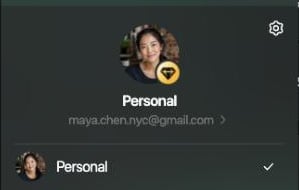
사이드바 아래쪽의 프로필을 선택한 다음, 이름 아래의 이메일을 선택해요. 그 메뉴에서 설정 아이콘을 선택하고 첫 번째 항목인 프로필을 선택해도 돼요.
이메일을 선택하면 프로필이 열려요.
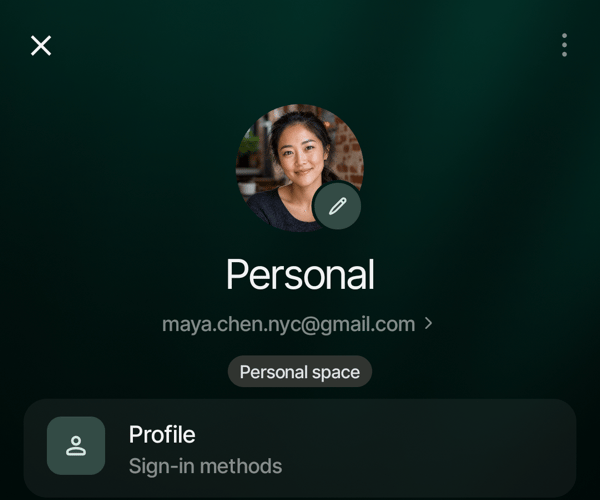
더 보기를 열고 위쪽의 공간 사진을 탭한 다음 공간 설정을 열어요. 첫 번째 행인 프로필이나 공간 이름 아래의 이메일을 탭해요.
프로필은 공간 설정의 첫 번째 행이에요.
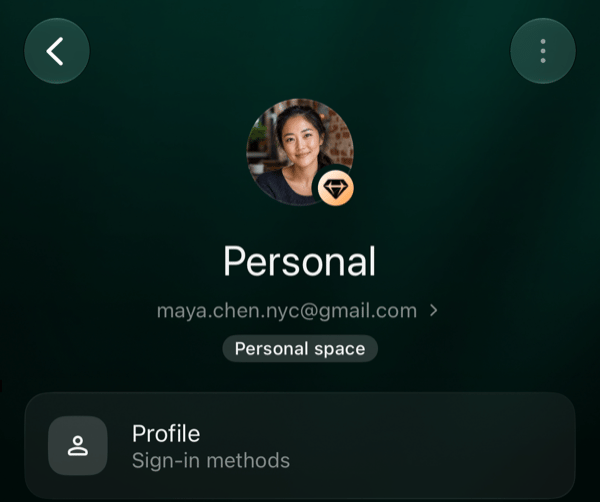
더 보기를 열고 오른쪽 위의 공간 아이콘을 탭해요. 첫 번째 행인 프로필이나 공간 이름 아래의 이메일을 탭해요.
프로필은 공간 설정의 첫 번째 행이에요.
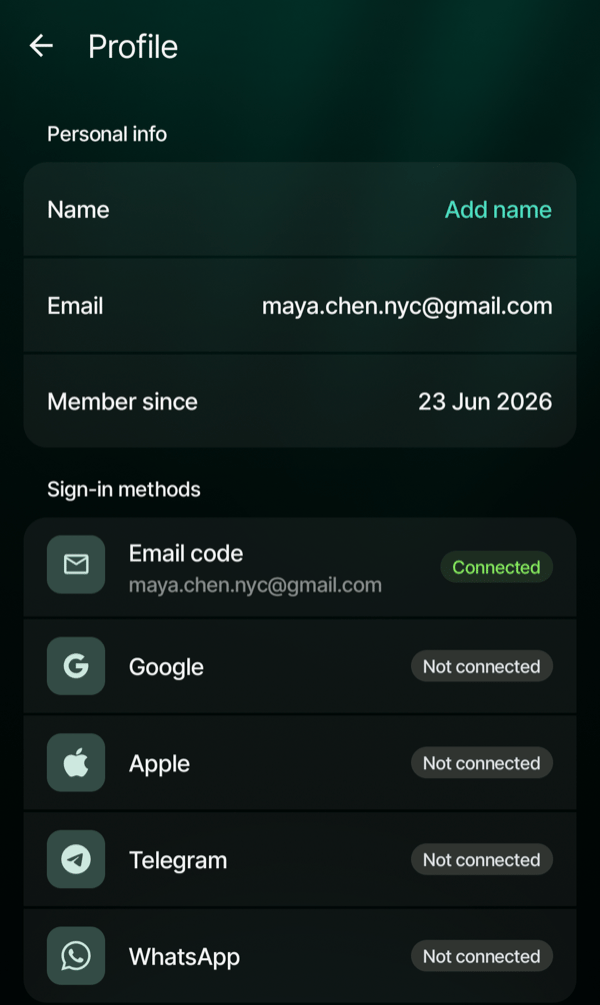
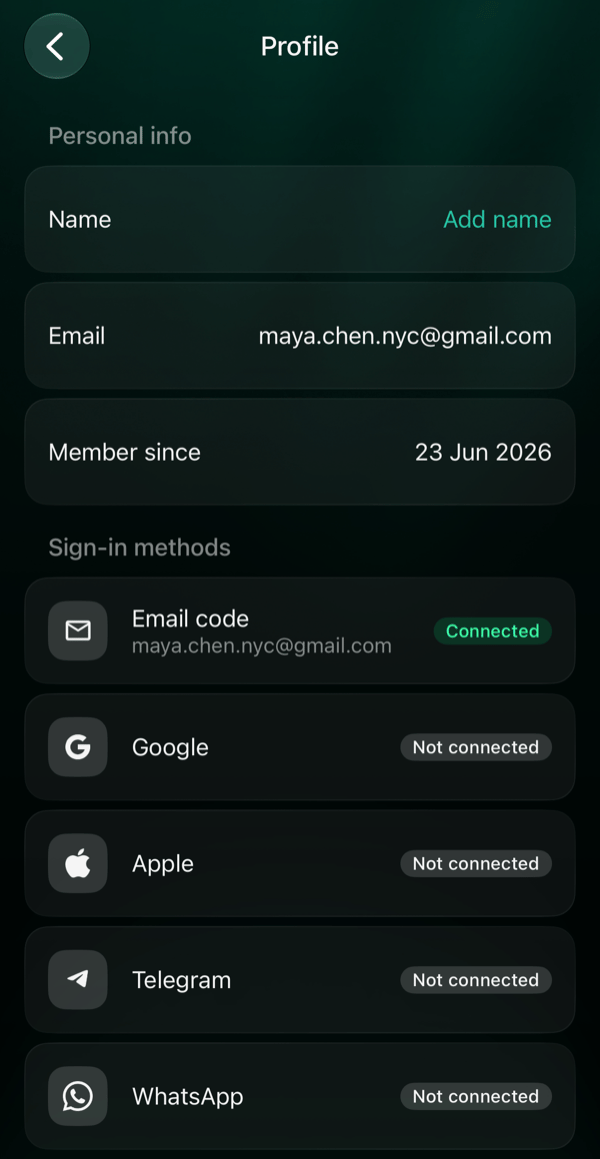
계정에 이메일이 없으면 이름 아래 줄에 이메일 추가가 표시되고, 이 줄을 누르면 프로필 대신 이메일 추가 화면이 열려요. 프로필을 열려면 프로필을 이용하세요.프로필에는 두 섹션이 있어요.
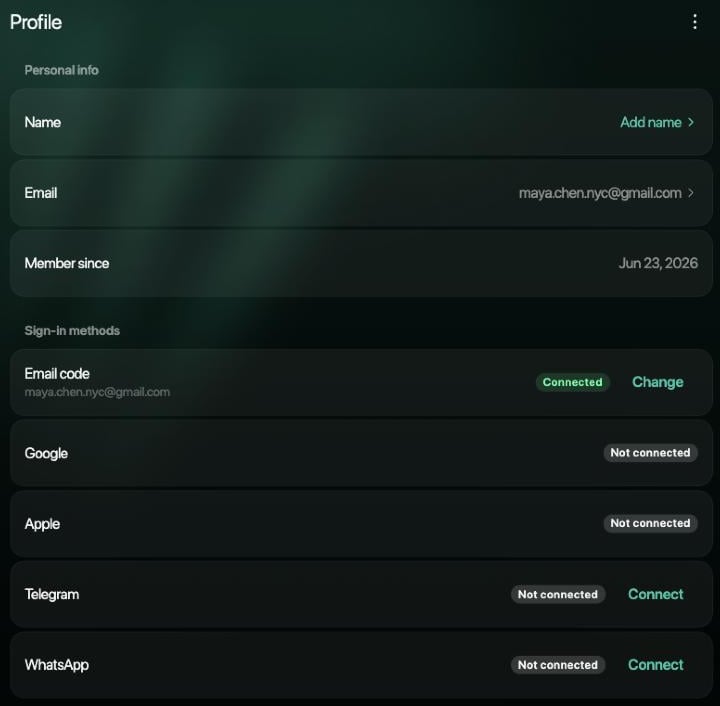
개인 정보: 계정에 있는 경우 이름, 이메일, 전화번호, 그리고 가입한 날짜인 가입일.
로그인 방법: 이메일 인증 코드, Google, Apple, Telegram, WhatsApp. 각각 연결됨 또는 연결 안 됨으로 표시돼요. 연결된 이메일 인증 코드에는 주소가, 연결된 WhatsApp에는 전화번호가 표시돼요.
Web
Android
iOS
아직 이름이 없고 이메일 코드로만 로그인하는 프로필이에요.
아직 이름이 없고 이메일 코드로만 로그인하는 프로필이에요.
아직 이름이 없고 이메일 코드로만 로그인하는 프로필이에요.
이름 추가하거나 바꾸기
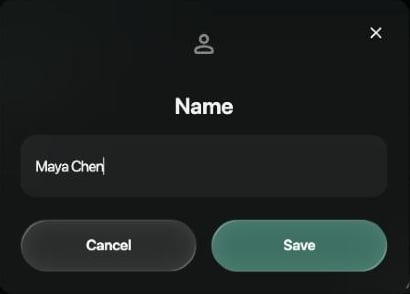
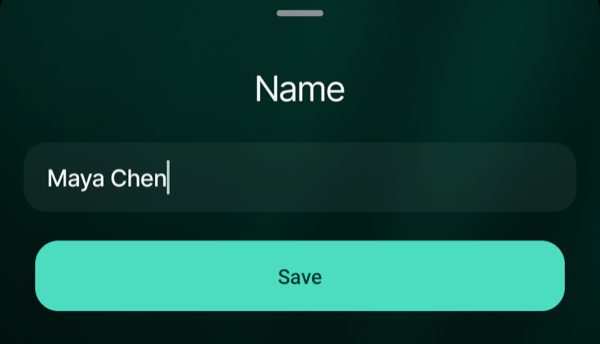
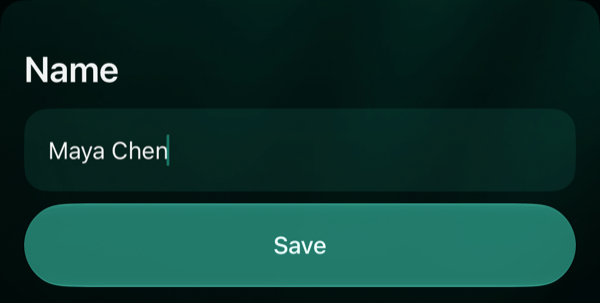
개인 정보에서 이름을 선택해요. 아직 이름이 없으면 이 행에 이름 추가라고 표시돼요.
이름을 100자 이내로 입력하고 저장을 선택해요.
Web
Android
iOS
저장을 선택하기 전에는 아무것도 바뀌지 않아요.
저장을 탭하기 전에는 아무것도 바뀌지 않아요.
저장을 탭하기 전에는 아무것도 바뀌지 않아요.
finerd에 이름이 저장됐어요가 표시돼요. 이름은 언제든 바꿀 수 있지만 비워 둘 수는 없어요. finerd에 저장하지 못했어요. 다시 시도하세요.가 표시되면 이름이 저장되지 않은 거예요. 저장을 다시 선택하세요.
이메일 변경하기
finerd는 로그인 코드를 내 이메일로 보내요. 이메일을 바꾸려면 새 주소와 계정이 내 것임을 증명할 방법이 필요해요. 현재 이메일로 받는 코드를 쓰거나, 로그인 방법에서 Google이 연결됨이라면 Google을 쓸 수 있어요.
Web
Android
iOS
개인 정보에서 이메일을 선택해요. 이메일 인증 코드 옆의 변경을 선택해도 돼요.
개인 정보에서 이메일을 탭해요. 로그인 방법에서 이메일 인증 코드를 탭해도 돼요.
iOS 앱에서는 이메일을 바꿀 수 없어요. 웹이나 Android 앱에서 바꾸세요. 그러면 iPhone에서도 새 주소로 로그인할 수 있어요.
이메일 변경에서 새 주소를 입력하고 코드 보내기를 선택해요.
본인인지 확인해 주세요에서 코드 보내기를 선택해 화면에 표시된 현재 이메일로 코드를 받고, 그 코드를 입력해요. Google이 연결되어 있다면 대신 Google로 계속을 선택해도 돼요.
finerd가 새 주소로 보낸 6자리 코드를 입력해요.
웹에서는 코드를 입력할 때마다 확인을 선택해요. Android 앱은 여섯 번째 숫자를 입력하는 즉시 코드를 확인해요. finerd에 이메일 변경됨이 표시되고, 새 주소가 개인 정보와 이메일 인증 코드 옆에 나타나요. 이제부터는 새 주소로 로그인하세요.본인 확인을 마치면 같은 기기에서 15분 동안은 다시 확인하지 않고 이메일을 또 바꿀 수 있어요. 현재 주소를 입력하면 finerd에 이미 사용 중인 이메일이에요.가 표시돼요. 새 주소가 다른 finerd 계정의 주소라면 이 이메일은 이미 다른 finerd 계정에서 사용 중이에요.가 표시돼요.
내가 이메일을 바꾸지 않았다면
이메일이 바뀌면 finerd가 이전 주소로 finerd 계정 이메일이 변경되었어요라는 이메일을 보내요. 내가 바꾼 게 아니라면 그 이메일을 열고 변경을 취소하세요를 선택해요. 링크는 7일 동안 한 번만 쓸 수 있어요.링크를 누르면 브라우저에 이메일 변경을 취소할까요?가 열려요. 변경 취소를 선택해요. finerd에 변경이 취소됐어요가 표시되고, 계정의 이메일이 이전 주소로 돌아가며 모든 기기에서 로그아웃돼요. 이전 이메일로 다시 로그인하세요.변경을 취소하면 내가 모르는 사이에 계정에 연결됐을 수 있는 것도 함께 끊겨요.
Claude, ChatGPT, Gemini 같은 AI 어시스턴트는 내 finerd에 접근할 수 없게 되고 다시 연결하라고 요청해요. 취소한 뒤에 연결한 어시스턴트는 계속 작동해요.
finerd 봇은 모든 채팅에서 더 이상 내 계정으로 작동하지 않아요. 다시 쓰려면 채팅에서 /start를 보내고 로그인하세요.
아직 봇에서 확인하지 않은 Telegram 또는 WhatsApp 연결은 취소돼요.
로그인 방법에서 이미 연결됨인 Telegram이나 WhatsApp은 그대로 남아요. 모르는 연결이 있다면 연결 해제하세요.페이지에 이 링크는 만료되었거나 이미 사용되었어요.가 표시되면 이전 주소에서 바로 이메일로 고객 지원에 문의하세요.
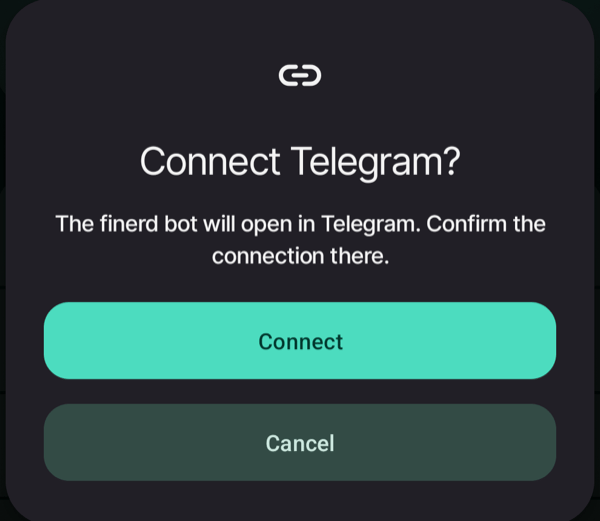
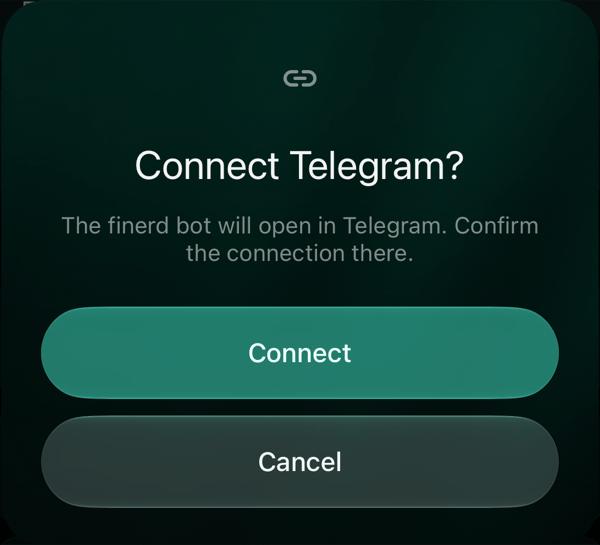
Telegram에서는 봇에서 시작을 누르고, WhatsApp에서는 미리 입력된 메시지를 보내요. 그런 다음 봇이 보낸 메시지의 Connect 버튼을 탭해요(봇의 버튼은 영어로 표시돼요).
finerd로 돌아와요. 프로필로 돌아오면 프로필이 연결을 확인해요.
연결을 탭하면 Telegram에서 finerd 봇이 열려요.
finerd가 기다리는 동안 행에 대기 중이 표시되고 Telegram에서 확인 또는 WhatsApp에서 메시지를 보내 주세요라고 나와요. 행을 탭하면 Telegram 열기(또는 WhatsApp 열기)로 봇을 다시 열거나 연결 취소로 기다리기를 멈출 수 있어요.
연결이 확인되면 finerd에 Telegram 연결됨 또는 WhatsApp 연결됨이 표시되고 행이 연결됨으로 바뀌어요.봇 링크는 10분 동안 유효해요. finerd에 링크가 만료됐어요. 다시 시도하세요.가 표시되면 다시 연결해 새 링크를 받으세요.여기서 Telegram을 연결하면 Telegram으로 로그인할 수 있어요. Telegram에서 finerd 어시스턴트와 채팅하려면 Telegram 봇 연결하기를 참고하세요.
Telegram 또는 WhatsApp 연결 해제하기
계정에 다른 로그인 방법이 있으면 Telegram이나 WhatsApp을 연결 해제할 수 있어요.
Web
Android
iOS
Telegram 또는 WhatsApp 옆의 연결 해제를 선택한 다음, 연결 해제를 선택해 확인해요.
Telegram 또는 WhatsApp을 탭한 다음, 연결 해제를 탭해 확인해요.
Telegram 또는 WhatsApp을 탭한 다음, 연결 해제를 탭해 확인해요.
finerd에 Telegram 연결 해제됨 또는 WhatsApp 연결 해제됨이 표시돼요. 이제 그 메신저로는 로그인할 수 없지만 finerd의 데이터는 바뀌지 않아요. 나중에 다시 연결할 수 있어요.이렇게 하면 로그인 방법만 없어져요. Telegram에서 finerd 어시스턴트와도 채팅하고 있다면 그 채팅은 연결된 채로 남아요. 채팅을 끝내려면 Telegram 봇 연결하기에 설명된 대로 채팅에서 /logout을 보내세요.메신저가 계정에 들어가는 유일한 방법이라면 행에 예를 들어 유일한 로그인 방법이라 Telegram 연결을 해제할 수 없어요.라고 표시돼요. 먼저 이메일을 추가한 다음 연결 해제하세요.
이메일 추가하기
Telegram이나 WhatsApp으로 가입했다면 계정에 아직 이메일이 없고 이메일 인증 코드가 연결 안 됨이에요. 이메일을 추가하면 이메일 코드로도 로그인할 수 있어요. 예를 들어 메신저가 없는 기기에서요.
Web
Android
iOS
이메일 인증 코드 옆의 연결을 선택해요. 프로필 메뉴에서 이름 아래의 이메일 추가를 선택해도 돼요.
로그인 방법에서 이메일 인증 코드를 탭하거나, 공간 설정에서 공간 이름 아래의 이메일 추가를 탭해요.
로그인 방법에서 이메일 인증 코드를 탭하거나, 공간 설정에서 공간 이름 아래의 이메일 추가를 탭해요.
이메일 추가에서 이메일 주소를 입력하고 코드 보내기를 선택해요.
이메일로 받은 6자리 코드를 입력해요. 웹에서는 확인을 선택해요. 앱은 여섯 번째 숫자를 입력하는 즉시 코드를 확인해요.
finerd에 이메일 연결됨이 표시되고, 주소가 개인 정보에 나타나며 이메일 인증 코드가 연결됨으로 바뀌어요. 코드는 로그인할 때와 똑같이 작동해요. 코드가 오지 않거나 받아들여지지 않으면 로그인할 수 없을 때를 참고하세요.주소 하나는 finerd 계정 하나에만 속할 수 있어요. finerd에 이 이메일은 이미 다른 finerd 계정에서 사용 중이에요.가 표시되면 다른 주소를 쓰거나, 대신 그 다른 계정에 이메일 코드로 로그인하세요.
finerd 봇에서 추가하기
Telegram이나 WhatsApp의 finerd 봇에서 가입했다면 채팅에서 바로 이메일을 추가할 수 있어요(봇의 버튼은 영어예요).
봇에 /email을 보내요. 봇이 Add email 버튼을 보여 주면 그 버튼을 눌러도 돼요.
추가할 이메일 주소를 보내요. 봇이 그 주소로 6자리 코드를 보내요.
이메일에 있는 6자리 숫자를 채팅으로 보내요.
봇이 주소와 함께 ✅ Email added라고 답하고, 그때부터 그 주소로 finerd에 로그인할 수 있어요. 이메일이 오지 않으면 스팸함을 확인하거나 Resend code를 눌러요. Another address로 다른 주소를 보낼 수 있고, Cancel을 누르면 이메일을 추가하지 않고 멈춰요.Telegram으로 가입했다면 봇이 한 번 알려 줄 수도 있어요. 보통 다음 날 아침이고, 미리 알림에는 Add email 버튼이 있어요. 미리 알림은 다시 오지 않으니, 준비되면 /email을 보내요.
문제가 생겼을 때
이 Telegram 계정은 이미 다른 finerd 계정에 연결되어 있어요. (WhatsApp도 마찬가지예요.) Telegram이나 WhatsApp 계정 하나는 finerd 계정 하나에만 속할 수 있고, 다른 계정에서 어떻게 쓰이고 있는지는 봇의 메시지에 나와요.
다른 계정의 로그인 방법이라면 그 계정에 로그인해 프로필에서 메신저를 연결 해제한 다음, 여기서 연결하세요.
다른 계정의 finerd 어시스턴트라면 봇과의 채팅에서 /logout을 보낸 다음, 여기서 다시 연결하세요.
Telegram 연결이 취소됐어요. 봇에서 연결이 취소됐어요. 다시 연결하고 봇에서 확인하세요.이메일을 바꿀 때 현재 이메일로 코드가 오지 않나요?본인인지 확인해 주세요에 표시된 주소와 그 메일함의 스팸함을 확인하거나, Google이 연결되어 있다면 Google로 계속을 이용하세요. 현재 메일함을 열 수 없고 Google 로그인도 없다면 이메일로 고객 지원에 문의하세요.
{"docsConfig":{"theme":"mint","$schema":"https://mintlify.com/docs.json","name":"finerd","description":"finerd helps financially savvy people manage complex personal, family, business, and international finances with accounting precision without accounting complexity.","colors":{"primary":"#38f7ff","light":"#38f7ff","dark":"#b98cff"},"logo":{"light":"https://finerd.ai/logo.svg","dark":"https://finerd.ai/logo.svg","href":"/"},"favicon":"https://finerd.ai/logo.svg","appearance":{"default":"dark","strict":true},"background":{"decoration":"grid","color":{"light":"#08090f","dark":"#08090f"}},"navbar":{"links":[{"href":"https://finerd.ai","label":"finerd.ai"}]},"seo":{"metatags":{"google-site-verification":"haq__cDMEelH2BlpExqZZ7DqIbXEtZMZDA_2Rn4amf8"}},"fonts":{"family":"Inter"},"styling":{"eyebrows":"breadcrumbs","latex":true},"contextual":{"options":["copy","view"],"display":"header"},"navigation":{"languages":[{"language":"en","footer":{"links":[{"items":[{"label":"YouTube","href":"https://www.youtube.com/@realFinerd"},{"label":"Reddit","href":"https://www.reddit.com/r/finerds"},{"label":"TikTok","href":"https://www.tiktok.com/@real.finerd"}]}]},"navbar":{"links":[{"href":"https://finerd.ai","label":"finerd.ai"}],"primary":{"type":"button","label":"Contact support","href":"/contact-us"}},"href":""},{"language":"uk","footer":{"links":[{"items":[{"label":"YouTube","href":"https://www.youtube.com/@finerd.ukraine"},{"label":"Telegram","href":"https://t.me/+TESz5VfXr50yNTRi"}]}]},"navbar":{"links":[{"href":"https://finerd.ai","label":"finerd.ai"}],"primary":{"type":"button","label":"Зв'язатися з підтримкою","href":"/uk/contact-us"}},"href":"uk"},{"language":"es","footer":{"links":[{"items":[{"label":"YouTube","href":"https://www.youtube.com/@realFinerd"},{"label":"Reddit","href":"https://www.reddit.com/r/finerds"},{"label":"TikTok","href":"https://www.tiktok.com/@real.finerd"}]}]},"navbar":{"links":[{"href":"https://finerd.ai","label":"finerd.ai"}],"primary":{"type":"button","label":"Contactar soporte","href":"/es/contact-us"}},"href":"es"},{"language":"ja","footer":{"links":[{"items":[{"label":"YouTube","href":"https://www.youtube.com/@realFinerd"},{"label":"Reddit","href":"https://www.reddit.com/r/finerds"},{"label":"TikTok","href":"https://www.tiktok.com/@real.finerd"}]}]},"navbar":{"links":[{"href":"https://finerd.ai","label":"finerd.ai"}],"primary":{"type":"button","label":"サポートに連絡","href":"/ja/contact-us"}},"href":"ja"},{"language":"pl","footer":{"links":[{"items":[{"label":"YouTube","href":"https://www.youtube.com/@realFinerd"},{"label":"Reddit","href":"https://www.reddit.com/r/finerds"},{"label":"TikTok","href":"https://www.tiktok.com/@real.finerd"}]}]},"navbar":{"links":[{"href":"https://finerd.ai","label":"finerd.ai"}],"primary":{"type":"button","label":"Kontakt z pomocą","href":"/pl/contact-us"}},"href":"pl"},{"language":"cs","footer":{"links":[{"items":[{"label":"YouTube","href":"https://www.youtube.com/@realFinerd"},{"label":"Reddit","href":"https://www.reddit.com/r/finerds"},{"label":"TikTok","href":"https://www.tiktok.com/@real.finerd"}]}]},"navbar":{"links":[{"href":"https://finerd.ai","label":"finerd.ai"}],"primary":{"type":"button","label":"Kontaktovat podporu","href":"/cs/contact-us"}},"href":"cs"},{"language":"it","footer":{"links":[{"items":[{"label":"YouTube","href":"https://www.youtube.com/@realFinerd"},{"label":"Reddit","href":"https://www.reddit.com/r/finerds"},{"label":"TikTok","href":"https://www.tiktok.com/@real.finerd"}]}]},"navbar":{"links":[{"href":"https://finerd.ai","label":"finerd.ai"}],"primary":{"type":"button","label":"Contatta assistenza","href":"/it/contact-us"}},"href":"it"},{"language":"fr","footer":{"links":[{"items":[{"label":"YouTube","href":"https://www.youtube.com/@realFinerd"},{"label":"Reddit","href":"https://www.reddit.com/r/finerds"},{"label":"TikTok","href":"https://www.tiktok.com/@real.finerd"}]}]},"navbar":{"links":[{"href":"https://finerd.ai","label":"finerd.ai"}],"primary":{"type":"button","label":"Contacter le support","href":"/fr/contact-us"}},"href":"fr"},{"language":"de","footer":{"links":[{"items":[{"label":"YouTube","href":"https://www.youtube.com/@realFinerd"},{"label":"Reddit","href":"https://www.reddit.com/r/finerds"},{"label":"TikTok","href":"https://www.tiktok.com/@real.finerd"}]}]},"navbar":{"links":[{"href":"https://finerd.ai","label":"finerd.ai"}],"primary":{"type":"button","label":"Support kontaktieren","href":"/de/contact-us"}},"href":"de"},{"language":"pt","footer":{"links":[{"items":[{"label":"YouTube","href":"https://www.youtube.com/@realFinerd"},{"label":"Reddit","href":"https://www.reddit.com/r/finerds"},{"label":"TikTok","href":"https://www.tiktok.com/@real.finerd"}]}]},"navbar":{"links":[{"href":"https://finerd.ai","label":"finerd.ai"}],"primary":{"type":"button","label":"Falar com suporte","href":"/pt/contact-us"}},"href":"pt"},{"language":"zh-Hant","footer":{"links":[{"items":[{"label":"YouTube","href":"https://www.youtube.com/@realFinerd"},{"label":"Reddit","href":"https://www.reddit.com/r/finerds"},{"label":"TikTok","href":"https://www.tiktok.com/@real.finerd"}]}]},"navbar":{"links":[{"href":"https://finerd.ai","label":"finerd.ai"}],"primary":{"type":"button","label":"聯絡客服","href":"/zh-Hant/contact-us"}},"href":"zh-Hant"},{"language":"ko","footer":{"links":[{"items":[{"label":"YouTube","href":"https://www.youtube.com/@realFinerd"},{"label":"Reddit","href":"https://www.reddit.com/r/finerds"},{"label":"TikTok","href":"https://www.tiktok.com/@real.finerd"}]}]},"navbar":{"links":[{"href":"https://finerd.ai","label":"finerd.ai"}],"primary":{"type":"button","label":"고객 지원 문의","href":"/ko/contact-us"}},"href":"ko"},{"language":"zh-Hans","footer":{"links":[{"items":[{"label":"YouTube","href":"https://www.youtube.com/@realFinerd"},{"label":"Reddit","href":"https://www.reddit.com/r/finerds"},{"label":"TikTok","href":"https://www.tiktok.com/@real.finerd"}]}]},"navbar":{"links":[{"href":"https://finerd.ai","label":"finerd.ai"}],"primary":{"type":"button","label":"联系支持","href":"/zh-Hans/contact-us"}},"href":"zh-Hans"},{"language":"nl","footer":{"links":[{"items":[{"label":"YouTube","href":"https://www.youtube.com/@realFinerd"},{"label":"Reddit","href":"https://www.reddit.com/r/finerds"},{"label":"TikTok","href":"https://www.tiktok.com/@real.finerd"}]}]},"navbar":{"links":[{"href":"https://finerd.ai","label":"finerd.ai"}],"primary":{"type":"button","label":"Neem contact op met support","href":"/nl/contact-us"}},"href":"nl"}]}},"deployment":{"deploymentMetadataValue":{"subdomain":"finerdai","hasAudioNarration":false,"actualSubdomain":"finerdai","customDomains":["help.finerd.ai"],"gitSource":{"type":"gitlab","owner":"finerd.ai/web","repo":"help","deployBranch":"main","contentDirectory":"","isPrivate":true,"projectId":85636094,"mountPath":"","label":""},"feedback":{"thumbs":true},"entitlements":{"AI_CHAT":{"status":"DISABLED"}},"buildId":"6b00a7593c4bb12541ace472","clientVersion":"0.0.4263","searchFilterCounts":[{"language":"en","tag":"Accounts \u0026 balances","count":8},{"language":"cs","tag":"Účty a zůstatky","count":8},{"language":"de","tag":"Konten und Salden","count":8},{"language":"es","tag":"Cuentas y saldos","count":8},{"language":"fr","tag":"Comptes et soldes","count":8},{"language":"it","tag":"Conti e saldi","count":8},{"language":"ja","tag":"口座と残高","count":8},{"language":"ko","tag":"계좌와 잔액","count":8},{"language":"nl","tag":"Rekeningen en saldi","count":8},{"language":"pl","tag":"Konta i salda","count":8},{"language":"pt","tag":"Contas e saldos","count":8},{"language":"uk","tag":"Рахунки та баланси","count":8},{"language":"zh-Hans","tag":"账户与余额","count":8},{"language":"zh-Hant","tag":"帳戶與餘額","count":8},{"language":"en","tag":"AI assistants","count":7},{"language":"en","tag":"Family \u0026 shared expenses","count":7},{"language":"en","tag":"Transactions","count":7},{"language":"cs","tag":"AI asistenti","count":7},{"language":"cs","tag":"Rodina a sdílené výdaje","count":7},{"language":"cs","tag":"Transakce","count":7},{"language":"de","tag":"AI-Assistenten","count":7},{"language":"de","tag":"Familie und geteilte Ausgaben","count":7},{"language":"de","tag":"Transaktionen","count":7},{"language":"es","tag":"Asistentes de AI","count":7},{"language":"es","tag":"Familia y gastos compartidos","count":7},{"language":"es","tag":"Transacciones","count":7},{"language":"fr","tag":"Assistants AI","count":7},{"language":"fr","tag":"Famille et dépenses partagées","count":7},{"language":"fr","tag":"Transactions","count":7},{"language":"it","tag":"Assistenti AI","count":7},{"language":"it","tag":"Famiglia e spese condivise","count":7},{"language":"it","tag":"Transazioni","count":7},{"language":"ja","tag":"AIアシスタント","count":7},{"language":"ja","tag":"ファミリーと共通の支出","count":7},{"language":"ja","tag":"取引","count":7},{"language":"ko","tag":"AI 어시스턴트","count":7},{"language":"ko","tag":"가족과 공유 지출","count":7},{"language":"ko","tag":"거래","count":7},{"language":"nl","tag":"AI-assistenten","count":7},{"language":"nl","tag":"Gezin en gedeelde uitgaven","count":7},{"language":"nl","tag":"Transacties","count":7},{"language":"pl","tag":"Asystenci AI","count":7},{"language":"pl","tag":"Rodzina i wspólne wydatki","count":7},{"language":"pl","tag":"Transakcje","count":7},{"language":"pt","tag":"Assistentes de AI","count":7},{"language":"pt","tag":"Família e despesas compartilhadas","count":7},{"language":"pt","tag":"Transações","count":7},{"language":"uk","tag":"ШІ-асистенти","count":7},{"language":"uk","tag":"Сім'я та спільні витрати","count":7},{"language":"uk","tag":"Транзакції","count":7},{"language":"zh-Hans","tag":"AI 助手","count":7},{"language":"zh-Hans","tag":"家庭与共同支出","count":7},{"language":"zh-Hans","tag":"交易","count":7},{"language":"zh-Hant","tag":"AI 助理","count":7},{"language":"zh-Hant","tag":"家庭與共享支出","count":7},{"language":"zh-Hant","tag":"交易","count":7},{"language":"en","tag":"Planning","count":6},{"language":"cs","tag":"Plánování","count":6},{"language":"de","tag":"Planung","count":6},{"language":"es","tag":"Planificación","count":6},{"language":"fr","tag":"Planification","count":6},{"language":"it","tag":"Pianificazione","count":6},{"language":"ja","tag":"プランニング","count":6},{"language":"ko","tag":"재무 설계","count":6},{"language":"nl","tag":"Financiële planning","count":6},{"language":"pl","tag":"Planowanie","count":6},{"language":"pt","tag":"Planejamento","count":6},{"language":"uk","tag":"Планування","count":6},{"language":"zh-Hans","tag":"财务规划","count":6},{"language":"zh-Hant","tag":"財務規劃","count":6},{"language":"en","tag":"Bills \u0026 receipts","count":5},{"language":"en","tag":"Get started","count":5},{"language":"cs","tag":"Účtenky","count":5},{"language":"cs","tag":"Začínáme","count":5},{"language":"de","tag":"Rechnungen und Kassenbons","count":5},{"language":"de","tag":"Erste Schritte","count":5},{"language":"es","tag":"Recibos","count":5},{"language":"es","tag":"Primeros pasos","count":5},{"language":"fr","tag":"Factures et tickets de caisse","count":5},{"language":"fr","tag":"Premiers pas","count":5},{"language":"it","tag":"Ricevute","count":5},{"language":"it","tag":"Primi passi","count":5},{"language":"ja","tag":"レシート","count":5},{"language":"ja","tag":"はじめに","count":5},{"language":"ko","tag":"영수증","count":5},{"language":"ko","tag":"시작하기","count":5},{"language":"nl","tag":"Bonnen","count":5},{"language":"nl","tag":"Aan de slag","count":5},{"language":"pl","tag":"Rachunki i paragony","count":5},{"language":"pl","tag":"Pierwsze kroki","count":5},{"language":"pt","tag":"Recibos de compra","count":5},{"language":"pt","tag":"Primeiros passos","count":5},{"language":"uk","tag":"Чеки","count":5},{"language":"uk","tag":"Початок роботи","count":5},{"language":"zh-Hans","tag":"小票","count":5},{"language":"zh-Hans","tag":"开始使用","count":5},{"language":"zh-Hant","tag":"收據","count":5},{"language":"zh-Hant","tag":"開始使用","count":5},{"language":"en","tag":"Account \u0026 subscription","count":4},{"language":"en","tag":"Business","count":4},{"language":"en","tag":"Investments \u0026 property","count":4},{"language":"cs","tag":"Účet a předplatné","count":4},{"language":"cs","tag":"Podnikání","count":4},{"language":"cs","tag":"Investice a majetek","count":4},{"language":"de","tag":"Konto und Abo","count":4},{"language":"de","tag":"Business","count":4},{"language":"de","tag":"Investments und Vermögenswerte","count":4},{"language":"es","tag":"Cuenta y suscripción","count":4},{"language":"es","tag":"Negocios","count":4},{"language":"es","tag":"Inversiones y patrimonio","count":4},{"language":"fr","tag":"Compte et abonnement","count":4},{"language":"fr","tag":"Entreprise","count":4},{"language":"fr","tag":"Investissements et patrimoine","count":4},{"language":"it","tag":"Account e abbonamento","count":4},{"language":"it","tag":"Business","count":4},{"language":"it","tag":"Investimenti e proprietà","count":4},{"language":"ja","tag":"アカウントとサブスクリプション","count":4},{"language":"ja","tag":"ビジネス","count":4},{"language":"ja","tag":"投資と資産","count":4},{"language":"ko","tag":"계정과 구독","count":4},{"language":"ko","tag":"비즈니스","count":4},{"language":"ko","tag":"투자와 재산","count":4},{"language":"nl","tag":"Account en abonnement","count":4},{"language":"nl","tag":"Zakelijk","count":4},{"language":"nl","tag":"Beleggingen en eigendommen","count":4},{"language":"pl","tag":"Konto i subskrypcja","count":4},{"language":"pl","tag":"Biznes","count":4},{"language":"pl","tag":"Inwestycje i majątek","count":4},{"language":"pt","tag":"Conta e assinatura","count":4},{"language":"pt","tag":"Negócios","count":4},{"language":"pt","tag":"Investimentos e patrimônio","count":4},{"language":"uk","tag":"Акаунт і підписка","count":4},{"language":"uk","tag":"Бізнес","count":4},{"language":"uk","tag":"Інвестиції й майно","count":4},{"language":"zh-Hans","tag":"账号与订阅","count":4},{"language":"zh-Hans","tag":"商业","count":4},{"language":"zh-Hans","tag":"投资与财产","count":4},{"language":"zh-Hant","tag":"會員帳號與訂閱","count":4},{"language":"zh-Hant","tag":"商務","count":4},{"language":"zh-Hant","tag":"投資與財產","count":4}]},"assistantConfig":{"enableAskAiButton":false,"enableStarterQuestions":false,"enableContextualStarterQuestions":false,"enableAskAiSearchBar":true},"basePath":"","hasChatPermissions":false,"hasWebMcpPermissions":false,"toggles":[{"name":"kill-isr","enabled":true,"variant":{"name":"disabled","enabled":false,"feature_enabled":true},"impressionData":false},{"name":"custom-rbac-roles","enabled":true,"variant":{"name":"disabled","enabled":false,"feature_enabled":true},"impressionData":false},{"name":"agent-mintlify-slack","enabled":true,"variant":{"name":"disabled","enabled":false,"feature_enabled":true},"impressionData":false},{"name":"agent-integrations-settings","enabled":true,"variant":{"name":"disabled","enabled":false,"feature_enabled":true},"impressionData":false},{"name":"rbac-expansion","enabled":true,"variant":{"name":"disabled","enabled":false,"feature_enabled":true},"impressionData":false},{"name":"automations-pr-grouping","enabled":true,"variant":{"name":"disabled","enabled":false,"feature_enabled":true},"impressionData":false},{"name":"custom-prefix","enabled":true,"variant":{"name":"disabled","enabled":false,"feature_enabled":true},"impressionData":false},{"name":"analytics-v7","enabled":true,"variant":{"name":"disabled","enabled":false,"feature_enabled":true},"impressionData":false},{"name":"user-flows-analytics","enabled":true,"variant":{"name":"disabled","enabled":false,"feature_enabled":true},"impressionData":false},{"name":"no-publish-flow","enabled":true,"variant":{"name":"disabled","enabled":false,"feature_enabled":true},"impressionData":false},{"name":"workos-onboarding","enabled":true,"variant":{"name":"disabled","enabled":false,"feature_enabled":true},"impressionData":false},{"name":"snapshot-serving-live","enabled":true,"variant":{"name":"disabled","enabled":false,"feature_enabled":true},"impressionData":false},{"name":"stripTemperatureMiddleware","enabled":true,"variant":{"name":"disabled","enabled":false,"feature_enabled":true},"impressionData":false},{"name":"support-platform-pylon-zendesk","enabled":true,"variant":{"name":"disabled","enabled":false,"feature_enabled":true},"impressionData":false},{"name":"snapshot-serving","enabled":true,"variant":{"name":"disabled","enabled":false,"feature_enabled":true},"impressionData":false},{"name":"instant-rollback","enabled":true,"variant":{"name":"disabled","enabled":false,"feature_enabled":true},"impressionData":false},{"name":"granular-notifications-server","enabled":true,"variant":{"name":"disabled","enabled":false,"feature_enabled":true},"impressionData":false},{"name":"granular-notifications","enabled":true,"variant":{"name":"disabled","enabled":false,"feature_enabled":true},"impressionData":false},{"name":"automations-fable","enabled":true,"variant":{"name":"disabled","enabled":false,"feature_enabled":true},"impressionData":false},{"name":"fixed-ai-action-pricing","enabled":true,"variant":{"name":"disabled","enabled":false,"feature_enabled":true},"impressionData":false},{"name":"site-roles","enabled":true,"variant":{"name":"disabled","enabled":false,"feature_enabled":true},"impressionData":false},{"name":"automation-resolve-merge-conflict","enabled":true,"variant":{"name":"disabled","enabled":false,"feature_enabled":true},"impressionData":false},{"name":"scoped-publishing","enabled":true,"variant":{"name":"disabled","enabled":false,"feature_enabled":true},"impressionData":false},{"name":"mintql","enabled":true,"variant":{"name":"disabled","enabled":false,"feature_enabled":true},"impressionData":false},{"name":"page-level-analytics","enabled":true,"variant":{"name":"disabled","enabled":false,"feature_enabled":true},"impressionData":false},{"name":"editor-version-history-v2","enabled":true,"variant":{"name":"disabled","enabled":false,"feature_enabled":true},"impressionData":false},{"name":"billing-page-v2","enabled":true,"variant":{"name":"disabled","enabled":false,"feature_enabled":true},"impressionData":false},{"name":"full-page-search","enabled":true,"variant":{"name":"disabled","enabled":false,"feature_enabled":true},"impressionData":false},{"name":"workspace-projects","enabled":true,"variant":{"name":"disabled","enabled":false,"feature_enabled":true},"impressionData":false},{"name":"assistant-v5","enabled":true,"variant":{"name":"disabled","enabled":false,"feature_enabled":true},"impressionData":false},{"name":"fork-pr-previews","enabled":true,"variant":{"name":"disabled","enabled":false,"feature_enabled":true},"impressionData":false},{"name":"revalidation-jwt","enabled":true,"variant":{"name":"disabled","enabled":false,"feature_enabled":true},"impressionData":false},{"name":"workos-sso-scim","enabled":true,"variant":{"name":"disabled","enabled":false,"feature_enabled":true},"impressionData":false},{"name":"hobby-abuse-scan","enabled":true,"variant":{"name":"disabled","enabled":false,"feature_enabled":true},"impressionData":false},{"name":"dashboard-inbox","enabled":true,"variant":{"name":"disabled","enabled":false,"feature_enabled":true},"impressionData":false},{"name":"workos-signup","enabled":true,"variant":{"name":"disabled","enabled":false,"feature_enabled":true},"impressionData":false},{"name":"turbopuffer-dual-write","enabled":true,"variant":{"name":"disabled","enabled":false,"feature_enabled":true},"impressionData":false},{"name":"workos-enabled","enabled":true,"variant":{"name":"disabled","enabled":false,"feature_enabled":true},"impressionData":false},{"name":"approve-review-flow","enabled":true,"variant":{"name":"disabled","enabled":false,"feature_enabled":true},"impressionData":false},{"name":"editor-metadata","enabled":true,"variant":{"name":"disabled","enabled":false,"feature_enabled":true},"impressionData":false},{"name":"sso-setup-deadline-banner","enabled":true,"variant":{"name":"disabled","enabled":false,"feature_enabled":true},"impressionData":false},{"name":"turbopuffer-serve","enabled":true,"variant":{"name":"disabled","enabled":false,"feature_enabled":true},"impressionData":false},{"name":"live-agents","enabled":true,"variant":{"name":"disabled","enabled":false,"feature_enabled":true},"impressionData":false},{"name":"starter-pricing","enabled":true,"variant":{"name":"treatment","enabled":true,"payload":{"type":"string","value":"treatment"},"feature_enabled":true},"impressionData":false},{"name":"llms-txt-v2","enabled":true,"variant":{"name":"disabled","enabled":false,"feature_enabled":true},"impressionData":false},{"name":"wildcard-email-auth","enabled":true,"variant":{"name":"disabled","enabled":false,"feature_enabled":true},"impressionData":false}],"googleFontsInlined":false},"customCss":[{"filePath":"style.css","content":".tab-container>ul[role=\"tablist\"]>li[role=\"tab\"]>div{font-size:1rem;line-height:1.75rem}.tab-container>ul[role=\"tablist\"]>li[role=\"tab\"]{padding-bottom:0.25rem}.tab-container .tab-container>ul[role=\"tablist\"]>li[role=\"tab\"]>div{font-size:0.875rem;line-height:1.5rem}#topbar-cta-button a>span:first-child{background:transparent;box-shadow:inset 0 0 0 1px rgb(0 0 0 / 0.15)}#topbar-cta-button a .text-white{color:rgb(17 24 39)}#topbar-cta-button a:hover>span:first-child{background:rgb(0 0 0 / 0.04)}.dark #topbar-cta-button a>span:first-child{box-shadow:inset 0 0 0 1px rgb(255 255 255 / 0.2)}.dark #topbar-cta-button a .text-white{color:rgb(243 244 246)}.dark #topbar-cta-button a:hover>span:first-child{background:rgb(255 255 255 / 0.06)}#header nav[aria-label=\"Breadcrumb\"]:not(.fh-crumbs){display:none}.fh-crumbs{display:flex;flex-wrap:wrap;align-items:center;gap:0.375rem;font-size:0.875rem;line-height:1.25rem;color:rgb(107 114 128)}.dark .fh-crumbs{color:rgb(156 163 175)}.fh-crumbs a{color:inherit;text-decoration:none;border:none}.fh-crumbs a:hover{color:rgb(8 145 178)}.dark .fh-crumbs a:hover{color:#38f7ff}.fh-video{width:100%;aspect-ratio:1804 / 1080;overflow:hidden;border-radius:12px;background:#000}.fh-video iframe{display:block;width:100%;height:100%;border:0}.fh-video-intro{display:grid;gap:1.5rem;align-items:center;margin:1.5rem 0 2rem;padding:1.25rem;border-radius:16px;box-shadow:inset 0 0 0 1px rgb(0 0 0 / 0.08)}.dark .fh-video-intro{background:#ffffff08;box-shadow:inset 0 0 0 1px rgb(255 255 255 / 0.08)}@media (min-width: 640px){.fh-video-intro{grid-template-columns:12rem minmax(0, 1fr);gap:2rem}}.fh-video-frame{width:100%;max-width:12rem;margin:0 auto;aspect-ratio:9 / 16;overflow:hidden;border-radius:12px;background:#000}.fh-video-frame iframe{display:block;width:100%;height:100%;border:0}.fh-video-text>:first-child{margin-top:0}.fh-video-text>:last-child{margin-bottom:0}.card{border:none!important;background:url(\"/images/home/card-gradient.png\") 0 0 / 100% 100% no-repeat,\n rgb(0 0 0 / 0.03)!important}.dark .card{background-color:#ffffff0d!important}.card:hover{background-color:rgb(0 0 0 / 0.05)!important}.dark .card:hover{background-color:#ffffff14!important}.card::before{content:\"\";position:absolute;inset:0;padding:1px;border-radius:inherit;background:linear-gradient(\n 147.14deg,\n rgb(0 0 0 / 0.12) 0%,\n rgb(0 0 0 / 0.04) 31.25%,\n rgb(0 0 0 / 0.04) 69.23%,\n rgb(0 0 0 / 0.12) 100%\n );-webkit-mask:linear-gradient(#fff 0 0) content-box,\n linear-gradient(#fff 0 0);-webkit-mask-composite:xor;mask-composite:exclude;pointer-events:none;z-index:1}.dark .card::before{background:linear-gradient(\n 147.14deg,\n rgb(255 255 255 / 0.05) 0%,\n rgb(255 255 255 / 0.015) 31.25%,\n rgb(255 255 255 / 0.015) 69.23%,\n rgb(255 255 255 / 0.05) 100%\n )}.dark .card [data-component-part=\"card-title\"]{color:#fffffff2}.dark .card [data-component-part=\"card-content\"]{color:#ffffff80}#navbar div:has(>#localization-select-trigger){display:flex!important}html:has(.fh-home) #search-bar-entry{visibility:hidden}html:has(.fh-home) #navbar button.h-14{display:none}@media (min-width: 768px){html:has(.fh-home) .fixed:has(>[role=\"dialog\"] [data-component-part=\"search-header\"]){padding-top:var(--fh-search-top, 3rem)!important}html:has(.fh-home) [role=\"dialog\"]:has([data-component-part=\"search-header\"]){margin-top:0!important;max-width:40rem!important;border-radius:1.5rem!important;transition:none!important;transform:none!important;scale:none!important;opacity:1!important}html:has(.fh-home) [data-component-part=\"search-header\"]{height:3.5rem!important;padding:0!important}html:has(.fh-home) [data-component-part=\"search-input-container\"]{padding:0 1rem 0 1.25rem!important;border:none!important;border-radius:9999px!important;background:rgb(0 0 0 / 0.04)!important;box-shadow:inset 0 0 0 1px rgb(56 247 255 / 0.5)!important}html.dark:has(.fh-home) [data-component-part=\"search-input-container\"]{background:rgb(255 255 255 / 0.05)!important}html:has(.fh-home) [data-component-part=\"search-input-container\"]>svg{left:1.25rem!important;width:1.125rem!important;height:1.125rem!important}html:has(.fh-home) [data-component-part=\"search-input\"]{padding-left:2.125rem!important;font-size:1.0625rem!important;font-weight:400!important}html:has(.fh-home) .fixed.inset-0[class*=\"bg-black/40\"]{opacity:0!important}html:has(.fh-home):has([data-component-part=\"search-input\"]) .fh-search{visibility:hidden}}.fh-home{--fh-text: rgb(17 24 39);--fh-muted: rgb(75 85 99);--fh-line: rgb(0 0 0 / 0.1);--fh-hover: rgb(0 0 0 / 0.04);display:flex;flex-direction:column;align-items:center;gap:4rem;max-width:64rem;margin:0 auto;padding:4rem 1rem 5rem;color:var(--fh-text)}.dark .fh-home{--fh-text: rgb(243 244 246);--fh-muted: rgb(156 163 175);--fh-line: rgb(255 255 255 / 0.1);--fh-hover: rgb(255 255 255 / 0.05)}.fh-home h1,.fh-home h2,.fh-home p,.fh-home ul{margin:0}.fh-home ul{padding:0;list-style:none}.fh-home li{margin:0;padding:0}.fh-home a{color:inherit;text-decoration:none;border:none}.fh-hero{position:relative;display:flex;flex-direction:column;align-items:center;gap:0.75rem;width:100%;text-align:center}.fh-hero::before{content:\"\";position:absolute;inset:-4rem 0 auto;height:22rem;background:radial-gradient(40% 60% at 30% 30%, rgb(56 247 255 / 0.14), transparent 70%),\n radial-gradient(40% 60% at 70% 30%, rgb(185 140 255 / 0.16), transparent 70%);pointer-events:none;z-index:-1}.fh-hero h1{font-size:clamp(2.25rem, 5vw, 3.5rem);line-height:1.1;font-weight:600;letter-spacing:-0.03em}.fh-accent{background:linear-gradient(90deg, #38f7ff, #b98cff);-webkit-background-clip:text;background-clip:text;color:transparent}.fh-hero p{font-size:1.125rem;color:var(--fh-muted)}.fh-search{display:flex;align-items:center;gap:0.75rem;width:100%;max-width:40rem;height:3.5rem;margin-top:2rem;padding:0 1.25rem;border-radius:9999px;background:var(--fh-hover);box-shadow:inset 0 0 0 1px var(--fh-line);color:var(--fh-muted);font-size:1.0625rem;cursor:pointer;text-align:left}.fh-search:hover{box-shadow:inset 0 0 0 1px rgb(56 247 255 / 0.5)}.fh-search span{flex:1;min-width:0;overflow:hidden;text-overflow:ellipsis;white-space:nowrap}.fh-search kbd{font-size:0.75rem;font-weight:600;font-family:inherit}.fh-label{margin-bottom:1rem!important;font-size:1rem;font-weight:600;text-align:center}.fh-chips{display:flex;flex-wrap:wrap;justify-content:center;gap:0.75rem;max-width:56rem}.fh-chips a{display:inline-flex;align-items:center;gap:0.625rem;padding:0.625rem 1.125rem;border-radius:9999px;box-shadow:inset 0 0 0 1px var(--fh-line);font-size:1rem;line-height:1.5rem}.fh-chips a:hover{background:var(--fh-hover);box-shadow:inset 0 0 0 1px rgb(56 247 255 / 0.4)}.fh-chips svg{flex:none}.fh-topics{display:grid;grid-template-columns:repeat(2, minmax(0, 1fr));gap:0.75rem;width:100%;max-width:56rem;margin:0 auto!important}.fh-topics li:last-child:nth-child(odd){grid-column:1 / -1}@media (max-width: 767px){.fh-home .fh-topics a{padding:1rem 1.125rem}}@media (min-width: 768px){.fh-topics{grid-template-columns:repeat(3, minmax(0, 1fr))}.fh-topics li:last-child:nth-child(odd){grid-column:auto}}.fh-topics a{position:relative;z-index:0;display:flex;flex-direction:column;gap:0.25rem;height:100%;padding:1.25rem 1.5rem;overflow:hidden;border-radius:16px;background:url(\"/images/home/card-gradient.png\") 0 0 / 100% 100% no-repeat,\n rgb(0 0 0 / 0.03);color:var(--fh-text)}.dark .fh-topics a{background-color:#ffffff0d}.fh-topics a:hover{background-color:rgb(0 0 0 / 0.05)}.dark .fh-topics a:hover{background-color:#ffffff14}.fh-topics a::before{content:\"\";position:absolute;inset:0;padding:1px;border-radius:inherit;background:linear-gradient(\n 147.14deg,\n rgb(0 0 0 / 0.12) 0%,\n rgb(0 0 0 / 0.04) 31.25%,\n rgb(0 0 0 / 0.04) 69.23%,\n rgb(0 0 0 / 0.12) 100%\n );-webkit-mask:linear-gradient(#fff 0 0) content-box,\n linear-gradient(#fff 0 0);-webkit-mask-composite:xor;mask-composite:exclude;pointer-events:none;z-index:1}.dark .fh-topics a::before{background:linear-gradient(\n 147.14deg,\n rgb(255 255 255 / 0.05) 0%,\n rgb(255 255 255 / 0.015) 31.25%,\n rgb(255 255 255 / 0.015) 69.23%,\n rgb(255 255 255 / 0.05) 100%\n )}.fh-topics strong{font-size:1rem;font-weight:600;line-height:1.5rem}.dark .fh-topics strong{color:#fffffff2}.fh-topics span{font-size:0.9375rem;line-height:1.375rem;color:var(--fh-muted)}.dark .fh-topics span{color:#ffffff80}.fh-lang{margin:0!important;font-size:0.9375rem;text-align:center}.fh-lang a{color:var(--fh-muted);text-decoration:underline;text-underline-offset:0.2em}.fh-lang a:hover{color:var(--fh-text)}"}]}
{"page":{"pagePath":"ko/account/profile-and-sign-in-methods","slug":"/ko/account/profile-and-sign-in-methods","pageMetadata":{"title":"프로필과 로그인 방법 관리하기","sidebarTitle":"프로필과 로그인 방법","icon":"id-card","description":"finerd 프로필에서 이름과 이메일을 바꾸고 Telegram과 WhatsApp 로그인을 연결하거나 연결 해제하는 방법을 안내해요. iOS에서는 아직 이메일을 바꿀 수 없어요.","keywords":["프로필","내 프로필","계정 설정","내 정보","개인 정보","이름","이름 변경","이름 바꾸기","이름 추가","이름 수정","이메일","이메일 변경","이메일 바꾸기","이메일 주소 변경","새 이메일 주소","이메일 추가","본인 확인","본인인지 확인","이메일 변경됨","이메일 변경 취소","누가 내 이메일을 바꿨어요","로그인 방법","로그인 수단","연결된 계정","Telegram 연결","텔레그램 연결","텔레그램 연동","Telegram 연결 해제","텔레그램 연동 해제","WhatsApp 연결","왓츠앱 연결","WhatsApp 연결 해제","텔레그램 로그인","왓츠앱 로그인","Google","구글","Apple","애플","이메일 인증 코드","가입일","유일한 로그인 방법","/email","텔레그램에서 이메일 추가","봇에서 이메일 추가","봇 미리 알림"],"href":"/ko/account/profile-and-sign-in-methods"},"description":{"compiledSource":"\"use strict\";\nconst {jsx: _jsx} = arguments[0];\nconst {useMDXComponents: _provideComponents} = arguments[0];\nfunction _createMdxContent(props) {\n const _components = {\n p: \"p\",\n ..._provideComponents(),\n ...props.components\n };\n return _jsx(_components.p, {\n children: \"finerd 프로필에서 이름과 이메일을 바꾸고 Telegram과 WhatsApp 로그인을 연결하거나 연결 해제하는 방법을 안내해요. iOS에서는 아직 이메일을 바꿀 수 없어요.\"\n });\n}\nfunction MDXContent(props = {}) {\n const {wrapper: MDXLayout} = {\n ..._provideComponents(),\n ...props.components\n };\n return MDXLayout ? _jsx(MDXLayout, {\n ...props,\n children: _jsx(_createMdxContent, {\n ...props\n })\n }) : _createMdxContent(props);\n}\nreturn {\n default: MDXContent\n};\n","frontmatter":{},"scope":{}},"pageType":"default","mdx":{"mdxSource":{"compiledSource":"\"use strict\";const{Fragment:_Fragment,jsx:_jsx,jsxs:_jsxs}=arguments[0];const{useMDXComponents:_provideComponents}=arguments[0];function _createMdxContent(props){const _components={a:`a`,code:`code`,li:`li`,ol:`ol`,p:`p`,strong:`strong`,tbody:`tbody`,td:`td`,th:`th`,thead:`thead`,tr:`tr`,ul:`ul`,..._provideComponents(),...props.components},{Frame,Heading,OptimizedImage,Tab,Table,Tabs}=_components;if(!Frame)_missingMdxReference(`Frame`,true);if(!Heading)_missingMdxReference(`Heading`,true);if(!OptimizedImage)_missingMdxReference(`OptimizedImage`,true);if(!Tab)_missingMdxReference(`Tab`,true);if(!Table)_missingMdxReference(`Table`,true);if(!Tabs)_missingMdxReference(`Tabs`,true);return _jsxs(_Fragment,{children:[_jsx(_components.p,{children:`finerd 프로필에는 내 이름과 이메일, 그리고 로그인할 수 있는 모든 방법(이메일 코드, Google, Apple, Telegram, WhatsApp)이 표시돼요. 프로필에서 이름과 이메일을 바꾸고, 메신저로 가입했다면 이메일을 추가하고, Telegram과 WhatsApp을 연결하거나 연결 해제할 수 있어요.`}),`\n`,_jsx(_components.p,{children:`프로필은 웹, Android, iOS에서 무료예요. 이메일 변경은 웹과 Android 앱에서 할 수 있고, iOS 앱에는 없어요. 메신저로 가입했다면 finerd 봇에서도 이메일을 추가할 수 있어요. 프로필은 공간이 아니라 내 계정에 속하므로 어느 공간을 열어도 똑같아요.`}),`\n`,_jsx(Heading,{level:`2`,id:`open`,children:`프로필 열기`}),`\n`,_jsxs(Tabs,{children:[_jsxs(Tab,{title:`Web`,id:`web`,children:[_jsxs(_components.p,{children:[`사이드바 아래쪽의 프로필을 선택한 다음, 이름 아래의 이메일을 선택해요. 그 메뉴에서 설정 아이콘을 선택하고 첫 번째 항목인 `,_jsx(_components.strong,{children:`프로필`}),`을 선택해도 돼요.`]}),_jsx(Frame,{caption:`이메일을 선택하면 프로필이 열려요.`,children:_jsx(OptimizedImage,{src:`https://mintcdn.com/finerdai/VuD2cPrpBYvGpE0M/images/account/profile-and-sign-in-methods/web-profile-menu.png?fit=max\u0026auto=format\u0026n=VuD2cPrpBYvGpE0M\u0026q=85\u0026s=ee65124637fe19d5712de3b5cc37dabd`,alt:`프로필 메뉴의 위쪽: 공간 사진, 공간 이름 Personal, 화살표가 있는 이메일, 오른쪽 위의 설정 아이콘.`,width:`260`,\"data-og-width\":`299`,\"data-og-height\":`190`,\"data-path\":`images/account/profile-and-sign-in-methods/web-profile-menu.png`,\"data-optimize\":`true`,\"data-opv\":`3`,srcset:`https://mintcdn.com/finerdai/VuD2cPrpBYvGpE0M/images/account/profile-and-sign-in-methods/web-profile-menu.png?w=280\u0026fit=max\u0026auto=format\u0026n=VuD2cPrpBYvGpE0M\u0026q=85\u0026s=1d2f1686aeb546db4569c3cfd1a4f78a 280w, https://mintcdn.com/finerdai/VuD2cPrpBYvGpE0M/images/account/profile-and-sign-in-methods/web-profile-menu.png?w=560\u0026fit=max\u0026auto=format\u0026n=VuD2cPrpBYvGpE0M\u0026q=85\u0026s=8bffd8b253f9ac7354199b0b053d35e1 560w, https://mintcdn.com/finerdai/VuD2cPrpBYvGpE0M/images/account/profile-and-sign-in-methods/web-profile-menu.png?w=840\u0026fit=max\u0026auto=format\u0026n=VuD2cPrpBYvGpE0M\u0026q=85\u0026s=2e34512736969ed91af3f71e61300326 840w, https://mintcdn.com/finerdai/VuD2cPrpBYvGpE0M/images/account/profile-and-sign-in-methods/web-profile-menu.png?w=1100\u0026fit=max\u0026auto=format\u0026n=VuD2cPrpBYvGpE0M\u0026q=85\u0026s=d6789dd02fb25a76a65b527d33090517 1100w, https://mintcdn.com/finerdai/VuD2cPrpBYvGpE0M/images/account/profile-and-sign-in-methods/web-profile-menu.png?w=1650\u0026fit=max\u0026auto=format\u0026n=VuD2cPrpBYvGpE0M\u0026q=85\u0026s=a3b01db218737591992e415dec37b9bf 1650w, https://mintcdn.com/finerdai/VuD2cPrpBYvGpE0M/images/account/profile-and-sign-in-methods/web-profile-menu.png?w=2500\u0026fit=max\u0026auto=format\u0026n=VuD2cPrpBYvGpE0M\u0026q=85\u0026s=8606549c157ed3ffa4ce2470c78116a7 2500w`})})]}),_jsxs(Tab,{title:`Android`,id:`android`,children:[_jsxs(_components.p,{children:[_jsx(_components.strong,{children:`더 보기`}),`를 열고 위쪽의 공간 사진을 탭한 다음 `,_jsx(_components.strong,{children:`공간 설정`}),`을 열어요. 첫 번째 행인 `,_jsx(_components.strong,{children:`프로필`}),`이나 공간 이름 아래의 이메일을 탭해요.`]}),_jsx(Frame,{caption:`프로필은 공간 설정의 첫 번째 행이에요.`,children:_jsx(OptimizedImage,{src:`https://mintcdn.com/finerdai/VuD2cPrpBYvGpE0M/images/account/profile-and-sign-in-methods/android-space-settings.png?fit=max\u0026auto=format\u0026n=VuD2cPrpBYvGpE0M\u0026q=85\u0026s=cbfab98669658e01cac1c27d8cc9844d`,alt:`Android Space settings의 위쪽: 공간 사진, 공간 이름 Personal, 화살표가 있는 이메일, Personal space 배지, 아래에 Sign-in methods가 표시된 Profile 행.`,width:`300`,\"data-og-width\":`600`,\"data-og-height\":`500`,\"data-path\":`images/account/profile-and-sign-in-methods/android-space-settings.png`,\"data-optimize\":`true`,\"data-opv\":`3`,srcset:`https://mintcdn.com/finerdai/VuD2cPrpBYvGpE0M/images/account/profile-and-sign-in-methods/android-space-settings.png?w=280\u0026fit=max\u0026auto=format\u0026n=VuD2cPrpBYvGpE0M\u0026q=85\u0026s=ab725f717c1b500cc0c86aaaae304510 280w, https://mintcdn.com/finerdai/VuD2cPrpBYvGpE0M/images/account/profile-and-sign-in-methods/android-space-settings.png?w=560\u0026fit=max\u0026auto=format\u0026n=VuD2cPrpBYvGpE0M\u0026q=85\u0026s=d27dbec23a5e5c739a1e65bee7e9cc33 560w, https://mintcdn.com/finerdai/VuD2cPrpBYvGpE0M/images/account/profile-and-sign-in-methods/android-space-settings.png?w=840\u0026fit=max\u0026auto=format\u0026n=VuD2cPrpBYvGpE0M\u0026q=85\u0026s=d38e6dd8044aa3263221fee3649304bf 840w, https://mintcdn.com/finerdai/VuD2cPrpBYvGpE0M/images/account/profile-and-sign-in-methods/android-space-settings.png?w=1100\u0026fit=max\u0026auto=format\u0026n=VuD2cPrpBYvGpE0M\u0026q=85\u0026s=0ed375b5d9f1da4c0cc1f0c5047e2bcf 1100w, https://mintcdn.com/finerdai/VuD2cPrpBYvGpE0M/images/account/profile-and-sign-in-methods/android-space-settings.png?w=1650\u0026fit=max\u0026auto=format\u0026n=VuD2cPrpBYvGpE0M\u0026q=85\u0026s=2e239396720e5ab5a8fb72cdf5a44fd0 1650w, https://mintcdn.com/finerdai/VuD2cPrpBYvGpE0M/images/account/profile-and-sign-in-methods/android-space-settings.png?w=2500\u0026fit=max\u0026auto=format\u0026n=VuD2cPrpBYvGpE0M\u0026q=85\u0026s=fe90da30472c285fc2c98ddb3617c437 2500w`})})]}),_jsxs(Tab,{title:`iOS`,id:`ios`,children:[_jsxs(_components.p,{children:[_jsx(_components.strong,{children:`더 보기`}),`를 열고 오른쪽 위의 공간 아이콘을 탭해요. 첫 번째 행인 `,_jsx(_components.strong,{children:`프로필`}),`이나 공간 이름 아래의 이메일을 탭해요.`]}),_jsx(Frame,{caption:`프로필은 공간 설정의 첫 번째 행이에요.`,children:_jsx(OptimizedImage,{src:`https://mintcdn.com/finerdai/VuD2cPrpBYvGpE0M/images/account/profile-and-sign-in-methods/ios-space-settings.png?fit=max\u0026auto=format\u0026n=VuD2cPrpBYvGpE0M\u0026q=85\u0026s=f09554cdbfba892537a305a5f4556942`,alt:`iOS 공간 설정의 위쪽: 공간 사진, 공간 이름 Personal, 화살표가 있는 이메일, Personal space 배지, 아래에 Sign-in methods가 표시된 Profile 행.`,width:`300`,\"data-og-width\":`600`,\"data-og-height\":`502`,\"data-path\":`images/account/profile-and-sign-in-methods/ios-space-settings.png`,\"data-optimize\":`true`,\"data-opv\":`3`,srcset:`https://mintcdn.com/finerdai/VuD2cPrpBYvGpE0M/images/account/profile-and-sign-in-methods/ios-space-settings.png?w=280\u0026fit=max\u0026auto=format\u0026n=VuD2cPrpBYvGpE0M\u0026q=85\u0026s=8e157716ba5e75ea9bb4cd6390b27064 280w, https://mintcdn.com/finerdai/VuD2cPrpBYvGpE0M/images/account/profile-and-sign-in-methods/ios-space-settings.png?w=560\u0026fit=max\u0026auto=format\u0026n=VuD2cPrpBYvGpE0M\u0026q=85\u0026s=f5992800b526b376004efd20656356f1 560w, https://mintcdn.com/finerdai/VuD2cPrpBYvGpE0M/images/account/profile-and-sign-in-methods/ios-space-settings.png?w=840\u0026fit=max\u0026auto=format\u0026n=VuD2cPrpBYvGpE0M\u0026q=85\u0026s=9a516048f8f7536443fe1620d49ecc50 840w, https://mintcdn.com/finerdai/VuD2cPrpBYvGpE0M/images/account/profile-and-sign-in-methods/ios-space-settings.png?w=1100\u0026fit=max\u0026auto=format\u0026n=VuD2cPrpBYvGpE0M\u0026q=85\u0026s=0676ea865527f9a291a3cddc11aae5ff 1100w, https://mintcdn.com/finerdai/VuD2cPrpBYvGpE0M/images/account/profile-and-sign-in-methods/ios-space-settings.png?w=1650\u0026fit=max\u0026auto=format\u0026n=VuD2cPrpBYvGpE0M\u0026q=85\u0026s=7a6a991f0641e0b8304dca2452bd29f9 1650w, https://mintcdn.com/finerdai/VuD2cPrpBYvGpE0M/images/account/profile-and-sign-in-methods/ios-space-settings.png?w=2500\u0026fit=max\u0026auto=format\u0026n=VuD2cPrpBYvGpE0M\u0026q=85\u0026s=82d847ab5e50b65f0e8e276ba0821372 2500w`})})]})]}),`\n`,_jsxs(_components.p,{children:[`계정에 이메일이 없으면 이름 아래 줄에 `,_jsx(_components.strong,{children:`이메일 추가`}),`가 표시되고, 이 줄을 누르면 프로필 대신 `,_jsx(_components.a,{href:`#add-email`,children:`이메일 추가`}),` 화면이 열려요. 프로필을 열려면 `,_jsx(_components.strong,{children:`프로필`}),`을 이용하세요.`]}),`\n`,_jsx(_components.p,{children:`프로필에는 두 섹션이 있어요.`}),`\n`,_jsxs(_components.ul,{children:[`\n`,_jsxs(_components.li,{children:[_jsx(_components.strong,{children:`개인 정보`}),`: 계정에 있는 경우 `,_jsx(_components.strong,{children:`이름`}),`, `,_jsx(_components.strong,{children:`이메일`}),`, `,_jsx(_components.strong,{children:`전화번호`}),`, 그리고 가입한 날짜인 `,_jsx(_components.strong,{children:`가입일`}),`.`]}),`\n`,_jsxs(_components.li,{children:[_jsx(_components.strong,{children:`로그인 방법`}),`: `,_jsx(_components.strong,{children:`이메일 인증 코드`}),`, `,_jsx(_components.strong,{children:`Google`}),`, `,_jsx(_components.strong,{children:`Apple`}),`, `,_jsx(_components.strong,{children:`Telegram`}),`, `,_jsx(_components.strong,{children:`WhatsApp`}),`. 각각 `,_jsx(_components.strong,{children:`연결됨`}),` 또는 `,_jsx(_components.strong,{children:`연결 안 됨`}),`으로 표시돼요. 연결된 이메일 인증 코드에는 주소가, 연결된 WhatsApp에는 전화번호가 표시돼요.`]}),`\n`]}),`\n`,_jsxs(Tabs,{children:[_jsx(Tab,{title:`Web`,id:`web-2`,children:_jsx(Frame,{caption:`아직 이름이 없고 이메일 코드로만 로그인하는 프로필이에요.`,children:_jsx(OptimizedImage,{src:`https://mintcdn.com/finerdai/VuD2cPrpBYvGpE0M/images/account/profile-and-sign-in-methods/web-profile.png?fit=max\u0026auto=format\u0026n=VuD2cPrpBYvGpE0M\u0026q=85\u0026s=8e80ce9c28781441909789c902d65351`,alt:`웹의 Profile 페이지. Personal info: Add name이 표시된 Name, Email, Member since. Sign-in methods: Connected 상태이고 Change가 있는 Email code, Not connected 상태인 Google과 Apple, Not connected 상태이고 Connect가 있는 Telegram과 WhatsApp.`,width:`480`,\"data-og-width\":`720`,\"data-og-height\":`706`,\"data-path\":`images/account/profile-and-sign-in-methods/web-profile.png`,\"data-optimize\":`true`,\"data-opv\":`3`,srcset:`https://mintcdn.com/finerdai/VuD2cPrpBYvGpE0M/images/account/profile-and-sign-in-methods/web-profile.png?w=280\u0026fit=max\u0026auto=format\u0026n=VuD2cPrpBYvGpE0M\u0026q=85\u0026s=6463821f890ed8580de21e5ef7cbc065 280w, https://mintcdn.com/finerdai/VuD2cPrpBYvGpE0M/images/account/profile-and-sign-in-methods/web-profile.png?w=560\u0026fit=max\u0026auto=format\u0026n=VuD2cPrpBYvGpE0M\u0026q=85\u0026s=273bbc488db3c58e0fc40b08427de92a 560w, https://mintcdn.com/finerdai/VuD2cPrpBYvGpE0M/images/account/profile-and-sign-in-methods/web-profile.png?w=840\u0026fit=max\u0026auto=format\u0026n=VuD2cPrpBYvGpE0M\u0026q=85\u0026s=fa3cecf7b4fc7b3d0da3cc3b1aa0c5e7 840w, https://mintcdn.com/finerdai/VuD2cPrpBYvGpE0M/images/account/profile-and-sign-in-methods/web-profile.png?w=1100\u0026fit=max\u0026auto=format\u0026n=VuD2cPrpBYvGpE0M\u0026q=85\u0026s=9f3675e5715fa0efc00d883cd66b03f7 1100w, https://mintcdn.com/finerdai/VuD2cPrpBYvGpE0M/images/account/profile-and-sign-in-methods/web-profile.png?w=1650\u0026fit=max\u0026auto=format\u0026n=VuD2cPrpBYvGpE0M\u0026q=85\u0026s=2c968d30d0f4493df66f69c871d6d6d6 1650w, https://mintcdn.com/finerdai/VuD2cPrpBYvGpE0M/images/account/profile-and-sign-in-methods/web-profile.png?w=2500\u0026fit=max\u0026auto=format\u0026n=VuD2cPrpBYvGpE0M\u0026q=85\u0026s=917ea761fe85a48f645de3a65cea508c 2500w`})})}),_jsx(Tab,{title:`Android`,id:`android-2`,children:_jsx(Frame,{caption:`아직 이름이 없고 이메일 코드로만 로그인하는 프로필이에요.`,children:_jsx(OptimizedImage,{src:`https://mintcdn.com/finerdai/VuD2cPrpBYvGpE0M/images/account/profile-and-sign-in-methods/android-profile.png?fit=max\u0026auto=format\u0026n=VuD2cPrpBYvGpE0M\u0026q=85\u0026s=a71b147c2905ab240b05bb31e28fba0c`,alt:`Android의 Profile 화면. Personal info: Add name이 표시된 Name, Email, Member since. Sign-in methods: Connected 상태인 Email code, Not connected 상태인 Google, Apple, Telegram, WhatsApp.`,width:`300`,\"data-og-width\":`600`,\"data-og-height\":`1005`,\"data-path\":`images/account/profile-and-sign-in-methods/android-profile.png`,\"data-optimize\":`true`,\"data-opv\":`3`,srcset:`https://mintcdn.com/finerdai/VuD2cPrpBYvGpE0M/images/account/profile-and-sign-in-methods/android-profile.png?w=280\u0026fit=max\u0026auto=format\u0026n=VuD2cPrpBYvGpE0M\u0026q=85\u0026s=4a557d634541799bbafde676681f1d72 280w, https://mintcdn.com/finerdai/VuD2cPrpBYvGpE0M/images/account/profile-and-sign-in-methods/android-profile.png?w=560\u0026fit=max\u0026auto=format\u0026n=VuD2cPrpBYvGpE0M\u0026q=85\u0026s=440474225bb82fdab6efb2916d7fa5b4 560w, https://mintcdn.com/finerdai/VuD2cPrpBYvGpE0M/images/account/profile-and-sign-in-methods/android-profile.png?w=840\u0026fit=max\u0026auto=format\u0026n=VuD2cPrpBYvGpE0M\u0026q=85\u0026s=dc533e3a27575a6eb0745d88f3e18ac7 840w, https://mintcdn.com/finerdai/VuD2cPrpBYvGpE0M/images/account/profile-and-sign-in-methods/android-profile.png?w=1100\u0026fit=max\u0026auto=format\u0026n=VuD2cPrpBYvGpE0M\u0026q=85\u0026s=edb9473a4dbb3daec6e49c226326f224 1100w, https://mintcdn.com/finerdai/VuD2cPrpBYvGpE0M/images/account/profile-and-sign-in-methods/android-profile.png?w=1650\u0026fit=max\u0026auto=format\u0026n=VuD2cPrpBYvGpE0M\u0026q=85\u0026s=6cb0d67dab535be850e27b20aebcbc9d 1650w, https://mintcdn.com/finerdai/VuD2cPrpBYvGpE0M/images/account/profile-and-sign-in-methods/android-profile.png?w=2500\u0026fit=max\u0026auto=format\u0026n=VuD2cPrpBYvGpE0M\u0026q=85\u0026s=9d3f6d074ff3064de8b6d6902b03ec3d 2500w`})})}),_jsx(Tab,{title:`iOS`,id:`ios-2`,children:_jsx(Frame,{caption:`아직 이름이 없고 이메일 코드로만 로그인하는 프로필이에요.`,children:_jsx(OptimizedImage,{src:`https://mintcdn.com/finerdai/VuD2cPrpBYvGpE0M/images/account/profile-and-sign-in-methods/ios-profile.png?fit=max\u0026auto=format\u0026n=VuD2cPrpBYvGpE0M\u0026q=85\u0026s=db411c5e0564bae920db6ab36badfa56`,alt:`iOS의 Profile 화면. Personal info: Add name이 표시된 Name, Email, Member since. Sign-in methods: Connected 상태인 Email code, Not connected 상태인 Google, Apple, Telegram, WhatsApp.`,width:`300`,\"data-og-width\":`600`,\"data-og-height\":`1159`,\"data-path\":`images/account/profile-and-sign-in-methods/ios-profile.png`,\"data-optimize\":`true`,\"data-opv\":`3`,srcset:`https://mintcdn.com/finerdai/VuD2cPrpBYvGpE0M/images/account/profile-and-sign-in-methods/ios-profile.png?w=280\u0026fit=max\u0026auto=format\u0026n=VuD2cPrpBYvGpE0M\u0026q=85\u0026s=330177f64853c019aedfc65743b8b5b4 280w, https://mintcdn.com/finerdai/VuD2cPrpBYvGpE0M/images/account/profile-and-sign-in-methods/ios-profile.png?w=560\u0026fit=max\u0026auto=format\u0026n=VuD2cPrpBYvGpE0M\u0026q=85\u0026s=fa85f795d903d587762990bc5a06193a 560w, https://mintcdn.com/finerdai/VuD2cPrpBYvGpE0M/images/account/profile-and-sign-in-methods/ios-profile.png?w=840\u0026fit=max\u0026auto=format\u0026n=VuD2cPrpBYvGpE0M\u0026q=85\u0026s=6484f425c25e80833fbac3a12f5fc4a6 840w, https://mintcdn.com/finerdai/VuD2cPrpBYvGpE0M/images/account/profile-and-sign-in-methods/ios-profile.png?w=1100\u0026fit=max\u0026auto=format\u0026n=VuD2cPrpBYvGpE0M\u0026q=85\u0026s=ab3b312075256b147db235aceb4a0548 1100w, https://mintcdn.com/finerdai/VuD2cPrpBYvGpE0M/images/account/profile-and-sign-in-methods/ios-profile.png?w=1650\u0026fit=max\u0026auto=format\u0026n=VuD2cPrpBYvGpE0M\u0026q=85\u0026s=24d9433983840eee78c0738c4ffc5857 1650w, https://mintcdn.com/finerdai/VuD2cPrpBYvGpE0M/images/account/profile-and-sign-in-methods/ios-profile.png?w=2500\u0026fit=max\u0026auto=format\u0026n=VuD2cPrpBYvGpE0M\u0026q=85\u0026s=930e42959f59796d7645d37d8e8f0b99 2500w`})})})]}),`\n`,_jsx(Heading,{level:`2`,id:`name`,children:`이름 추가하거나 바꾸기`}),`\n`,_jsxs(_components.ol,{children:[`\n`,_jsxs(_components.li,{children:[_jsx(_components.strong,{children:`개인 정보`}),`에서 `,_jsx(_components.strong,{children:`이름`}),`을 선택해요. 아직 이름이 없으면 이 행에 `,_jsx(_components.strong,{children:`이름 추가`}),`라고 표시돼요.`]}),`\n`,_jsxs(_components.li,{children:[`이름을 100자 이내로 입력하고 `,_jsx(_components.strong,{children:`저장`}),`을 선택해요.`]}),`\n`]}),`\n`,_jsxs(Tabs,{children:[_jsx(Tab,{title:`Web`,id:`web-3`,children:_jsx(Frame,{caption:`저장을 선택하기 전에는 아무것도 바뀌지 않아요.`,children:_jsx(OptimizedImage,{src:`https://mintcdn.com/finerdai/VuD2cPrpBYvGpE0M/images/account/profile-and-sign-in-methods/web-edit-name.png?fit=max\u0026auto=format\u0026n=VuD2cPrpBYvGpE0M\u0026q=85\u0026s=c54c1dd9abbd1f8253f60726baa265fe`,alt:`필드에 이름이 입력되어 있고 Cancel과 Save 버튼이 있는 Name 창.`,width:`340`,\"data-og-width\":`410`,\"data-og-height\":`294`,\"data-path\":`images/account/profile-and-sign-in-methods/web-edit-name.png`,\"data-optimize\":`true`,\"data-opv\":`3`,srcset:`https://mintcdn.com/finerdai/VuD2cPrpBYvGpE0M/images/account/profile-and-sign-in-methods/web-edit-name.png?w=280\u0026fit=max\u0026auto=format\u0026n=VuD2cPrpBYvGpE0M\u0026q=85\u0026s=e3f40cb3c58d25d80f0a9aa14a9eb72d 280w, https://mintcdn.com/finerdai/VuD2cPrpBYvGpE0M/images/account/profile-and-sign-in-methods/web-edit-name.png?w=560\u0026fit=max\u0026auto=format\u0026n=VuD2cPrpBYvGpE0M\u0026q=85\u0026s=38717b805ffc489567252f5c7a807153 560w, https://mintcdn.com/finerdai/VuD2cPrpBYvGpE0M/images/account/profile-and-sign-in-methods/web-edit-name.png?w=840\u0026fit=max\u0026auto=format\u0026n=VuD2cPrpBYvGpE0M\u0026q=85\u0026s=20dc7e3a31ad43610885954bed964faa 840w, https://mintcdn.com/finerdai/VuD2cPrpBYvGpE0M/images/account/profile-and-sign-in-methods/web-edit-name.png?w=1100\u0026fit=max\u0026auto=format\u0026n=VuD2cPrpBYvGpE0M\u0026q=85\u0026s=0af67fe7199fcc9b49fbd7ca00b17839 1100w, https://mintcdn.com/finerdai/VuD2cPrpBYvGpE0M/images/account/profile-and-sign-in-methods/web-edit-name.png?w=1650\u0026fit=max\u0026auto=format\u0026n=VuD2cPrpBYvGpE0M\u0026q=85\u0026s=14e8e4fe7340e399ead84a62e6992837 1650w, https://mintcdn.com/finerdai/VuD2cPrpBYvGpE0M/images/account/profile-and-sign-in-methods/web-edit-name.png?w=2500\u0026fit=max\u0026auto=format\u0026n=VuD2cPrpBYvGpE0M\u0026q=85\u0026s=0834bec17fd57704441cc2e4361c6aef 2500w`})})}),_jsx(Tab,{title:`Android`,id:`android-3`,children:_jsx(Frame,{caption:`저장을 탭하기 전에는 아무것도 바뀌지 않아요.`,children:_jsx(OptimizedImage,{src:`https://mintcdn.com/finerdai/VuD2cPrpBYvGpE0M/images/account/profile-and-sign-in-methods/android-edit-name.png?fit=max\u0026auto=format\u0026n=VuD2cPrpBYvGpE0M\u0026q=85\u0026s=bba8264aa7d64c07768c76bfe0d5c694`,alt:`필드에 이름이 입력되어 있고 Save 버튼이 있는 Android의 Name 시트.`,width:`300`,\"data-og-width\":`600`,\"data-og-height\":`344`,\"data-path\":`images/account/profile-and-sign-in-methods/android-edit-name.png`,\"data-optimize\":`true`,\"data-opv\":`3`,srcset:`https://mintcdn.com/finerdai/VuD2cPrpBYvGpE0M/images/account/profile-and-sign-in-methods/android-edit-name.png?w=280\u0026fit=max\u0026auto=format\u0026n=VuD2cPrpBYvGpE0M\u0026q=85\u0026s=0e25434255916917709f7e6fd899ffa4 280w, https://mintcdn.com/finerdai/VuD2cPrpBYvGpE0M/images/account/profile-and-sign-in-methods/android-edit-name.png?w=560\u0026fit=max\u0026auto=format\u0026n=VuD2cPrpBYvGpE0M\u0026q=85\u0026s=8b2ab5fbe0fd393f2ee488dcc9717032 560w, https://mintcdn.com/finerdai/VuD2cPrpBYvGpE0M/images/account/profile-and-sign-in-methods/android-edit-name.png?w=840\u0026fit=max\u0026auto=format\u0026n=VuD2cPrpBYvGpE0M\u0026q=85\u0026s=c59b3d268e03e18fbfdcdfdf296623a6 840w, https://mintcdn.com/finerdai/VuD2cPrpBYvGpE0M/images/account/profile-and-sign-in-methods/android-edit-name.png?w=1100\u0026fit=max\u0026auto=format\u0026n=VuD2cPrpBYvGpE0M\u0026q=85\u0026s=50862fedad07cf097179a11bac359285 1100w, https://mintcdn.com/finerdai/VuD2cPrpBYvGpE0M/images/account/profile-and-sign-in-methods/android-edit-name.png?w=1650\u0026fit=max\u0026auto=format\u0026n=VuD2cPrpBYvGpE0M\u0026q=85\u0026s=bf2c35a25c4d7bf187952622fe679ad9 1650w, https://mintcdn.com/finerdai/VuD2cPrpBYvGpE0M/images/account/profile-and-sign-in-methods/android-edit-name.png?w=2500\u0026fit=max\u0026auto=format\u0026n=VuD2cPrpBYvGpE0M\u0026q=85\u0026s=6e8c9f4274b77d9ca087e14a4b63dac9 2500w`})})}),_jsx(Tab,{title:`iOS`,id:`ios-3`,children:_jsx(Frame,{caption:`저장을 탭하기 전에는 아무것도 바뀌지 않아요.`,children:_jsx(OptimizedImage,{src:`https://mintcdn.com/finerdai/VuD2cPrpBYvGpE0M/images/account/profile-and-sign-in-methods/ios-edit-name.png?fit=max\u0026auto=format\u0026n=VuD2cPrpBYvGpE0M\u0026q=85\u0026s=955affcfa79994c857a0ed469f155bb0`,alt:`필드에 이름이 입력되어 있고 Save 버튼이 있는 iOS의 Name 시트.`,width:`300`,\"data-og-width\":`600`,\"data-og-height\":`303`,\"data-path\":`images/account/profile-and-sign-in-methods/ios-edit-name.png`,\"data-optimize\":`true`,\"data-opv\":`3`,srcset:`https://mintcdn.com/finerdai/VuD2cPrpBYvGpE0M/images/account/profile-and-sign-in-methods/ios-edit-name.png?w=280\u0026fit=max\u0026auto=format\u0026n=VuD2cPrpBYvGpE0M\u0026q=85\u0026s=14119f95635c5dbdf0c2e5af8b9cc4be 280w, https://mintcdn.com/finerdai/VuD2cPrpBYvGpE0M/images/account/profile-and-sign-in-methods/ios-edit-name.png?w=560\u0026fit=max\u0026auto=format\u0026n=VuD2cPrpBYvGpE0M\u0026q=85\u0026s=736a25e42d448d8b32be84ba5e742aa0 560w, https://mintcdn.com/finerdai/VuD2cPrpBYvGpE0M/images/account/profile-and-sign-in-methods/ios-edit-name.png?w=840\u0026fit=max\u0026auto=format\u0026n=VuD2cPrpBYvGpE0M\u0026q=85\u0026s=7f12e0b2997c3bed69faa96a181ea91d 840w, https://mintcdn.com/finerdai/VuD2cPrpBYvGpE0M/images/account/profile-and-sign-in-methods/ios-edit-name.png?w=1100\u0026fit=max\u0026auto=format\u0026n=VuD2cPrpBYvGpE0M\u0026q=85\u0026s=449a3d29d4049c6d81d0434c23188c02 1100w, https://mintcdn.com/finerdai/VuD2cPrpBYvGpE0M/images/account/profile-and-sign-in-methods/ios-edit-name.png?w=1650\u0026fit=max\u0026auto=format\u0026n=VuD2cPrpBYvGpE0M\u0026q=85\u0026s=f337def89287c7fe4bd9ecb21d8fe684 1650w, https://mintcdn.com/finerdai/VuD2cPrpBYvGpE0M/images/account/profile-and-sign-in-methods/ios-edit-name.png?w=2500\u0026fit=max\u0026auto=format\u0026n=VuD2cPrpBYvGpE0M\u0026q=85\u0026s=d84a3100c5e284065241401148cd3ac2 2500w`})})})]}),`\n`,_jsxs(_components.p,{children:[`finerd에 `,_jsx(_components.strong,{children:`이름이 저장됐어요`}),`가 표시돼요. 이름은 언제든 바꿀 수 있지만 비워 둘 수는 없어요. finerd에 `,_jsx(`strong`,{children:`저장하지 못했어요. 다시 시도하세요.`}),`가 표시되면 이름이 저장되지 않은 거예요. `,_jsx(_components.strong,{children:`저장`}),`을 다시 선택하세요.`]}),`\n`,_jsx(Heading,{level:`2`,id:`change-email`,children:`이메일 변경하기`}),`\n`,_jsxs(_components.p,{children:[`finerd는 로그인 코드를 내 이메일로 보내요. 이메일을 바꾸려면 새 주소와 계정이 내 것임을 증명할 방법이 필요해요. 현재 이메일로 받는 코드를 쓰거나, 로그인 방법에서 Google이 `,_jsx(_components.strong,{children:`연결됨`}),`이라면 Google을 쓸 수 있어요.`]}),`\n`,_jsxs(Tabs,{children:[_jsx(Tab,{title:`Web`,id:`web-4`,children:_jsxs(_components.p,{children:[_jsx(_components.strong,{children:`개인 정보`}),`에서 `,_jsx(_components.strong,{children:`이메일`}),`을 선택해요. `,_jsx(_components.strong,{children:`이메일 인증 코드`}),` 옆의 `,_jsx(_components.strong,{children:`변경`}),`을 선택해도 돼요.`]})}),_jsx(Tab,{title:`Android`,id:`android-4`,children:_jsxs(_components.p,{children:[_jsx(_components.strong,{children:`개인 정보`}),`에서 `,_jsx(_components.strong,{children:`이메일`}),`을 탭해요. `,_jsx(_components.strong,{children:`로그인 방법`}),`에서 `,_jsx(_components.strong,{children:`이메일 인증 코드`}),`를 탭해도 돼요.`]})}),_jsx(Tab,{title:`iOS`,id:`ios-4`,children:_jsx(_components.p,{children:`iOS 앱에서는 이메일을 바꿀 수 없어요. 웹이나 Android 앱에서 바꾸세요. 그러면 iPhone에서도 새 주소로 로그인할 수 있어요.`})})]}),`\n`,_jsxs(_components.ol,{children:[`\n`,_jsxs(_components.li,{children:[_jsx(_components.strong,{children:`이메일 변경`}),`에서 새 주소를 입력하고 `,_jsx(_components.strong,{children:`코드 보내기`}),`를 선택해요.`]}),`\n`,_jsxs(_components.li,{children:[_jsx(_components.strong,{children:`본인인지 확인해 주세요`}),`에서 `,_jsx(_components.strong,{children:`코드 보내기`}),`를 선택해 화면에 표시된 현재 이메일로 코드를 받고, 그 코드를 입력해요. Google이 연결되어 있다면 대신 `,_jsx(_components.strong,{children:`Google로 계속`}),`을 선택해도 돼요.`]}),`\n`,_jsx(_components.li,{children:`finerd가 새 주소로 보낸 6자리 코드를 입력해요.`}),`\n`]}),`\n`,_jsxs(_components.p,{children:[`웹에서는 코드를 입력할 때마다 `,_jsx(_components.strong,{children:`확인`}),`을 선택해요. Android 앱은 여섯 번째 숫자를 입력하는 즉시 코드를 확인해요. finerd에 `,_jsx(_components.strong,{children:`이메일 변경됨`}),`이 표시되고, 새 주소가 `,_jsx(_components.strong,{children:`개인 정보`}),`와 `,_jsx(_components.strong,{children:`이메일 인증 코드`}),` 옆에 나타나요. 이제부터는 새 주소로 로그인하세요.`]}),`\n`,_jsxs(_components.p,{children:[`본인 확인을 마치면 같은 기기에서 15분 동안은 다시 확인하지 않고 이메일을 또 바꿀 수 있어요. 현재 주소를 입력하면 finerd에 `,_jsx(`strong`,{children:`이미 사용 중인 이메일이에요.`}),`가 표시돼요. 새 주소가 다른 finerd 계정의 주소라면 `,_jsx(`strong`,{children:`이 이메일은 이미 다른 finerd 계정에서 사용 중이에요.`}),`가 표시돼요.`]}),`\n`,_jsx(Heading,{level:`2`,id:`undo`,children:`내가 이메일을 바꾸지 않았다면`}),`\n`,_jsxs(_components.p,{children:[`이메일이 바뀌면 finerd가 이전 주소로 `,_jsx(_components.strong,{children:`finerd 계정 이메일이 변경되었어요`}),`라는 이메일을 보내요. 내가 바꾼 게 아니라면 그 이메일을 열고 `,_jsx(_components.strong,{children:`변경을 취소하세요`}),`를 선택해요. 링크는 7일 동안 한 번만 쓸 수 있어요.`]}),`\n`,_jsxs(_components.p,{children:[`링크를 누르면 브라우저에 `,_jsx(`strong`,{children:`이메일 변경을 취소할까요?`}),`가 열려요. `,_jsx(_components.strong,{children:`변경 취소`}),`를 선택해요. finerd에 `,_jsx(_components.strong,{children:`변경이 취소됐어요`}),`가 표시되고, 계정의 이메일이 이전 주소로 돌아가며 모든 기기에서 로그아웃돼요. 이전 이메일로 다시 로그인하세요.`]}),`\n`,_jsx(_components.p,{children:`변경을 취소하면 내가 모르는 사이에 계정에 연결됐을 수 있는 것도 함께 끊겨요.`}),`\n`,_jsxs(_components.ul,{children:[`\n`,_jsxs(_components.li,{children:[`Claude, ChatGPT, Gemini 같은 `,_jsx(_components.strong,{children:`AI 어시스턴트`}),`는 내 finerd에 접근할 수 없게 되고 다시 연결하라고 요청해요. 취소한 뒤에 연결한 어시스턴트는 계속 작동해요.`]}),`\n`,_jsxs(_components.li,{children:[_jsx(_components.strong,{children:`finerd 봇`}),`은 모든 채팅에서 더 이상 내 계정으로 작동하지 않아요. 다시 쓰려면 채팅에서 `,_jsx(_components.code,{children:`/start`}),`를 보내고 로그인하세요.`]}),`\n`,_jsxs(_components.li,{children:[_jsx(_components.strong,{children:`아직 봇에서 확인하지 않은 Telegram 또는 WhatsApp 연결`}),`은 취소돼요.`]}),`\n`]}),`\n`,_jsxs(_components.p,{children:[_jsx(_components.strong,{children:`로그인 방법`}),`에서 이미 `,_jsx(_components.strong,{children:`연결됨`}),`인 Telegram이나 WhatsApp은 그대로 남아요. 모르는 연결이 있다면 `,_jsx(_components.a,{href:`#disconnect`,children:`연결 해제하세요`}),`.`]}),`\n`,_jsxs(_components.p,{children:[`페이지에 `,_jsx(`strong`,{children:`이 링크는 만료되었거나 이미 사용되었어요.`}),`가 표시되면 이전 주소에서 바로 `,_jsx(_components.a,{href:`/ko/contact-us#email`,children:`이메일로 고객 지원에 문의하세요`}),`.`]}),`\n`,_jsx(Heading,{level:`2`,id:`methods`,children:`각 로그인 방법의 의미`}),`\n`,_jsxs(Table,{children:[_jsx(_components.thead,{children:_jsxs(_components.tr,{children:[_jsx(_components.th,{children:`방법`}),_jsxs(_components.th,{children:[_jsx(_components.strong,{children:`연결됨`}),`의 의미`]}),_jsx(_components.th,{children:`연결하는 방법`})]})}),_jsxs(_components.tbody,{children:[_jsxs(_components.tr,{children:[_jsx(_components.td,{children:_jsx(_components.strong,{children:`이메일 인증 코드`})}),_jsx(_components.td,{children:`표시된 주소로 받는 6자리 코드로 로그인할 수 있어요.`}),_jsxs(_components.td,{children:[`Telegram이나 WhatsApp으로 가입했다면 `,_jsx(_components.a,{href:`#add-email`,children:`이메일을 추가하세요`}),`.`]})]}),_jsxs(_components.tr,{children:[_jsx(_components.td,{children:_jsx(_components.strong,{children:`Google`})}),_jsx(_components.td,{children:`Google로 한 번 이상 로그인했어요.`}),_jsx(_components.td,{children:`finerd 계정과 같은 이메일 주소의 Google 계정으로 로그인하세요.`})]}),_jsxs(_components.tr,{children:[_jsx(_components.td,{children:_jsx(_components.strong,{children:`Apple`})}),_jsx(_components.td,{children:`Apple로 한 번 이상 로그인했어요.`}),_jsx(_components.td,{children:`웹이나 iOS에서 finerd 계정과 같은 이메일 주소의 Apple 계정으로 로그인하세요.`})]}),_jsxs(_components.tr,{children:[_jsx(_components.td,{children:_jsx(_components.strong,{children:`Telegram`})}),_jsx(_components.td,{children:`Telegram의 finerd 봇으로 로그인할 수 있어요.`}),_jsxs(_components.td,{children:[_jsx(_components.a,{href:`#connect`,children:`프로필에서 연결하세요`}),`.`]})]}),_jsxs(_components.tr,{children:[_jsx(_components.td,{children:_jsx(_components.strong,{children:`WhatsApp`})}),_jsx(_components.td,{children:`WhatsApp의 finerd 봇으로 로그인할 수 있어요.`}),_jsxs(_components.td,{children:[_jsx(_components.a,{href:`#connect`,children:`프로필에서 연결하세요`}),`.`]})]})]})]}),`\n`,_jsxs(_components.p,{children:[`Google, Apple, 이메일 코드 로그인은 `,_jsx(_components.a,{href:`/ko/getting-started/sign-up-and-sign-in`,children:`finerd에 가입하고 로그인하기`}),`에서 설명해요. 이 방법들은 프로필에서 연결 해제할 수 없어요.`]}),`\n`,_jsx(Heading,{level:`2`,id:`connect`,children:`Telegram 또는 WhatsApp 연결하기`}),`\n`,_jsx(_components.p,{children:`연결할 Telegram 또는 WhatsApp 계정이 필요해요.`}),`\n`,_jsxs(Tabs,{children:[_jsxs(Tab,{title:`Web`,id:`web-5`,children:[_jsxs(_components.ol,{children:[`\n`,_jsxs(_components.li,{children:[_jsx(_components.strong,{children:`로그인 방법`}),`에서 `,_jsx(_components.strong,{children:`Telegram`}),` 또는 `,_jsx(_components.strong,{children:`WhatsApp`}),` 옆의 `,_jsx(_components.strong,{children:`연결`}),`을 선택해요. finerd 봇이 새 탭이나 메신저 앱에서 열려요.`]}),`\n`,_jsxs(_components.li,{children:[`Telegram에서는 봇에서 `,_jsx(_components.strong,{children:`시작`}),`을 누르고, WhatsApp에서는 미리 입력된 메시지를 보내요. 그런 다음 봇이 보낸 메시지의 `,_jsx(_components.strong,{children:`Connect`}),` 버튼을 선택해요(봇의 버튼은 영어로 표시돼요).`]}),`\n`,_jsx(_components.li,{children:`finerd로 돌아와요. 페이지가 자동으로 업데이트돼요.`}),`\n`]}),_jsxs(_components.p,{children:[`finerd가 기다리는 동안 행에 `,_jsx(_components.strong,{children:`Telegram에서 확인`}),` 또는 `,_jsx(_components.strong,{children:`WhatsApp에서 메시지를 보내 주세요`}),`가 표시되고, 봇을 다시 여는 `,_jsx(_components.strong,{children:`Telegram 열기`}),`(또는 `,_jsx(_components.strong,{children:`WhatsApp 열기`}),`)와 기다리기를 멈추는 `,_jsx(_components.strong,{children:`취소`}),`가 함께 나와요.`]})]}),_jsxs(Tab,{title:`Android`,id:`android-5`,children:[_jsxs(_components.ol,{children:[`\n`,_jsxs(_components.li,{children:[_jsx(_components.strong,{children:`로그인 방법`}),`에서 `,_jsx(_components.strong,{children:`Telegram`}),` 또는 `,_jsx(_components.strong,{children:`WhatsApp`}),`을 탭해요.`]}),`\n`,_jsxs(_components.li,{children:[_jsx(_components.strong,{children:`Telegram 계정을 연결할까요?`}),`(또는 `,_jsx(_components.strong,{children:`WhatsApp 계정을 연결할까요?`}),`)에서 `,_jsx(_components.strong,{children:`연결`}),`을 탭해요. finerd 봇이 메신저에서 열려요.`]}),`\n`,_jsxs(_components.li,{children:[`Telegram에서는 봇에서 `,_jsx(_components.strong,{children:`시작`}),`을 누르고, WhatsApp에서는 미리 입력된 메시지를 보내요. 그런 다음 봇이 보낸 메시지의 `,_jsx(_components.strong,{children:`Connect`}),` 버튼을 탭해요(봇의 버튼은 영어로 표시돼요).`]}),`\n`,_jsx(_components.li,{children:`finerd로 돌아와요. 프로필이 자동으로 업데이트돼요.`}),`\n`]}),_jsx(Frame,{caption:`연결을 탭하면 Telegram에서 finerd 봇이 열려요.`,children:_jsx(OptimizedImage,{src:`https://mintcdn.com/finerdai/VuD2cPrpBYvGpE0M/images/account/profile-and-sign-in-methods/android-connect-telegram.png?fit=max\u0026auto=format\u0026n=VuD2cPrpBYvGpE0M\u0026q=85\u0026s=52176d2b0284f0c520cee2d65e286af1`,alt:`Android의 Connect Telegram? 대화상자: “The finerd bot will open in Telegram. Confirm the connection there.” 문구와 Connect, Cancel 버튼.`,width:`300`,\"data-og-width\":`600`,\"data-og-height\":`521`,\"data-path\":`images/account/profile-and-sign-in-methods/android-connect-telegram.png`,\"data-optimize\":`true`,\"data-opv\":`3`,srcset:`https://mintcdn.com/finerdai/VuD2cPrpBYvGpE0M/images/account/profile-and-sign-in-methods/android-connect-telegram.png?w=280\u0026fit=max\u0026auto=format\u0026n=VuD2cPrpBYvGpE0M\u0026q=85\u0026s=d17e5ae8bb4727f78c3436834df2e38d 280w, https://mintcdn.com/finerdai/VuD2cPrpBYvGpE0M/images/account/profile-and-sign-in-methods/android-connect-telegram.png?w=560\u0026fit=max\u0026auto=format\u0026n=VuD2cPrpBYvGpE0M\u0026q=85\u0026s=6a656b543054938cc7e3a730d9abf331 560w, https://mintcdn.com/finerdai/VuD2cPrpBYvGpE0M/images/account/profile-and-sign-in-methods/android-connect-telegram.png?w=840\u0026fit=max\u0026auto=format\u0026n=VuD2cPrpBYvGpE0M\u0026q=85\u0026s=80ed9fad4a9a5e4f0b52aba42bfc587c 840w, https://mintcdn.com/finerdai/VuD2cPrpBYvGpE0M/images/account/profile-and-sign-in-methods/android-connect-telegram.png?w=1100\u0026fit=max\u0026auto=format\u0026n=VuD2cPrpBYvGpE0M\u0026q=85\u0026s=d31a09162696607bd911bea56ef276ce 1100w, https://mintcdn.com/finerdai/VuD2cPrpBYvGpE0M/images/account/profile-and-sign-in-methods/android-connect-telegram.png?w=1650\u0026fit=max\u0026auto=format\u0026n=VuD2cPrpBYvGpE0M\u0026q=85\u0026s=18ef8ea64b1af4402420cfab71171d11 1650w, https://mintcdn.com/finerdai/VuD2cPrpBYvGpE0M/images/account/profile-and-sign-in-methods/android-connect-telegram.png?w=2500\u0026fit=max\u0026auto=format\u0026n=VuD2cPrpBYvGpE0M\u0026q=85\u0026s=6fa62f1adc3947417a7a85e27ffa3d17 2500w`})}),_jsxs(_components.p,{children:[`finerd가 기다리는 동안 행에 `,_jsx(_components.strong,{children:`대기 중`}),`이 표시되고 `,_jsx(_components.strong,{children:`Telegram에서 확인`}),` 또는 `,_jsx(_components.strong,{children:`WhatsApp에서 메시지를 보내 주세요`}),`라고 나와요. 행을 탭하면 `,_jsx(_components.strong,{children:`Telegram 열기`}),`(또는 `,_jsx(_components.strong,{children:`WhatsApp 열기`}),`)로 봇을 다시 열거나 `,_jsx(_components.strong,{children:`연결 취소`}),`로 기다리기를 멈출 수 있어요.`]})]}),_jsxs(Tab,{title:`iOS`,id:`ios-5`,children:[_jsxs(_components.ol,{children:[`\n`,_jsxs(_components.li,{children:[_jsx(_components.strong,{children:`로그인 방법`}),`에서 `,_jsx(_components.strong,{children:`Telegram`}),` 또는 `,_jsx(_components.strong,{children:`WhatsApp`}),`을 탭해요.`]}),`\n`,_jsxs(_components.li,{children:[_jsx(_components.strong,{children:`Telegram 계정을 연결할까요?`}),`(또는 `,_jsx(_components.strong,{children:`WhatsApp 계정을 연결할까요?`}),`)에서 `,_jsx(_components.strong,{children:`연결`}),`을 탭해요. finerd 봇이 메신저에서 열려요.`]}),`\n`,_jsxs(_components.li,{children:[`Telegram에서는 봇에서 `,_jsx(_components.strong,{children:`시작`}),`을 누르고, WhatsApp에서는 미리 입력된 메시지를 보내요. 그런 다음 봇이 보낸 메시지의 `,_jsx(_components.strong,{children:`Connect`}),` 버튼을 탭해요(봇의 버튼은 영어로 표시돼요).`]}),`\n`,_jsx(_components.li,{children:`finerd로 돌아와요. 프로필로 돌아오면 프로필이 연결을 확인해요.`}),`\n`]}),_jsx(Frame,{caption:`연결을 탭하면 Telegram에서 finerd 봇이 열려요.`,children:_jsx(OptimizedImage,{src:`https://mintcdn.com/finerdai/VuD2cPrpBYvGpE0M/images/account/profile-and-sign-in-methods/ios-connect-telegram.png?fit=max\u0026auto=format\u0026n=VuD2cPrpBYvGpE0M\u0026q=85\u0026s=d9e404af38ecb6032d90c86b25d8d55e`,alt:`iOS의 Connect Telegram? 대화상자: “The finerd bot will open in Telegram. Confirm the connection there.” 문구와 Connect, Cancel 버튼.`,width:`300`,\"data-og-width\":`600`,\"data-og-height\":`545`,\"data-path\":`images/account/profile-and-sign-in-methods/ios-connect-telegram.png`,\"data-optimize\":`true`,\"data-opv\":`3`,srcset:`https://mintcdn.com/finerdai/VuD2cPrpBYvGpE0M/images/account/profile-and-sign-in-methods/ios-connect-telegram.png?w=280\u0026fit=max\u0026auto=format\u0026n=VuD2cPrpBYvGpE0M\u0026q=85\u0026s=53522f7535250d10c1baa6750b9390f0 280w, https://mintcdn.com/finerdai/VuD2cPrpBYvGpE0M/images/account/profile-and-sign-in-methods/ios-connect-telegram.png?w=560\u0026fit=max\u0026auto=format\u0026n=VuD2cPrpBYvGpE0M\u0026q=85\u0026s=feb4822e61d470a893c8957be9c7693a 560w, https://mintcdn.com/finerdai/VuD2cPrpBYvGpE0M/images/account/profile-and-sign-in-methods/ios-connect-telegram.png?w=840\u0026fit=max\u0026auto=format\u0026n=VuD2cPrpBYvGpE0M\u0026q=85\u0026s=0f46c0245d8284a59935941efaf0ce59 840w, https://mintcdn.com/finerdai/VuD2cPrpBYvGpE0M/images/account/profile-and-sign-in-methods/ios-connect-telegram.png?w=1100\u0026fit=max\u0026auto=format\u0026n=VuD2cPrpBYvGpE0M\u0026q=85\u0026s=85870ae6b3b2d53720e9d5bf92e5c0ef 1100w, https://mintcdn.com/finerdai/VuD2cPrpBYvGpE0M/images/account/profile-and-sign-in-methods/ios-connect-telegram.png?w=1650\u0026fit=max\u0026auto=format\u0026n=VuD2cPrpBYvGpE0M\u0026q=85\u0026s=31c6e954285aec9a578d895c77b2888c 1650w, https://mintcdn.com/finerdai/VuD2cPrpBYvGpE0M/images/account/profile-and-sign-in-methods/ios-connect-telegram.png?w=2500\u0026fit=max\u0026auto=format\u0026n=VuD2cPrpBYvGpE0M\u0026q=85\u0026s=570432ecf07cdbfcd8849d02c98614a4 2500w`})}),_jsxs(_components.p,{children:[`finerd가 기다리는 동안 행에 `,_jsx(_components.strong,{children:`대기 중`}),`이 표시되고 `,_jsx(_components.strong,{children:`Telegram에서 확인`}),` 또는 `,_jsx(_components.strong,{children:`WhatsApp에서 메시지를 보내 주세요`}),`라고 나와요. 행을 탭하면 `,_jsx(_components.strong,{children:`Telegram 열기`}),`(또는 `,_jsx(_components.strong,{children:`WhatsApp 열기`}),`)로 봇을 다시 열거나 `,_jsx(_components.strong,{children:`연결 취소`}),`로 기다리기를 멈출 수 있어요.`]})]})]}),`\n`,_jsxs(_components.p,{children:[`연결이 확인되면 finerd에 `,_jsx(_components.strong,{children:`Telegram 연결됨`}),` 또는 `,_jsx(_components.strong,{children:`WhatsApp 연결됨`}),`이 표시되고 행이 `,_jsx(_components.strong,{children:`연결됨`}),`으로 바뀌어요.`]}),`\n`,_jsxs(_components.p,{children:[`봇 링크는 10분 동안 유효해요. finerd에 `,_jsx(`strong`,{children:`링크가 만료됐어요. 다시 시도하세요.`}),`가 표시되면 다시 연결해 새 링크를 받으세요.`]}),`\n`,_jsxs(_components.p,{children:[`여기서 Telegram을 연결하면 Telegram으로 로그인할 수 있어요. Telegram에서 finerd 어시스턴트와 채팅하려면 `,_jsx(_components.a,{href:`/ko/ai/connect-telegram`,children:`Telegram 봇 연결하기`}),`를 참고하세요.`]}),`\n`,_jsx(Heading,{level:`2`,id:`disconnect`,children:`Telegram 또는 WhatsApp 연결 해제하기`}),`\n`,_jsx(_components.p,{children:`계정에 다른 로그인 방법이 있으면 Telegram이나 WhatsApp을 연결 해제할 수 있어요.`}),`\n`,_jsxs(Tabs,{children:[_jsx(Tab,{title:`Web`,id:`web-6`,children:_jsxs(_components.p,{children:[_jsx(_components.strong,{children:`Telegram`}),` 또는 `,_jsx(_components.strong,{children:`WhatsApp`}),` 옆의 `,_jsx(_components.strong,{children:`연결 해제`}),`를 선택한 다음, `,_jsx(_components.strong,{children:`연결 해제`}),`를 선택해 확인해요.`]})}),_jsx(Tab,{title:`Android`,id:`android-6`,children:_jsxs(_components.p,{children:[_jsx(_components.strong,{children:`Telegram`}),` 또는 `,_jsx(_components.strong,{children:`WhatsApp`}),`을 탭한 다음, `,_jsx(_components.strong,{children:`연결 해제`}),`를 탭해 확인해요.`]})}),_jsx(Tab,{title:`iOS`,id:`ios-6`,children:_jsxs(_components.p,{children:[_jsx(_components.strong,{children:`Telegram`}),` 또는 `,_jsx(_components.strong,{children:`WhatsApp`}),`을 탭한 다음, `,_jsx(_components.strong,{children:`연결 해제`}),`를 탭해 확인해요.`]})})]}),`\n`,_jsxs(_components.p,{children:[`finerd에 `,_jsx(_components.strong,{children:`Telegram 연결 해제됨`}),` 또는 `,_jsx(_components.strong,{children:`WhatsApp 연결 해제됨`}),`이 표시돼요. 이제 그 메신저로는 로그인할 수 없지만 finerd의 데이터는 바뀌지 않아요. 나중에 다시 연결할 수 있어요.`]}),`\n`,_jsxs(_components.p,{children:[`이렇게 하면 로그인 방법만 없어져요. Telegram에서 finerd 어시스턴트와도 채팅하고 있다면 그 채팅은 연결된 채로 남아요. 채팅을 끝내려면 `,_jsx(_components.a,{href:`/ko/ai/connect-telegram`,children:`Telegram 봇 연결하기`}),`에 설명된 대로 채팅에서 `,_jsx(_components.code,{children:`/logout`}),`을 보내세요.`]}),`\n`,_jsxs(_components.p,{children:[`메신저가 계정에 들어가는 유일한 방법이라면 행에 예를 들어 `,_jsx(`strong`,{children:`유일한 로그인 방법이라 Telegram 연결을 해제할 수 없어요.`}),`라고 표시돼요. 먼저 `,_jsx(_components.a,{href:`#add-email`,children:`이메일을 추가한`}),` 다음 연결 해제하세요.`]}),`\n`,_jsx(Heading,{level:`2`,id:`add-email`,children:`이메일 추가하기`}),`\n`,_jsxs(_components.p,{children:[`Telegram이나 WhatsApp으로 가입했다면 계정에 아직 이메일이 없고 `,_jsx(_components.strong,{children:`이메일 인증 코드`}),`가 `,_jsx(_components.strong,{children:`연결 안 됨`}),`이에요. 이메일을 추가하면 이메일 코드로도 로그인할 수 있어요. 예를 들어 메신저가 없는 기기에서요.`]}),`\n`,_jsxs(Tabs,{children:[_jsx(Tab,{title:`Web`,id:`web-7`,children:_jsxs(_components.p,{children:[_jsx(_components.strong,{children:`이메일 인증 코드`}),` 옆의 `,_jsx(_components.strong,{children:`연결`}),`을 선택해요. 프로필 메뉴에서 이름 아래의 `,_jsx(_components.strong,{children:`이메일 추가`}),`를 선택해도 돼요.`]})}),_jsx(Tab,{title:`Android`,id:`android-7`,children:_jsxs(_components.p,{children:[_jsx(_components.strong,{children:`로그인 방법`}),`에서 `,_jsx(_components.strong,{children:`이메일 인증 코드`}),`를 탭하거나, `,_jsx(_components.strong,{children:`공간 설정`}),`에서 공간 이름 아래의 `,_jsx(_components.strong,{children:`이메일 추가`}),`를 탭해요.`]})}),_jsx(Tab,{title:`iOS`,id:`ios-7`,children:_jsxs(_components.p,{children:[_jsx(_components.strong,{children:`로그인 방법`}),`에서 `,_jsx(_components.strong,{children:`이메일 인증 코드`}),`를 탭하거나, 공간 설정에서 공간 이름 아래의 `,_jsx(_components.strong,{children:`이메일 추가`}),`를 탭해요.`]})})]}),`\n`,_jsxs(_components.ol,{children:[`\n`,_jsxs(_components.li,{children:[_jsx(_components.strong,{children:`이메일 추가`}),`에서 이메일 주소를 입력하고 `,_jsx(_components.strong,{children:`코드 보내기`}),`를 선택해요.`]}),`\n`,_jsxs(_components.li,{children:[`이메일로 받은 6자리 코드를 입력해요. 웹에서는 `,_jsx(_components.strong,{children:`확인`}),`을 선택해요. 앱은 여섯 번째 숫자를 입력하는 즉시 코드를 확인해요.`]}),`\n`]}),`\n`,_jsxs(_components.p,{children:[`finerd에 `,_jsx(_components.strong,{children:`이메일 연결됨`}),`이 표시되고, 주소가 `,_jsx(_components.strong,{children:`개인 정보`}),`에 나타나며 `,_jsx(_components.strong,{children:`이메일 인증 코드`}),`가 `,_jsx(_components.strong,{children:`연결됨`}),`으로 바뀌어요. 코드는 로그인할 때와 똑같이 작동해요. 코드가 오지 않거나 받아들여지지 않으면 `,_jsx(_components.a,{href:`/ko/getting-started/sign-up-and-sign-in#cant-sign-in`,children:`로그인할 수 없을 때`}),`를 참고하세요.`]}),`\n`,_jsxs(_components.p,{children:[`주소 하나는 finerd 계정 하나에만 속할 수 있어요. finerd에 `,_jsx(`strong`,{children:`이 이메일은 이미 다른 finerd 계정에서 사용 중이에요.`}),`가 표시되면 다른 주소를 쓰거나, 대신 그 다른 계정에 이메일 코드로 로그인하세요.`]}),`\n`,_jsx(Heading,{level:`3`,id:`add-email-in-the-bot`,children:`finerd 봇에서 추가하기`}),`\n`,_jsx(_components.p,{children:`Telegram이나 WhatsApp의 finerd 봇에서 가입했다면 채팅에서 바로 이메일을 추가할 수 있어요(봇의 버튼은 영어예요).`}),`\n`,_jsxs(_components.ol,{children:[`\n`,_jsxs(_components.li,{children:[`봇에 `,_jsx(_components.code,{children:`/email`}),`을 보내요. 봇이 `,_jsx(_components.strong,{children:`Add email`}),` 버튼을 보여 주면 그 버튼을 눌러도 돼요.`]}),`\n`,_jsx(_components.li,{children:`추가할 이메일 주소를 보내요. 봇이 그 주소로 6자리 코드를 보내요.`}),`\n`,_jsx(_components.li,{children:`이메일에 있는 6자리 숫자를 채팅으로 보내요.`}),`\n`]}),`\n`,_jsxs(_components.p,{children:[`봇이 주소와 함께 `,_jsx(`strong`,{children:`✅ Email added`}),`라고 답하고, 그때부터 그 주소로 finerd에 로그인할 수 있어요. 이메일이 오지 않으면 스팸함을 확인하거나 `,_jsx(_components.strong,{children:`Resend code`}),`를 눌러요. `,_jsx(_components.strong,{children:`Another address`}),`로 다른 주소를 보낼 수 있고, `,_jsx(_components.strong,{children:`Cancel`}),`을 누르면 이메일을 추가하지 않고 멈춰요.`]}),`\n`,_jsxs(_components.p,{children:[`Telegram으로 가입했다면 봇이 한 번 알려 줄 수도 있어요. 보통 다음 날 아침이고, 미리 알림에는 `,_jsx(_components.strong,{children:`Add email`}),` 버튼이 있어요. 미리 알림은 다시 오지 않으니, 준비되면 `,_jsx(_components.code,{children:`/email`}),`을 보내요.`]}),`\n`,_jsx(Heading,{level:`2`,id:`troubleshooting`,children:`문제가 생겼을 때`}),`\n`,_jsxs(_components.p,{children:[_jsx(_components.strong,{children:`이 Telegram 계정은 이미 다른 finerd 계정에 연결되어 있어요.`}),` (WhatsApp도 마찬가지예요.) Telegram이나 WhatsApp 계정 하나는 finerd 계정 하나에만 속할 수 있고, 다른 계정에서 어떻게 쓰이고 있는지는 봇의 메시지에 나와요.`]}),`\n`,_jsxs(_components.ul,{children:[`\n`,_jsxs(_components.li,{children:[`다른 계정의 로그인 방법이라면 그 계정에 로그인해 프로필에서 메신저를 `,_jsx(_components.a,{href:`#disconnect`,children:`연결 해제`}),`한 다음, 여기서 연결하세요.`]}),`\n`,_jsxs(_components.li,{children:[`다른 계정의 finerd 어시스턴트라면 봇과의 채팅에서 `,_jsx(_components.code,{children:`/logout`}),`을 보낸 다음, 여기서 다시 연결하세요.`]}),`\n`]}),`\n`,_jsxs(_components.p,{children:[_jsx(_components.strong,{children:`Telegram 연결이 취소됐어요.`}),` 봇에서 연결이 취소됐어요. 다시 연결하고 봇에서 확인하세요.`]}),`\n`,_jsxs(_components.p,{children:[_jsx(_components.strong,{children:`이메일을 바꿀 때 현재 이메일로 코드가 오지 않나요?`}),` `,_jsx(_components.strong,{children:`본인인지 확인해 주세요`}),`에 표시된 주소와 그 메일함의 스팸함을 확인하거나, Google이 연결되어 있다면 `,_jsx(_components.strong,{children:`Google로 계속`}),`을 이용하세요. 현재 메일함을 열 수 없고 Google 로그인도 없다면 `,_jsx(_components.a,{href:`/ko/contact-us#email`,children:`이메일로 고객 지원에 문의하세요`}),`.`]}),`\n`,_jsx(Heading,{level:`2`,id:`related-articles`,children:`관련 문서`}),`\n`,_jsxs(_components.ul,{children:[`\n`,_jsx(_components.li,{children:_jsx(_components.a,{href:`/ko/getting-started/sign-up-and-sign-in`,children:`finerd에 가입하고 로그인하기`})}),`\n`,_jsx(_components.li,{children:_jsx(_components.a,{href:`/ko/ai/connect-telegram`,children:`Telegram 봇 연결하기`})}),`\n`,_jsx(_components.li,{children:_jsx(_components.a,{href:`/ko/account/delete-space-or-account#delete-account`,children:`finerd 계정 삭제하기`})}),`\n`]})]})}function MDXContent(props={}){const{wrapper:MDXLayout}={..._provideComponents(),...props.components};return MDXLayout?_jsx(MDXLayout,{...props,children:_jsx(_createMdxContent,{...props})}):_createMdxContent(props)}return{default:MDXContent};function _missingMdxReference(id,component){throw new Error(`Expected `+(component?`component`:`object`)+\" `\"+id+\"` to be defined: you likely forgot to import, pass, or provide it.\")}","frontmatter":{},"scope":{"config":{},"pageMetadata":{"title":"프로필과 로그인 방법 관리하기","sidebarTitle":"프로필과 로그인 방법","icon":"id-card","description":"finerd 프로필에서 이름과 이메일을 바꾸고 Telegram과 WhatsApp 로그인을 연결하거나 연결 해제하는 방법을 안내해요. iOS에서는 아직 이메일을 바꿀 수 없어요.","keywords":["프로필","내 프로필","계정 설정","내 정보","개인 정보","이름","이름 변경","이름 바꾸기","이름 추가","이름 수정","이메일","이메일 변경","이메일 바꾸기","이메일 주소 변경","새 이메일 주소","이메일 추가","본인 확인","본인인지 확인","이메일 변경됨","이메일 변경 취소","누가 내 이메일을 바꿨어요","로그인 방법","로그인 수단","연결된 계정","Telegram 연결","텔레그램 연결","텔레그램 연동","Telegram 연결 해제","텔레그램 연동 해제","WhatsApp 연결","왓츠앱 연결","WhatsApp 연결 해제","텔레그램 로그인","왓츠앱 로그인","Google","구글","Apple","애플","이메일 인증 코드","가입일","유일한 로그인 방법","/email","텔레그램에서 이메일 추가","봇에서 이메일 추가","봇 미리 알림"],"href":"/ko/account/profile-and-sign-in-methods"}}},"mdxSourceWithNoJs":null},"mdxExtracts":{"tableOfContents":[{"title":"프로필 열기","slug":"open","depth":2,"children":[]},{"title":"이름 추가하거나 바꾸기","slug":"name","depth":2,"children":[]},{"title":"이메일 변경하기","slug":"change-email","depth":2,"children":[]},{"title":"내가 이메일을 바꾸지 않았다면","slug":"undo","depth":2,"children":[]},{"title":"각 로그인 방법의 의미","slug":"methods","depth":2,"children":[]},{"title":"Telegram 또는 WhatsApp 연결하기","slug":"connect","depth":2,"children":[]},{"title":"Telegram 또는 WhatsApp 연결 해제하기","slug":"disconnect","depth":2,"children":[]},{"title":"이메일 추가하기","slug":"add-email","depth":2,"children":[{"title":"finerd 봇에서 추가하기","slug":"add-email-in-the-bot","depth":3,"children":[]}]},{"title":"문제가 생겼을 때","slug":"troubleshooting","depth":2,"children":[]},{"title":"관련 문서","slug":"related-articles","depth":2,"children":[]}],"codeExamples":{}},"jsLinks":["/_mintlify/custom/finerdai/2881c869d4bf7355/navigation.js","/_mintlify/custom/finerdai/478ffae39ccf7bd6/search.js"],"subdomain":"finerdai","siteName":"finerd","title":"프로필과 로그인 방법 관리하기 - finerd","navMaps":{"firstHrefInVersion":{},"firstHrefInLanguage":{"en":{"href":"/account/profile-and-sign-in-methods","matchLevel":1},"uk":{"href":"/uk/account/profile-and-sign-in-methods","matchLevel":1},"es":{"href":"/es/account/profile-and-sign-in-methods","matchLevel":1},"ja":{"href":"/ja/account/profile-and-sign-in-methods","matchLevel":1},"pl":{"href":"/pl/account/profile-and-sign-in-methods","matchLevel":1},"cs":{"href":"/cs/account/profile-and-sign-in-methods","matchLevel":1},"it":{"href":"/it/account/profile-and-sign-in-methods","matchLevel":1},"fr":{"href":"/fr/account/profile-and-sign-in-methods","matchLevel":1},"de":{"href":"/de/account/profile-and-sign-in-methods","matchLevel":1},"pt":{"href":"/pt/account/profile-and-sign-in-methods","matchLevel":1},"zh-Hant":{"href":"/zh-Hant/account/profile-and-sign-in-methods","matchLevel":1},"ko":{"href":"/ko/account/profile-and-sign-in-methods","matchLevel":0},"zh-Hans":{"href":"/zh-Hans/account/profile-and-sign-in-methods","matchLevel":1},"nl":{"href":"/nl/account/profile-and-sign-in-methods","matchLevel":1}}},"lastModified":"2026-11-20T20:02:44.624Z","originalFileLocation":"ko/account/profile-and-sign-in-methods.mdx","locale":"ko"},"headHtml":"\u003cscript data-mint-head>(function(){var d=document.documentElement,p=\"dark\";if(!p){try{p=localStorage.getItem(\"isDarkMode\")}catch(e){}if(p==='true')p='dark';else if(p==='false')p='light';if(p!=='light'\u0026\u0026p!=='dark'\u0026\u0026p!=='system')p=\"dark\"}var r=p==='system'?(matchMedia(\"(prefers-color-scheme: dark)\").matches?'dark':'light'):p;d.classList.remove(r==='dark'?'light':'dark');d.classList.add(r);d.setAttribute(\"data-theme-preference\",p)})();\u003c/script>\u003cmeta data-mint-head name=\"description\" content=\"finerd 프로필에서 이름과 이메일을 바꾸고 Telegram과 WhatsApp 로그인을 연결하거나 연결 해제하는 방법을 안내해요. iOS에서는 아직 이메일을 바꿀 수 없어요.\">\u003cmeta data-mint-head name=\"application-name\" content=\"finerd\">\u003cmeta data-mint-head name=\"generator\" content=\"Mintlify\">\u003clink data-mint-head rel=\"apple-touch-icon\" type=\"image/svg+xml\" sizes=\"180x180\" href=\"https://finerd.ai/logo.svg\">\u003clink data-mint-head rel=\"icon\" type=\"image/svg+xml\" sizes=\"32x32\" href=\"https://finerd.ai/logo.svg\">\u003clink data-mint-head rel=\"icon\" type=\"image/svg+xml\" sizes=\"16x16\" href=\"https://finerd.ai/logo.svg\">\u003clink data-mint-head rel=\"shortcut icon\" type=\"image/svg+xml\" href=\"https://finerd.ai/logo.svg\">\u003cmeta data-mint-head property=\"og:title\" content=\"프로필과 로그인 방법 관리하기 - finerd\">\u003cmeta data-mint-head property=\"og:description\" content=\"finerd 프로필에서 이름과 이메일을 바꾸고 Telegram과 WhatsApp 로그인을 연결하거나 연결 해제하는 방법을 안내해요. iOS에서는 아직 이메일을 바꿀 수 없어요.\">\u003cmeta data-mint-head property=\"og:site_name\" content=\"finerd\">\u003cmeta data-mint-head property=\"og:url\" content=\"https://help.finerd.ai/ko/account/profile-and-sign-in-methods\">\u003cmeta data-mint-head property=\"og:type\" content=\"website\">\u003cmeta data-mint-head property=\"og:image\" content=\"https://finerdai.mintlify.site/_mintlify/api/og/v2?division=%EA%B3%84%EC%A0%95%EA%B3%BC+%EA%B5%AC%EB%8F%85\u0026amp;title=%ED%94%84%EB%A1%9C%ED%95%84%EA%B3%BC+%EB%A1%9C%EA%B7%B8%EC%9D%B8+%EB%B0%A9%EB%B2%95+%EA%B4%80%EB%A6%AC%ED%95%98%EA%B8%B0\u0026amp;description=finerd+%ED%94%84%EB%A1%9C%ED%95%84%EC%97%90%EC%84%9C+%EC%9D%B4%EB%A6%84%EA%B3%BC+%EC%9D%B4%EB%A9%94%EC%9D%BC%EC%9D%84+%EB%B0%94%EA%BE%B8%EA%B3%A0+Telegram%EA%B3%BC+WhatsApp+%EB%A1%9C%EA%B7%B8%EC%9D%B8%EC%9D%84+%EC%97%B0%EA%B2%B0%ED%95%98%EA%B1%B0%EB%82%98+%EC%97%B0%EA%B2%B0+%ED%95%B4%EC%A0%9C%ED%95%98%EB%8A%94+%EB%B0%A9%EB%B2%95%EC%9D%84+%EC%95%88%EB%82%B4%ED%95%B4%EC%9A%94.+iOS%EC%97%90%EC%84%9C%EB%8A%94+%EC%95%84%EC%A7%81+%EC%9D%B4%EB%A9%94%EC%9D%BC%EC%9D%84+%EB%B0%94%EA%BF%80+%EC%88%98+%EC%97%86%EC%96%B4%EC%9A%94.\u0026amp;theme=ab72892c1009f3eed2e27227\u0026amp;signature=60bfd7b0c2a36e0063d07318f4aa01ccc1e48af8c9a6b267ad6388c246fc7710\">\u003cmeta data-mint-head property=\"og:image:width\" content=\"1200\">\u003cmeta data-mint-head property=\"og:image:height\" content=\"630\">\u003cmeta data-mint-head name=\"twitter:card\" content=\"summary_large_image\">\u003cmeta data-mint-head name=\"twitter:title\" content=\"프로필과 로그인 방법 관리하기 - finerd\">\u003cmeta data-mint-head name=\"twitter:description\" content=\"finerd 프로필에서 이름과 이메일을 바꾸고 Telegram과 WhatsApp 로그인을 연결하거나 연결 해제하는 방법을 안내해요. iOS에서는 아직 이메일을 바꿀 수 없어요.\">\u003cmeta data-mint-head name=\"twitter:image\" content=\"https://finerdai.mintlify.site/_mintlify/api/og/v2?division=%EA%B3%84%EC%A0%95%EA%B3%BC+%EA%B5%AC%EB%8F%85\u0026amp;title=%ED%94%84%EB%A1%9C%ED%95%84%EA%B3%BC+%EB%A1%9C%EA%B7%B8%EC%9D%B8+%EB%B0%A9%EB%B2%95+%EA%B4%80%EB%A6%AC%ED%95%98%EA%B8%B0\u0026amp;description=finerd+%ED%94%84%EB%A1%9C%ED%95%84%EC%97%90%EC%84%9C+%EC%9D%B4%EB%A6%84%EA%B3%BC+%EC%9D%B4%EB%A9%94%EC%9D%BC%EC%9D%84+%EB%B0%94%EA%BE%B8%EA%B3%A0+Telegram%EA%B3%BC+WhatsApp+%EB%A1%9C%EA%B7%B8%EC%9D%B8%EC%9D%84+%EC%97%B0%EA%B2%B0%ED%95%98%EA%B1%B0%EB%82%98+%EC%97%B0%EA%B2%B0+%ED%95%B4%EC%A0%9C%ED%95%98%EB%8A%94+%EB%B0%A9%EB%B2%95%EC%9D%84+%EC%95%88%EB%82%B4%ED%95%B4%EC%9A%94.+iOS%EC%97%90%EC%84%9C%EB%8A%94+%EC%95%84%EC%A7%81+%EC%9D%B4%EB%A9%94%EC%9D%BC%EC%9D%84+%EB%B0%94%EA%BF%80+%EC%88%98+%EC%97%86%EC%96%B4%EC%9A%94.\u0026amp;theme=ab72892c1009f3eed2e27227\u0026amp;signature=60bfd7b0c2a36e0063d07318f4aa01ccc1e48af8c9a6b267ad6388c246fc7710\">\u003cmeta data-mint-head name=\"twitter:image:width\" content=\"1200\">\u003cmeta data-mint-head name=\"twitter:image:height\" content=\"630\">\u003cmeta data-mint-head name=\"msapplication-config\" content=\"https://mintlify.s3.us-west-1.amazonaws.com/finerdai/_generated/favicon/browserconfig.xml?v=3\">\u003cmeta data-mint-head name=\"apple-mobile-web-app-title\" content=\"finerd\">\u003cmeta data-mint-head name=\"msapplication-TileColor\" content=\"#38f7ff\">\u003cmeta data-mint-head name=\"google-site-verification\" content=\"haq__cDMEelH2BlpExqZZ7DqIbXEtZMZDA_2Rn4amf8\">\u003clink data-mint-head rel=\"canonical\" href=\"https://help.finerd.ai/ko/account/profile-and-sign-in-methods\">\u003clink data-mint-head rel=\"alternate\" type=\"application/xml\" href=\"/sitemap.xml\">\u003clink data-mint-head rel=\"alternate\" type=\"text/markdown\" href=\"/ko/account/profile-and-sign-in-methods.md\">\u003clink data-mint-head rel=\"alternate\" hreflang=\"ko\" href=\"https://help.finerd.ai/ko/account/profile-and-sign-in-methods\">\u003clink data-mint-head rel=\"alternate\" hreflang=\"en\" href=\"https://help.finerd.ai/account/profile-and-sign-in-methods\">\u003clink data-mint-head rel=\"alternate\" hreflang=\"uk\" href=\"https://help.finerd.ai/uk/account/profile-and-sign-in-methods\">\u003clink data-mint-head rel=\"alternate\" hreflang=\"es\" href=\"https://help.finerd.ai/es/account/profile-and-sign-in-methods\">\u003clink data-mint-head rel=\"alternate\" hreflang=\"ja\" href=\"https://help.finerd.ai/ja/account/profile-and-sign-in-methods\">\u003clink data-mint-head rel=\"alternate\" hreflang=\"pl\" href=\"https://help.finerd.ai/pl/account/profile-and-sign-in-methods\">\u003clink data-mint-head rel=\"alternate\" hreflang=\"cs\" href=\"https://help.finerd.ai/cs/account/profile-and-sign-in-methods\">\u003clink data-mint-head rel=\"alternate\" hreflang=\"it\" href=\"https://help.finerd.ai/it/account/profile-and-sign-in-methods\">\u003clink data-mint-head rel=\"alternate\" hreflang=\"fr\" href=\"https://help.finerd.ai/fr/account/profile-and-sign-in-methods\">\u003clink data-mint-head rel=\"alternate\" hreflang=\"de\" href=\"https://help.finerd.ai/de/account/profile-and-sign-in-methods\">\u003clink data-mint-head rel=\"alternate\" hreflang=\"pt\" href=\"https://help.finerd.ai/pt/account/profile-and-sign-in-methods\">\u003clink data-mint-head rel=\"alternate\" hreflang=\"zh-Hant\" href=\"https://help.finerd.ai/zh-Hant/account/profile-and-sign-in-methods\">\u003clink data-mint-head rel=\"alternate\" hreflang=\"zh-Hans\" href=\"https://help.finerd.ai/zh-Hans/account/profile-and-sign-in-methods\">\u003clink data-mint-head rel=\"alternate\" hreflang=\"nl\" href=\"https://help.finerd.ai/nl/account/profile-and-sign-in-methods\">\u003clink data-mint-head rel=\"alternate\" hreflang=\"x-default\" href=\"https://help.finerd.ai/account/profile-and-sign-in-methods\">\u003cscript data-mint-head type=\"application/ld+json\">{\"@context\":\"https://schema.org\",\"@graph\":[{\"@type\":\"Organization\",\"@id\":\"https://help.finerd.ai/#organization\",\"name\":\"finerd\",\"url\":\"https://help.finerd.ai\",\"logo\":{\"@type\":\"ImageObject\",\"url\":\"https://finerd.ai/logo.svg\"}},{\"@type\":\"WebSite\",\"@id\":\"https://help.finerd.ai#website\",\"name\":\"finerd\",\"url\":\"https://help.finerd.ai\",\"publisher\":{\"@id\":\"https://help.finerd.ai/#organization\"}},{\"@type\":\"WebPage\",\"@id\":\"https://help.finerd.ai/ko/account/profile-and-sign-in-methods#webpage\",\"url\":\"https://help.finerd.ai/ko/account/profile-and-sign-in-methods\",\"name\":\"프로필과 로그인 방법 관리하기\",\"description\":\"finerd 프로필에서 이름과 이메일을 바꾸고 Telegram과 WhatsApp 로그인을 연결하거나 연결 해제하는 방법을 안내해요. iOS에서는 아직 이메일을 바꿀 수 없어요.\",\"dateModified\":\"2026-11-20T20:02:44.624Z\",\"isPartOf\":{\"@id\":\"https://help.finerd.ai#website\"},\"breadcrumb\":{\"@id\":\"https://help.finerd.ai/ko/account/profile-and-sign-in-methods#breadcrumb\"}},{\"@type\":\"BreadcrumbList\",\"@id\":\"https://help.finerd.ai/ko/account/profile-and-sign-in-methods#breadcrumb\",\"itemListElement\":[{\"@type\":\"ListItem\",\"position\":1,\"name\":\"finerd\",\"item\":\"https://help.finerd.ai\"},{\"@type\":\"ListItem\",\"position\":2,\"name\":\"프로필과 로그인 방법 관리하기\",\"item\":\"https://help.finerd.ai/ko/account/profile-and-sign-in-methods\"}]},{\"@type\":[\"Article\",\"TechArticle\"],\"@id\":\"https://help.finerd.ai/ko/account/profile-and-sign-in-methods#article\",\"headline\":\"프로필과 로그인 방법 관리하기\",\"name\":\"프로필과 로그인 방법 관리하기\",\"description\":\"finerd 프로필에서 이름과 이메일을 바꾸고 Telegram과 WhatsApp 로그인을 연결하거나 연결 해제하는 방법을 안내해요. iOS에서는 아직 이메일을 바꿀 수 없어요.\",\"url\":\"https://help.finerd.ai/ko/account/profile-and-sign-in-methods\",\"mainEntityOfPage\":{\"@id\":\"https://help.finerd.ai/ko/account/profile-and-sign-in-methods#webpage\"},\"dateModified\":\"2026-11-20T20:02:44.624Z\",\"keywords\":\"프로필, 내 프로필, 계정 설정, 내 정보, 개인 정보, 이름, 이름 변경, 이름 바꾸기, 이름 추가, 이름 수정, 이메일, 이메일 변경, 이메일 바꾸기, 이메일 주소 변경, 새 이메일 주소, 이메일 추가, 본인 확인, 본인인지 확인, 이메일 변경됨, 이메일 변경 취소, 누가 내 이메일을 바꿨어요, 로그인 방법, 로그인 수단, 연결된 계정, Telegram 연결, 텔레그램 연결, 텔레그램 연동, Telegram 연결 해제, 텔레그램 연동 해제, WhatsApp 연결, 왓츠앱 연결, WhatsApp 연결 해제, 텔레그램 로그인, 왓츠앱 로그인, Google, 구글, Apple, 애플, 이메일 인증 코드, 가입일, 유일한 로그인 방법, /email, 텔레그램에서 이메일 추가, 봇에서 이메일 추가, 봇 미리 알림\",\"publisher\":{\"@id\":\"https://help.finerd.ai/#organization\"},\"isPartOf\":{\"@id\":\"https://help.finerd.ai#website\"}}]}\u003c/script>\u003cscript data-mint-head type=\"application/ld+json\">{\"@context\":\"https://schema.org\",\"@type\":\"WebSite\",\"name\":\"finerd\",\"publisher\":{\"@type\":\"Organization\",\"name\":\"finerd\"},\"provider\":{\"@type\":\"Organization\",\"name\":\"Mintlify\",\"url\":\"https://mintlify.com\"}}\u003c/script>","agentPointerHref":"/ko/account/profile-and-sign-in-methods.md","siteName":"finerd","nav":{"global":null,"languages":[{"language":"en","footer":{"links":[{"items":[{"label":"YouTube","href":"https://www.youtube.com/@realFinerd"},{"label":"Reddit","href":"https://www.reddit.com/r/finerds"},{"label":"TikTok","href":"https://www.tiktok.com/@real.finerd"}]}]},"navbar":{"links":[{"href":"https://finerd.ai","label":"finerd.ai"}],"primary":{"type":"button","label":"Contact support","href":"/contact-us"}},"pages":[{"title":"en","href":"/account/profile-and-sign-in-methods"}]},{"language":"uk","footer":{"links":[{"items":[{"label":"YouTube","href":"https://www.youtube.com/@finerd.ukraine"},{"label":"Telegram","href":"https://t.me/+TESz5VfXr50yNTRi"}]}]},"navbar":{"links":[{"href":"https://finerd.ai","label":"finerd.ai"}],"primary":{"type":"button","label":"Зв'язатися з підтримкою","href":"/uk/contact-us"}},"pages":[{"title":"uk","href":"/uk/account/profile-and-sign-in-methods"}]},{"language":"es","footer":{"links":[{"items":[{"label":"YouTube","href":"https://www.youtube.com/@realFinerd"},{"label":"Reddit","href":"https://www.reddit.com/r/finerds"},{"label":"TikTok","href":"https://www.tiktok.com/@real.finerd"}]}]},"navbar":{"links":[{"href":"https://finerd.ai","label":"finerd.ai"}],"primary":{"type":"button","label":"Contactar soporte","href":"/es/contact-us"}},"pages":[{"title":"es","href":"/es/account/profile-and-sign-in-methods"}]},{"language":"ja","footer":{"links":[{"items":[{"label":"YouTube","href":"https://www.youtube.com/@realFinerd"},{"label":"Reddit","href":"https://www.reddit.com/r/finerds"},{"label":"TikTok","href":"https://www.tiktok.com/@real.finerd"}]}]},"navbar":{"links":[{"href":"https://finerd.ai","label":"finerd.ai"}],"primary":{"type":"button","label":"サポートに連絡","href":"/ja/contact-us"}},"pages":[{"title":"ja","href":"/ja/account/profile-and-sign-in-methods"}]},{"language":"pl","footer":{"links":[{"items":[{"label":"YouTube","href":"https://www.youtube.com/@realFinerd"},{"label":"Reddit","href":"https://www.reddit.com/r/finerds"},{"label":"TikTok","href":"https://www.tiktok.com/@real.finerd"}]}]},"navbar":{"links":[{"href":"https://finerd.ai","label":"finerd.ai"}],"primary":{"type":"button","label":"Kontakt z pomocą","href":"/pl/contact-us"}},"pages":[{"title":"pl","href":"/pl/account/profile-and-sign-in-methods"}]},{"language":"cs","footer":{"links":[{"items":[{"label":"YouTube","href":"https://www.youtube.com/@realFinerd"},{"label":"Reddit","href":"https://www.reddit.com/r/finerds"},{"label":"TikTok","href":"https://www.tiktok.com/@real.finerd"}]}]},"navbar":{"links":[{"href":"https://finerd.ai","label":"finerd.ai"}],"primary":{"type":"button","label":"Kontaktovat podporu","href":"/cs/contact-us"}},"pages":[{"title":"cs","href":"/cs/account/profile-and-sign-in-methods"}]},{"language":"it","footer":{"links":[{"items":[{"label":"YouTube","href":"https://www.youtube.com/@realFinerd"},{"label":"Reddit","href":"https://www.reddit.com/r/finerds"},{"label":"TikTok","href":"https://www.tiktok.com/@real.finerd"}]}]},"navbar":{"links":[{"href":"https://finerd.ai","label":"finerd.ai"}],"primary":{"type":"button","label":"Contatta assistenza","href":"/it/contact-us"}},"pages":[{"title":"it","href":"/it/account/profile-and-sign-in-methods"}]},{"language":"fr","footer":{"links":[{"items":[{"label":"YouTube","href":"https://www.youtube.com/@realFinerd"},{"label":"Reddit","href":"https://www.reddit.com/r/finerds"},{"label":"TikTok","href":"https://www.tiktok.com/@real.finerd"}]}]},"navbar":{"links":[{"href":"https://finerd.ai","label":"finerd.ai"}],"primary":{"type":"button","label":"Contacter le support","href":"/fr/contact-us"}},"pages":[{"title":"fr","href":"/fr/account/profile-and-sign-in-methods"}]},{"language":"de","footer":{"links":[{"items":[{"label":"YouTube","href":"https://www.youtube.com/@realFinerd"},{"label":"Reddit","href":"https://www.reddit.com/r/finerds"},{"label":"TikTok","href":"https://www.tiktok.com/@real.finerd"}]}]},"navbar":{"links":[{"href":"https://finerd.ai","label":"finerd.ai"}],"primary":{"type":"button","label":"Support kontaktieren","href":"/de/contact-us"}},"pages":[{"title":"de","href":"/de/account/profile-and-sign-in-methods"}]},{"language":"pt","footer":{"links":[{"items":[{"label":"YouTube","href":"https://www.youtube.com/@realFinerd"},{"label":"Reddit","href":"https://www.reddit.com/r/finerds"},{"label":"TikTok","href":"https://www.tiktok.com/@real.finerd"}]}]},"navbar":{"links":[{"href":"https://finerd.ai","label":"finerd.ai"}],"primary":{"type":"button","label":"Falar com suporte","href":"/pt/contact-us"}},"pages":[{"title":"pt","href":"/pt/account/profile-and-sign-in-methods"}]},{"language":"zh-Hant","footer":{"links":[{"items":[{"label":"YouTube","href":"https://www.youtube.com/@realFinerd"},{"label":"Reddit","href":"https://www.reddit.com/r/finerds"},{"label":"TikTok","href":"https://www.tiktok.com/@real.finerd"}]}]},"navbar":{"links":[{"href":"https://finerd.ai","label":"finerd.ai"}],"primary":{"type":"button","label":"聯絡客服","href":"/zh-Hant/contact-us"}},"pages":[{"title":"zh-Hant","href":"/zh-Hant/account/profile-and-sign-in-methods"}]},{"language":"ko","footer":{"links":[{"items":[{"label":"YouTube","href":"https://www.youtube.com/@realFinerd"},{"label":"Reddit","href":"https://www.reddit.com/r/finerds"},{"label":"TikTok","href":"https://www.tiktok.com/@real.finerd"}]}]},"navbar":{"links":[{"href":"https://finerd.ai","label":"finerd.ai"}],"primary":{"type":"button","label":"고객 지원 문의","href":"/ko/contact-us"}},"groups":[{"group":"개요","pages":[{"title":"finerd 도움말 센터","sidebarTitle":"홈","icon":"house","mode":"custom","href":"/ko"},{"title":"finerd란 무엇인가요?","icon":"sparkles","href":"/ko/what-is-finerd"}]},{"group":"시작하기","icon":"rocket","pages":[{"title":"finerd에 가입하고 로그인하기","sidebarTitle":"가입과 로그인","icon":"right-to-bracket","href":"/ko/getting-started/sign-up-and-sign-in"},{"title":"통화와 시간대","icon":"globe","href":"/ko/getting-started/initial-setup"},{"title":"새로 시작하거나 기존 내역 가져오기","icon":"file-import","href":"/ko/getting-started/choose-how-to-start"},{"title":"은행 연결, 목표 선택, 첫 계좌 확인하기","sidebarTitle":"은행, 목표, 첫 계좌","icon":"wallet","href":"/ko/getting-started/first-account"},{"title":"홈 맞춤 설정하기","sidebarTitle":"홈 맞춤 설정","icon":"table-cells-large","href":"/ko/getting-started/customize-dashboard"}]},{"group":"자동 가져오기","icon":"arrows-rotate","pages":[{"title":"Apple Pay 결제 기록하기","href":"/ko/apple-pay"},{"title":"Google Wallet 결제 기록하기","href":"/ko/google-wallet"}]},{"group":"계좌와 잔액","icon":"wallet","pages":[{"title":"계좌를 만들고 설정하기","href":"/ko/accounts/create-account"},{"title":"finerd에서 현금 관리하기","href":"/ko/accounts/track-cash"},{"title":"은행 연결하기","href":"/ko/institutions/connect-institution"},{"title":"국가별 은행 연결","sidebarTitle":"지원 국가","href":"/ko/institutions/supported-countries"},{"title":"이메일로 PrivatBank 연결하기","href":"/ko/institutions/connect-privatbank"},{"title":"은행 연결을 고치거나 다시 연결하기","href":"/ko/institutions/reconnect-institution"},{"title":"은행 연결 해제하기","href":"/ko/institutions/disconnect-institution"},{"title":"확인된 잔액","href":"/ko/verified-balance"}]},{"group":"거래","icon":"arrow-right-arrow-left","pages":[{"title":"거래 추가 및 편집하기","href":"/ko/transactions/add-transaction"},{"title":"이체 또는 환전 기록하기","href":"/ko/transactions/transfer-or-exchange"},{"title":"환불 기록하기","href":"/ko/transactions/record-refund"},{"title":"거래 나누기","href":"/ko/transactions/split-transaction"},{"title":"가져온 거래 검토하기","href":"/ko/transactions/review-imported-transactions"},{"title":"카테고리, 가맹점, 태그 설정하기","sidebarTitle":"카테고리, 가맹점, 태그","href":"/ko/transactions/categories-merchants-tags"},{"title":"finerd가 거래를 자동으로 처리하는 방식","sidebarTitle":"자동 처리","href":"/ko/transactions/auto-processing"}]},{"group":"영수증","icon":"file-invoice","pages":[{"title":"영수증을 기록에 추가하기","sidebarTitle":"영수증 추가","href":"/ko/bills"},{"title":"Gmail을 연결해 영수증 가져오기","sidebarTitle":"이메일 연결","href":"/ko/bills/connect-email"},{"title":"이메일 영수증을 finerd로 전달하기","sidebarTitle":"영수증 전달","href":"/ko/bills/forward-email"},{"title":"은행 거래 내역서 가져오기","sidebarTitle":"거래 내역서 가져오기","href":"/ko/bills/import-statement"},{"title":"다른 앱이나 스프레드시트에서 데이터 이전하기","sidebarTitle":"다른 앱에서 이전","href":"/ko/bills/move-your-data"}]},{"group":"가족과 공유 지출","icon":"users","pages":[{"title":"가족 가계부 설정하기","sidebarTitle":"가족 가계부 설정하기","href":"/ko/family-accounting"},{"title":"개인 거래와 가족 거래 관리하기","sidebarTitle":"개인 거래와 가족 거래","href":"/ko/family-accounting/family-transactions"},{"title":"채무 관리하기","href":"/ko/debts/track-debts"},{"title":"다른 사람과 정산하기","href":"/ko/debts/settle-up-with-people"},{"title":"iMessage 그룹 채팅에서 지출 나누기","sidebarTitle":"iMessage에서 나누기","icon":"message","href":"/ko/debts/split-expenses-in-imessage"},{"group":"영수증 나누기: CheckPie","icon":"receipt","root":{"title":"CheckPie로 영수증 나누기","sidebarTitle":"CheckPie로 영수증 나누기","href":"/ko/checkpie"},"pages":[{"title":"CheckPie에 참여해 내 품목 선택하기","sidebarTitle":"참여 및 품목 선택","href":"/ko/checkpie/select-your-items"},{"title":"CheckPie 후 정산하기","sidebarTitle":"정산하기","href":"/ko/checkpie/settle-up"}]}]},{"group":"반복 거래와 예산","icon":"calendar-days","pages":[{"title":"반복 거래 관리하기","sidebarTitle":"반복 거래","href":"/ko/recurring/track-recurring-payments"},{"title":"예산을 만들고 관리하기","href":"/ko/budget/create-budget"},{"title":"계획이 바뀔 때 예산 조정하기","href":"/ko/budget/adjust-budget"}]},{"group":"리포트","icon":"chart-pie","pages":[{"title":"수입, 지출, 현금 흐름 분석하기","sidebarTitle":"수입, 지출, 현금 흐름","href":"/ko/reports/income-expenses-cash-flow"},{"title":"내 순자산 이해하기","sidebarTitle":"순자산","href":"/ko/reports/net-worth"},{"title":"리포트 맞춤 설정하기","sidebarTitle":"리포트 맞춤 설정하기","href":"/ko/reports/customize-report"}]},{"group":"투자와 재산","icon":"arrow-trend-up","pages":[{"title":"내 투자 관리하기","sidebarTitle":"투자 관리","href":"/ko/investments/track-investments"},{"title":"내 재산 관리하기","sidebarTitle":"재산 관리","href":"/ko/investments/track-property"},{"title":"대출 또는 주택 담보 대출 관리하기","sidebarTitle":"대출 관리","href":"/ko/investments/track-loan"},{"title":"리워드와 포인트 관리하기","sidebarTitle":"리워드와 포인트","href":"/ko/investments/track-rewards"}]},{"group":"재무 설계","icon":"chart-line","pages":[{"title":"재무 계획","sidebarTitle":"개요","href":"/ko/financial-plan"},{"title":"재무 계획 세우기","sidebarTitle":"계획 세우기","href":"/ko/financial-plan/build-financial-plan"},{"title":"재무 계획에 미래 이벤트 추가하기","sidebarTitle":"미래 이벤트 추가","href":"/ko/financial-plan/add-future-events"},{"title":"시나리오 비교 및 업데이트하기","sidebarTitle":"시나리오 비교","href":"/ko/financial-plan/compare-scenarios"},{"title":"재무 계획은 왜 세워야 할까요?","href":"/ko/financial-plan/why-build-a-financial-plan"},{"title":"$1,000는 앞으로 얼마가 될까요?","href":"/ko/financial-plan/what-1000-can-become"}]},{"group":"AI 어시스턴트","icon":"robot","pages":[{"title":"AI로 재정 관리하기","sidebarTitle":"AI 활용하기","icon":"robot","href":"/ko/ai"},{"title":"finerd를 Claude에 연결하기","icon":"comment","href":"/ko/ai/connect-claude"},{"title":"finerd를 ChatGPT에 연결하기","icon":"comment-dots","href":"/ko/ai/connect-chatgpt"},{"title":"finerd를 Gemini에 연결하기","icon":"gem","href":"/ko/ai/connect-gemini"},{"title":"AI 접근 권한 관리하기","sidebarTitle":"AI 접근 권한 관리하기","icon":"shield-halved","href":"/ko/ai/manage-access"},{"title":"Telegram 봇 연결하기","sidebarTitle":"Telegram 연결","icon":"telegram","href":"/ko/ai/connect-telegram"},{"title":"iPhone에서 Siri와 단축어로 finerd 사용하기","sidebarTitle":"Siri와 단축어","href":"/ko/ai/siri"}]},{"group":"비즈니스","icon":"briefcase","pages":[{"title":"finerd에서 비즈니스 공간 만들기","sidebarTitle":"비즈니스 공간 만들기","href":"/ko/business/create-business-space"},{"title":"비즈니스 공간 멤버 초대 및 관리하기","sidebarTitle":"멤버와 역할","href":"/ko/business/manage-members"},{"title":"finerd에서 비즈니스 자본 관리하기","sidebarTitle":"비즈니스 자본","href":"/ko/business/track-equity"},{"title":"finerd에서 비즈니스 리포트 보기","sidebarTitle":"비즈니스 리포트","description":"finerd에서 사업의 손익, 재무상태표, 현금 흐름을 확인하고, 팀 멤버마다 열 수 있는 리포트를 정하는 방법을 안내해요.","href":"/ko/business/business-reports"}]},{"group":"계정과 구독","icon":"credit-card","pages":[{"title":"프로필과 로그인 방법 관리하기","sidebarTitle":"프로필과 로그인 방법","icon":"id-card","href":"/ko/account/profile-and-sign-in-methods"},{"title":"finerd 구독 관리하기","sidebarTitle":"구독 관리","description":"finerd의 Free와 Pro에 포함된 기능, 무료 체험 방식, 웹, Android, iOS에서 Pro를 구독하고 확인하고 취소하거나 복원하는 방법을 안내해요.","href":"/ko/account/manage-subscription"},{"title":"finerd에서 내 데이터 내보내기","sidebarTitle":"데이터 내보내기","href":"/ko/account/export-data"},{"title":"finerd 공간 또는 계정 삭제하기","sidebarTitle":"공간 또는 계정 삭제","href":"/ko/account/delete-space-or-account"}]},{"group":"고객 지원","icon":"headset","pages":[{"title":"알림과 고객 지원","icon":"headset","href":"/ko/contact-us"},{"title":"finerd 지원팀에 내 데이터 접근 허용하기","sidebarTitle":"finerd 지원팀의 데이터 접근","href":"/ko/support/support-access"}]}]},{"language":"zh-Hans","footer":{"links":[{"items":[{"label":"YouTube","href":"https://www.youtube.com/@realFinerd"},{"label":"Reddit","href":"https://www.reddit.com/r/finerds"},{"label":"TikTok","href":"https://www.tiktok.com/@real.finerd"}]}]},"navbar":{"links":[{"href":"https://finerd.ai","label":"finerd.ai"}],"primary":{"type":"button","label":"联系支持","href":"/zh-Hans/contact-us"}},"pages":[{"title":"zh-Hans","href":"/zh-Hans/account/profile-and-sign-in-methods"}]},{"language":"nl","footer":{"links":[{"items":[{"label":"YouTube","href":"https://www.youtube.com/@realFinerd"},{"label":"Reddit","href":"https://www.reddit.com/r/finerds"},{"label":"TikTok","href":"https://www.tiktok.com/@real.finerd"}]}]},"navbar":{"links":[{"href":"https://finerd.ai","label":"finerd.ai"}],"primary":{"type":"button","label":"Neem contact op met support","href":"/nl/contact-us"}},"pages":[{"title":"nl","href":"/nl/account/profile-and-sign-in-methods"}]}]},"basePath":"","title":"프로필과 로그인 방법 관리하기 - finerd","deploymentId":"dpl_7AgmPo2RyRWZ68ZGceW618SWGEAz","buildId":"dpl_7AgmPo2RyRWZ68ZGceW618SWGEAz","dynamics":["07c022d89b","a74be98ba7"],"chunks":["Frame-CvAlztAG.js","DynamicMarkdown-T8UDalrO.js","zoom-image-lightbox-HqsaJYmF.js","lightbox-handle-r17bVUz3.js"]}