> ## Documentation Index
> Fetch the complete documentation index at: https://help.finerd.ai/llms.txt
> Use this file to discover all available pages before exploring further.
# Connect the Telegram bot
> Link the finerd Telegram bot to one space, choose read-only or read-and-write access, record expenses and ask about money in the chat.
The finerd Telegram bot, [@finerds\_bot](https://t.me/finerds_bot), lets you keep your records from a Telegram chat: write "coffee 85", send a voice note or a receipt photo, ask how much went on taxis last month, and get a message when a transaction needs review. You link it to one finerd space and choose whether it can only read that space or also change it.
The bot needs **Pro** in the space you connect. You link it in Telegram and on a finerd page in your browser, and you disconnect it from the chat with `/logout`: the finerd web, Android and iOS apps have no Telegram settings. AI assistants such as Claude or ChatGPT connect differently, through finerd MCP: see [Work with your finances through AI](/ai).
Connect the bot
1. Open the bot in Telegram.
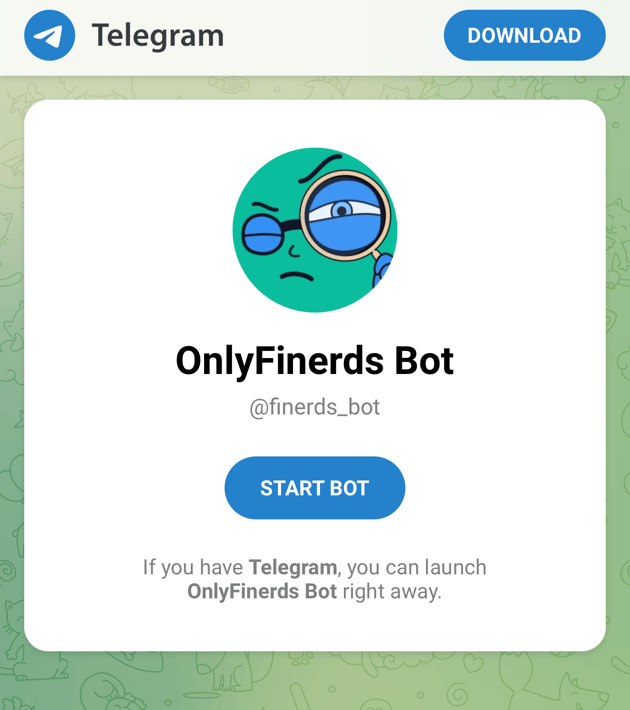
Open [t.me/finerds\_bot](https://t.me/finerds_bot) in your browser and open it in Telegram, or search for **finerds\_bot** in Telegram. The bot's name is **OnlyFinerds Bot**.
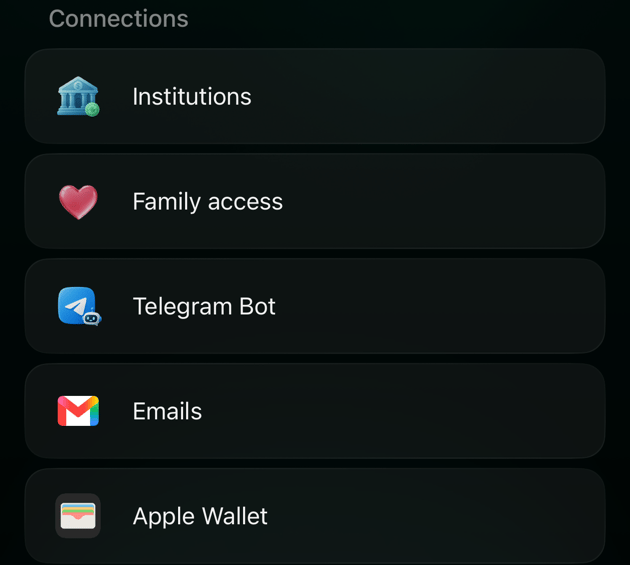
Open **More** and, under **Connections**, select **Telegram Bot**. The bot's page opens; open it in Telegram.
Open **More** and, under **Connections**, select **Telegram Bot**. If Telegram is installed, the bot opens in it. Otherwise Safari shows the bot's page with **START BOT** and a link to download Telegram.
2. Start the bot. Its first message has hello buttons in nine languages: select yours, or say hi in your own words. The bot then writes in that language.
3. When the bot asks which bank you use, select **I have an account**.
4. Select **Sign in to Finerd**. A finerd page opens in your browser; sign in if finerd asks you to. The bot is linked to the finerd account signed in on that page, so if the browser is signed in to someone else's account, sign out first.
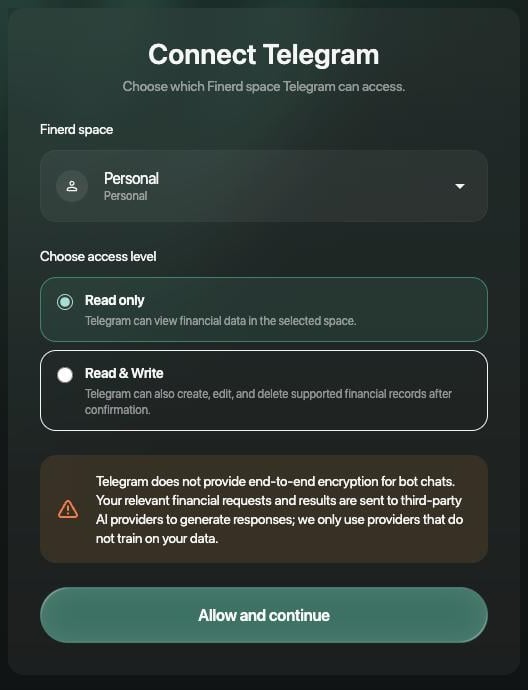
5. Under **Finerd space**, choose the space the bot will work in. Under **Choose access level**, choose **Read only** or **Read & Write** (see [Choose the space and access](#space-access)). Then select **Allow and continue**.
 6. The page shows **Consent recorded**. Select **Return to Telegram**. The bot gets access only after you return: it confirms with "Done ✅" and a few examples of what to write.
The **Sign in to Finerd** button works for 10 minutes and only once. If it doesn't open the page, or the page says the link has expired, write "new link" in the chat and use the new button.
**No finerd account yet?** Skip **I have an account** and answer the bot's questions instead. It asks for your email, sends a sign-in code to it, asks for your currency and city, and creates your finerd account. The bot is then connected to your new Personal space with **Read & Write**, with no finerd page to open.
6. The page shows **Consent recorded**. Select **Return to Telegram**. The bot gets access only after you return: it confirms with "Done ✅" and a few examples of what to write.
The **Sign in to Finerd** button works for 10 minutes and only once. If it doesn't open the page, or the page says the link has expired, write "new link" in the chat and use the new button.
**No finerd account yet?** Skip **I have an account** and answer the bot's questions instead. It asks for your email, sends a sign-in code to it, asks for your currency and city, and creates your finerd account. The bot is then connected to your new Personal space with **Read & Write**, with no finerd page to open.
Choose the space and access
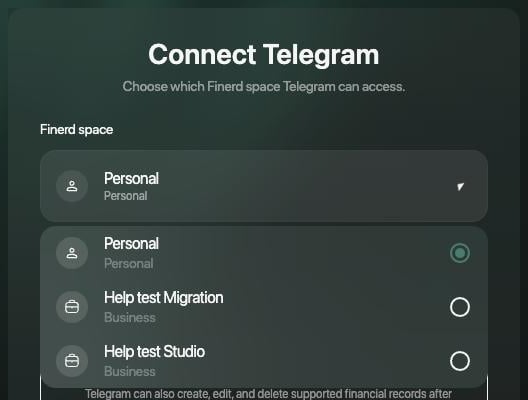
The bot works in one space: the one you choose on the finerd page. **Finerd space** lists your Personal space and your business spaces, with the space currently open in finerd selected; the demo space isn't offered. Everything you record in the chat, every answer and every notification belongs to that space.
 | Access | What the bot can do |
| - | - |
| **Read only** (selected initially) | View the space's financial data and answer questions about balances, transactions, reports, budgets, debts and receipts. |
| **Read & Write** | Also record expenses and transfers; change a transaction's category, tags, merchant, comment or date; split transactions; mark them as reviewed or as family; create categories, tags, merchants, budgets and accounts; archive accounts. |
With either access, the bot can't delete a transaction or change how much was paid: do that in the finerd app. Changes made through the bot are saved in finerd right away.
Before you allow access, the page warns that Telegram doesn't use end-to-end encryption for chats with bots, and that the bot sends your requests and their results to AI providers to prepare its replies. finerd uses only providers that don't train on your data.
To move the bot to another space or change its access, send `/logout`, then `/start`, select **I have an account** and sign in again, choosing the space and access you want.
AI assistants connected through finerd MCP work differently: one connection covers every space you belong to. See [Which spaces the assistant sees](/ai/manage-access#spaces).
| Access | What the bot can do |
| - | - |
| **Read only** (selected initially) | View the space's financial data and answer questions about balances, transactions, reports, budgets, debts and receipts. |
| **Read & Write** | Also record expenses and transfers; change a transaction's category, tags, merchant, comment or date; split transactions; mark them as reviewed or as family; create categories, tags, merchants, budgets and accounts; archive accounts. |
With either access, the bot can't delete a transaction or change how much was paid: do that in the finerd app. Changes made through the bot are saved in finerd right away.
Before you allow access, the page warns that Telegram doesn't use end-to-end encryption for chats with bots, and that the bot sends your requests and their results to AI providers to prepare its replies. finerd uses only providers that don't train on your data.
To move the bot to another space or change its access, send `/logout`, then `/start`, select **I have an account** and sign in again, choosing the space and access you want.
AI assistants connected through finerd MCP work differently: one connection covers every space you belong to. See [Which spaces the assistant sees](/ai/manage-access#spaces).
What you can do in the chat
Write to the bot the way you'd text a friend. It replies in the language of your latest message.
* **Record an expense** (**Read & Write**): write it, for example "coffee 85", or send a voice note or a photo of the receipt.
* **Ask about your money**: "how much went on taxis in September?", your balances, a report, a budget or a debt.
* **Add a bank or an account**: write "connect mono", "connect privat" or "add a manual account". Other banks open a finerd page in your browser; see [Connect a bank](/institutions/connect-institution).
* **Review new transactions**: when a transaction in the space needs review or a category, the bot sends a message about it with **Open in Finerd**. With **Read & Write**, the message also has **✅ Mark as reviewed**.
If you have [family accounting](/family-accounting) and the bot has **Read & Write**, these messages also have **👨👩👦 Mark as family**. It marks the transaction as Family, which adds a copy to your partner's space, and marks it as reviewed. The button then becomes **↩ Remove from family**: removing the mark deletes your partner's copy, together with the changes they made to it. The bot can't mark a split transaction, a transfer between accounts or a transaction on a joint account; change those in finerd.
The bot also understands these commands:
| Command | What it does |
| - | - |
| `/start` | Connect your finerd account, or continue where you left off |
| `/help` | List the commands |
| `/accounts` | Show your accounts |
| `/banks` | Show your connected banks |
| `/mode` | Choose what the bot sends you: **Everything**, **Only family questions** or **Only review questions** |
| `/cancel` | Pause the current step |
| `/logout` | Disconnect the bot from your finerd account |
Never send bank passwords or bank codes in the chat. The bot only needs your email to sign you in.
Disconnect the bot
Send `/logout` in the chat with the bot. It replies "You are logged out of Finerd in this chat" and stops working with your space. You can't disconnect the bot from the finerd apps.
Changes the bot has already made stay in finerd, and the chat history stays in Telegram. One Telegram account is linked to one finerd account at a time: to switch accounts, send `/logout`, then `/start` and sign in with the other account.
If Pro ends in the connected space, the bot stays linked, but it answers every message with "The Finerd assistant needs a paid plan for this space" and stops sending notifications. See [Manage your finerd subscription](/account/manage-subscription).
Fix connection problems
| What you see | What to do |
| - | - |
| **Invalid connection link** on the finerd page, or "This connection link is invalid" | Go back to the chat and write "new link", then use the new **Sign in to Finerd** button. |
| "This connection link has expired" or "was already used" | The link works for 10 minutes and once. Write "new link" in the chat. |
| "Telegram connections are not available for this account or space" | The space you chose doesn't have Pro, or your seat in a business space isn't paid. Choose a space with Pro, or [upgrade](/account/manage-subscription). |
| "Too many connection attempts" | Wait a while, then write "new link" in the chat. |
| You returned to Telegram, but the bot didn't reply | Send `/start` and, if the bot asks, sign in again. |
| "That action needs write access" or "Changes need edit permission" | The bot has **Read only**. Send `/logout`, then `/start`, and choose **Read & Write** when you sign in. |
| "The Finerd assistant needs a paid plan for this space" | Pro has ended in the connected space. [Renew Pro](/account/manage-subscription), or connect the bot to another space. |
If a problem repeats, [contact support](/contact-us) with the time and what the bot replied.
* [Work with your finances through AI](/ai)
* [Manage AI access](/ai/manage-access)
* [Set up family accounting](/family-accounting)
* [Review imported transactions](/transactions/review-imported-transactions)
* [Manage your finerd subscription](/account/manage-subscription)
This documentation is built and hosted on [Mintlify](https://mintlify.com), a developer documentation platform.